
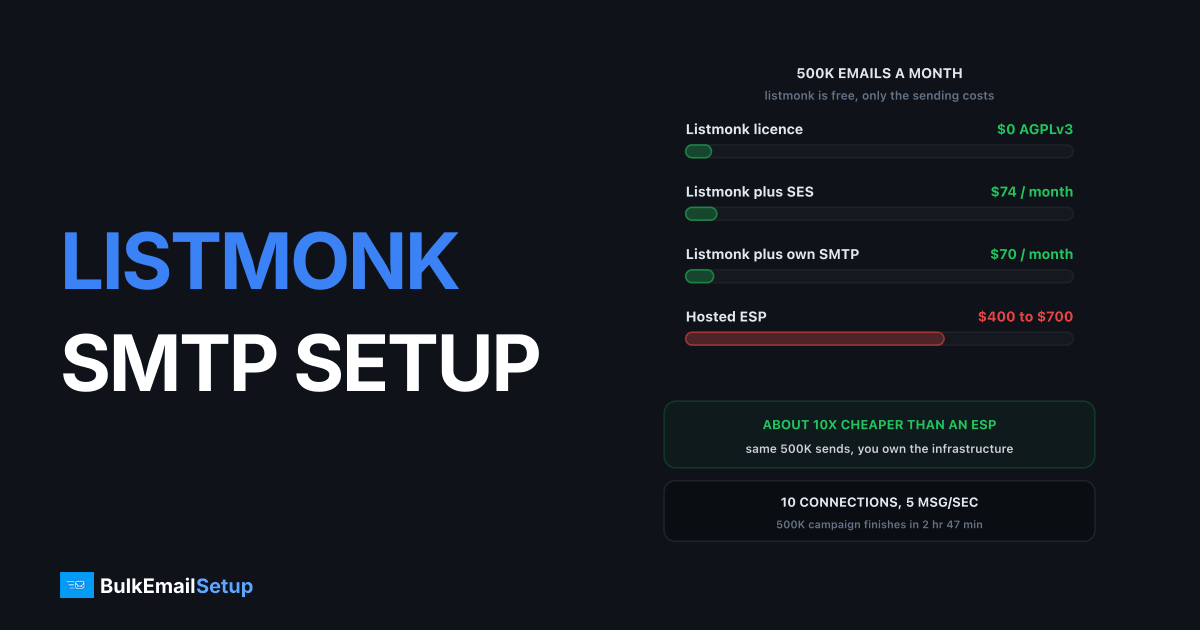
Listmonk is a single Go binary and a PostgreSQL database, it costs nothing, and on a 4 vCPU box it will push a 500,000-subscriber campaign in about 83 minutes at 100 messages a second. The setup that matters is not the install, it is four numbers in Settings: max connections, message rate, retries and batch size. Get those wrong and you either crawl at 200 emails an hour or hammer your own MTA until receivers defer you. Here is the config I run for large lists, and the box underneath it.
What listmonk is, and what it is not
Listmonk is a list manager and campaign sender. That is the whole product, and the narrowness is the point.
| Capability | Listmonk | Mautic | MailWizz |
|---|---|---|---|
| List and subscriber management | Yes | Yes | Yes |
| SQL-based segmentation | Yes, raw SQL queries | Filter builder | Filter builder |
| One-off and scheduled campaigns | Yes | Yes | Yes |
| Visual automation flow builder | No | Yes | Limited |
| Behavioural triggers, lead scoring | No | Yes | No |
| Landing pages, forms beyond opt-in | No | Yes | Basic |
| Multi-tenant customer accounts | No | No | Yes |
| Licence cost | $0, AGPLv3 | $0 | ~$100 one-time |
| Runtime | One Go binary | PHP plus MySQL plus cron | PHP plus MySQL plus cron |
Want drip sequences that fire on behaviour? Wrong tool, read the Mautic SMTP configuration guide. Want per-client separation to resell sending? See MailWizz SMTP setup.
What you get for the missing features is speed and almost no operational surface. No cron jobs, no PHP-FPM, no worker daemon. The binary is the app and the queue, pulling subscribers from Postgres in batches and pushing them over a pooled set of SMTP connections.
The SMTP settings that actually matter
Settings then SMTP in the admin UI. You can define several SMTP blocks and toggle each.
| Setting | Sane value for a dedicated server | Why |
|---|---|---|
| Host | mail.yourdomain.com | The MTA you control |
| Port | 587 | STARTTLS. Use 465 only if the server offers implicit TLS |
| Auth protocol | PLAIN (or LOGIN) | Use cram only if the MTA insists |
| TLS | STARTTLS, skip verify OFF | Never disable cert verification on a live sender |
| Max connections | 10 | Concurrent sockets held open for the campaign |
| Idle timeout | 15s | Frees sockets between campaigns |
| Message rate | 10 per second per connection | 10 x 10 = 100/sec total throughput |
| Retries | 2 | A silent re-send over a different pooled connection |
The pair that matters is max connections and message rate, because listmonk multiplies them. Ten connections at 10 per second is 100 emails a second, or 360,000 an hour. Far more than a freshly warmed IP should be doing.
Retries needs a note. The listmonk configuration docs define it as the number of times a message failing at the moment of sending is retried silently over a different pooled connection. Transport retry, not delivery retry. A hard 5xx will not become a delivery on a second socket, so 2 is plenty.
Batch size sits under Settings then Performance and sets how many subscribers get pulled from Postgres per cycle, roughly every 5 seconds. Default 1,000 is fine. Raise it to 5,000 only if database round trips are demonstrably the bottleneck, which at 500K they usually are not.
Sizing the box and tuning Postgres
Listmonk itself barely registers, sitting at 150 to 400 MB of RSS even mid-campaign because the Go binary streams rather than buffering the whole list. PostgreSQL is what you actually pay for.
| List size | vCPU | RAM | shared_buffers | Disk |
|---|---|---|---|---|
| Up to 100K | 2 | 4 GB | 1 GB | 40 GB NVMe |
| 100K to 500K | 4 | 8 GB | 2 GB | 80 GB NVMe |
| 500K to 2M | 8 | 16 GB | 4 GB | 200 GB NVMe |
Two Postgres settings do most of the work: shared_buffers at roughly 25% of RAM, and work_mem at 32MB to 64MB so the segmentation queries do not spill to disk. Set them and restart:
shared_buffers = 2GB
work_mem = 64MB
maintenance_work_mem = 512MB
effective_cache_size = 6GB
The thing that bites at month six is table bloat. Every campaign writes view and click rows, and every subscriber update leaves a dead tuple. The listmonk docs are explicit about running VACUUM ANALYZE on a schedule, so cron it weekly:
0 3 * * 0 psql -U listmonk -d listmonk -c "VACUUM ANALYZE;"
Also turn on slow-query caching in Settings then Performance. It stops the dashboard and subscribers page counting rows in real time, using periodic cached counts instead. At 500K that is a dashboard loading in 200ms rather than 8 seconds.
Bounce processing, the part people skip
An unconfigured bounce setup is how a good list rots. Listmonk gives you three routes, and they are not equal.
| Method | Setup effort | Latency | Best for |
|---|---|---|---|
| POP3 bounce mailbox | Medium, needs a mailbox and Return-Path | Minutes, polled | Your own MTA (Postfix, Postal) |
| SES or SendGrid webhook | Low, paste a URL in the provider console | Seconds | Anyone relaying through SES |
| Generic /webhooks/bounce | High, you write the script | Seconds | Parsing MTA logs directly |
Turn it on in Settings then Bounces. Point the mailbox at [email protected] and make sure campaigns send that address in the Return-Path header, or the bounces land somewhere listmonk never reads. Then set thresholds. Per the listmonk docs on bounce processing, you configure a count per bounce type and an action. My values:
| Bounce type | Count before action | Action |
|---|---|---|
| Hard | 1 | Blocklist |
| Soft | 3 | Blocklist |
| Complaint | 1 | Blocklist |
One hard bounce is enough. The address does not exist and will not start existing. Soft at 3 gives a genuinely full mailbox a couple of chances. Complaints at 1 is not negotiable: Google's bulk sender guidelines put the spam complaint ceiling at 0.3% with a target under 0.1%, and you do not get there by keeping people who hit the spam button. More in email bounce handling best practices.
Listmonk classifies bounces with heuristics, reading the body and the status code, and anything unmatched defaults to soft. Reasonable, but a badly worded rejection from an obscure host can sit as soft forever. Check the hard/soft split after your first few campaigns.
Double opt-in and list hygiene
Listmonk has proper double opt-in in the public subscription page and the import flow. Use it. A single opt-in list at 500K carries spam traps you cannot see, and traps turn a reputation problem into a Spamhaus listing. Rules for a large install:
- Set new lists to double opt-in, not single, at creation.
- Send the opt-in confirmation campaign to every imported segment before mailing it.
- Keep subscribers who never confirm in the
unconfirmedstate and never mail them. - Use SQL segments for re-engagement, for example subscribers with no click in 12 months, and mail that segment separately at a lower rate.
- Export the blocklist monthly and keep it, because it is your suppression list if you ever change tools.
The SQL segmentation is genuinely good here. You write raw SQL against the subscribers table, so last-clicked-over-365-days is one line rather than a filter builder puzzle.
Volume maths for a 500K list
Assume 500,000 subscribers, one campaign.
| Config | Effective rate | Time to finish 500K |
|---|---|---|
| 5 connections, 5 msg/sec | 25/sec | 5 hr 33 min |
| 10 connections, 5 msg/sec | 50/sec | 2 hr 47 min |
| 10 connections, 10 msg/sec | 100/sec | 1 hr 23 min |
| 20 connections, 10 msg/sec | 200/sec | 42 min |
Faster is not better. Pushing 200 per second at Gmail from a young IP earns 4xx deferrals, which listmonk retries, which makes the campaign slower than going at 25 would have been.
My rule: set the rate so the campaign finishes in 2 to 4 hours. Slow enough that receiver throttling never engages, fast enough to be done before lunch. For 500K that is 35 to 70 per second, so 10 connections at 5 per second is what I run. Still warming? Cap it lower and follow an IP warm-up schedule. Postfix ships with default_process_limit = 100, so 10 connections is comfortable and 40 is not.
What it costs at 100K, 500K and 2M a month
Listmonk is free, so the cost is the box plus mail transport. Monthly, rounded.
| Line item | 100K/month | 500K/month | 2M/month |
|---|---|---|---|
| Listmonk licence | $0 | $0 | $0 |
| VPS running listmonk and Postgres | $12 | $24 | $48 |
| Listmonk plus Amazon SES at $0.10/1K | $10 | $50 | $200 |
| Total, listmonk plus SES | $22 | $74 | $248 |
| Total, listmonk plus dedicated SMTP server | ~$60 | ~$70 | ~$110 |
| Hosted ESP at same volume | $100 to $250 | $400 to $700 | $1,200 to $2,500 |
SES is cheapest at low volume and stays cheap, but it is shared infrastructure under Amazon's sending policy, and a complaint spike gets your account reviewed. A dedicated server costs more at 100K and less at 2M, and nobody reviews your account. Mailchimp at 500,000 sends with a comparable contact count sits in the $500 to $700 range, roughly ten times the listmonk plus SES total. Full breakdown in cost to send 500,000 emails per month.
The cost missing from the table is your time. Postgres backups, TLS renewal, OS patching and VACUUM are yours now. Budget an hour a month and a bad afternoon once a year.
Go-live checklist
Before the first real campaign, in order.
- DNS. SPF, DKIM and DMARC published for the sending domain, DMARC starting at
p=none. - rDNS. The sending IP's PTR record resolves to your HELO hostname and back again.
- SMTP block. Host, port 587, STARTTLS, auth set, skip-verify off. Hit the test button.
- Rate. Max connections 10, message rate 5 per second, retries 2.
- Bounces. Enabled, POP3 mailbox or SES webhook configured, thresholds set to 1 hard / 3 soft / 1 complaint.
- Return-Path. Points at the bounce mailbox, verified by sending to a known-dead address.
- Opt-in. Lists set to double opt-in, unconfirmed subscribers excluded from campaigns.
- Postgres. shared_buffers tuned, weekly VACUUM ANALYZE in cron, nightly
pg_dumpoff the box. - Performance. Slow-query caching on, batch size 1,000.
- Test send. A campaign to a 50-address seed segment, then check headers for DKIM
d=alignment before you touch the real list.
Step 10 is the one people skip and regret. A misaligned DKIM domain on a 500K send cannot be taken back.
How BulkEmailSetup helps
Listmonk solves the campaign side for free. It does not give you an IP, a warmed reputation, or an MTA still delivering in six months. That is the dedicated SMTP server, and it is where self-hosted stacks fail, not in the software.
We supply listmonk-ready SMTP: credentials that drop into the Settings panel, dedicated IPs warmed on a managed schedule, and server-side rate limits matched to the warm-up so your message rate never outruns your reputation. Basic is $549 one-time for 1 SMTP server, 3 dedicated IPs, 25,000 emails/day and unlimited contacts; higher tiers go to 15 IPs and 200,000 emails/day. Details on the pricing page.
Frequently asked questions
What SMTP settings does listmonk need?
In Settings > SMTP, add your host, port 587 with STARTTLS (or 465 for implicit TLS), auth protocol PLAIN or LOGIN, and your username and password. The two settings that actually decide throughput are max connections and the per-connection message rate, both under the same panel. Retries defaults to a silent re-send over a different pooled connection.
How many concurrent SMTP connections should listmonk use?
Ten concurrent connections is a sane default for a single dedicated SMTP server. Postfix ships with a default process limit of 100, so 10 leaves plenty of headroom, and each listmonk connection holds a socket open for the whole campaign. Raising it past 25 rarely helps because the bottleneck moves to the receiving side, not your box.
How long does listmonk take to send to 500,000 subscribers?
At 10 connections and 10 messages per second per connection, that is 100 messages a second, so 500,000 emails takes about 83 minutes. Cut the rate to 5 per second and the same campaign runs about 2 hours 47 minutes. Most people should send slower than their hardware allows, because receiver throttling is the real limit.
Does listmonk handle bounces?
Yes. Listmonk reads a bounce mailbox over POP3, accepts webhooks from Amazon SES, SendGrid, Postmark and a few others, and exposes a generic /webhooks/bounce endpoint for your own scripts. You set a bounce count threshold per type and an action, and Blocklist is the one worth using.
Can listmonk do marketing automation and drip flows?
No. Listmonk is a list manager and campaign sender, so there is no visual flow builder, no behavioural triggers and no lead scoring. It has lists, segments via SQL queries, templates, campaigns and an API. If you need multi-step automation, Mautic is the closer self-hosted match.
What server does listmonk need for a 500K list?
Four vCPU, 8 GB RAM and NVMe storage handles a 500K-subscriber install comfortably. Listmonk itself is a single Go binary using a few hundred MB; PostgreSQL is what needs the memory, so give shared_buffers about 2 GB and run VACUUM ANALYZE on a schedule. Storage grows with campaign view and click rows, not just subscribers.
Is listmonk actually free?
Yes, listmonk is open source under AGPLv3 with no licence fee, no subscriber tier and no send limit in the software. Your only costs are the box it runs on and whatever carries the mail, which is why the total at 500K emails a month lands around $40 to $100 instead of $600 plus at a hosted ESP.


