
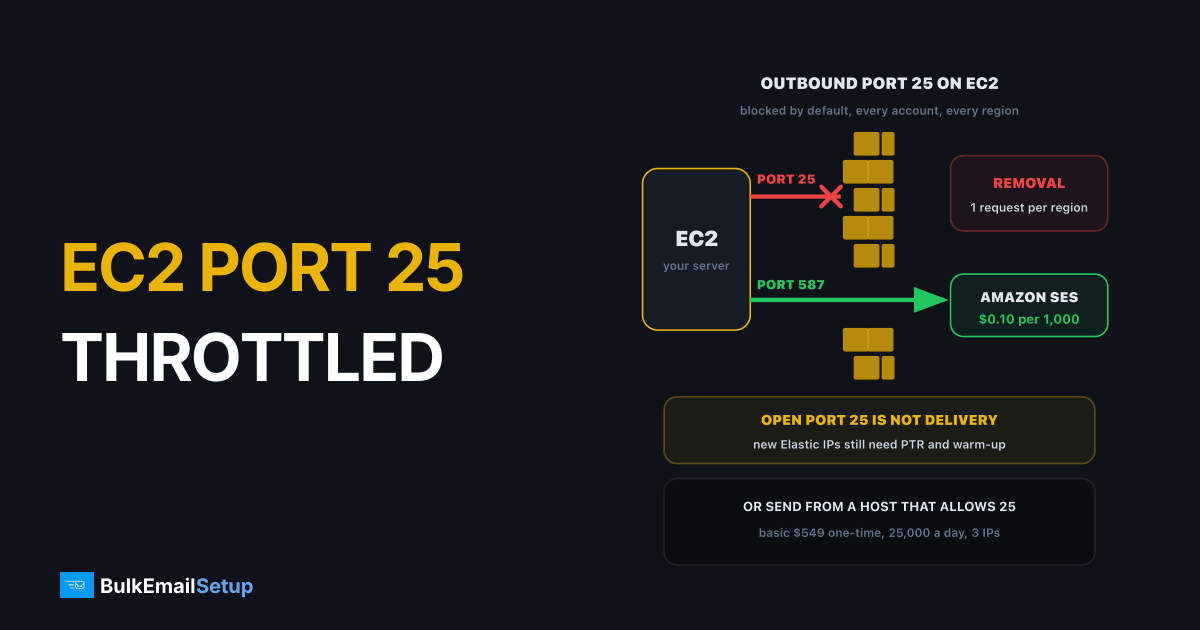
AWS blocks outbound port 25 on every EC2 instance and Lambda function by default, and lifts it only when you submit a request to remove email sending limitations, once per region. Removal fixes the connection, not delivery: mail from a fresh Elastic IP in a cloud range still needs reverse DNS, authentication and weeks of warm-up before Gmail and Microsoft trust it. So the real choice is between three routes: open port 25 on EC2, relay through Amazon SES on port 587, or run the sending server somewhere built for bulk mail.
What AWS actually blocks
AWS's knowledge centre article on EC2 port 25 throttling is short and clear: outbound traffic on port 25 is blocked by default for all EC2 instances and Lambda functions in accounts that are not allowlisted. The EC2 documentation adds that port 25 traffic is allowed only to private IPv4 addresses by default.
| Traffic | Default on EC2 | What it is for |
|---|---|---|
| Outbound port 25 to the internet | blocked | server-to-server delivery (what a bulk MTA needs) |
| Outbound port 25 to private IPs | allowed | mail inside your own VPC |
| Outbound 587 or 465 to a relay | not covered by the port 25 block | your app submitting mail to SES or another SMTP service |
| Inbound port 25 | not part of this block | receiving mail |
That distinction is the whole article. If your app just needs to send receipts, you never needed port 25: submit to a relay on 587. If you want to run Postfix, PowerMTA or Postal on EC2 and deliver directly to Gmail, you need port 25 open, and that is where the request comes in.
The blocked lane is direct delivery. The open lane goes through a relay.
How to request removal
The form is AWS's "Request to remove email sending limitations". It asks for more than people expect, and a thin answer is the most common reason for a refusal.
Six things the request needs. Miss the last two and expect a no.
- Allocate Elastic IPs first. The request ties the limit removal and reverse DNS to specific Elastic IP addresses. A normal auto-assigned public IP changes on stop and start, which breaks PTR and reputation.
- Decide the reverse DNS names. Each Elastic IP needs a PTR record such as
mta1.mail.yourdomain.com, and that name must resolve forward to the same IP. AWS's reverse DNS documentation covers the forward-record requirement. - Write the use case like an auditor will read it. What you send, to whom, how they opted in, expected daily volume.
- Describe your anti-spam controls. Bounce handling, complaint handling, unsubscribe in every message, list sources. Requests that skip this are the ones refused.
- Repeat per region. A removal in us-east-1 does nothing in eu-west-1.
AWS may still say no, and forum reports show refusals for accounts with billing problems, earlier policy issues or no clear use case. When it refuses, its reply usually points you to Amazon SES.
Why bulk sending from EC2 stays hard
Say the request is approved. Three problems remain, and they are the reason most bulk senders do not run their MTA on EC2.
| Problem | What it means for a bulk sender |
|---|---|
| Cloud IP reputation | AWS itself notes that receiving providers may block cloud IP ranges. New Elastic IPs start with no history and less benefit of the doubt. |
| Public IPv4 charges | each Elastic IP is billed as a public IPv4 address. Five sending IPs add a monthly line on top of the instance. |
| Everything else is yours | MTA tuning, queue management, bounce processing, feedback loops, blocklist monitoring, warm-up. |
None of these are blockers for a team that runs mail servers already. For a marketing team that just wants campaigns to land, they add up fast. Our article on why port 25 is blocked explains why every big cloud makes this deliberately awkward.
The three routes, compared
| Route | Port | Who owns the IP reputation | Typical cost shape | Best for |
|---|---|---|---|---|
| Open port 25 on EC2, run your own MTA | 25 | you, on AWS ranges | instance + public IPv4 per IP + your time | teams already running mail servers on AWS |
| App on EC2, relay through Amazon SES | 587 or 465 | AWS shared, or a dedicated IP at $24.95 a month | $0.10 per 1,000 emails | app and transactional mail |
| Sending server at a host that allows port 25 | 25 | you, on IPs bought for mail | one-time setup + low monthly hosting | steady bulk campaigns |
SES is the route AWS wants you on, and for app mail it is a good one. It comes with its own entry hurdle, the sandbox, which caps new accounts at 200 messages a day until production access is approved. Our guide to getting out of the SES sandbox covers that request, and Amazon SES vs a dedicated SMTP server compares the two at volume.
If you do open port 25 on EC2
Treat the first month like any new sending infrastructure:
- Set PTR before the first send. A mismatch between PTR and HELO name is one of the quickest ways to get deferred. See how to set up a PTR record.
- Publish SPF, DKIM and DMARC for the sending domain, ideally a subdomain.
- Warm each IP from a few hundred a day, growing about 30% every two days while deferrals stay low.
- Test the real network path. One AWS forum thread reports SMTP traffic through a NAT gateway being dropped even after the limits were removed, while instances with their own Elastic IPs worked.
- Watch for timeouts. If connections still hang, our port 25 connection timed out fix walks through the checks.
How BulkEmailSetup helps
We build the third route: a dedicated SMTP server at a host that allows port 25 and PTR records, with your own IPs, SPF, DKIM, DMARC and reverse DNS configured, bounce handling, a campaign platform and a warm-up plan. Your app can stay on EC2 and submit to it on 587, or you can send campaigns from the built-in platform.
| Plan | One-time fee | Emails per day | Dedicated IPs | Hosting you pay your host |
|---|---|---|---|---|
| Basic | $549 | 25,000 | 3 | about $11 a month |
| Advance | $1,199 | 200,000 | 15 | about $49 a month |
No monthly fee to us, no contact limit, and a 15-day money-back guarantee that applies until server access is handed over. Opt-in lists only: our anti-spam policy bans purchased, rented and scraped addresses. See the Basic plan or all pricing.
Frequently asked questions
Why does AWS throttle port 25 on EC2?
To stop spam leaving its network. AWS blocks outbound traffic on port 25 by default for all EC2 instances and Lambda functions in accounts that are not on its allowlist. Port 25 is how servers hand mail to other servers, so an open port 25 on a compromised or throwaway instance is a spam cannon. AWS lifts the block only after a request it reviews.
How do I request removal of the EC2 email limit?
Submit AWS's request to remove email sending limitations, signed in as the account owner. Describe your use case, list the Elastic IP addresses you will send from and the reverse DNS name for each, and explain how you prevent spam. Submit a separate request for every region you send from. Vague requests and accounts with billing or policy history are often refused.
Can I run a bulk SMTP server on EC2?
Technically yes, once port 25 is open and reverse DNS is set. In practice it is hard: many receivers treat cloud IP ranges with suspicion, AWS itself warns that providers may block them, and every Elastic IP adds a public IPv4 charge. Most senders either relay through Amazon SES from EC2 or run the sending server at a host built for it.
Which hosts allow port 25 for bulk email?
Hosts differ, and the policy can depend on account age. Several large clouds block outbound port 25 by default, while many VPS and dedicated-server hosts open it on request or after a short waiting period. Before you buy, read the host's own policy on outbound SMTP, reverse DNS and bulk mail. BulkEmailSetup installs its servers only on hosts that allow port 25 and PTR records, from $549 one-time.
Does opening port 25 fix delivery from EC2?
No. Removing the limit only lets the connection out. Whether Gmail and Microsoft accept the mail depends on reverse DNS, SPF, DKIM, DMARC, IP warm-up and your list. A brand-new Elastic IP has no sending history, so it needs the same weeks of gradual warm-up as any new IP, and cloud ranges start with less benefit of the doubt.
Can I use port 587 from EC2 instead?
Yes, for submitting mail to a relay. AWS's block is on port 25. Your application can send over 587 or 465 to Amazon SES or another SMTP service, which then delivers on port 25 from its own IPs. That is the route AWS recommends. One caveat seen on AWS's own forum: traffic routed through a NAT gateway can behave differently, so test from your real network path.


