
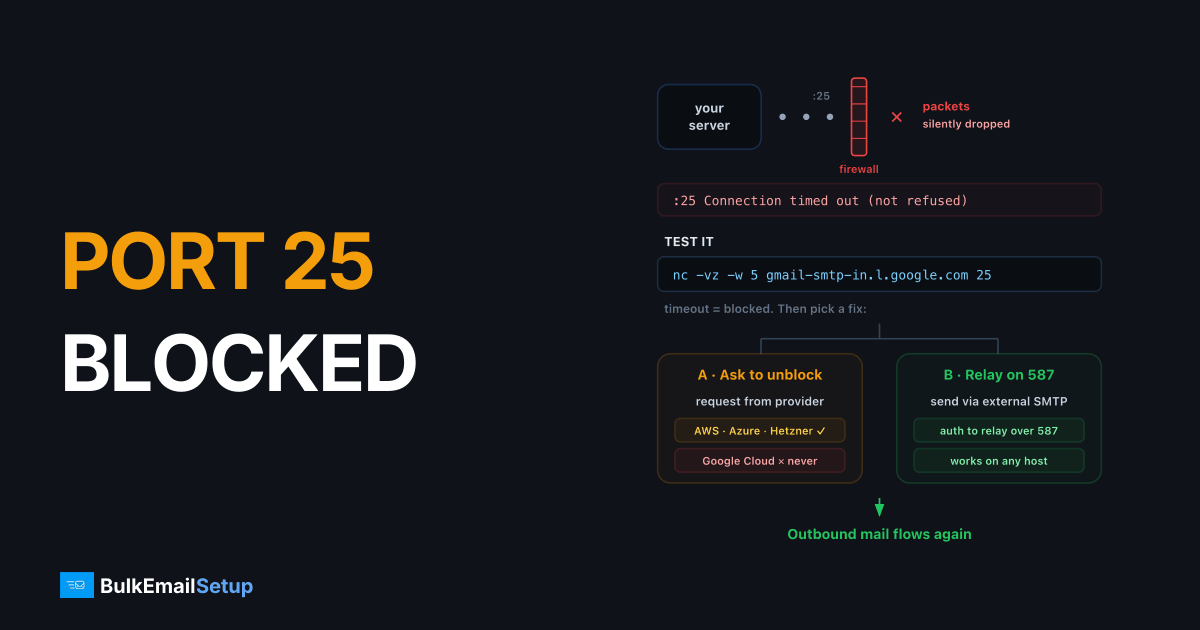
An SMTP "connection timed out" on port 25 almost always means your hosting provider or ISP is silently blocking outbound port 25, the standard anti-spam measure on most clouds and residential connections. Test it with nc -vz -w 5 gmail-smtp-in.l.google.com 25; if it times out, the fix is to request an unblock from your provider or relay outbound mail through an external SMTP service on port 587.
The symptom
Your queue fills with deferrals like:
connect to gmail-smtp-in.l.google.com[142.250.27.26]:25: Connection timed out
The key detail: timed out, not "refused." Refused means something answered and said no. Timed out means packets vanished, a firewall is dropping them, usually your provider's, occasionally your own.
The 10-second test
From the affected server:
nc -vz -w 5 gmail-smtp-in.l.google.com 25
| Result | Meaning |
|---|---|
Connection to ... succeeded! | Port 25 is open, your problem is DNS, routing, or the specific destination |
| Timeout after 5s | Outbound 25 is blocked upstream |
Connection refused | Something answered; not a port block, check the destination host |
Cross-check with a port that's never blocked, to rule out general network failure:
nc -vz -w 5 gmail-smtp-in.l.google.com 443   # should succeed instantly
telnet gmail-smtp-in.l.google.com 25          # alternative test; expect a 220 banner if open
Who blocks port 25
| Provider | Policy |
|---|---|
| Google Cloud | Blocked permanently; no unblock process |
| AWS EC2 | Throttled/blocked by default; unblock via the "Request to remove email sending limitations" form |
| Azure | Blocked for most subscription types; unblock by support request, enterprise agreements only |
| Hetzner | Blocked for new accounts; support unblocks on request after the first month |
| DigitalOcean / Vultr / Oracle | Blocked by default for new accounts; ticket-based exceptions, often refused |
| Residential ISPs | Almost universally blocked |
Before requesting an unblock, also check your own firewall, an overzealous iptables/ufw OUTPUT rule or a corporate egress filter produces the identical symptom:
sudo iptables -L OUTPUT -n | grep -E "25|REJECT|DROP"
Fix 1: Get the port unblocked
Worth doing if your provider allows it (AWS, Azure, Hetzner). In the request, state that you run a mail server for your own domain, with rDNS set, SPF/DKIM published, and opt-in recipients. Set your PTR record first, providers check.
This is the right fix when you're running real mail infrastructure and want direct-to-MX delivery. Pair it with proper authentication setup or the unblocked port won't get you inboxed.
Fix 2: Relay through port 587
If the block is permanent (GCP, residential), don't fight it, relay. Your server hands mail to an external SMTP server over the submission port, which is never blocked, and that server does the port-25 delivery. For how ports 25, 465, 587, 2525 differ, see the full breakdown.
Postfix relayhost configuration in /etc/postfix/main.cf:
relayhost = [smtp.yourrelay.com]:587
smtp_sasl_auth_enable = yes
smtp_sasl_password_maps = hash:/etc/postfix/sasl_passwd
smtp_sasl_security_options = noanonymous
smtp_tls_security_level = encrypt
echo "[smtp.yourrelay.com]:587 username:password" > /etc/postfix/sasl_passwd
postmap /etc/postfix/sasl_passwd && chmod 600 /etc/postfix/sasl_passwd*
postfix reload
The relay's IP reputation now determines your deliverability, choose one you control. A dedicated SMTP server on a hosting network with open port 25 gives you relay capability plus your own IP reputation.
Fix 3: Move the workload
If you're building serious sending volume on a provider that blocks port 25 with no recourse, the pragmatic answer is hosting the mail function elsewhere, typically behind a dedicated SMTP relay. Keep the app where it is; put the MTA on infrastructure built for email, clean IP space, open port 25, proper rDNS control. Comparison points in our dedicated SMTP provider guide.
Don't do these
| Workaround | Why not |
|---|---|
| Tunnel port 25 via VPN/proxy | Exit IP has no rDNS matching HELO; instant spam-folder or rejection |
| Send via port 465/587 direct to recipient MXs | Recipient MX servers accept inbound mail on 25 only; 587 is for authenticated submission |
| Rotate through residential proxies | This is botnet behavior; blacklisted immediately |
How BulkEmailSetup helps
Our dedicated SMTP servers run on networks with open port 25, correct rDNS, and pre-warmed IPs, use them as your relayhost from any cloud that blocks 25, with authentication set up for you. See pricing.
Frequently asked questions
Why does my SMTP connection time out on port 25?
In most cases your hosting provider or ISP blocks outbound port 25 to prevent spam. The packets are silently dropped, so instead of a refusal you get a timeout after 30+ seconds.
How do I test if port 25 is blocked?
Run 'nc -vz -w 5 gmail-smtp-in.l.google.com 25' from the affected server. A timeout means blocked; an immediate 'succeeded' or SMTP banner means the port is open and the problem is elsewhere.
Which cloud providers block port 25?
Google Cloud blocks it outright with no unblock option, AWS and Azure restrict it and require a request process, and Hetzner blocks it for new accounts (unblockable via support after the first paid month). DigitalOcean, Vultr, and Oracle Cloud also block by default for new accounts.
Can I send email without port 25?
Yes, relay through an external SMTP server on port 587 or 465. Your server authenticates to the relay, and the relay (whose port 25 is open) delivers to recipient mail servers.
Does a port 25 block affect receiving email?
Usually not. Providers block outbound port 25 (your server connecting out); inbound port 25 (others connecting to you) is typically open, though some providers filter both, test each direction separately.


