
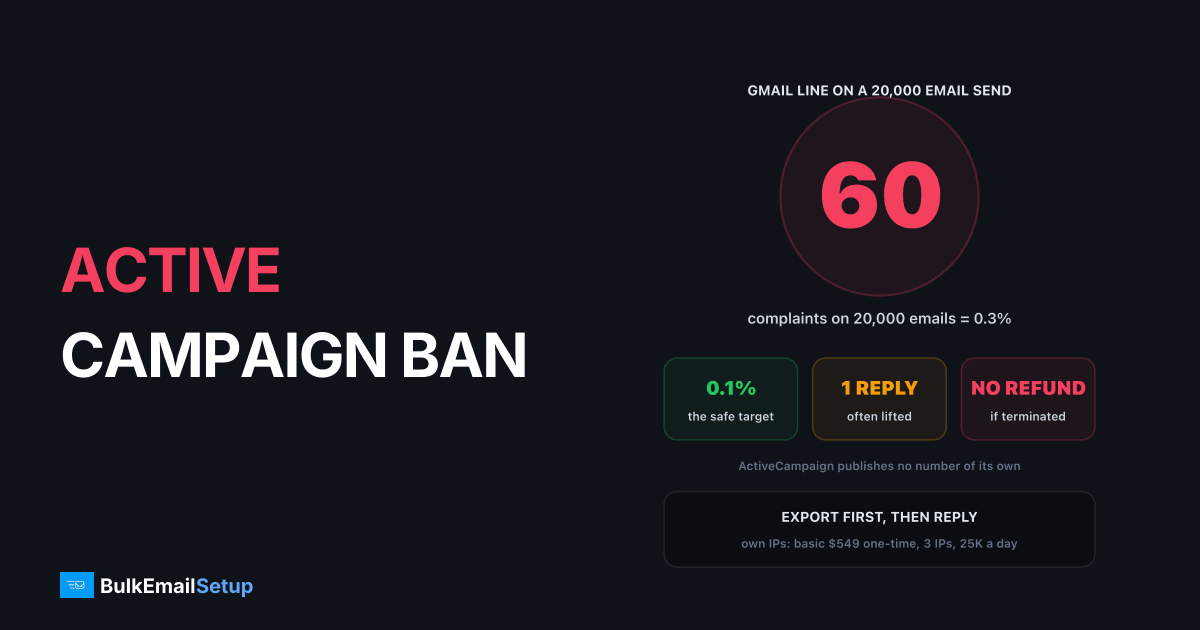
ActiveCampaign puts an account under review when spam complaints run higher than normal, and while it is under review your campaigns do not send. Its own help center says that after it reads your reply, it often switches the account back to Active. So the order is: export your contacts, find the list or campaign that caused the complaints, then reply once, clearly. If the account is closed for a terms breach instead, the refund policy allows that without notice or refund, and the job becomes moving your sending elsewhere.
Under review or terminated: which one are you?
| State | What it means | Campaigns | Way back |
|---|---|---|---|
| Campaign approval | new account, campaigns checked before send | held | expedite with the approval steps |
| Under review | complaints higher than normal | stopped until resolved | reply by email or the Help page |
| Trial account suspended | trial flagged | stopped | contact support through chat |
| Terminated | terms or policy breach | gone | usually none, no refund |
ActiveCampaign's account review article says the complaints come from mailbox providers and directly from subscribers, and that the review protects deliverability for every customer on the platform. That last part explains the strictness: you share sending infrastructure, so your complaints are everyone's problem.
Step one: export before you reply
Do this first, while you can still log in.
- Go to Contacts.
- Open the menu at the top right and choose Export.
- Pick all fields, not just email. The export runs in the background and you can leave the page.
Contact notes are not included in the export, so copy any you need. Also save your unsubscribes and bounced contacts as separate lists: they must stay suppressed wherever you send next. Our guide to exporting your list before an ESP ban covers the fields that prove consent.
Step two: find what caused the complaints
ActiveCampaign does not publish a complaint threshold. The useful benchmark is Gmail's, from Google's sender guidelines: a spam rate under 0.1% is the target, and 0.3% is the line you must not cross.
| Signal | Healthy | Trouble | What it usually means |
|---|---|---|---|
| Spam complaints | under 0.1% | 0.3% or more | people who did not expect your mail |
| Hard bounces | under 2% | 5% or more | old, bought or scraped addresses |
| Unsubscribes | under 0.5% | 1% or more | wrong audience or too many sends |
| Volume jump | steady | 3x in a week | an old segment mailed all at once |
On a 20,000 email campaign, 0.3% is just 60 complaints. Sort your last 7 days of campaigns by complaints and look at list source. The cause is almost always one segment: an imported list, an old event list, or contacts added without clear opt-in.
Where 20 and 60 complaints sit on a 20,000 email send
Step three: write the reply
One reply, short and factual. ActiveCampaign wants to know why complaints were high and what stops it happening again.
What a reply that gets lifted contains
Things that slow a reply down:
- Vague causes. "Some old contacts" gets a follow-up question, not a decision.
- Arguing. Saying the complaints are unfair does not change the numbers.
- Several tickets. One clear reply beats five short ones.
- Keeping the segment. If the list that caused it is still in the account, expect a second review.
Step four: if the account is closed
ActiveCampaign's refund policy says it can suspend or terminate access without notice or refund if it decides you broke the Terms of Service. If that happens, the appeal is usually over, and the question becomes where to send.
| Option | Good when | Risk |
|---|---|---|
| Another shared ESP | small list, cause fully fixed | same complaint rules, same outcome |
| Keep ActiveCampaign CRM, send elsewhere | you like the automations | two tools to run |
| Your own SMTP server | ongoing volume, a clean opted-in list | you run warm-up and hygiene |
Moving the same list to Mailchimp or Brevo without cleaning it is the most common mistake. Every shared platform reviews you on the same signals. See Mailchimp shut down my account for the same pattern on another platform, and ActiveCampaign alternatives for a like-for-like comparison.
ActiveCampaign does not let you point campaigns at your own SMTP server, which is covered in ActiveCampaign sending limits and workarounds. On your own server, campaigns go out from a separate platform you control.
The 30-day recovery plan
Days 1 to 3: export contacts, unsubscribes and bounces. Identify the segment that caused the complaints. Send one clear reply.
Days 4 to 7: remove hard bounces for good, and drop contacts with no opens or clicks in 12 months. Expect 20% to 30% of the list to go.
Days 8 to 14: if you are moving, set up a sending subdomain with SPF, DKIM, DMARC and PTR.
Days 15 to 45: warm up new IPs from a few hundred emails a day each, growing about 30% every two days, starting with your most engaged contacts.
Ongoing: check complaints per campaign. Keep every send under 0.1%.
How BulkEmailSetup helps
We set up a dedicated SMTP server you own, with a campaign platform, SPF, DKIM, DMARC and PTR, bounce handling and a warm-up plan. Because the IPs are yours alone, no other customer's complaints can put your account under review.
| Plan | One-time fee | Emails per day | Dedicated IPs | Hosting you pay your host |
|---|---|---|---|---|
| Basic | $549 | 25,000 | 3 | about $11 a month |
| Advance | $1,199 | 200,000 | 15 | about $49 a month |
No monthly fee to us, no contact limit, and a 15-day money-back guarantee. A clean list still matters on your own server. See the Basic plan or compare all pricing.
Frequently asked questions
Why does ActiveCampaign suspend accounts?
The main trigger ActiveCampaign names is spam complaints running higher than normal, reported by mailbox providers and directly by subscribers. Breaches of its Acceptable Use Policy or Terms of Service, such as bought lists or banned content, also lead to review or suspension. ActiveCampaign does not publish a numeric complaint threshold, so judge yourself against Gmail's 0.3% ceiling and aim for 0.1% or less.
Can I get my ActiveCampaign account back?
Often, if it is a review. ActiveCampaign's help center says that after it reviews your reply, it often changes the account back to Active. Reply quickly, name the list or campaign that caused the complaints, and show what you removed. A termination for a terms breach is different: the refund policy allows ActiveCampaign to end access without notice or refund.
Can I export my contacts from a suspended account?
Usually yes while the account is under review, since you can still log in and only campaign sending stops. Go to Contacts, open the menu at the top right and choose Export. The export runs in the background and does not include contact notes. Do it before you reply, because after a termination access is not guaranteed.
What is a safe alternative after an ActiveCampaign ban?
First fix whatever caused the complaints, because any shared platform reviews you on the same signals. Then choose between another ESP with similar shared-pool rules, or a dedicated SMTP server where only your own reputation counts. BulkEmailSetup's Basic setup is $549 one-time for 3 dedicated IPs and 25,000 emails a day, with hosting around $11 a month.
How long does an ActiveCampaign account review take?
ActiveCampaign does not publish a fixed time. Campaigns stay paused until the review is resolved, and the help center says replies are often followed by a return to Active status. In practice the speed depends on how fast and how clearly you reply. Plan for a few days without campaigns, and longer if your first reply is vague.
Will I get a refund if ActiveCampaign closes my account?
Probably not. ActiveCampaign's refund policy says it can modify, suspend or terminate access without notice or refund if it decides you violated the Terms of Service. That is why paying annually on a list with complaint risk is a gamble. If you are unsure about a list's history, clean it before you send rather than after the review.
Can I use my own SMTP server with ActiveCampaign?
Not for campaigns. ActiveCampaign sends marketing email through its own infrastructure and does not offer a custom SMTP relay for it. To send campaigns from your own server, you export the contacts and send from a separate campaign platform pointed at your SMTP, while ActiveCampaign can still run your CRM or automations if you keep it.


