
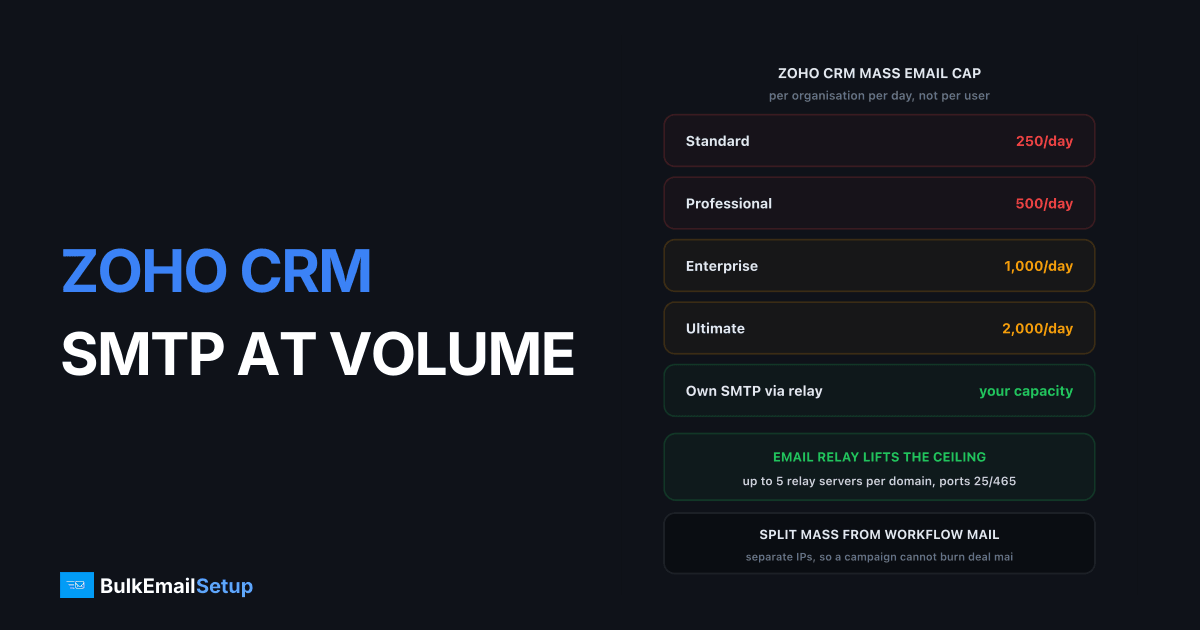
Zoho CRM caps mass email at 250 a day on Standard, 500 on Professional, 1000 on Enterprise and 2000 on Ultimate, and that number is per organisation per day, not per user. Individual emails run on a separate allowance of 300 per confirmed user per day on paid editions. Everything leaves through Zoho's shared servers unless you configure Email Relay, which points CRM at your own SMTP host on port 25, 465 or 587 and lets you run up to five relay servers per domain.
That relay setting is the whole article: the difference between renting Zoho's IP reputation and owning yours.
What the limits actually are
| Email type | Allowance | Scope |
|---|---|---|
| Mass email, Standard | 250/day | per organisation |
| Mass email, Professional | 500/day | per organisation |
| Mass email, Enterprise | 1,000/day | per organisation |
| Mass email, Ultimate | 2,000/day | per organisation |
| Mass email, paid uplift | up to 2,500/day | per organisation |
| Individual email, paid editions | confirmed users x 300 | per organisation |
| Individual email, free or trial | confirmed users x 50, max 3 users | 150/day total |
Source: Zoho CRM's email limits page. Zoho revises these, so check the current page before you build a plan around a number.
The mass email figure is the one that bites. It is per organisation, so extra user seats do nothing for it, and the count includes autoresponders, schedulers and macros alongside campaigns. An Enterprise account running three autoresponder sequences can burn most of its 1,000 before anyone presses send. A day runs midnight to 11:59pm in your org's time zone.
Individual email works the opposite way. It scales with confirmed users at 300 each, so a 20-seat Enterprise org gets 6,000 individual emails a day but still only 1,000 mass.
Where the limit actually stops you
| Scenario | Emails needed | Enterprise allowance | Verdict |
|---|---|---|---|
| 5,000 contacts, monthly newsletter | 5,000 in one send | 1,000/day | blocked, needs 5 days |
| 800 leads, weekly nurture | 800/week | 1,000/day | fine |
| 25,000 contacts, monthly | 25,000 | 1,000/day | not viable in CRM |
| Deal-stage workflow mail, 200/day | 200/day | shares the 1,000 | fine, watch autoresponders |
| Quote and invoice mail, 400/day | 400/day | individual allowance | fine on 2+ seats |
CRM-triggered operational mail fits comfortably. Full-list marketing does not. Anything above roughly 1,000 recipients in one send is where people go looking for the relay setting, and it is the same wall HubSpot users hit from the other direction, where the constraint is the marketing contact bill rather than a daily cap.
What Email Relay does
Email Relay hands your outbound CRM mail to an SMTP server you control instead of Zoho's. Per Zoho's relay documentation:
| Capability | Detail |
|---|---|
| Relay servers per domain | up to 5 |
| Ports | 25, 465, 587 |
| Encryption | SSL, TLS, or Never |
| Authentication | optional, username and password |
| Daily mail limit | you set it per relay server |
| Email types routed | workflow, mass, or individual |
| Failure behaviour | falls back to Zoho CRM's server |
Per-email-type routing. Each relay carries workflow, mass or individual mail. Split them and a bad campaign cannot damage the IP delivering your quotes and deal notifications. Zoho's own servers have no such separation.
Five servers per domain. Enough for separate IPs per stream with a spare, or a split by business unit if one CRM runs several brands.
Automatic fallback. If your relay fails, Zoho sends from its own servers. Nothing is lost, but the message loses your IP and your authentication alignment, so it can land differently. Monitor for it rather than assuming fallback is free.
Setting the relay up
Fifteen minutes once the server exists. In CRM: Setup, Channels, Email, Email Deliverability, Email Relay, then + New Server.
| Field | What to enter |
|---|---|
| Server name | anything, e.g. relay-mass-01 |
| Host | your SMTP hostname, e.g. mail.yourdomain.com |
| Port | 587 for almost everyone |
| Encryption | TLS |
| Authentication | Yes, then the SMTP username and password |
| From domain | your verified sending domain |
| Email type | workflow, mass, or individual |
| Daily mail limit | set slightly under what your server handles |
Port choice is not a preference. Port 25 is blocked outbound by most cloud hosts, so it only works where the provider permits it. Port 587 with TLS is the submission port and the right default, and 465 is implicit TLS if your server prefers it. Breakdown in SMTP ports 25 vs 465 vs 587 vs 2525.
Before you save, test the credentials from a shell, so an auth failure shows as a clear error rather than silent fallback to Zoho:
openssl s_client -starttls smtp -crlf -connect mail.yourdomain.com:587
Then send one CRM email of each routed type and check the Received: headers name your server. If they name a Zoho host, the relay is not being used.
Which mail goes where
| Stream | Route to | Why |
|---|---|---|
| Deal, quote, invoice notifications | relay 1, its own IP | must arrive, low volume, protect it |
| Workflow and autoresponder mail | relay 1 or 2 | operational, predictable volume |
| Mass email campaigns | relay 3, separate IP | highest complaint risk |
| Individual sales mail | relay 4, or leave on Zoho | low volume, per-user allowance is generous |
| Newsletter to the full list | not CRM at all | use MailWizz or Mautic on the same server |
The last row is the one people resist and then agree with. Zoho CRM's mass email is built for CRM segments, not a 50,000-address list, and the daily cap says as much. If the newsletter is your real volume, run it from self-hosted campaign software pointed at the same server and let CRM carry only CRM mail. See SMTP for CRM and marketing automation.
Individual sales mail is the one stream worth leaving on Zoho. Volumes are small and the per-user 300 allowance is rarely the constraint.
The deliverability change, and why it cuts both ways
Moving off Zoho's servers changes who owns your reputation. That is an improvement only if you do the authentication work.
On Zoho's shared infrastructure your mail leaves from IP ranges used by thousands of other customers, and you get no visibility into their behaviour. On your own IPs nobody else can burn your reputation. Nobody else can carry you, either.
The alignment gain is the concrete part. Once the mail leaves your server:
- SPF must list your relay's IP in your domain's TXT record.
- DKIM must sign with a key published under your domain, not Zoho's.
- DMARC then has something to align against, because the From domain, the SPF domain and the DKIM domain finally match.
That alignment is what Gmail's bulk sender rules require. Google mandates SPF, DKIM and DMARC for anyone sending more than 5,000 messages a day to Gmail addresses, and holds spam complaints under 0.30% with a target of 0.10% (Google's sender guidelines). Full record syntax is in our SPF, DKIM and DMARC setup guide.
Skip this and the relay makes delivery worse, not better. You will have swapped a warm shared pool for a cold IP with no authentication.
Warm-up, because the IPs are new
A new relay IP has no sending history. Zoho's did. Ramp or spend a week in deferrals.
| Days | Per IP per day | Send to |
|---|---|---|
| 1 to 3 | 200 to 500 | most engaged contacts only |
| 4 to 10 | +30% every 2 days | engaged, last 90 days |
| 11 to 21 | 5,000 to 15,000 | active list |
| 22 to 42 | ramp to target | full active list |
Watch 4xx deferral rates, not open rates. A rising 4xx from Gmail or Microsoft means hold the current volume two more days. Four to eight weeks to full volume is normal even if you have sent through Zoho for years, because receivers score the IP as well as the domain. Detail in the IP warm-up schedule.
The CRM case has one advantage: workflow mail is exactly the traffic you want during warm-up, since it goes to people who just did something in your product. Route that stream first, then add mass email once the IP has three clean weeks.
Limits and costs compared
| Option | Daily ceiling | Cost model | IP reputation |
|---|---|---|---|
| Zoho CRM alone, Enterprise | 1,000 mass, users x 300 individual | included in CRM seat | Zoho shared pool |
| Zoho CRM plus paid uplift | up to 2,500 mass | CRM seat plus add-on fee, check current | Zoho shared pool |
| Zoho CRM plus your own relay | your server's capacity, 5 relays | one-time build, then hosting | yours alone |
| Zoho Campaigns | contact-tier plan or prepaid credits | per stored contact, check current tier | Zoho shared pool |
| Own SMTP plus MailWizz or Mautic | your server's capacity | one-time build, then hosting | yours alone |
The relay row changes the shape of the bill. A CRM seat does not scale with email volume and a one-time build does not renew, so the marginal cost of the 100,000th email is near zero. Contact-tier pricing does the opposite: an unengaged 30% of your list costs the same as your buyers every month, mailed or not. Worked through in Zoho Campaigns vs a dedicated SMTP server.
Campaigns is not a bad product. It has the builder, journeys and signup forms a relay does not. The point is you can keep the suite and stop renting the sending.
Setup checklist
Work in this order.
- Confirm your current edition's mass email cap on Zoho's limits page.
- Count what you actually send per day, split by workflow, mass and individual.
- Provision the SMTP server and its IPs, with PTR records matching the HELO hostname.
- Publish SPF authorising the relay IPs, and DKIM under your sending domain.
- Set DMARC to
p=noneand read reports for two weeks before enforcing. - Add relay server 1 in CRM for workflow mail, port 587, TLS, auth on.
- Send one test workflow email and check the
Received:headers name your host. - Warm the IP with workflow traffic for two to three weeks.
- Add relay server 2 for mass email once the first IP is clean.
- Set a daily mail limit on each relay slightly below your server's real capacity.
- Watch for fallback: mail arriving from Zoho hosts means your relay failed.
- Move the full-list newsletter to MailWizz or Mautic on the same server.
Step 11 is the one people skip. The fallback is a good safety net and a terrible blind spot: a broken relay looks like working email until someone checks headers.
How BulkEmailSetup helps
We build the SMTP server your Zoho CRM relay points at: your own host and IPs, PTR, SPF, DKIM and DMARC on your sending domain, MTA tuning, bounce handling and a warm-up plan. You keep every CRM record, workflow and deal-stage trigger. What changes is the IP the mail leaves from, the reputation attached to it, and the daily ceiling.
Basic is $549 one-time, covering 1 SMTP server, 3 dedicated IPs, 25,000 emails/day and unlimited contacts. Higher tiers scale to 15 IPs and 200,000 emails/day. See pricing, or read SMTP for CRM and marketing automation for how the CRM and newsletter layers fit on one server.
Frequently asked questions
What is the Zoho CRM mass email limit?
Per Zoho's own limits page it is 250 emails a day on Standard, 500 on Professional, 1000 on Enterprise and 2000 on Ultimate. That figure is per organisation per day, not per user, and it counts autoresponders, schedulers, macros and mass emails together. Zoho sells a paid uplift to 2500 a day per organisation.
How many individual emails can a Zoho CRM user send per day?
On paid editions the organisation allowance is the number of confirmed users multiplied by 300, so a five-user account gets 1500 individual emails a day. Free and trial editions get 50 per confirmed user with a maximum of 3 users, which caps the organisation at 150 a day. A day runs midnight to 11:59pm in the organisation's time zone.
Does Zoho CRM Email Relay remove the sending limits?
It moves the bottleneck to your own server rather than removing every cap. You set a daily mail limit on each relay server yourself, and Zoho supports up to five relay servers per domain, so the practical ceiling becomes whatever your SMTP infrastructure can carry. Check the current limits page before you plan a volume, since Zoho revises the numbers.
What ports does Zoho CRM Email Relay support?
Ports 25, 465 and 587, with the encryption set to SSL, TLS or Never. Use 587 with TLS for almost every setup. Port 25 is blocked outbound by most cloud hosts, and 465 is the implicit-TLS option if your server prefers it.
Can I route mass email and workflow email to different servers in Zoho CRM?
Yes. Each relay server in Zoho CRM is configured to carry workflow emails, mass emails or individual emails, so you can split them across separate relays and separate IPs. That keeps a bad newsletter from damaging the IP that carries deal notifications and quote emails.
What happens if my relay server goes down?
Zoho falls back automatically. Its documentation states that if outbound emails fail to deliver from the relay server they are sent via Zoho CRM's own server instead. You lose your IP and your authentication alignment for those messages, but you do not lose the mail.
Do I still need SPF and DKIM after setting up Email Relay?
More than before. Once your own server sends the mail, your domain's SPF record has to authorise that server's IP and your DKIM key has to be published under your domain, or Gmail rejects the message under its bulk sender rules. Google requires SPF, DKIM and DMARC for anyone sending over 5,000 messages a day to Gmail.
Should I use Zoho Campaigns or Email Relay for newsletters?
Relay handles CRM-originated mass email, which is capped by edition and built for CRM lists. Zoho Campaigns is the newsletter product with the builder, journeys and signup forms, and it bills per stored contact. Many teams keep CRM on their own relay for transactional and workflow mail and run the newsletter layer on self-hosted MailWizz or Mautic pointed at the same server.


