
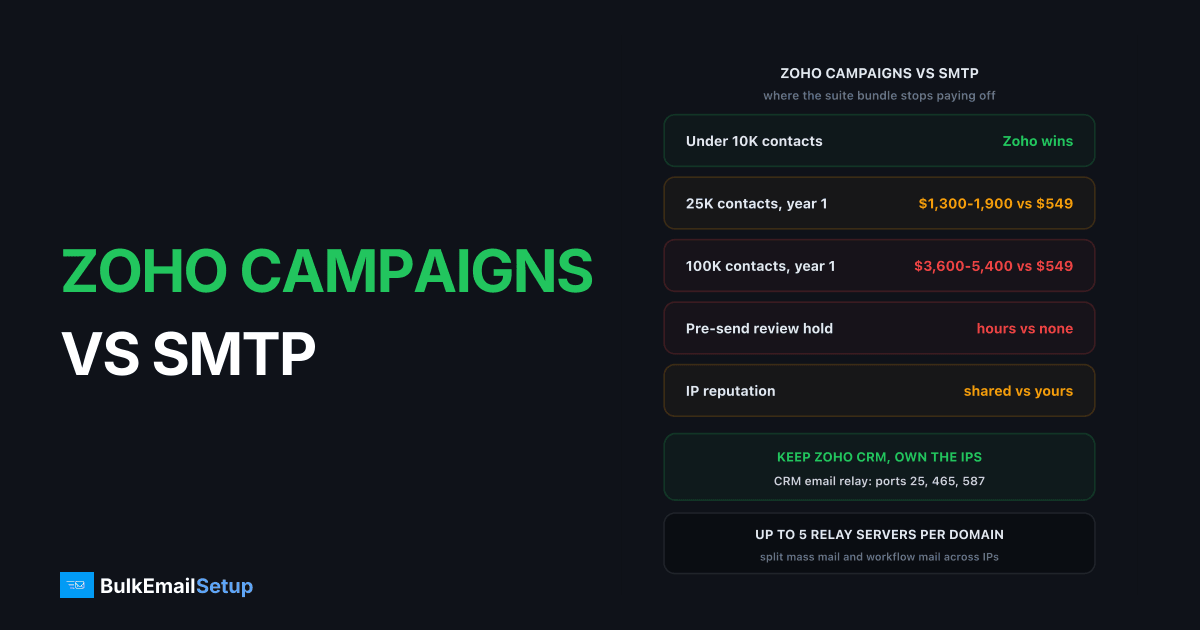
Zoho Campaigns is cheap because it is a bundle play, not a sending product. It is priced to keep you inside the Zoho suite alongside CRM, Desk and Books, which is why it undercuts Mailchimp at the same contact count. That works well below about 25,000 contacts. Past that you are paying $300 or more a month for shared IPs, a per-contact bill and a review queue that can sit between you and a time-bound send.
The interesting part is that this is not an either-or. Zoho CRM will relay its mail through your own SMTP server, so you can keep the suite and stop renting the sending.
What you are actually comparing
Most comparisons frame this as Zoho Campaigns against a server. That is the wrong frame. The suite is the product you are locked into, and Campaigns is one component of it.
| Factor | Zoho Campaigns | Dedicated SMTP |
|---|---|---|
| Pricing model | per stored contact, or prepaid credits | one-time build |
| Cost at 100K contacts | ~$300-450/mo | fixed, no per-contact fee |
| IP reputation | shared pool | yours alone |
| Dedicated IPs | high-volume accounts only, add-on | included |
| Pre-send review | yes, on new and unusual sends | none |
| Send button to first byte | minutes to hours if held | immediate |
| CRM sync | native, its main advantage | via relay or API |
| Campaign builder | yes | no, pair with a mailer |
| Automation journeys | yes | no |
| Warm-up | handled for you | yours, 4 to 8 weeks |
| Suspension risk | real, shared-pool policy | none, IPs are yours |
Two rows decide this for most people: the per-contact bill and the review hold. Everything else is the normal platform-versus-infrastructure trade you get with MailerLite or anyone else.
The two pricing models, and which one you are on
Zoho sells Campaigns two ways and they behave very differently. Confirm the current ladder on the Zoho Campaigns pricing page, because the tiers move.
| Model | How you are billed | Ceiling | Suits |
|---|---|---|---|
| Standard, contact tier | monthly, on stored contacts | 100,000 contacts | weekly senders |
| Professional, contact tier | monthly, on stored contacts | 500,000 contacts | weekly senders, more automation |
| Email credits | prepaid, burned per email sent | none | occasional large sends |
| Forever Free | free | 2,000 contacts, 6,000 emails/mo | testing |
The contact-tier plans advertise unlimited emails. That is real, and it is the best thing about them: if you mail a 50,000 list weekly, the per-email cost gets genuinely low. The catch is you are billed on storage. An unengaged 30% of your list costs exactly the same as your buyers.
Credits are the opposite shape. No monthly fee, no contact ceiling, and you pay per email that leaves. If you mail 200,000 people three times a year, credits are far cheaper than sitting on a Professional plan for twelve months to use it three times.
Most people pick wrong here. Work out your annual emails sent, divide by your contact count, and if the answer is under about 12 you are probably overpaying on a contact tier.
The review process nobody mentions before signing up
This is the operational difference that surprises people, and it has no equivalent on your own server.
Zoho does not let a new account send bulk mail until the account itself is approved. After that, individual campaigns can still be held for a compliance check, usually when the send is much larger than your history, when the list was recently imported, or when the content trips a content filter.
| Situation | What happens |
|---|---|
| Brand new account | bulk sending disabled until approved |
| First large send | held for review, typically a few hours |
| Newly imported list | held, and the list source is questioned |
| Routine send, established account | goes out normally |
| Review declined | campaign blocked, you rewrite or appeal |
For a monthly newsletter this is a non-event. For a flash sale that starts at 9am, an event reminder the night before, or a service notice, a four-hour hold is the whole problem. On your own SMTP server there is no queue and no reviewer. You press send and the mail leaves.
That is not a criticism of Zoho. Reviewing sends is exactly what a responsible shared-pool operator has to do, because one bad sender damages every other customer on those IPs. It is simply a cost you stop paying when the IPs are yours.
Cost at three sizes
Round numbers, twelve months, against a one-time dedicated build.
| Volume | Zoho Campaigns, year 1 | Dedicated SMTP, year 1 | Year 2 onward |
|---|---|---|---|
| 25,000 contacts | ~$1,300-1,900 | $549 one-time | Zoho recurs, dedicated is $0 |
| 100,000 contacts | ~$3,600-5,400 | one-time build + hosting | gap widens every year |
| 500,000 emails/month | Professional tier or credits | one-time build + hosting | dedicated wins outright |
The pattern is the one every per-contact platform produces. Year one looks close. Year three is not close at all, because a subscription renews and a build does not. Full arithmetic in what 100,000 emails a month actually costs and the break-even maths.
One caveat that genuinely matters here. If you already pay for Zoho One across a team, the marginal cost of Campaigns is much lower than the standalone price, and the numbers above overstate what you are actually spending on email. Do the sum on the marginal cost, not the list price.
Keeping Zoho CRM without Zoho's IPs
Here is the part that makes this comparison different from the usual platform migration. You do not have to leave the suite.
Zoho CRM has an email relay setting. Point it at your own SMTP host and CRM's mail leaves through your servers instead of Zoho's shared pool. Per Zoho's own relay documentation, it supports:
- Ports 25, 465 and 587, with SSL, TLS or no encryption
- Username and password authentication
- A daily send cap you set yourself
- Up to five relay servers per domain
- Different relays for different email types, so mass mail and workflow mail can leave on separate IPs
- Automatic fallback to Zoho's servers if your relay fails
That last two are worth dwelling on. Splitting mass mail and workflow mail onto separate relays means a bad newsletter cannot damage the IP carrying your deal notifications and quote emails. And the fallback means a server outage degrades to Zoho delivery rather than losing mail.
What you keep: CRM records, workflows, deal-stage triggers, reporting, the whole suite. What changes: the IPs, the reputation and the bill.
What you still need to replace is the newsletter layer, because Campaigns is where the builder and the journeys live. Self-hosted MailWizz, Mautic or Listmonk on top of your own SMTP covers it. See SMTP for CRM and marketing automation for how the two halves fit together.
The deliverability difference
On Zoho Campaigns your mail leaves from IP ranges shared with thousands of other Zoho customers. Their compliance team polices complaint rates hard, which is why the review process exists. That protects you when you are the careful sender and hurts you when someone else is not, and you get no visibility either way.
On your own IPs the reputation is entirely yours. Nobody else can burn it, and nobody is weighing your legitimate campaign against another customer's risk. The price is that bad list quality has nowhere to hide, and you own the 4 to 8 week warm-up.
Neither model exempts you from the receiver rules. Google's bulk sender guidelines apply to anyone sending over 5,000 messages a day to Gmail:
- SPF and DKIM on the sending domain
- A DMARC record,
p=noneis enough - One-click unsubscribe headers, plus a visible link in the body
- Spam complaints under 0.30% in Postmaster Tools, ideally under 0.10%
- Valid forward and reverse DNS on the sending IP
- TLS on the connection
Zoho handles the DNS and IP half for you. The complaint rate is yours in both models, and it is the requirement that actually kills campaigns.
Where the crossover sits
| Contact count | Which wins |
|---|---|
| Under 10K | Zoho Campaigns, clearly |
| 10K to 25K | Zoho, especially if you already pay for Zoho One |
| 25K to 100K | roughly even, decided by send frequency and review tolerance |
| Over 100K | dedicated wins on cost, and keeps winning |
Send frequency is the tiebreaker in the middle band. Mail a 50,000 list weekly and the unlimited-emails contact plan is good value. Mail it monthly and you are paying a subscription mostly to store names.
The other tiebreaker is timing. If any of your sends are time-bound, price the review hold as a real cost, not a footnote.
Who should stay
Stay on Zoho Campaigns if you are under 25,000 contacts, already inside Zoho One or CRM, and your sends are not time-critical. The suite integration is the genuine advantage and rebuilding it costs more than it saves.
Use the relay split if you like Zoho CRM but the sending side is the problem. Keep CRM, point its relay at your own SMTP, run a self-hosted mailer for newsletters. This is the answer for most people asking the question.
Go fully dedicated if you are past 100,000 contacts, sending weekly or more, the review hold has bitten you at least once, and someone will own warm-up and list hygiene. That last condition is not optional. Eight weeks of daily attention is the most common reason self-managed sending fails.
Questions worth settling first
How many emails per contact per year? Under 12 and you are on the wrong pricing model before you even consider leaving.
Has a send ever been held? If yes, and it cost you, that is your answer. If never, the review process is not your problem.
Do you pay for Zoho One already? The marginal cost changes the maths substantially. Run it on marginal, not list price.
Who owns warm-up? If nobody, stay on shared infrastructure. Four to eight weeks of daily ramping is real work.
Is the CRM sync doing anything? If your campaigns genuinely fire off deal stages and lead scores, the relay split keeps that. Leaving entirely does not.
How BulkEmailSetup helps
We build the sending half and leave your suite alone. Your own server, your own IPs, full SPF, DKIM, DMARC and PTR configuration, MTA tuning, bounce handling and a warm-up plan. Point Zoho CRM's email relay at it and the records, workflows and reporting carry on exactly as they are.
Basic is $549 one-time, covering 1 SMTP server, 3 dedicated IPs, 25,000 emails/day and unlimited contacts, which is the line that matters when you are being billed per stored contact elsewhere. Higher tiers run to 15 dedicated IPs and 200,000 emails/day. See pricing.
Frequently asked questions
Is Zoho Campaigns good for bulk email?
Up to roughly 25,000 contacts it is one of the cheapest credible options, especially if you already pay for Zoho One or Zoho CRM. Above that the contact-tier price climbs and you are still sending from Zoho's shared IP pools with a review process that can hold a campaign for hours. For pure sending volume a dedicated SMTP server costs less over a year and gives you your own IP reputation.
Does Zoho Campaigns review campaigns before sending?
Yes. New accounts and unusually large or unusual sends get held for a compliance check before the mail leaves, and the account has to be approved before bulk sending is enabled at all. Reviews normally clear in a few hours but can take a full working day. If your sends are time-bound, such as a flash sale or an event reminder, that hold is the single biggest operational difference against your own SMTP server, where nothing sits between you and the send button.
Can I keep Zoho CRM and send email from my own SMTP server?
Yes, and this is the arrangement most people end up with. Zoho CRM has an email relay setting that routes individual, mass and workflow emails through your own SMTP host on port 25, 465 or 587, with up to five relay servers per domain. You keep the CRM records, workflows and sync, and the mail leaves from your IPs instead of Zoho's shared pool.
How much does Zoho Campaigns cost at 100,000 contacts?
Expect roughly $300 to $450 a month on the contact-tier plans, billed on stored contacts rather than emails sent, so a quiet month costs the same as four campaigns. Check the current tier on the Zoho Campaigns pricing page, since the ladder changes. A dedicated SMTP build handling that volume is a one-time cost with no per-contact fee.
What is the difference between Zoho Campaigns contact pricing and email credits?
Contact-tier plans bill monthly on how many subscribers you store and include a generous send allowance. Email credits are a prepaid pool you buy once and burn per email sent, with no monthly fee and no contact ceiling. Credits suit senders who mail a large list two or three times a year. Contact plans suit senders who mail a smaller list every week.
What do you lose leaving Zoho Campaigns?
The native CRM sync, the campaign builder, the automation journeys, the signup forms and the reporting that ties opens back to CRM records. A dedicated SMTP server is sending infrastructure only. Most people keep Zoho CRM, point its relay at their own server, and add self-hosted campaign software such as MailWizz or Mautic for the newsletter layer.


