
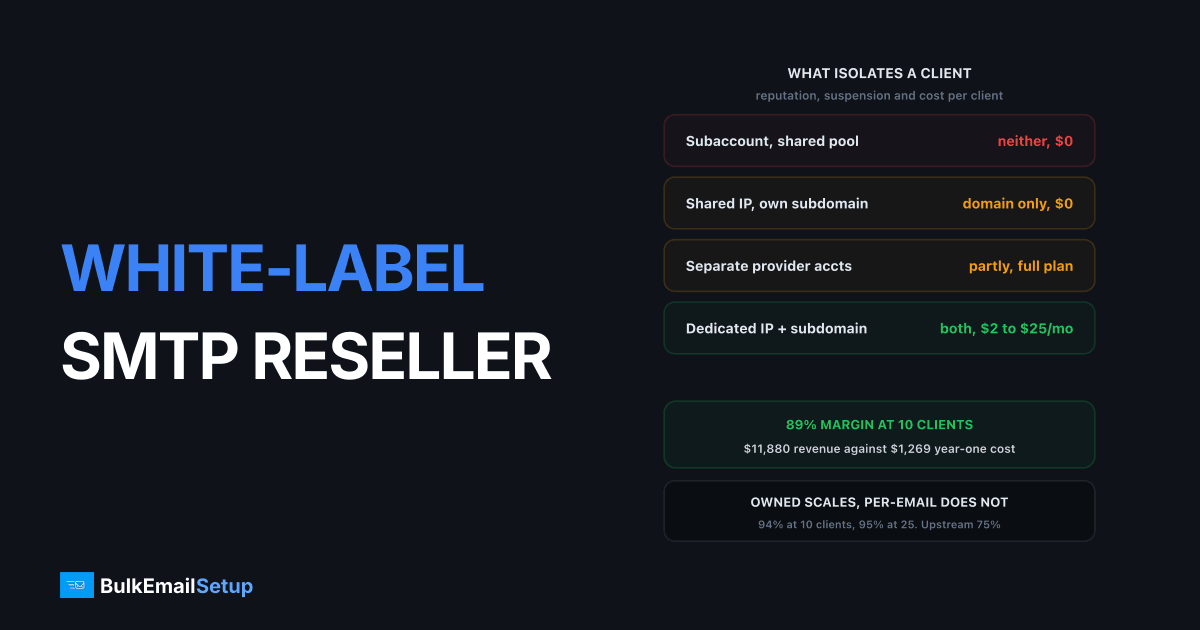
White-label SMTP means your client never learns who really carries the mail, and that takes control of four separate things: the sending domain and hostnames, the control panel branding, the support path, and the billing relationship. Miss any one and the mask slips. The most common leak is technical: Received headers and the Return-Path in raw message source name the real sender, and a client who clicks "show original" in Gmail finds it in ten seconds. At 10 clients billed $99/month on a flat $549 one-time server, gross margin sits near 89%. Here is what to build, and what to charge.
The infrastructure side of running a sending business is covered in SMTP infrastructure for ESPs reselling email. This piece is the commercial mechanics: how you actually hide the vendor, separate clients, price the thing, and stay out of trouble.
The four things white-label actually means
Most people mean "put my logo on it" and stop there. That fails the first time a technical client reads a message header.
| Layer | What the client must see | What leaks it |
|---|---|---|
| Sending identity | mail.clientdomain.com, DKIM on their domain | Vendor bounce domain, vendor d= |
| Message headers | Your hostname and PTR on the last hop | Received lines, HELO, Return-Path |
| Control panel | Your logo, your domain, your login URL | Vendor favicon, vendor help links |
| Support | Your inbox, your ticket system, your SLA | Forwarded vendor replies, vendor docs |
| Billing | Your invoice, your currency, your terms | Vendor charge on the client's card |
The first two are technical and permanent. The last three are process and can be fixed in a week. Get the technical ones wrong and no amount of branding saves you, because the evidence is inside every message you send.
The header leak problem, in detail
A client can read the full source of any message you send them. In Gmail that is three clicks. What they find is a stack of trace headers, and RFC 5321 section 4.4 requires every relay to prepend its own Received line and forbids it from altering the lines already there. You cannot scrub history. You can only control the last hop.
Here is what a leaking message looks like versus a clean one:
Leaking:
Received: from o12.sgmail.example by mx.google.com
Return-Path: <[email protected]>
DKIM-Signature: d=vendordomain.com

Clean:
Received: from mta1.yoursendingbrand.com by mx.google.com
Return-Path: <[email protected]>
DKIM-Signature: d=clientdomain.com
Four fixes, in order of how badly they leak:
- Return-Path. The bounce address is the loudest signal. It must be on a subdomain of the client's domain, not a vendor-generated string. Fixing this alone removes most of the giveaway.
- DKIM d= domain. Sign with a key published on the client's domain. This also builds their domain reputation separately, which is the point of isolation anyway.
- HELO hostname and PTR. Your MTA must announce itself as your own hostname, and the reverse DNS for the IP must match. Mismatch here is both a leak and a deliverability problem.
- Bounce and error messages. Postmaster replies quote the original headers. A vendor-branded bounce message arriving in the client's inbox undoes everything above.
Client isolation, and where subaccounts stop working
Isolation is the product you are actually selling. If client A's complaint rate can hurt client B, you have a branded pass-through, not a platform.
| Isolation method | Separates reputation | Separates suspension | Cost per client |
|---|---|---|---|
| Subaccount on shared pool | No | No, parent account dies | $0 |
| Separate provider accounts | Partly | Yes | Full plan cost each |
| Shared IP, separate subdomain | Domain only | No | Near $0 |
| Dedicated IP + subdomain | Yes | Yes | ~$2 to $25/month |
Subaccounts on SendGrid or Mailgun split your API keys and your reporting. They do not split the IP pool on a standard plan, and a policy suspension normally lands on the parent account, which stops all your clients at once. That is the failure mode that ends reseller businesses in an afternoon.
The practical rule I use: dedicated IP for anyone over 50,000 emails a month or in a risky vertical, shared IP with a separate subdomain below that. Gmail scores the sending domain separately from the IP, so per-client subdomains do a lot of the isolation work cheaply. Google's sender guidelines put the hard complaint ceiling at 0.3% and the target at 0.10%, measured per sending domain, which is exactly why the subdomain split matters even when two clients share an IP.
Never put a new client straight onto a warm pool that carries your best account. Start everyone on a starter IP and promote after 60 days of clean sending. Dedicated IP vs shared IP covers the reputation mechanics behind that call.
The pricing and margin model
The whole reason to white-label on owned infrastructure is that your cost stops scaling with volume while your revenue keeps scaling with client count. That gap is the business.
Assume a flat one-time server at $549 plus roughly $60/month for hosting, monitoring and IP costs. Compare against a per-email upstream at a realistic $0.25 per 1,000 emails, with clients averaging 100,000 emails a month, billed at $99/month each.
| Line item | 10 clients, owned server | 10 clients, per-email upstream |
|---|---|---|
| Client revenue/month | $990 | $990 |
| Infrastructure/month | $60 | $250 |
| Year-one one-time cost | $549 | $0 |
| Year-one total cost | $1,269 | $3,000 |
| Year-one revenue | $11,880 | $11,880 |
| Gross margin | 89% | 75% |
Now scale it. Client count goes up, owned cost barely moves, per-email cost moves in lockstep.
| Metric | 10 clients | 25 clients |
|---|---|---|
| Emails/month total | 1,000,000 | 2,500,000 |
| Revenue at $99/client | $990/month | $2,475/month |
| Owned infrastructure | $60/month | $120/month, 2 servers |
| Per-email upstream cost | $250/month | $625/month |
| Owned gross margin | 94% steady state | 95% steady state |
| Upstream gross margin | 75% | 75% |
Read the second table carefully. On owned infrastructure margin improves with scale because a second server absorbs 15 more clients. On per-email pricing margin is flat forever, and any client who doubles their volume eats your markup without paying you more. That is why resellers on per-email upstreams end up rewriting their contracts every year.
Two honest caveats. First, at 25 clients you need a second server, which is another one-time cost and another warm-up cycle. Second, the $99 line is not universal. Agencies managing campaigns charge $150 to $400 a month; pure relay resellers sell at $29 to $79. Price on what you handle, not on emails sent. The full cost curve by volume is in cost per email, SMTP vs ESP.
Support: you just became tier 1
This is the part nobody prices in. When you white-label, the client has no vendor to call. They call you, at 9pm, about a Microsoft block.
What lands on you:
- Setup and DNS. Every client onboarding is SPF, DKIM, DMARC, a bounce subdomain and a verification cycle. Script it or it eats your week.
- Blocklist incidents. A Spamhaus or UCEPROTECT listing on your IP is yours to resolve, including the delisting form and the follow-up sending pattern.
- Deferrals and throttling. Clients read a
421deferral as "your service is broken". You explain rate limiting, repeatedly. - Warm-up expectations. New clients want full volume on day one. You say no, and you say why, and some of them argue.
- Their own list quality. The complaint rate is theirs. The block is yours.
Steady state runs about 1 to 3 tickets per client per month once onboarding is scripted. Before that, budget 2 to 4 hours per client per month. At 25 clients that is a part-time job you must either do or hire, and it is the reason the $99 price point stops working past a certain client count without automation.
Compliance: your IPs, your problem
Legally and operationally, you own what your clients send. Their spam run lists your IP. Their CAN-SPAM violation reaches your abuse contact. Their scraped list burns the pool your other nine clients sit on.
Three things must exist before the first client sends:
- A written acceptable use policy in the contract. Name the banned categories explicitly, require consent-based lists, ban purchased and scraped data, and reserve the right to suspend without notice. Vague terms are unenforceable when you need them.
- List-source verification at onboarding. Ask where the list came from and how consent was captured. Anyone who cannot answer is telling you something.
- A kill switch. A documented, tested way to stop one client's sending in under five minutes without touching the others. Per-client SMTP credentials and a per-client route make this a one-line change. Shared credentials make it impossible.
Monitor per client, not per platform. Complaint rate, bounce rate and blocklist status per sending domain, checked at least weekly. A platform-level average of 0.08% hides one client sitting at 0.4%, and that one client is the one who takes your IP down.
What to avoid
Four failure patterns, all of which I have watched play out:
- Reselling shared-pool capacity as if it were dedicated. The client eventually reads a header, or a stranger on the pool gets you blocked, or the parent account is suspended and 10 clients go dark at once. The lie has a short half-life and it costs the whole roster.
- One sending domain for all clients. Sending every client from mail.youragency.com merges 10 domain reputations into one. The worst client sets everyone's inbox placement. Use the client's own domain, always.
- Shared SMTP credentials. No per-client isolation, no kill switch, no per-client reporting, and no way to prove who sent what when a complaint arrives.
- Pricing on emails when you are selling management. If your value is deliverability work and support, a per-email price caps your revenue at the client's volume and punishes you when they grow. Charge a retainer.
Launch checklist
Work top to bottom. Nothing below the line matters until the things above it are true.
| Step | What you do | Done when |
|---|---|---|
| 1. Infrastructure | Own MTA, own IPs, own hostname and matching PTR | Message source shows your hostname |
| 2. Header hygiene | Custom bounce domain and DKIM per client domain | No vendor string in raw source |
| 3. Isolation | Per-client subdomain, per-client SMTP credentials | You can kill one client alone |
| 4. Panel | Your logo, your domain, your login URL | No vendor branding anywhere |
| 5. Policy | Written AUP, list-source questions, suspension rights | Signed with every contract |
| 6. Monitoring | Per-client complaint, bounce and blocklist checks | Weekly report exists per client |
| 7. Pricing | Retainer tiers, not per-email pass-through | Margin holds at 2x client volume |
| 8. Support | Documented SLA, scripted onboarding runbook | New client live in under 2 hours |
Run steps 1 to 3 before you sign anyone. Steps 4 to 8 can happen in parallel with your first two clients, but not later than your fifth, because retrofitting policy and isolation onto a live roster means telling paying clients their setup is changing.
For the provider-by-provider scoring on isolation, white-label support and suspension blast radius, see best SMTP provider for agencies in 2026. The general agency infrastructure case is in SMTP server for agencies, and our white-label page covers what we brand for you directly.
How BulkEmailSetup helps
We build dedicated SMTP infrastructure you own and brand: your own server, your own IPs, your hostname on the MTA with matching PTR, and per-client SPF, DKIM, DMARC and bounce subdomains so headers carry your client's domain and your hostname, never ours. Per-client SMTP credentials and separate routes give you the kill switch and the per-client reporting a reseller business needs from day one.
Basic is $549 one-time, covering 1 SMTP server, 3 dedicated IPs, 25,000 emails/day and unlimited contacts. Higher tiers scale to 15 IPs and 200,000 emails/day, which is the range most resellers land in between 10 and 25 clients. See pricing for the tiers.
Frequently asked questions
What does white-label SMTP actually mean?
It means the client sees your brand at every touch point: the sending subdomain and DKIM are on their own domain, the control panel carries your logo and your domain, support tickets come to you, and the invoice is from your company. If any of those still show a vendor name, you are reselling, not white-labelling.
Can a client see which SMTP provider I really use?
Yes, from the raw message source, unless you close the leaks. Received headers, the Return-Path bounce domain, the DKIM d= domain and the HELO hostname all name the sending machine. RFC 5321 requires each relay to add a Received line and forbids altering existing ones, so the only real fix is to own the last hop yourself and set your own hostname and PTR.
How much margin is there in reselling white-label SMTP?
On a flat $549 one-time server carrying 10 clients at $99/month each, year-one revenue is $11,880 against roughly $1,269 of cost, about 89% gross margin. On per-email upstream pricing the same 10 clients at 100K emails each cost you around $100 to $250 a month before you bill anything, so the margin is thinner and it never improves with scale.
Should each client get their own IP?
Give a dedicated IP to any client sending over roughly 50,000 emails a month or in a risky vertical. Below that, group two or three low-volume clients per IP but keep each on their own sending subdomain so DKIM and domain reputation stay separate. Gmail scores the domain independently of the IP, so subdomain separation does most of the work.
Am I responsible for what my white-label clients send?
Yes. Your IPs, your abuse contact, your blocklist listings. You need a written acceptable use policy in every client contract, list-source proof at onboarding, and a technical kill switch that stops one client's sending in under five minutes without touching the others.
Can I resell shared-pool SMTP as white-label?
You can brand the panel, but you cannot honestly sell it as dedicated. On a shared pool your client's inbox placement depends on strangers, and a parent-account suspension stops every client at once. Selling shared capacity as dedicated is the single fastest way to lose a client roster.
What support load does white-labelling add?
You become tier 1. Expect roughly 1 to 3 tickets per client per month in steady state, plus blocklist incidents you have to work yourself. Budget 2 to 4 hours per client per month at the start, dropping to under an hour once onboarding is scripted.


