
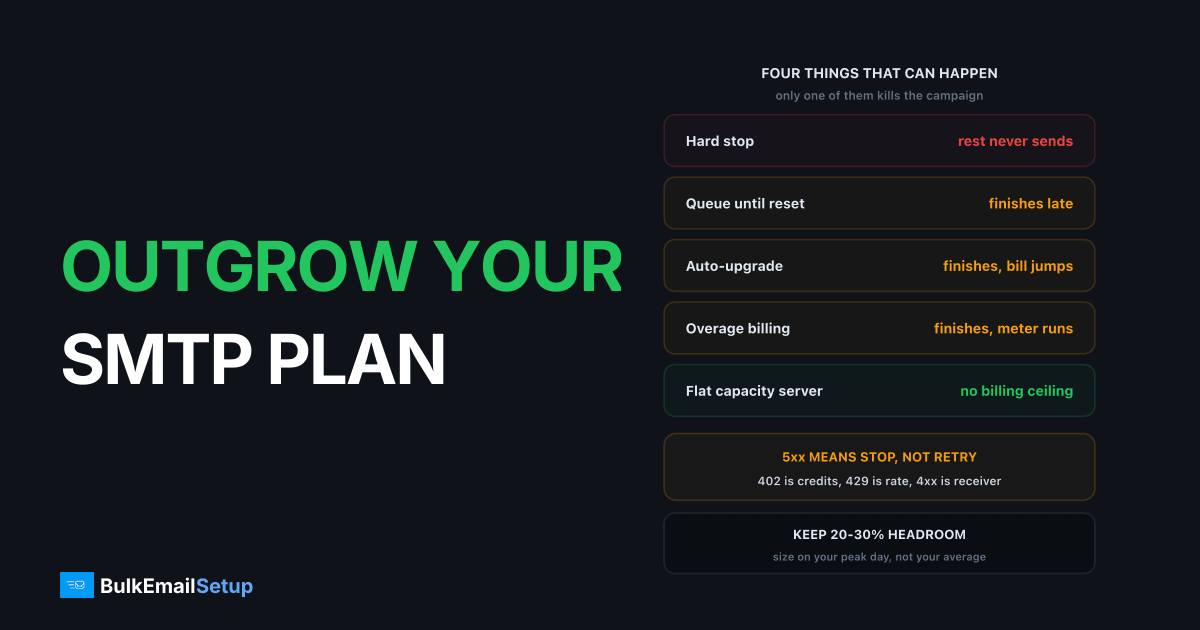
Cross your SMTP plan limit and one of four things happens: the provider hard-stops you and rejects the rest of the send, it queues the overflow until the next billing period, it auto-upgrades you to the next tier and bills the difference, or it accepts the mail and charges overage per 1,000 emails. Only the last two let a running campaign finish. On a hard-stop provider, hitting the ceiling 40,000 messages into a 90,000-message send means the other 50,000 never go out, and re-sending duplicates the first 40,000. Which behaviour you get is a provider setting, not an industry standard, and almost nobody checks it before the day it matters.
The four things that can happen
Here is the whole problem in one table. The behaviour column is what decides whether your campaign survives.
| Behaviour | What the provider does | Campaign outcome | Bill impact |
|---|---|---|---|
| Hard stop | Rejects every message past the limit | Dies at the limit, rest never sent | None, you just lose the send |
| Queue until reset | Accepts and holds until the period rolls over | Finishes late, sometimes days late | None |
| Auto-upgrade | Moves you to the next tier automatically | Finishes normally | Next tier price, often prorated |
| Overage billing | Accepts everything, meters the excess | Finishes normally | Per-1,000 charge on the excess |
Two of these are silent to your sending code. Auto-upgrade and overage billing both return a normal 250 accept, so your logs look clean and the surprise arrives on the invoice. That is a finance problem, and it is covered in hidden costs of ESP overage fees.
The other two are operational problems. A hard stop is loud and immediate. A queue is quiet and slow, which is worse in some ways, because a time-sensitive campaign that lands three days late is a campaign you paid to send and got nothing from.
Which providers typically do which
State these as typical, because every one of them is negotiable per account, changes with plan tier, and is rarely published in full. Check your own dashboard and contract before planning a send around a number in any blog post, this one included.
| Provider | Typical behaviour at the limit | What you tend to see |
|---|---|---|
| Amazon SES | Hard stop on the 24-hour quota | API Throttling / max sending rate exceeded, message refused |
| SendGrid | Hard stop on credits, plan-dependent overage on some contracts | API 402 or credit exhaustion, sending paused |
| Mailgun | Overage billed per 1,000 on most plans | Mail delivers, invoice grows |
| Brevo | Hard stop on credit balance | Sending blocked until you top up credits |
| Postmark | Overage or auto-upgrade depending on tier | Mail delivers, bill adjusts |
| Klaviyo / Mailchimp | Auto-upgrade or overage depending on contact tier | Plan silently changes tier |
Amazon SES is the clearest example of the hard-stop model. Its own service quotas documentation states a sandbox account gets 200 emails per 24-hour period at 1 email per second, and that production quotas vary by account and must be raised by request. There is no overage concept. You hit the number, you stop, and the increase request is a support ticket that takes about a day.
Credit-model providers behave the same way for a different reason. When the balance hits zero there is nothing to spend, so the send stops until a card clears.
What a hard stop looks like in your logs
The tell is whose hostname is in the error and whether the code is permanent.
SMTP submission to your provider's relay returns something like this:
550 5.7.1 Daily sending quota exceeded for this account
Or on the API side:
HTTP/1.1 402 Payment Required
{"errors":[{"message":"Maximum credits exceeded"}]}
Three things to read off those:
| Signal | Meaning | Right response |
|---|---|---|
| 5xx from your provider's host | Permanent for this billing period | Stop. Do not retry. |
| HTTP 402 | Credits or payment exhausted | Top up, then resume from the stop point |
| HTTP 429 | Rate cap, not volume cap | Slow down, the quota is fine |
| 4xx from gmail-smtp-in | Receiver deferral, unrelated to your plan | Different playbook entirely |
That last row is the one people get wrong constantly. A 4xx from the receiving side is a reputation and pacing problem, not a billing one, and slowing your send does nothing for an exhausted quota. Provider throttled my sending covers how to separate the two properly.
The 429 case is worth flagging separately because retrying makes it worse. Most providers count rejected calls against the same rate window, so a naive retry loop turns a temporary cap into a longer one.
The mid-campaign risk nobody plans for
This is the actual damage, and it is not the money.
Picture a 90,000-message send on a plan with 50,000 remaining. On a hard-stop provider the first 50,000 go out. The other 40,000 are rejected. Now you have a list split into two groups: people who got the email and people who did not, and nothing in your ESP dashboard cleanly marks the boundary.
What usually happens next is the expensive mistake. Someone tops up the plan and re-sends the campaign. The 50,000 who already received it get it a second time. Duplicate sends drive complaints, and Google's sender guidelines put the hard spam-rate ceiling at 0.30% with 0.10% as the target you should actually hold. A duplicate blast to 50,000 people is exactly the kind of event that pushes a normally clean sender through 0.10%.
So one plan-limit event can cost you three separate things:
- The 40,000 people who never got the campaign, and the revenue attached to them.
- A complaint spike from the 50,000 who got it twice.
- The reputation damage that follows the complaint spike into your next campaign.
The fix is boring and it works: before any re-send, export the delivery log, build a suppression list of every address that got a 250 accept, and resume only against the remainder.
How to see it coming
Three habits catch this before it catches you. None of them takes more than a few minutes a week.
Set usage alerts at 70% and 90%. Most providers have them and most people never switch them on. 70% is the "start thinking" line, 90% is the "do not launch anything big" line. If your provider has no alerting, a daily API call that pulls your sent count is ten lines of code.
Run a daily volume check. Yesterday's send count against your monthly quota divided by days remaining. If you are ahead of pace on the 12th of the month, you will cross the line before the 30th.
Keep 20 to 30% headroom above your normal peak day. Peak, not average. Averages hide exactly the spikes that break you.
| Metric | What to measure | Where the line sits |
|---|---|---|
| Peak day | Highest single-day send in 90 days | Size the plan on this |
| Headroom | Plan ceiling minus peak day | Aim for 20-30% |
| Pace | Month-to-date sends vs days elapsed | Flag if ahead by 15%+ |
| Seasonal multiple | Peak month vs median month | Usually 2x to 3x |
The seasonal number is the one that ruins otherwise careful planning. Black Friday, Cyber Monday and the year-end run typically produce 2 to 3 times normal volume, and a plan sized comfortably for March is a plan sized badly for late November. If you spike once a year, you either pay for permanent headroom for eleven unused months or you eat the limit event in the twelfth. The SMTP cost calculator by list size is a faster way to price both options than doing it on the invoice.
What to do the moment you hit the limit
Order matters here. Doing step four before step two is how the duplicate-send disaster happens.
- Pause the campaign. Not slow it, stop it. Every further message is either a rejection or a billed overage, and neither helps.
- Do not retry blindly. A 5xx quota rejection is permanent for the period. Retries burn API calls and can trip a rate limit on top of the volume limit.
- Work out whether the failed portion was rejected or queued. These need opposite responses. Rejected mail needs re-sending. Queued mail will send itself, and re-sending it produces duplicates.
- Build the suppression list. Every address with a 250 accept goes on it before anything else happens.
- Fix the capacity. Top up credits, upgrade the tier, or file the quota increase. SES reviews increase requests in roughly 24 hours once you supply volume and list-source detail.
- Resume in order, against the remainder only, at your normal pace. A catch-up burst on top of a quota event is how you trip receiver throttling as well.
Step three is where most of the confusion lives. Check whether messages sit in the provider's dashboard queue marked processing or paused, which means queued, or whether they show as rejected or failed with an error code, which means gone. Those two states look similar in a summary view and mean completely different things.
How to size a plan so this never happens
Size against the worst month you can reasonably expect, not the typical one. The arithmetic is short.
| Step | Input | Example |
|---|---|---|
| 1 | Peak day in the last 90 days | 42,000 |
| 2 | Seasonal multiple | 2.5x |
| 3 | Projected peak day | 105,000 |
| 4 | Add 25% headroom | 131,250 |
| 5 | Plan you actually need | 130,000+/day capacity |
The gap between step 1 and step 5 is the number that surprises people. A sender whose normal peak is 42,000 a day needs roughly three times that in plan capacity to survive a seasonal spike without a limit event. Metered pricing charges you for that headroom every month whether you use it or not, which is exactly why the overage trap works: buying the safe tier feels wasteful eleven months of the year, so people buy the tight tier and pay the penalty in the twelfth.
There is a third option, and it changes the shape of the problem rather than the price of it.
Why flat capacity removes this failure mode
On a dedicated SMTP server there is no plan limit to cross, because there is no meter. Your ceiling is throughput and receiver tolerance, which are physical limits, not billing ones.
| Factor | Metered ESP plan | Dedicated SMTP server |
|---|---|---|
| Ceiling type | Billing quota | Throughput and receiver limits |
| What happens at the ceiling | One of four behaviours, provider's choice | Mail queues on your MTA and retries |
| Seasonal spike | Overage, upgrade or hard stop | Same fixed cost |
| Mid-campaign death risk | Real on hard-stop providers | None from billing |
| Who decides your cap | Provider policy and billing | Your IP warm-up state |
The practical difference on a spike day: a metered plan hands you a rejection or an invoice, while a dedicated server just queues and drains a bit slower. Your own MTA holding 20,000 messages for two hours is a normal Tuesday. A provider rejecting 40,000 with a 5xx is a dead campaign.
This is not free of limits. A warmed dedicated IP carries roughly 20,000 to 50,000 messages a day to mixed consumer domains, and pushing far past that produces receiver deferrals regardless of what you paid. The honest framing is that the constraint moves from something a billing system enforces to something you can engineer around with more IPs and better pacing. The break-even point for a dedicated SMTP server has the volume maths on when that swap pays for itself.
The checklist
Run this once, then the pace check weekly.
- Find out which of the four behaviours your provider does at your plan limit. Ask support in writing.
- Turn on usage alerts at 70% and 90% of quota.
- Record your peak send day in the last 90 days, not your average.
- Calculate headroom: plan ceiling minus peak day, target 20-30%.
- Apply your seasonal multiple, usually 2x to 3x for retail.
- Confirm your sending code stops on a 5xx instead of retrying it.
- Confirm your sending code distinguishes 402, 429 and receiver 4xx codes.
- Write the mid-campaign recovery steps down before you need them.
- Keep a suppression-list export process ready, tested, not theoretical.
- Price the headroom tier against flat capacity at your projected peak.
The item people skip is the first one. Everything else is downstream of knowing whether your provider rejects, queues, upgrades or bills, and that single fact is the difference between a campaign that finishes and one that dies at 55%.
How BulkEmailSetup helps
We build dedicated SMTP infrastructure you own, so there is no plan quota to cross and no billing system that can stop a campaign at 55%. Your ceiling is throughput on warmed IPs, which means a seasonal spike queues on your own MTA and drains, instead of returning a 5xx and splitting your list into two halves. We handle SPF, DKIM, DMARC and PTR, MTA tuning, and the warm-up schedule that sets your real daily capacity.
Basic is $549 one-time, covering 1 SMTP server, 3 dedicated IPs, 25,000 emails/day and unlimited contacts. Higher tiers scale to 15 IPs and 200,000 emails/day, with the same flat structure at every level. See pricing, or read hidden costs of ESP overage fees for the billing side of the same problem.
Frequently asked questions
What happens if I go over my SMTP plan limit?
One of four things, depending on the provider. A hard stop rejects every message past the limit with a 5xx SMTP error or an API 402/429. A queue holds them until the next billing period. An auto-upgrade moves you to the next tier and bills the difference. Overage billing accepts the mail and charges per 1,000 extra emails. Only the last two let a campaign finish.
Does exceeding your email quota stop a campaign mid-send?
On a hard-stop provider, yes. If you cross the limit 40,000 messages into a 90,000-message campaign, the remaining 50,000 are rejected outright and never queued. The dangerous part is the cleanup: re-sending the campaign duplicates the first 40,000 unless you suppress everyone who already received it.
How much headroom should I buy above my normal sending volume?
20 to 30% above your normal peak day, not your average day. Averages hide spikes. Seasonal peaks like Black Friday and year-end typically run 2 to 3 times normal volume, so if that spike matters to your revenue, size the plan against the peak month rather than buying headroom you top up in a panic.
What does a plan limit look like in my logs?
SMTP submission returns a 5xx permanent rejection with wording like 'daily sending quota exceeded' and the provider's own hostname in the reply. API senders get HTTP 402 Payment Required for exhausted credits or HTTP 429 Too Many Requests for a rate cap. A 4xx reply from gmail-smtp-in or protection.outlook.com is a different problem entirely, that is the receiver, not your plan.
Should I retry messages that were rejected for exceeding a quota?
No, not blindly. A 5xx quota rejection is permanent for that billing period, so retries just burn API calls and can count against a rate limit window. Pause the send, work out whether the failed portion was rejected or queued, then resume from the exact point it stopped using a suppression list of everyone who already got it.
Does a dedicated SMTP server have a plan limit?
Not a billing one. On your own server the ceiling is throughput and receiver tolerance, not a meter, so a warmed dedicated IP carries roughly 20,000 to 50,000 messages a day to mixed consumer domains with no quota to cross. There is no invoice event and no support review at 2am on Black Friday.


