
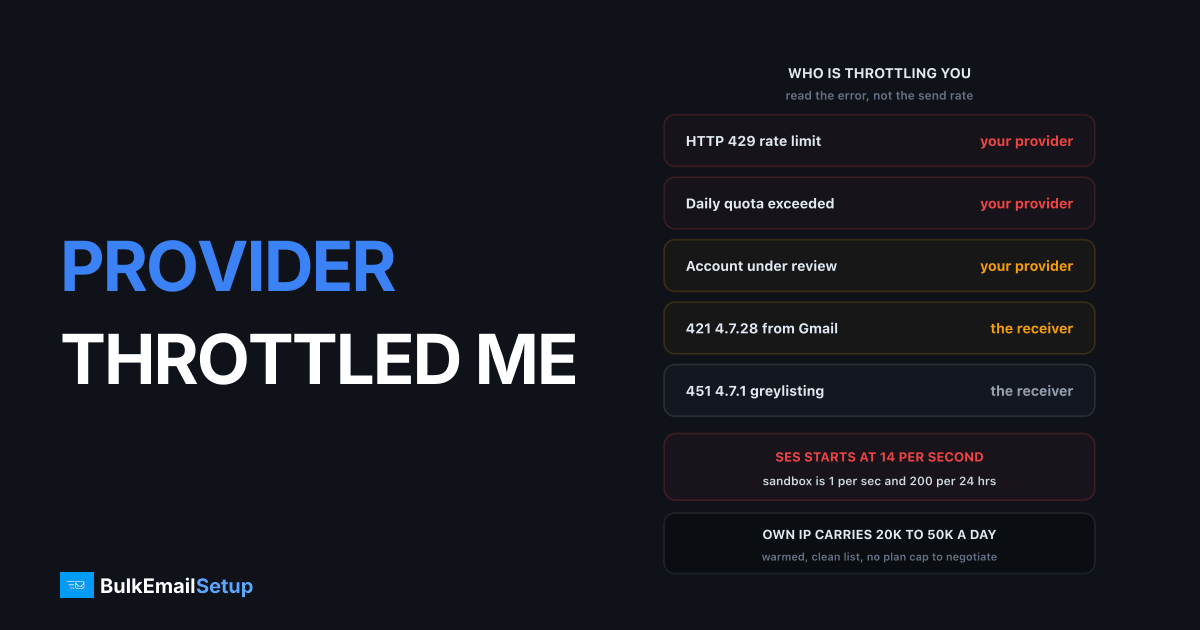
If your mail is sitting in your provider's dashboard queue, your API is returning HTTP 429, or you got an email saying "sending paused pending review", that is your provider throttling you, not Gmail. The five causes are a new-account ramp, your plan's messages-per-second cap, a complaint or bounce trigger, exhausted credits, and a volume spike of 3x or more. Amazon SES starts a fresh production account at 14 messages per second with a fixed 24-hour quota. Stop retrying, spread the send over more hours, and file a limit increase with real numbers.
Provider throttling and receiver throttling are different problems
People mix these up constantly and then apply the wrong fix. Slowing your send rate does nothing for an exhausted monthly credit balance. Adding warm-up days does nothing for a plan cap of 10 messages per second.
The tell is simply where the delay shows up.
| Symptom | Your provider throttling you | The receiver throttling you |
|---|---|---|
| Where mail is stuck | Provider dashboard queue, "processing" or "paused" | Your outbound queue after the provider accepted it |
| What the error says | HTTP 429, "rate limit exceeded", "daily quota exceeded", "account under review" | 421 4.7.28, 451 4.7.1, 421 4.7.0 too many connections |
| Whose name is in the error | The provider's (sendgrid.com, amazonses.com) | The receiver's (gmail-smtp-in, protection.outlook.com) |
| Whose logs show it | Provider activity feed and API responses | Delivery logs, bounce webhooks, Postmaster Tools |
| Affects which domains | All of them equally | Usually one, Gmail or Microsoft first |
| Who lifts it | A support ticket or a plan upgrade | Time, warm-up, and a lower complaint rate |
That last row is the important one. A receiver throttle is earned back over weeks. A provider throttle is often a form and a plan change. If you spend two weeks warming up when the actual problem was a 10-per-second plan cap, you lost two weeks.
Receiver-side deferrals have their own playbook, covered in why is my email deferred and what is email throttling. This article is about the other one.
Why providers throttle you
Five reasons cover almost everything I see.
New-account ramp. Every provider caps fresh accounts, because they cannot tell you from a spammer with a stolen card yet. Mailgun holds new accounts to a per-hour limit for the first days. Brevo caps new accounts at a low daily number until identity is verified. SES starts you in a sandbox at 200 messages per 24 hours and 1 per second, and even after production access the default is a bounded quota.
Plan rate limit. Your plan has a messages-per-second or messages-per-hour ceiling that is separate from your monthly volume allowance. You can be well inside your 100,000 monthly emails and still get 429s at 3pm because you tried to push 40,000 of them in twenty minutes.
Complaint or bounce trigger. Cross a threshold and an automated system slows or pauses you before a human ever looks. Complaints over roughly 0.1% and hard bounces over 5% are the usual lines. Google's own sender guidelines put the hard ceiling at 0.3%, and shared-pool providers act well before that because your behaviour lands on their other customers.
Credit or quota exhaustion. You spent the month's allowance. The dashboard says queued, the mail is not moving, and the fix is a card, not a config change.
Volume spike. A jump of 3x or more over your trailing daily average trips automated review at every major provider. Black Friday, a product launch, a re-engagement campaign to a list you have not touched in a year. The system does not know it is legitimate, so it holds you while someone checks.
Typical provider rate limits
Treat these as typical starting points, not contract terms. Providers change them, negotiate them per account, and rarely publish the tiers in full. Verify yours in your own dashboard before you plan a send around a number from a blog post, including this one.
| Provider | Typical rate cap | Typical volume cap | Notes |
|---|---|---|---|
| Amazon SES | 14 messages/sec default after sandbox | Fixed 24-hour sending quota | Sandbox is 1/sec and 200 per 24 hrs |
| SendGrid | Per-plan, low hundreds/sec on higher tiers | Monthly plan allowance | Free and Essentials caps are tightest |
| Mailgun | Per-hour cap on new accounts | Monthly plan allowance | Ramp lifts after verification and clean sending |
| Brevo | Daily cap on unverified new accounts | Daily plan allowance | Verification is the main gate early on |
| Postmark | Per-second API limit, transactional focus | Monthly allowance | Bulk marketing is a separate product |
| Your own MTA | No plan cap, receiver limits only | Hardware and IP count | You set the pacing |
The SES numbers are the ones worth reading in full, because AWS documents the model clearly: a rolling 24-hour sending quota plus a maximum send rate, both per region, both increased only on request. The SES sending quotas page explains that sending a message which would exceed the daily maximum gets rejected outright rather than queued. Quotas count recipients, not messages, so one email to ten people is ten against the quota.
If your SES increase already came back declined, that has its own causes and its own rewrite, covered in SES sending limit increase denied.
What to do in the first hour
Order matters here. The first instinct is usually the wrong one.
- Stop retrying. Most providers count rejected calls against the same rate window, so a retry loop on 429 keeps you pinned at the ceiling and can look like abuse. Back off, then use exponential retry with jitter, not a tight loop.
- Read the dashboard, not the code. Open the provider's activity or account page and find the actual state: queued, paused, under review, quota exceeded. These are four different problems with four different fixes.
- Check credits and billing. Sounds obvious. It is the cause maybe one time in five, and it takes thirty seconds to rule out.
- Look at your last 7 days of complaint and bounce rates. Complaints over 0.1% or bounces over 5% mean this is a metrics trigger and no rate change will clear it. Fix the list first.
- Spread the send. Take today's remaining volume and divide it across the hours you have left, staying under the per-second cap. A 50,000 send at 10 per second needs about 84 minutes of clean running, not a burst.
- Move transactional off the marketing path. Password resets and receipts should not be stuck behind a throttled campaign. Separate stream, separate credentials, separate subdomain.
How to get the cap lifted
Providers raise limits on evidence. A ticket that says "please increase my limit" gets a template reply. A ticket with numbers gets a real answer, usually inside 24 to 48 hours.
Include all six of these:
- Current and requested numbers. "Currently 14/sec and 50,000 per 24 hours, requesting 50/sec and 500,000 per 24 hours."
- Why now. A launch date, a seasonal peak, a migration from another provider with its volume history.
- Where the list came from. Signup form, checkout, double opt-in. Say it plainly. This is the question they actually care about.
- Your metrics. Complaint rate, bounce rate, unsubscribe rate for the last 30 days. If they are good, lead with them.
- How you handle bounces and unsubscribes. Named process, automated suppression, not an intention.
- Authentication status. SPF, DKIM and DMARC all passing on the sending domain.
AWS reviews SES quota increases in roughly a day when the case includes list source and bounce handling. Vague cases get a request for more detail, which costs you another cycle. Write it once, properly.
What will not work
Every one of these makes things worse, and I see all four regularly.
| Attempted workaround | What actually happens |
|---|---|
| Second API key | Limits are per account, not per key. No change. |
| Subaccounts to split volume | Read as limit evasion. Escalates a throttle into a suspension. |
| More concurrent SMTP connections | The cap is on messages accepted, not connections. You get 421s on top of 429s. |
| A second account on a new card | Providers link by domain, payment method and sending pattern. Both accounts get closed. |
| Retrying the 429 immediately | Rejected calls count against the window. You stay pinned at the ceiling. |
The pattern in all of them: you are trying to route around a policy decision with a technical trick, and providers built detection for exactly this years ago.
The structural fix at volume
Below roughly 50,000 emails a month, provider caps are an annoyance you work around. Above that they become a recurring tax on every campaign you plan, because you are always negotiating with someone else's risk team about how fast you may send your own mail.
On your own SMTP server with your own IPs, the plan cap disappears. There is no messages-per-second tier, no monthly credit balance, no review queue. The only limits left are the receivers' own, and those you manage with pacing and reputation rather than a support ticket.
Here is what a single warmed IP actually carries. These are working numbers from mixed consumer lists, not theoretical maximums.
| IP state | Daily volume per IP | Practical send rate |
|---|---|---|
| Week 1 of warm-up | 500 to 1,000 | Slow, single connection per receiver |
| Week 4 of warm-up | 8,000 to 15,000 | Moderate, 2 to 3 connections |
| Fully warmed, clean list | 20,000 to 50,000 | Receiver-limited only |
| Fully warmed, weak engagement | 5,000 to 15,000 | Receivers cap you well before hardware does |
Three warmed IPs at the clean-list figure carry 60,000 to 150,000 a day, and no part of that requires anyone's approval. The per-IP maths is broken down further in how many emails per day per IP.
The honest trade-off: you take on warm-up, MTA tuning and bounce handling that the provider used to do for you. That is real work. It buys you a ceiling set by physics and reputation instead of by a pricing tier.
Checklist
Work down it in order the next time sending stops.
- Confirm where the mail is stuck: provider queue or your own outbound queue.
- Read the exact error. 429 and "quota exceeded" are provider.
421 4.7.xis receiver. - Stop all retry loops before you change anything else.
- Check credits, plan allowance, and account status in the dashboard.
- Pull 7-day complaint and bounce rates. Over 0.1% and 5% respectively means fix the list, not the rate.
- Recalculate today's send as volume divided by remaining hours, under the per-second cap.
- Split transactional mail onto a separate stream and subdomain.
- File one limit increase with volumes, list source, metrics and authentication status.
- Do not create keys, subaccounts or second accounts.
- If you hit the cap more than twice a quarter, price your own infrastructure against the plan upgrade.
How BulkEmailSetup helps
We build the SMTP server and the dedicated IPs, tune the MTA for throughput, configure SPF, DKIM, DMARC and PTR, and run the warm-up so the IPs reach full volume without tripping receiver limits. There is no plan rate cap on your own server, no monthly credit balance, and no review team deciding whether your launch volume looks suspicious.
Basic is $549 one-time and covers 1 SMTP server, 3 dedicated IPs, 25,000 emails/day and unlimited contacts. Higher tiers scale to 15 IPs and 200,000 emails/day. See pricing for the full comparison.
Frequently asked questions
Why is my email provider throttling my sending?
The five common reasons are a new-account ramp period, a plan rate limit measured in messages per second or per hour, a complaint or bounce rate trigger, credit or quota exhaustion, and a sudden volume spike of 3x or more over your normal daily send. Amazon SES, for example, caps a fresh production account at 14 messages per second and a fixed 24-hour quota until you request an increase.
How do I tell provider throttling from receiver throttling?
Look at where the mail is stuck. If it sits in your provider's dashboard queue or your API returns HTTP 429, that is your provider capping you. If the message left the provider and the log shows a 4.x.x reply from gmail-smtp-in or protection.outlook.com, that is the receiver deferring you. The first is a billing and plan problem, the second is a reputation and pacing problem.
What does a 429 error mean when sending email?
HTTP 429 Too Many Requests means you exceeded your provider's API rate limit, usually messages per second or API calls per minute. The message was never handed to a receiving server. Retrying immediately makes it worse because most providers count rejected calls against the same window. Back off and spread the send instead.
How long does a new account sending limit last?
Typically 7 to 30 days of consistent clean sending. Providers raise caps on evidence, not on time alone, so an account that sends 500 a day with under 0.1% complaints for two weeks gets a lift faster than one that sits idle for a month. Amazon SES reviews quota increase requests in about 24 hours once you supply volume and list-source detail.
Will more API keys or subaccounts get around a rate limit?
No. Rate limits are enforced per account, not per key, and creating subaccounts to split volume is treated as limit evasion in most terms of service. It is one of the fastest ways to turn a temporary throttle into a suspension. Opening more concurrent SMTP connections does not help either, since the cap is on messages accepted, not on connections.
What is the real fix if I keep hitting provider caps?
Move to your own SMTP server with dedicated IPs. On your own MTA the only rate limits are the receivers' own, so a warmed IP can carry roughly 20,000 to 50,000 messages a day to mixed consumer domains with no plan ceiling, no per-message billing and no review team deciding whether your volume looks suspicious.


