
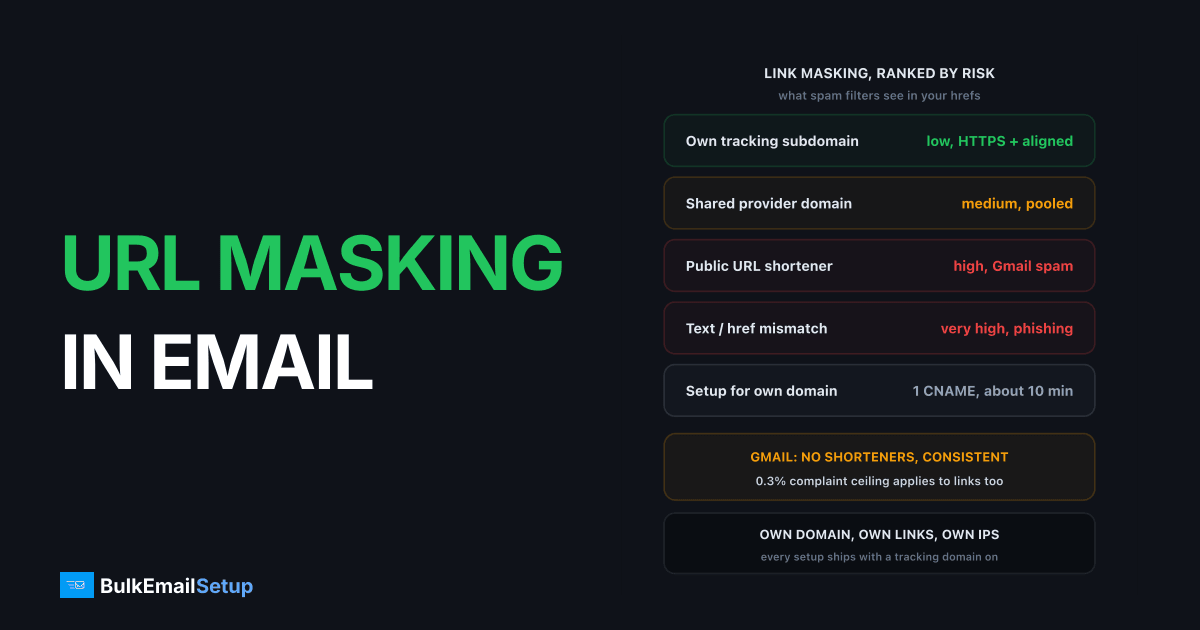
URL masking in email means rewriting the visible link so it points at a tracking domain you control, for example links.yourbrand.com/c/abc123, which logs the click and then redirects to the real page. Mailers do it for click tracking and branded links. There are three forms: a tracking-domain redirect, a public URL shortener, and link text that shows one domain while the href goes to another. The first is safe when the tracking domain is a subdomain of your sending domain with a valid HTTPS certificate. The other two are called out directly in Gmail's sender guidelines and will cost you inbox placement.
Why do mailers mask URLs at all?
Two reasons, and both are legitimate.
Click tracking is the big one. A mail server can tell you who opened and who bounced, but it cannot tell you who clicked unless the click passes through a server you own. So the platform swaps https://yourbrand.com/sale for https://links.yourbrand.com/c/7f3a9 at send time. The redirect records the recipient ID, the timestamp, and the target, then issues a 302 to the real page. The whole round trip takes well under 100 ms on a decent host.
Branded links are the second reason. If you send from mail.yourbrand.com but the links in the body all point at sendgrid.net or mailchimp.com, the recipient sees a third party's name in the status bar. A branded tracking domain keeps the hover text on your brand.
I've run tracking domains for every platform we've used over the last 9 years. The tracking itself never hurt deliverability. How it was set up did.
What are the three forms of link masking?
Not all masking is equal. Filters treat these three cases very differently.
| Masking method | What the recipient sees | Deliverability risk | When to use |
|---|---|---|---|
| Tracking-domain redirect on your own subdomain | links.yourbrand.com/c/... | Low, if HTTPS and aligned with From domain | Every campaign where you want click data |
| Tracking-domain redirect on a shared provider domain | sendgrid.net, ct.sendgrid.net, mandrillapp.com | Medium, you inherit other senders' reputation | Never for volume senders, acceptable for a test account |
| Public URL shortener | bit.ly/3xYz, tinyurl.com/... | High, named by Gmail as a spam signal | Never in bulk email |
| Display text and href mismatch | Text says paypal.com, href goes elsewhere | Very high, this is the phishing pattern | Never |
The first row is what every serious platform does, and it is what the rest of this article is about. The last two rows are what gets senders filtered.
Why do spam filters punish shorteners and mismatched links?
Because those two patterns are what phishing looks like. Filters are trained on millions of real phishing samples, and the two most common tricks in that corpus are hiding the destination behind a shortener and writing one domain in the anchor text while the href points somewhere else.
Google's Email sender guidelines say it plainly. Under message formatting: don't use link shorteners, and make sure links are visible and easy to understand. The same page tells you to keep the domain in your links consistent with your sending domain. Those are not suggestions. Since February 2024 the guidelines also carry a 0.3% spam complaint ceiling and a 5,000 messages per day threshold for bulk sender rules, so the days of ignoring that page are over.
Yahoo's sender best practices say the same thing in different words: use links that reveal the actual destination, and avoid shorteners because they hide it.
The display-text mismatch is the worst offender
When the anchor text reads https://yourbank.com/login but the href points at http://198.51.100.7/x, the filter does not need a reputation lookup. The mismatch alone is enough. SpamAssassin has shipped a rule for this for over 15 years. Gmail, Outlook, and Yahoo all have their own versions. If your template builder ever shows a raw URL as link text, make sure that URL and the href match exactly, including the scheme.
Shorteners break the domain reputation model
A shortener collapses thousands of unrelated senders onto one domain. Filters can't tell your bit.ly link from a scammer's bit.ly link, so they discount the whole domain. Shorteners also add a second redirect hop on top of your tracking redirect. Two hops, two domains, and the recipient's mail client has no idea where it ends up. That is exactly the pattern Safe Browsing flags.
How do I set up a tracking domain safely?
Put the tracking domain on a subdomain of the domain you send from, CNAME it to your platform's redirect host, and make sure it answers on HTTPS with a valid certificate. That is the whole recipe. Here is what it looks like in DNS.
; Sending domain:  mail.yourbrand.com   (From and DKIM)
; Tracking domain: links.yourbrand.com  (click redirects)

links.yourbrand.com.   3600   IN   CNAME   track.yourplatform.com.
Four things to check after the record propagates.
- Alignment with the From domain. If you send from
mail.yourbrand.com, the tracking host should sit underyourbrand.comtoo. Filters compare link domains against the From and DKIM domains at the organizational level, solinks.yourbrand.comandmail.yourbrand.commatch.links.yourbrand-mail.comdoes not. See subdomain vs root domain for email sending for how to carve up the subdomains. - HTTPS with a valid certificate. The redirect host must serve a certificate that covers
links.yourbrand.com. Most platforms issue one through Let's Encrypt, which is valid for 90 days and renews automatically. An expired or mismatched cert means the browser throws a warning on every click, and filters that follow links see the same thing. - HTTPS in the email itself. The rewritten href must start with
https://, nothttp://. A plain-HTTP tracking link in 2026 is a standalone negative signal. - Port 443 answers for the bare hostname. Some platforms only serve the cert for the redirect path. Test
https://links.yourbrand.com/with no path and make sure it does not return a certificate error.
Why shared tracking domains are a bad idea
Every platform ships a default tracking domain. SendGrid uses sendgrid.net, Mailgun uses mailgun.org, and so on. The default works out of the box, which is why most people never change it. Here is the trade-off.
| Factor | Shared tracking domain | Own tracking domain |
|---|---|---|
| Who else uses it | Every customer on the platform who skipped setup | Only you |
| Reputation | Pooled, you inherit the worst sender's mistakes | Yours alone |
| Safe Browsing exposure | One phisher can get the domain flagged for everyone | Only your own behaviour counts |
| Hover text | Shows the platform's name | Shows your brand |
| Alignment with From domain | Never matches | Matches |
| Setup cost | None | One CNAME record and a certificate, about 10 minutes |
| Lifetime | Tied to the platform, lost if you migrate | Yours, moves with you |
I've watched a shared tracking domain get listed on a URI blocklist because of one bad actor on the same platform. Every customer on that default domain saw click-through traffic drop for 3 days until the listing cleared. The ones on their own subdomain noticed nothing. That is the full argument. Domain reputation vs IP reputation covers why domain-level signals like this outlast IP changes.
How do I check what my links are actually doing?
Send yourself a test and inspect it before you trust the campaign. Three checks, in order.
Hover. Put the cursor on every link and read the status bar. The hostname should be your tracking subdomain, start with https://, and look nothing like the anchor text if the anchor is a raw URL. If you see the platform's default domain, your CNAME is not being used.
Headers and source. Open the raw message. Confirm the From domain and the d= value in the DKIM-Signature header share a root with the link domains in the body. Then grep the HTML for http://. There should be zero plain-HTTP hrefs.
Follow the redirect.
curl -sI https://links.yourbrand.com/c/7f3a9 | grep -i -E "^(HTTP|location)"
You want a 301 or 302 and a Location: header pointing at your real page over HTTPS. A 200 with a landing page, a redirect to HTTP, or a chain of 3 or more hops are all problems.
Safe Browsing and blocklists. Run the tracking hostname through Google's Safe Browsing site status at transparencyreport.google.com/safe-browsing/search and through a URI blocklist like SURBL. Do this once at setup and again whenever click-through drops without an obvious reason. If the domain is flagged, your mail is landing in spam regardless of how clean your IP is. How spam filters score your email walks through where link reputation sits in the overall score, and if you're already in the junk folder, emails going to spam fix has the recovery order.
Does URL masking ever hurt even when done right?
Rarely, and only in two situations.
First, cold outreach with very low volume. If you send 50 one-to-one emails a day from a sales inbox, a tracked link can look out of place next to an otherwise plain-text message. Many cold senders turn click tracking off for that reason and accept the lost data.
Second, a brand-new tracking subdomain with no history. A fresh hostname that suddenly appears in 20,000 emails on day one has no reputation either way. Warm it with the same ramp you use for a new sending domain: small sends first, then scale over 2 to 4 weeks. The same aging logic that applies to IPs applies here.
Everything else is fine. The tracking redirect itself has never been a spam signal. The shortener, the mismatch, and the shared domain are what you need to avoid.
How BulkEmailSetup helps
Every setup we deliver comes with its own tracking domain on a subdomain of your sending domain, CNAME'd, with a valid HTTPS certificate and aligned with the From domain, so your links never share reputation with anyone else. You also get dedicated IPs, so neither the link domain nor the sending IP is pooled. See plans on our pricing page.
Frequently asked questions
What is URL masking in email?
URL masking rewrites the link in your email so it points at a tracking domain you control, such as links.yourbrand.com, which logs the click and redirects to the real page. It exists for click tracking and branded links. The reader sees your domain, not the final URL.
Does URL masking hurt deliverability?
It depends on the form. A tracking subdomain on your own sending domain with HTTPS is safe and standard. Public URL shorteners and link text that shows one domain while the href goes to another are both named in Gmail's sender guidelines as things to avoid.
Should my tracking domain match my From domain?
Yes. If you send from mail.yourbrand.com, track on links.yourbrand.com. Filters compare the link domains in the body against the From and DKIM domains. Matching root domains is one of the cheapest trust signals you can give them.
What is wrong with a shared tracking domain?
Every sender on the provider's default tracking domain shares its reputation. If one of them spams, the domain gets flagged in Safe Browsing or a URI blocklist, and your links inherit the block. Your own subdomain isolates you from that.
How do I check what my tracking domain is doing?
Hover a link in a sent test and read the status bar. Then run the tracking hostname through Google Safe Browsing and a URI blocklist like SURBL. Finally, follow the redirect with curl -I and confirm it is HTTPS end to end with a 301 or 302 to the right page.


