
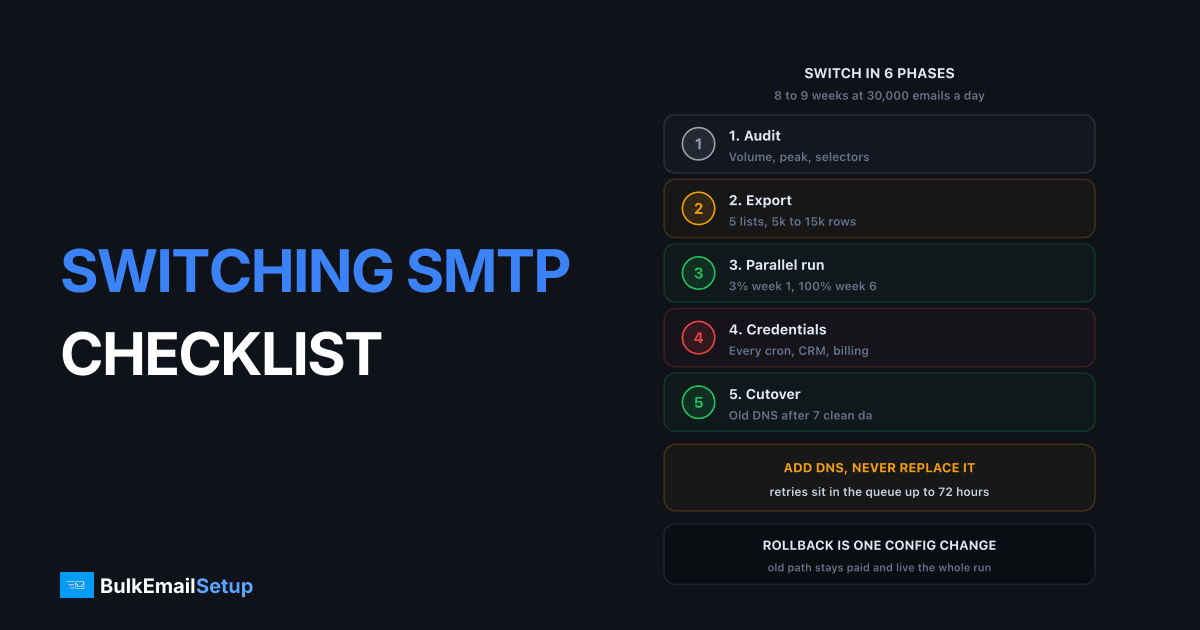
Switching SMTP providers is a 6-phase job that takes 8 to 9 weeks at 30,000 emails a day: audit, export, parallel run, credential rollout, verification, then cutover and decommission. The deliverability side is well understood. What kills switches is operations: a cron job still pointed at the old host, a suppression list nobody exported, DNS ripped out while messages sat in a retry queue. This is the tick-list.
Why reputation breaks during a switch is covered in switching ESP without losing deliverability. For specific moves, see SendGrid to a dedicated SMTP server or Mailchimp to your own SMTP.
Phase 1: the pre-switch audit
Write down what you actually send first. Most teams are wrong about their own volume by 20 to 40%, because transactional mail sits outside the marketing dashboard.
| Audit item | What to record | Why it matters |
|---|---|---|
| Average daily volume | 30-day mean, per stream | Sizes the plan and the warm-up curve |
| Peak day | Highest single day in 12 months | 4x your mean breaks an undersized ramp |
| Streams | Marketing, transactional, notifications | May each need its own subdomain and IP |
| Sending domains and subdomains | Every From domain in use | Usually 2 or 3 more than anyone remembers |
| DKIM selectors in use | Exact names on every domain | The new one must not collide with s1 or s2 |
| Apps holding credentials | Every system that authenticates | Decides your cutover length |
| Who has access | Named people, with roles | Two must be able to log in on cutover day |
| Contract exit terms | Notice period, minimum term | 30-day notice common, 90 on annual deals |
Peak day is the number that gets skipped. A 30,000 mean with a 120,000 December peak means warming to 120,000 before December, pulling the schedule forward by weeks.
Pull the DKIM selectors on every domain you find:
dig +short TXT s1._domainkey.example.com
dig +short TXT selector1._domainkey.example.com
Your new selector must not be a name already in that list, or the new TXT record and the old CNAME collide and one fails silently.
Phase 2: the export list
Export before you give notice. Some providers cut API access the day you downgrade.
| Export | Typical size on a 200k list | Lost if you skip it |
|---|---|---|
| Hard bounces and blocks | 3,500 to 11,000 addresses | Re-mailed on cold IPs, 5%+ bounce rate |
| Spam complaints | 200 to 1,500 | Every one complains again |
| Global unsubscribes | 2,000 to 6,000 | Legal exposure under CAN-SPAM and GDPR |
| Per-list unsubscribes | 500 to 3,000 | Hides under each list, most-missed export |
| 90 days of engagement | Millions of rows | No way to segment the warm-up |
| Templates | 10 to 60 files | A rewrite, not a port |
Use the API, not the dashboard. Dashboards paginate at 50 or 100 rows and people export page one and stop. Contract exit terms belong here too: on a 30-day notice with a 6-week parallel run, you serve notice in week 2, not week 8.
Phase 3: parallel-run setup
Both paths live at once. Add DNS, never replace it. The old provider is your rollback, so it stays paid until the new one proves itself.
| Record | At setup, before the first new send | At decommission, after 7 clean days |
|---|---|---|
| SPF | Add new ip4: entries beside the old include | Remove the old include |
| DKIM | Publish a new selector with a distinct name | Remove the old selector's TXT or CNAME |
| DMARC | No change | No change until 2 weeks of clean alignment |
| Return-Path | Add the new bounce domain on a fresh subdomain | Remove the old CNAME |
| Tracking domain | Add the new click-tracking CNAME | Remove after old links expire |
| PTR | Set on every new IP, matching HELO | No change |
SPF has a hard 10 lookup limit and most domains sit at 7 or 8 already. A second include can push you into PERMERROR, a fail on both paths at once. Use raw ip4: entries, which cost zero lookups.
The split plan, at 30,000 a day:
| Week | Old path | New path | New volume | Segment on the new path |
|---|---|---|---|---|
| 0 | 100% | 0% | 50 seeds | Internal seeds only |
| 1 | 97% | 3% | 900 | Opened or clicked in 30 days |
| 2 | 85% | 15% | 4,500 | Engaged in 90 days |
| 3 | 60% | 40% | 12,000 | Engaged in 180 days |
| 4 | 25% | 75% | 22,500 | Full list minus 12-month inactives |
| 5 | 5% | 95% | 28,500 | Everything except transactional |
| 6 | 0% | 100% | 30,000 | All mail, old path idle |
Split by recipient, not by campaign. Campaign A on the old path and B on the new gives two numbers you cannot compare. Splitting one campaign's recipients gives a same-day delivered-rate comparison on identical content.
Phase 4: the credential rollout
This phase decides whether the switch takes 6 weeks or 6 months. Every system that authenticates to SMTP must be found, changed and verified.
| Place credentials hide | Owner | Missed |
|---|---|---|
| Cron jobs and scheduled scripts | Engineering | Very often, nightly reports |
| CRM (HubSpot, Salesforce, Zoho) | Sales ops | Often, sequences send outside marketing |
| Helpdesk (Zendesk, Freshdesk, Intercom) | Support | Often, ticket replies are real email |
| Billing (Stripe, Chargebee, in-house) | Finance | Very often, invoices and dunning mail |
| Monitoring and alert senders | Ops | Very often, found during an incident |
| Third-party tools a contractor set up | Nobody | Found by grepping, not by asking |
First, grep everything for the old provider's hostname before you cancel:
grep -ri "smtp.sendgrid.net\|smtp.mailgun.org\|email-smtp.us-east-1.amazonaws.com" \
  /etc /opt /var/www /home --include="*.env" --include="*.yml" \
  --include="*.php" --include="*.json" --include="*.conf" 2>/dev/null
Second, ask the old provider for its API keys and SMTP users with last-used timestamps. Anything used in 90 days is a system you have not found. Cancel nothing until that report shows zero activity for 7 straight days.
Issue one credential per system, never a shared login. When the forgotten cron job turns up in week 5, the auth log names it for you.
Phase 5: verification before you increase volume
Do not raise the percentage until these pass on a real message through the new path. Send one to a Gmail address you control and read the headers.
| Check | Pass condition | Where to read it |
|---|---|---|
| SPF | spf=pass, domain matches your From domain | Gmail Show Original |
| DKIM alignment | dkim=pass header.d=yourdomain.com | Gmail Show Original |
| DMARC | dmarc=pass on both mechanisms | Gmail Show Original |
| PTR | Reverse returns the HELO hostname, forward resolves back | dig -x <ip> |
| TLS | Connection encrypted, TLS 1.2 or higher | Received header or provider logs |
| List-Unsubscribe | HTTPS URL plus List-Unsubscribe-Post: List-Unsubscribe=One-Click | Raw headers |
| Bounce processing | A test bounce lands in the suppression table | Your own database |
DKIM alignment fails quietly. Plenty of platforms sign with their own domain by default, so you see d=sendgrid.net instead of d=yourdomain.com, and DMARC passed only because SPF aligned through their bounce domain. Change the bounce domain and neither aligns. At p=reject that is refusal.
Check PTR and forward resolution together:
dig -x 203.0.113.10 +short
dig +short mta1.mail.example.com
The first must return your mail hostname, the second that same IP. Microsoft defers mail where these disagree.
Google's bulk sender requirements make SPF, DKIM, DMARC, TLS, valid forward and reverse DNS and one-click unsubscribe mandatory above 5,000 messages a day, with spam rate under 0.30% and a 0.10% target. The header pair is defined in RFC 8058 and must accept a POST without a login screen.
Do the bounce test twice. Send to a guaranteed-invalid address, confirm the DSN reaches your Return-Path, confirm your parser wrote it into the suppression table. Better to find broken bounce handling at 3% of volume than at 100%.
Phase 6: cutover and decommission
Cutover is not the day you hit 100%. It is the day you remove the old path, 7 clean days later.
| Step | When | Not until |
|---|---|---|
| New path at 100% | End of week 6 | All checks passed at 75% volume |
| Old path idle but live | Weeks 6 to 7 | 7 straight days with nothing sent |
| Remove old SPF include and DKIM selector | Week 7 or 8 | Old provider's queue is empty in their logs |
| Remove bounce and tracking CNAMEs | Week 8 | Campaign links expired, ~30 days |
| Downgrade the account | Week 8 | Every export verified readable on your own disk |
| Cancel the contract | Week 8 or later | Notice served, exports verified, read-only kept |
Removing DNS early is the classic mistake. Messages sit in a retry queue up to 72 hours. Pull the SPF include the day you flip to 100% and those retries fail authentication on your own domain.
Downgrade before you cancel where the provider allows it. A month on the cheapest tier keeps read-only access to stats and suppression lists. Cheapest insurance in the project.
The rollback plan
Write this before week 1, not during week 4. Rollback is cheap only while the old path is still paid for.
| Trigger | Threshold | Action |
|---|---|---|
| 4xx deferral rate | over 15% for 24 hours, hold; over 25%, roll back | Hold, then roll back a week's split |
| Complaint rate at Gmail | over 0.30% | Roll back to 100% old, audit the suppression load |
| Domain reputation | drops to Low in Postmaster Tools | Roll back and stop, not a ramp problem |
| New IPs blocklisted | any Spamhaus SBL or XBL listing | Roll back, delist, restart at week 1 |
Rollback has to be one config change. If it means redeploying eleven systems you will not do it under pressure. Test it once in week 1, at a 3% split, when nobody notices.
The five things that go wrong
In order of how often I see them.
- A forgotten sender keeps using the old provider. Usually a cron job or the billing system. The old account cannot be cancelled and nobody knows why its volume is not zero. Fix: the phase 4 grep plus the last-used key report.
- The suppression list did not fully import. Per-list unsubscribes hide under each list. Complaint rate climbs from 0.05% to 0.3% over 7 to 10 days. Fix: count rows before and after import.
- DNS removed too early. The old SPF include is pulled on cutover day and retries fail authentication for 72 hours. Fix: 7 clean days, then remove.
- DKIM signs with the provider's domain. Alignment fails and at
p=rejectmail is refused. Fix: checkheader.d=before passing the seed batch. - Peak day was never in the plan. The ramp targets the 30,000 mean and December arrives at 120,000. Fix: warm to peak, and finish 6 weeks before your busiest month.
Every one is caught by an item above. To cut risk further, run a paid trial first: how to test an SMTP provider before committing.
How BulkEmailSetup helps
We build the new side of the switch: your own server and IPs, SPF, DKIM, DMARC and PTR with selectors chosen so they do not collide with your current provider's records, per-system SMTP credentials so the phase 4 rollout is traceable, bounce and complaint parsing wired into a suppression table you load your exports into, and a warm-up sized to your peak day rather than your average. The old provider stays live the whole time as your rollback.
Basic is $549 one-time, covering 1 SMTP server, 3 dedicated IPs, 25,000 emails/day and unlimited contacts. Higher tiers scale to 15 IPs and 200,000 emails/day. See pricing, or read switching ESP without losing deliverability for the reputation theory behind this schedule.
Frequently asked questions
How long does switching SMTP providers take end to end?
Budget 8 to 9 weeks for a sender doing 30,000 a day: 1 week of audit and export, 6 weeks of parallel running while the new IPs warm, then 1 to 2 weeks of clean-day monitoring before you remove the old DNS and cancel. Senders under 5,000 a day can compress the parallel run to 2 weeks. The calendar is driven by IP warm-up, not by how fast your team can work.
What should I export before I cancel my old SMTP provider?
Five suppression lists (hard bounces, blocks, spam complaints, global unsubscribes, per-list unsubscribes), 90 days of open and click events for warm-up segmentation, every template, your webhook event history, and your delivered rate per mailbox provider as a baseline. On a 200,000 address list the suppression export usually runs 5,000 to 15,000 addresses. Pull it via API, not the dashboard, because dashboards paginate and people miss pages.
Where do teams forget to change SMTP credentials?
Cron jobs, the CRM, the helpdesk, the billing system, staging environments, WordPress plugins, backup and monitoring alert senders, and anything a contractor set up years ago. I have seen a switch look complete for three weeks while a nightly invoice cron kept authenticating to the old provider. Grep your codebase and config for the old hostname before you cancel, not after.
Should I remove the old provider's DNS records at cutover?
No. Keep the old SPF include and DKIM selector live for at least 7 clean days after the last message leaves the old path, and ideally 14. Removing them early means any message still in the old provider's retry queue fails SPF and DKIM, which is a DMARC failure on your own domain. Add new records before the first send, remove old records last.
What has to pass before I increase volume on the new provider?
Six checks on a real message from the new path: SPF pass with alignment, DKIM pass signed with your own domain, valid PTR matching the HELO hostname, TLS on the connection, List-Unsubscribe plus List-Unsubscribe-Post headers present, and bounces landing in your suppression table. Google's bulk sender rules require SPF, DKIM, DMARC, TLS, valid reverse DNS and one-click unsubscribe above 5,000 messages a day.
What is a realistic rollback plan during an SMTP switch?
Keep the old provider paid and live for the whole parallel run so rollback is a config change, not a rebuild. Define the triggers in advance: 4xx deferrals over 15% for 24 hours, complaint rate over 0.3% at Gmail, or domain reputation dropping to Low. Rollback means flipping the traffic split back to 100% old within one deploy, and it should be tested once in week 1 while the stakes are small.
Can I switch SMTP providers without running both in parallel?
You can, but only if you are under about 5,000 emails a day or your account was closed and you have no choice. Below that volume a cold-start ramp over 2 to 3 weeks is survivable. Above it, a same-day flip means the old path drops to zero and a new unknown path appears at full volume, which reads to receivers like a compromised domain and typically costs you 2 to 4 weeks of throttling.


