
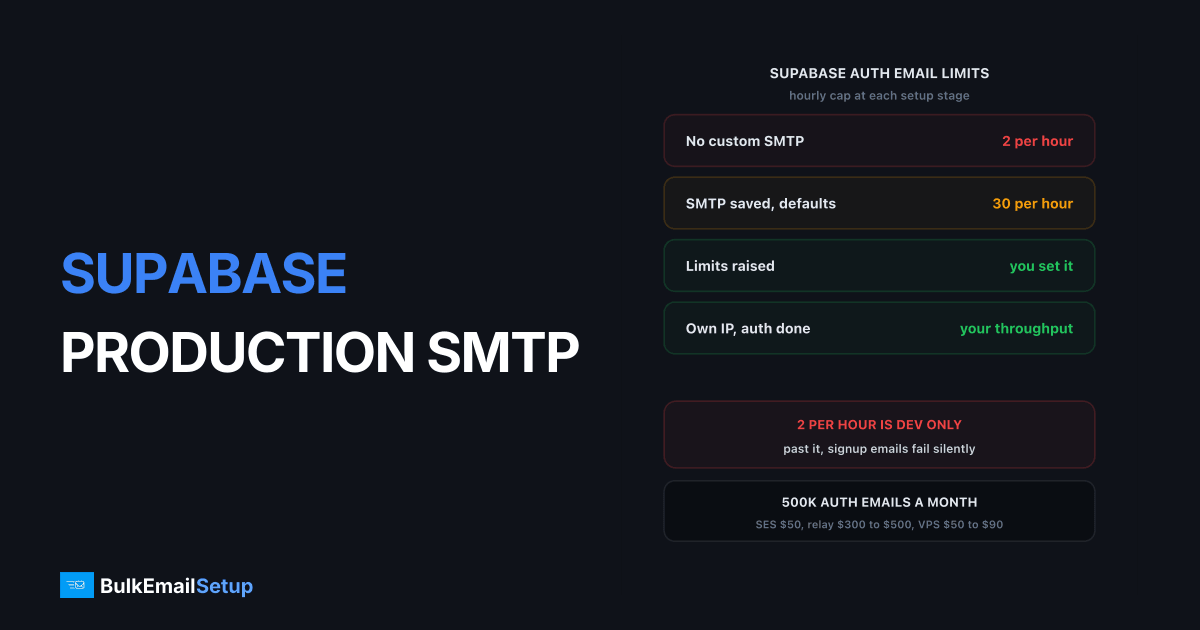
Supabase's built-in auth email service sends 2 messages per hour and the docs say directly it is not meant for production use. Cross that line and confirmation links and password resets simply stop going out, with no error surfaced to the user or to your logs. Every production Supabase app needs custom SMTP configured, and the starting rate limit of 30 messages an hour that Supabase applies afterwards needs raising too.
I have watched teams spend two days debugging a "broken signup flow" that worked perfectly. The emails were never sent.
The built-in limit and why it is set that low
Supabase ships a shared email sender so you can build a signup flow the same afternoon you create a project. It is a convenience for development, not infrastructure. Supabase's own auth SMTP docs put the limit at 2 messages per hour and describe the service as intended for exploring Supabase Auth and testing templates.
The reason is who else is on that sender. Every free project would otherwise share one reputation, so one spam-signup script on somebody else's project lists the whole pool. Shared pools get policed tightly, and 2 an hour is about as tight as it gets.
| Stage | Sender | Hourly limit | Production safe |
|---|---|---|---|
| New project, no SMTP | Supabase shared | 2 messages | No |
| Custom SMTP saved, limits untouched | Your server | 30 messages | No |
| Custom SMTP plus raised limits | Your server | Whatever you set | Yes |
| Custom SMTP, own IP, auth complete | Your server | Your throughput | Yes, at scale |
Most teams reach the middle row and think they are done. Thirty an hour is 720 a day, and a launch or a bot on your signup form chews through that before lunch.
What actually breaks when you hit the cap
Hitting the limit produces no red banner. The signup API call succeeds, the user row is created, the client redirects to "check your email", and no email arrives.
| Symptom the user reports | What is really happening | Where it looks like a bug |
|---|---|---|
| "I never got the confirmation link" | Send suppressed by rate limit | Your signup form |
| "Reset password does nothing" | Same, on the recovery template | Your auth page |
| Support tickets spike after a launch | Cap hit during traffic burst | Your product |
| Works for you, not for users | You tested inside the 2/hour window | Nowhere, and that is the problem |
The tell is that it works in testing and fails in bursts. One signup lands, you ship, then twenty users sign up in an hour and eighteen see nothing. Nobody files a bug report about a missing confirmation link, they close the tab. Check the Auth logs for rate limit entries before you touch application code.
Configuring custom SMTP in the dashboard
Project Settings, then Authentication, then SMTP Settings. Six fields, each with a way of being wrong.
| Field | What to enter | Common mistake |
|---|---|---|
| Host | Your SMTP server hostname | Using an IP, which breaks TLS cert validation |
| Port | 587 (STARTTLS) | Using 25, which most clouds block outbound |
| Username | The SMTP auth user | Reusing a mailbox login instead of a relay user |
| Password | The SMTP auth password | Pasted with a trailing space |
| Sender name | Your product name | Left as the default, looks unbranded |
| Sender address | [email protected] | A domain with no DKIM key published |
Port 587 with STARTTLS is the right default, 465 works if 587 is filtered, and port 25 is blocked outbound on AWS, GCP, Azure, DigitalOcean and Hetzner by default. See the port 25 blocked fix.
Test the credentials outside Supabase first:
swaks --to [email protected] \
      --from [email protected] \
      --server smtp.yourapp.com:587 \
      --auth LOGIN --auth-user smtpuser --tls
A 250 Ok from swaks means the server is fine and the problem is the dashboard config or the rate limits.
Raise the rate limits at the same time
Supabase applies a starting limit of 30 messages per hour after you connect custom SMTP. Do not leave it there. The Rate Limits page is in the same Authentication settings area.
Set it from your own numbers: peak hourly signups times 1.5 for resets and re-sends, then double for launch-day headroom. An app doing 200 signups in a busy hour wants around 600, not 30.
| App size | Peak signups per hour | Suggested email limit |
|---|---|---|
| Early stage | 10 | 100 |
| Growing SaaS | 100 | 400 |
| Post-launch spike | 500 | 2,000 |
| High volume consumer | 2,000 | 8,000 |
Setting it far too high is not free either. The limit is your only brake on a bot hammering the signup form, and a script can burn 50,000 emails in an hour against your own server.
Which auth emails Supabase sends, and which cannot wait
Supabase sends six template-driven emails, and they are not equally urgent.
| Email type | Trigger | Time sensitive | Impact if delayed |
|---|---|---|---|
| Confirm signup | New account created | Yes, seconds | User abandons signup |
| Magic link | Passwordless login request | Yes, seconds | User cannot log in at all |
| Reset password | Forgot password flow | Yes, seconds | Support ticket |
| Reauthentication | Sensitive action confirm | Yes, seconds | Action blocked mid-flow |
| Invite user | Admin invites a teammate | No, minutes fine | Mild friction |
| Change email address | User updates their email | No, minutes fine | Mild friction |
Four of the six have a person sitting there waiting. Magic link is the harshest, because it is the entire login: a magic link in spam is an account nobody can get into. Greylisting hurts most here, since a 4 minute deferral is invisible on a newsletter and fatal on a login. See the 451 4.7.1 greylisting fix.
Supabase links also expire on a timer, so a message delayed by a greylist retry can arrive already dead.
Templates worth customising
The defaults work and look like defaults. Edit them under Authentication, then Email Templates. Three things matter more than styling:
- A From name people recognise. "YourApp" beats a bare address. Unrecognised senders get deleted unopened, which Gmail reads as a negative signal.
- Plain text alongside HTML. HTML-only scores worse in most filters. Make sure the text alternative carries the link.
- No images or tracking pixels. These are functional emails, and every remote resource is another filter trigger.
Keep the subject boring and literal. "Confirm your email" delivers better than anything clever.
Auth mail belongs on its own subdomain
Send Supabase auth email from auth.yourapp.com and marketing from news.yourapp.com. Highest value decision here, and it costs one DNS record.
The logic is blast radius. Gmail scores domain reputation independently of who carries the mail, and its published spam complaint threshold is 0.3%, with 0.1% the target, per Google's bulk sender guidelines. A campaign to a stale list crosses that in one send, and if the domain is shared it takes your password resets to spam with it.
| Setup | Marketing complaint spike | Password reset delivery |
|---|---|---|
| Everything on yourapp.com | Domain reputation drops | Degrades with it |
| auth. and news. subdomains | news. reputation drops | Unaffected |
| Separate subdomains and separate IPs | news. IP and domain drop | Fully isolated |
Subdomains split domain reputation, separate IPs split IP reputation. Above roughly 50,000 emails a month across both streams, do both. See the subdomain versus root domain guide.
Deliverability requirements before you go live
Custom SMTP gets the message out of Supabase. Authentication gets it into the inbox. Four records on the auth subdomain.
| Record | What it does | Failure symptom |
|---|---|---|
| SPF | Authorises the sending IP | 550 5.7.1 at Gmail |
| DKIM | Signs the message, 2048-bit key | 550 5.7.26 unauthenticated |
| DMARC | Ties the two to the From domain | Inconsistent placement |
| PTR | Reverse DNS on the sending IP | Rejects at Microsoft |
DKIM alignment is where Supabase setups usually break. The sender address in the dashboard has to be on the domain your DKIM key signs for. Set the sender to [email protected] while the key sits on the root domain, and Gmail treats the mail as unauthenticated.
Start DMARC at p=none, read the reports for two weeks, then enforce:
_dmarc.auth.yourapp.com. TXT "v=DMARC1; p=none; rua=mailto:[email protected]; adkim=s; aspf=s"
PTR matters more than people expect, because Microsoft rejects outright on a missing or mismatched reverse DNS record. Half your B2B users are on Outlook or Microsoft 365, so that is half your signups failing on one record.
What Supabase auth email costs at volume
Auth email volume tracks your user count, so it grows whether you send campaigns or not.
| Monthly auth emails | Amazon SES | Managed relay | Own SMTP server |
|---|---|---|---|
| 10,000 | ~$1 | $15 to $20 | $25 to $40 VPS |
| 100,000 | ~$10 | $80 to $100 | $30 to $50 VPS |
| 500,000 | ~$50 | $300 to $500 | $50 to $90 VPS |
SES is genuinely cheap at $0.10 per thousand. The catch is the account: sandbox limits are strict, production access needs approval that can take days, and SES suspends for complaint rates like any shared provider. A review that kills your auth email kills every signup. Managed relays are easier but bill per email forever, so 500,000 a month runs $3,600 to $6,000 a year for mail a $60 VPS sends identically.
Own infrastructure flips the curve: you pay for the server, not the volume. Full breakdown in what 100,000 emails a month costs. The trade is owning the warm-up and monitoring, real work for the first month and near zero after.
Go-live checklist
Before you flip the app to production.
- Custom SMTP saved under Project Settings, Authentication, SMTP Settings, port 587.
- Rate limit raised from 30 to peak hourly signups times three.
- Sender address on a dedicated subdomain such as
auth.yourapp.com. - SPF, DKIM (2048-bit) and DMARC published on that subdomain, DKIM aligned with the sender address.
- PTR record on the sending IP matching the HELO hostname.
- Templates edited, plain text alternative present, no tracking pixels.
- Test signup, magic link and password reset to Gmail, Outlook and Yahoo, checking inbox and spam.
- Message headers checked for
dkim=pass,spf=pass,dmarc=passon all three. - CAPTCHA on the signup form so a bot cannot burn your rate limit and reputation.
- Auth log alert for rate limit rejections, so a cap hit reaches you before it reaches support.
Step 7 is the one people skip and the one that catches everything. Five minutes.
Welcome sequences and onboarding drips belong on the marketing subdomain, out of the auth flow. SMTP for SaaS onboarding emails covers that split.
How BulkEmailSetup helps
We build the SMTP infrastructure your Supabase project points at: your own server, your own IPs, SPF, DKIM, DMARC and PTR on the auth subdomain, MTA tuning, bounce handling and a warm-up plan. You paste host, port, username and password into the dashboard, and the only reputation on those IPs is yours.
Basic is $549 one-time, covering 1 SMTP server, 3 dedicated IPs, 25,000 emails/day and unlimited contacts. Higher tiers scale to 15 IPs and 200,000 emails/day. See pricing, or read SMTP for SaaS transactional email for how the transactional stream fits alongside the rest.
Frequently asked questions
What is the Supabase built-in email rate limit?
Supabase's built-in auth email service allows 2 messages per hour per project, and the docs state plainly it is not meant for production use. It exists so you can test signup flows and email templates while building. Any real app crosses 2 emails an hour on its first busy afternoon.
Do I have to configure custom SMTP on Supabase?
Yes, for any production app. Without custom SMTP, signup confirmations and password resets stop being sent once you pass 2 an hour, and the user sees no error at all. You configure host, port 587, username, password, sender name and sender address in Project Settings under Authentication.
What rate limit does Supabase apply after I enable custom SMTP?
Supabase sets a starting limit of 30 messages per hour even after you connect your own SMTP server. That is still too low for most apps, so raise it on the Rate Limits page in the same settings area at the same time you save the SMTP credentials. Forgetting this step is the most common reason auth email still fails after setup.
Should Supabase auth emails use the same domain as my marketing email?
Use a separate subdomain, such as auth.yourapp.com for Supabase and news.yourapp.com for campaigns. If both streams share a domain, a marketing campaign that draws complaints above Gmail's 0.3% threshold can push your password reset emails into spam. Separate subdomains keep the reputations independent.
Why are my Supabase confirmation emails going to spam?
Almost always missing or misaligned authentication. Gmail and Yahoo require SPF, DKIM and DMARC on the sending domain, and the DKIM signature has to align with the From address you set in the Supabase SMTP sender field. A PTR record on the sending IP that matches the HELO hostname is the other common gap.
What does it cost to send 100,000 Supabase auth emails a month?
Roughly $10 a month on Amazon SES at $0.10 per thousand, around $80 to $100 on a mid-tier relay like SendGrid or Postmark, and about $30 to $50 a month for a VPS running your own SMTP server after a one-time setup cost. At 500,000 the gap widens sharply in favour of owned infrastructure.


