
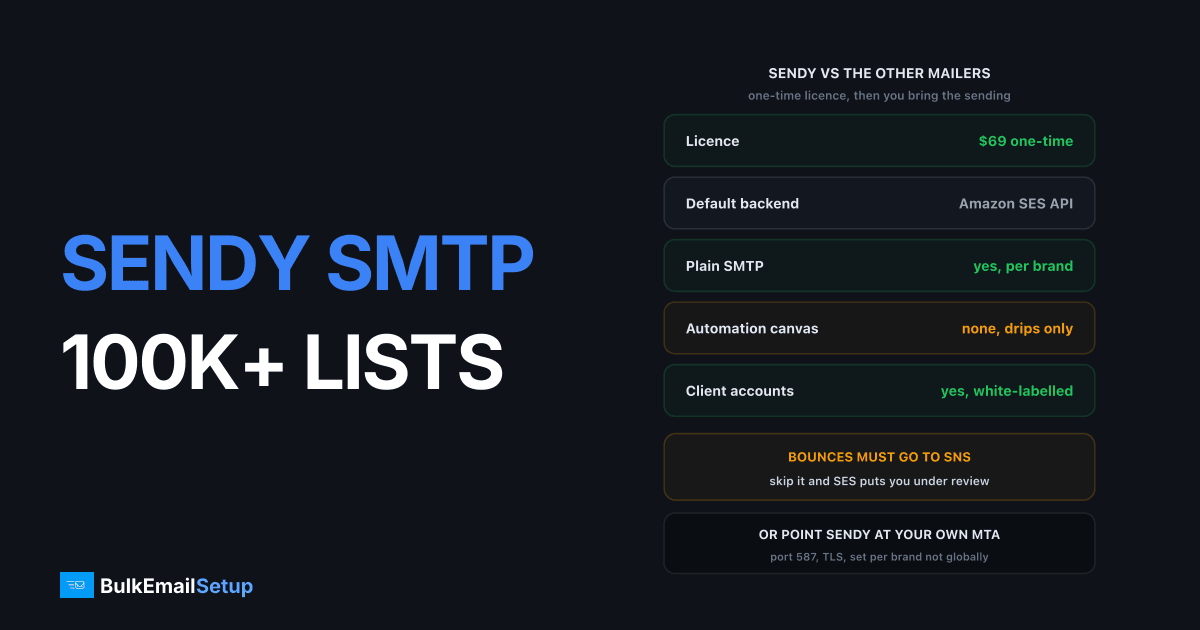
Sendy is a $69 one-time PHP app that most people run on Amazon SES at $0.10 per 1,000 emails, which puts a 100,000-email month at roughly $10 of sending plus a $12 VPS. What almost nobody uses is the SMTP option sitting in the same settings panel, which lets Sendy send through your own server and your own IP instead. Both paths work at 100K plus. The difference is who owns the reputation, and how much SNS plumbing you have to build.
What Sendy is, and what it is not
Sendy is a self-hosted campaign sender with a licence you buy once. Per Sendy's own pricing page the fee is $69, one time, no subscription. That is the entire pitch, and the feature list is narrower than people expect.
| Capability | Sendy | Listmonk | Mautic |
|---|---|---|---|
| Licence cost | $69 one-time | $0, AGPLv3 | $0 |
| Runtime | PHP plus MySQL plus cron | One Go binary plus Postgres | PHP plus MySQL plus cron |
| Default sending backend | Amazon SES API | Any SMTP | Any SMTP |
| Plain SMTP sending | Yes, per brand | Yes | Yes |
| Autoresponder drip series | Yes | No | Yes |
| Visual automation canvas | No | No | Yes |
| Behavioural branching, lead scoring | No | No | Yes |
| Multi-tenant client accounts | Yes, white-labelled | No | No |
| Bounce and complaint handling | Yes, via SNS or SMTP bounces | POP3 or webhooks | Mailbox monitor |
Autoresponders are the ceiling on automation: a timed series fired on list join or a date field, plus rules and webhooks. No canvas, no branching on clicks. People who buy Sendy expecting a Klaviyo-shaped flow builder return within a week.
What Sendy has that listmonk does not is white-labelled client accounts. If you send on behalf of customers, that alone decides it. Compare the wider field in Sendy alternatives, or the pure-speed option in the listmonk SMTP server setup.
The Amazon SES path
This is the default and the reason Sendy exists. You give Sendy an IAM access key and a region, and it calls the SES API directly rather than talking SMTP.
Create an IAM user with AmazonSESFullAccess, or a tighter policy allowing ses:SendRawEmail, ses:GetSendQuota and the SNS actions. Then fill in Settings.
| Field | What goes in it | Gotcha |
|---|---|---|
| AWS Access Key ID | IAM user key | Never the root account key |
| AWS Secret Access Key | IAM user secret | Rotate if it ever hits a git repo |
| Region | us-east-1, eu-west-1, etc. | Must match the region where the domain is verified |
| SES sending quota | Read-only, Sendy fetches it | Shows if you are still in the sandbox |
Two things trip people. Region mismatch: verify your domain in eu-west-1, set Sendy to us-east-1, and every send fails on an unverified identity. And the sandbox, where a fresh SES account can only mail verified addresses, capped at 200 a day and 1 a second. File the production access request before any of this matters at 100K.
Out of the sandbox the default is 50,000 emails a day at 14 a second. That number governs your throughput, and you raise it by asking, with your bounce and complaint rates as the argument.
Pointing Sendy at your own SMTP server
Sendy will happily ignore SES. Each brand has an SMTP block, and setting it makes that brand send through a normal mail server instead of the API.
| Setting | Value for a dedicated server | Note |
|---|---|---|
| Sending method | SMTP | Per brand, not global |
| Host | mail.yourdomain.com | The MTA you control |
| Port | 587 | 465 only if the server offers implicit TLS |
| Encryption | TLS | Never send unencrypted on port 25 to a relay |
| Username | Your SMTP user | Usually the full mailbox address |
| Password | Your SMTP password | Stored in the Sendy database |
Why do it. On SES you sit in a shared IP pool by default, priced at $0.10 per 1,000, with a dedicated IP available at $24.95 a month per IP according to the Amazon SES pricing page. Add two IPs and you are at $50 a month before a single email. On your own server the IP is yours, the reputation is yours, and nobody reviews your account because there is no account.
The catch is bounce handling. On SES, SNS hands Sendy structured bounce data. On your own server you route bounces to a mailbox Sendy polls, which is slower and worth testing before you trust it.
I run the hybrid more often than either pure path: transactional brands on SES, the main newsletter on a dedicated server. Sendy's per-brand setting makes that a five-minute config change, not a migration.
Cron, PHP limits and real throughput
Sendy sends from cron. That single fact explains most of the throughput complaints.
Two jobs, both every 5 minutes:
*/5 * * * * php /var/www/sendy/scheduled.php > /dev/null 2>&1
*/5 * * * * php /var/www/sendy/autoresponders.php > /dev/null 2>&1
Miss these and scheduled campaigns simply never fire. It is the most common Sendy install complaint and it is always the cron.
Each pass sends a chunk and exits when the PHP script limit hits. On shared hosting with max_execution_time = 30 you get a few hundred emails per pass, so a 100,000-email campaign drags across many hours. Raise the limits:
max_execution_time = 300
memory_limit = 256M
Now the real ceiling. Sendy cannot exceed the SES rate limit, and SES throttles you at your granted rate.
| SES sending rate | Throughput per hour | Time to send 100,000 |
|---|---|---|
| 1/sec (sandbox) | 3,600 | 27 hr 47 min |
| 14/sec (default production) | 50,400 | 1 hr 59 min |
| 50/sec (raised on request) | 180,000 | 33 min |
| Your own SMTP, throttled to 25/sec | 90,000 | 1 hr 7 min |
The 14 per second default is fine for 100K and stops being fine past 500K, where you either request a rate increase or move that brand to your own server.
Faster is not automatically better. A young IP pushing 50 per second at Gmail collects 4xx deferrals, and deferrals turn a fast campaign into a slow one. Target a 2 to 4 hour finish and follow an IP warm-up schedule if the IP is new.
Sizing the box for 100K plus
Sendy is light. MySQL is what grows, and it grows on clicks and opens, not subscriber rows.
| List size | vCPU | RAM | innodb_buffer_pool_size | Disk |
|---|---|---|---|---|
| Up to 50K | 1 | 2 GB | 512 MB | 25 GB NVMe |
| 50K to 250K | 2 | 4 GB | 1 GB | 40 GB NVMe |
| 250K to 1M | 4 | 8 GB | 3 GB | 80 GB NVMe |
A 100K list on a $12 VPS is comfortable. What kills these installs is not subscriber count, it is the tracking tables after two years of daily sends. Purge old campaign data on a schedule.
Sendy also stores your AWS keys and SMTP password in includes/config.php and the database. Lock the directory down and put the app behind HTTPS.
Bounces and complaints via SNS
Skip this section and Amazon will find you. AWS expects bounces under 5% and complaints under 0.1%, and it measures those regardless of whether you are processing the notifications.
The wiring, in order:
- In the AWS console, create an SNS topic, one for bounces and one for complaints (one topic for both works too).
- Subscribe the topic with protocol HTTPS and the endpoint URL Sendy gives you in Settings, which looks like
https://yourdomain.com/sendy/_bounces.php. - Confirm the subscription. Sendy auto-confirms if the URL is reachable over valid HTTPS.
- In SES, on the verified domain identity, set the bounce and complaint notifications to that SNS topic.
- Send to a known-dead address and confirm the subscriber flips to bounced in Sendy.
| Event | What SNS sends | What Sendy does |
|---|---|---|
| Hard bounce | Permanent, address does not exist | Marks the subscriber bounced, stops mailing |
| Soft bounce | Transient, mailbox full or deferred | Retried, not blocked immediately |
| Complaint | Recipient hit the spam button | Unsubscribes and records the complaint |
Step 5 is the one people skip. A subscription that shows "pending confirmation" in the SNS console looks fine on the AWS side and does absolutely nothing.
Google's bulk sender guidelines put the spam complaint ceiling at 0.3% with a target under 0.1%, and Amazon acts earlier because your behaviour risks their shared pool. An unprocessed bounce list mails the same dead addresses every send, the rate climbs, and the account goes under review. Read Amazon SES account under review before you need it.
On your own SMTP server none of this exists. Route the MTA's Return-Path to a bounce mailbox and give Sendy the POP3 details. More work, no review queue.
What it costs at 100K, 500K and 2M a month
The licence is $69 once, so it barely registers past month one. Monthly figures below, rounded, licence excluded.
| Line item | 100K/month | 500K/month | 2M/month |
|---|---|---|---|
| VPS running Sendy and MySQL | $12 | $24 | $48 |
| Amazon SES at $0.10 per 1,000 | $10 | $50 | $200 |
| SES dedicated IPs, 2 at $24.95 | $50 | $50 | $50 |
| Total, Sendy plus SES shared pool | $22 | $74 | $248 |
| Total, Sendy plus SES with 2 dedicated IPs | $72 | $124 | $298 |
| Total, Sendy plus dedicated SMTP server | ~$60 | ~$70 | ~$110 |
| Hosted ESP at same volume | $100 to $250 | $400 to $700 | $1,200 to $2,500 |
SES on the shared pool is the cheapest row at every volume. What it does not price is the review risk: one complaint spike, one sending pause, one lost launch window, worth far more than the $50 saved.
Add dedicated IPs to SES and the maths flips. At 2M the dedicated server row is a third of the SES-with-dedicated-IPs row, with an unmetered send rate instead of a quota you request. Mailchimp at 500,000 sends runs $500 to $700, roughly seven times Sendy plus SES. Full working in cost to send 500,000 emails per month.
The line missing from every table is your time. Patching PHP, renewing TLS, purging tracking tables, debugging a cron that silently stopped. An hour a month, and one bad afternoon a year.
Go-live checklist
Before the first campaign to a real 100K list, in order.
- Licence and install. Sendy running on PHP 8 with the required extensions,
includes/config.phppermissions locked down, HTTPS enforced. - Cron. Both
scheduled.phpandautoresponders.phpon a 5-minute schedule, verified by a test scheduled send. - PHP limits.
max_execution_timeat 300,memory_limitat 256M. - Sending method. SES keys plus the correct region, or the SMTP block with port 587 and TLS. Send a test to yourself.
- SES production access. Out of the sandbox, quota confirmed at 50,000 a day or higher.
- DNS. SPF, DKIM and DMARC published, DMARC starting at
p=none. - rDNS. On your own server, the sending IP's PTR resolves to the HELO hostname and back.
- SNS. Bounce and complaint topics created, HTTPS subscription confirmed (not pending), SES identity pointed at them.
- Bounce test. Mail a known-dead address, confirm the subscriber flips to bounced within a minute.
- Seed send. 50 addresses first, then check headers for DKIM
d=alignment.
Steps 8 and 9 are one job. A confirmed subscription that never fires is the same as no subscription, and you find out at 3% bounce rate.
How BulkEmailSetup helps
Sendy solves the campaign side for $69. It does not give you an IP, a warmed reputation, or an SES account that survives a bad list. The sending infrastructure is where these stacks break, not the PHP.
We supply Sendy-ready SMTP: credentials that paste into the brand's SMTP block, dedicated IPs warmed on a managed schedule, and rate limits matched to the warm-up so your cron never outruns your reputation. Basic is $549 one-time for 1 SMTP server, 3 dedicated IPs, 25,000 emails/day and unlimited contacts; higher tiers go to 15 IPs and 200,000 emails/day. Details on the pricing page.
Frequently asked questions
How much does Sendy cost?
Sendy's own site lists the licence at $69 as a one-time fee with no monthly charge and no subscription. That buys the PHP application, which you host yourself. Sending is billed separately by whatever carries the mail, so at Amazon SES rates of $0.10 per 1,000 emails a 100,000-email month adds about $10.
Can Sendy send through my own SMTP server instead of Amazon SES?
Yes. Under Settings, each brand has an SMTP option where you set host, port, encryption and credentials, and Sendy will use that instead of the SES API. Most people never notice it because every Sendy tutorial assumes SES. Switching costs you nothing in campaigns, lists or templates, since only the sending credentials change.
Does Sendy need cron jobs?
Yes, two of them. One runs scheduled.php every 5 minutes to fire scheduled campaigns and autoresponders, and one runs autoresponders.php on the same interval. Without them nothing scheduled ever sends, which is the single most common Sendy install complaint.
How long does Sendy take to send 100,000 emails?
At the SES default sending rate of 14 emails per second, 100,000 emails takes about two hours if PHP can keep up. On a shared host with a 30-second script limit it takes far longer, because each cron pass sends a chunk and then exits. A 2 vCPU VPS with a 300-second PHP limit is the practical minimum at that list size.
What happens if I skip SNS bounce and complaint handling in Sendy?
Amazon puts your SES account under review or pauses sending. AWS expects bounces under 5% and complaints under 0.1%, and it measures those whether or not you process the notifications. Sendy uses SNS webhooks to mark bounced addresses and unsubscribe complainers automatically, so skipping the setup means your list never cleans itself and the rates climb.
Does Sendy have a visual automation builder?
No. Sendy has autoresponders, which are timed drip series triggered on list join or a date field, plus rules and webhooks. There is no flow canvas, no branching on behaviour, and no lead scoring. If you need those, Mautic is the closer self-hosted match.
What server does Sendy need for a 100K list?
Two vCPU, 4 GB RAM and 40 GB NVMe handles 100,000 subscribers. Sendy is PHP plus MySQL, so the database is what grows, mostly from click and open rows rather than subscribers. Raise the PHP max_execution_time to 300 seconds and memory_limit to 256M, and give MySQL an innodb_buffer_pool_size of about 1 GB.


