
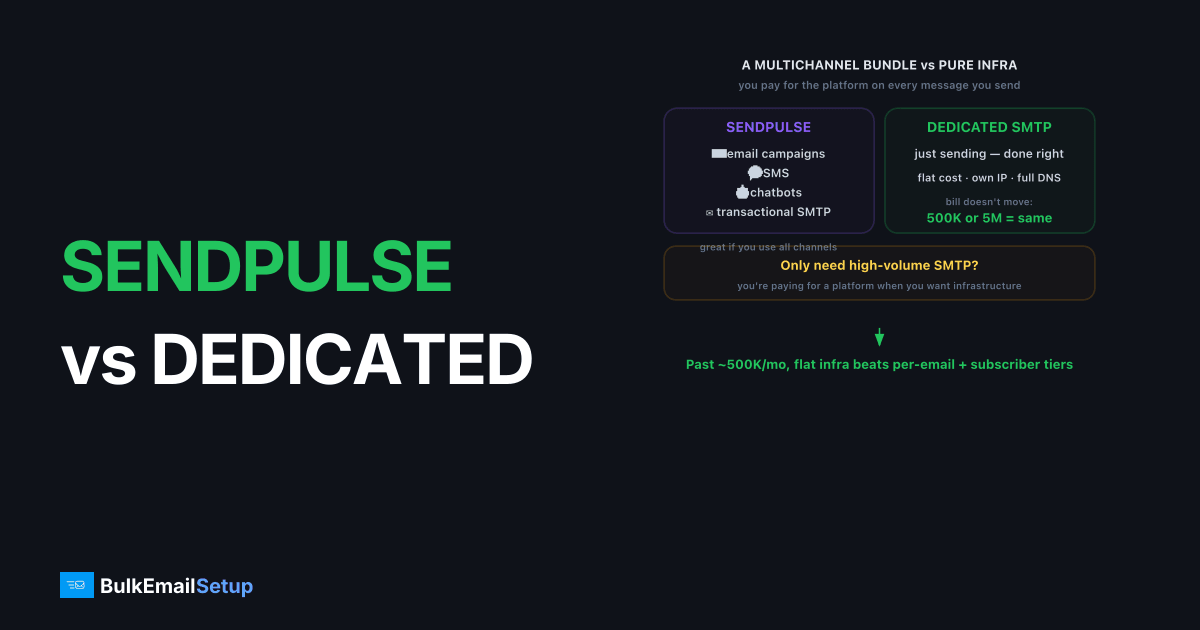
SendPulse is the cheaper, easier start for multichannel marketing at low volume; a dedicated SMTP server wins on real cost-per-email and control once you send consistently past roughly 500K/month. SendPulse bundles email, SMS, and chatbots with an SMTP relay, mixing per-email and subscriber-based pricing. A dedicated SMTP server is pure infrastructure: a flat monthly cost, your own IP, full SMTP and DNS access, and a bill that doesn't move whether you send 500K or 5M.
What is SendPulse and who is it for?
SendPulse is a multichannel marketing platform with email campaigns, SMS, chatbots, and a transactional SMTP relay. It targets small and mid-size businesses that want several channels in one tool. As of early 2026, it combines a free tier, subscriber-based marketing plans, and per-email SMTP pricing.
The multichannel bundle is the draw. If you run email plus SMS and chatbots, SendPulse consolidates them. If you only need high-volume SMTP, you're paying for a platform when you want infrastructure.
How do SendPulse and a dedicated SMTP server compare?
| Factor | SendPulse | Dedicated SMTP server |
|---|---|---|
| Price model | Per-email + subscriber tiers | Flat monthly |
| Bundled tools | Email, SMS, chatbots | None, pure SMTP |
| Volume limits | Plan and list size | Bound by IP capacity |
| Dedicated IP | Paid add-on, higher plans | Included, you control it |
| Setup effort | Minutes | Hours to days (or managed) |
| Deliverability control | Provider-managed | Full: IP, warm-up, DNS, MTA |
| Support | Plan-dependent | Provider or self-managed |
Figures are directional as of early 2026. Confirm current tiers on the SendPulse pricing page.
What does SendPulse really cost at volume?
The real cost hides in two meters. Subscriber-based marketing plans charge by list size, while SMTP sending charges per email, so a large list with high send volume gets billed on both axes. At scale those stack up past a single flat dedicated-server rate.
A dedicated server charges one monthly price regardless of list size or message count. We compare the curves in cost per email: SMTP vs ESP and hidden costs of ESP overage fees.
What about deliverability and control?
SendPulse manages your reputation; a dedicated server hands it to you. You configure SPF, DKIM, and DMARC, set the PTR record, and run your own warm-up. A dedicated IP only helps if you keep it warm, roughly 50K+/month consistently, and hold metrics clean.
The bulk-sender basics still apply on either platform. Meet the Gmail bulk sender requirements, authenticate, and keep complaints low. No tool rescues a dirty list.
What does the cost actually look like at volume?
SendPulse's pricing is harder to predict than a single per-email rate because it mixes two meters: subscriber-based marketing plans and per-email SMTP. A flat dedicated plan has one meter, fixed. Here's a directional view as of early 2026.
| Monthly volume | SendPulse (subscriber + per-email) | Dedicated SMTP server (flat) |
|---|---|---|
| 50K | Free tier or cheap, multichannel | Flat plan, likely more per email |
| 100K | Two meters start stacking | Roughly break-even territory |
| 500K | Both meters climb | Flat plan usually cheaper per email |
| 1M+ | Largest, least predictable cost | Flat plan, clearly cheaper and fixed |
The unpredictability is the real cost. A growing list raises the marketing meter even if your send volume is flat, and a busy send month raises the SMTP meter even if your list is flat. Both can climb at once. A flat dedicated plan removes that guesswork entirely. We compare the curves in cost per email: SMTP vs ESP and hidden costs of ESP overage fees.
Where is SendPulse the better choice?
SendPulse wins when you genuinely run multiple channels. If your outreach spans email, SMS, and chatbots, consolidating them in one platform with one login and one set of contacts is real value. Wiring three separate vendors together costs time and money that the bundle saves.
It's also a fine pick at low volume where the free tier and multichannel tools carry you. A small business sending modest email alongside SMS and chat gets a working stack for little or nothing. You're buying a marketing suite, not raw throughput. The friction starts only when email volume grows large enough that the per-email and subscriber meters together outrun a flat plan.
Where does a dedicated SMTP server win?
A dedicated SMTP server wins on predictable cost and control once email is high-volume. One flat rate replaces two climbing meters, so your bill stops depending on list size and send count. For a finance team that hates surprise overages, that predictability alone can justify the move.
Control is the other win. You configure your own authentication, run your own warm-up, and isolate streams across separate IPs you own. When deliverability dips, you read raw SMTP responses instead of a managed dashboard. For an operation where email is the core revenue channel, owning the infrastructure beats renting it inside a multichannel suite you've outgrown on the email side.
How do you migrate from SendPulse to a dedicated server?
Migration is DNS plus warm-up, not a rebuild. Both speak standard SMTP on ports 587 or 465, so the app change is host, port, and credentials. The careful part is reputation: a fresh dedicated IP starts cold and warms over four to six weeks.
Stage the move. Stand up the server with SPF, DKIM, DMARC, and PTR verified. Route a small slice through the new IP while SendPulse carries the bulk, ramping on a warm-up schedule. Shift the rest once placement holds. You can keep SendPulse for SMS and chat while moving only the email send to your own relay, which is a common end state for multichannel teams.
Who should pick which?
| Your situation | Better pick |
|---|---|
| Run email plus SMS plus chatbots | SendPulse |
| Low volume, want multichannel | SendPulse |
| No marketing stack yet | SendPulse |
| High, steady email volume | Dedicated SMTP server |
| Want predictable, fixed cost | Dedicated SMTP server |
| Need multiple isolated IPs | Dedicated SMTP server |
| Email is your core channel | Dedicated SMTP server |
What deliverability factors carry over no matter which you pick?
Switching platforms doesn't reset the rules receivers enforce. Gmail and Yahoo's bulk sender requirements (5,000+ recipients a day) demand SPF, DKIM, and DMARC all passing, one-click unsubscribe per RFC 8058, TLS in transit, valid PTR or reverse DNS, and a spam complaint rate held under 0.3%, ideally under 0.1%. SendPulse handles much of this behind its dashboard; on a dedicated server you own each record. Neither approach exempts you from the thresholds.
The records themselves have technical floors worth knowing. Your DKIM key should be 2048-bit (1024 is the bare minimum and increasingly weak). Your SPF record must resolve in 10 DNS lookups or fewer, or receivers return a PermError and treat the check as failed. DMARC moves through three policies, none, quarantine, then reject, and you tighten it as your authentication proves stable. Getting these right matters more than the brand on your relay.
What goes wrong when senders switch badly?
The most common mistake is cutting over all volume to a cold IP at once. A new dedicated IP with no history that suddenly sends 200K in a day looks exactly like a spam cannon to Gmail, which answers with a 421 4.7.28 rate limit or worse, a soft block that pushes you to the spam folder. The fix is patience: ramp from roughly 50 to 100 messages a day and double every few days while watching placement.
The second mistake is moving a dirty list to fresh infrastructure and blaming the server when it underperforms. A new IP with a 5% bounce rate and rising complaints burns reputation faster than any shared pool would, because the damage is concentrated on an IP that's entirely yours. Clean the list, suppress hard bounces, and segment your most engaged contacts to lead the warm-up. Reputation is earned by behavior, and a switch is the worst time to skip list hygiene.
The list-hygiene case is the one we see fail most. A team migrates a two-year-old list that never got cleaned, sends it on day three of a fresh IP, and the 5.1.1 user-unknown bounces run past 6 percent within the first hour. On a shared pool that mess hides among thousands of other senders. On a dedicated IP it is all yours, and a Spamhaus or UCEPROTECT listing often lands before the campaign even finishes sending.
How much volume justifies leaving a bundled platform?
The practical threshold is consistency, not just a raw number. A dedicated IP needs steady volume to hold a warm reputation, and the rough floor is around 50K sends a month sent regularly. Below that, a shared, managed relay like SendPulse usually delivers better because your mail rides a pool kept warm by other senders. Above it, a dedicated IP starts to make sense, and the case strengthens as volume climbs.
Cost reinforces the same line. With SendPulse's two meters, a list of a few thousand and modest sending stays cheap, but a large list paired with heavy monthly volume bills you on both axes at once. Once your combined bill rivals a flat dedicated plan, the managed convenience is costing you a premium on every message. For most senders, the move makes sense somewhere past 500K consistent monthly emails, earlier if your list is large or your sending is steady. If you're weighing the exact tipping point, our guide on how many emails before you need dedicated infrastructure walks through the signals.
There's a staffing factor too. A dedicated server hands you the controls, which only helps if someone will use them. If nobody on your team will read SMTP logs, tune warm-up, or manage DNS records, the managed bundle's hand-holding has real value even at higher cost. The decision isn't only volume and price; it's whether owning the infrastructure fits how your team works.
How BulkEmailSetup helps
If SendPulse's subscriber and per-email pricing has made your real cost hard to predict, a dedicated SMTP server gives you one flat rate and full IP control. We provision clean dedicated IPs, configure authentication, and run the warm-up so your cost stays fixed as you scale. See plans on our pricing page.
Frequently asked questions
Is SendPulse cheaper than a dedicated SMTP server?
At low volume, SendPulse's free tier and multichannel tools make it cheaper to start. At consistent high volume, a flat-rate dedicated SMTP server usually costs less per email because you stop paying per-message tiers and subscriber-based pricing.
Does SendPulse offer a dedicated IP?
Yes, SendPulse offers dedicated IPs on higher plans, typically as a paid add-on. A dedicated SMTP server includes the IP plus full DNS and MTA control, so you own warm-up, PTR, and reputation directly rather than through a dashboard.
What is SendPulse's real cost at volume?
SendPulse mixes per-email SMTP pricing with subscriber-based marketing plans, so cost depends on both list size and send volume. At high volume those combine to exceed a flat dedicated server plan, which charges one monthly rate regardless of messages sent.
When should I move from SendPulse to a dedicated server?
Move when per-email and subscriber costs dominate your bill, when you need a dedicated IP you control, or when you want full MTA and authentication control. That usually happens once you send consistently above roughly 500K emails per month.


