
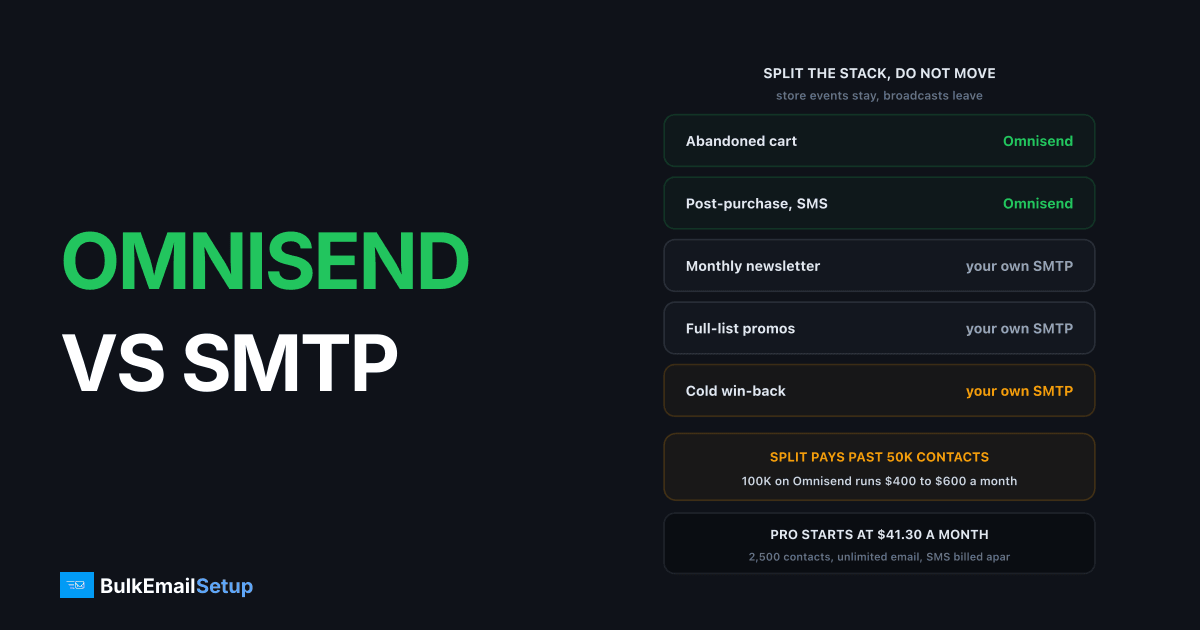
Omnisend sells ecommerce automation, and a dedicated SMTP server sells sending capacity. They overlap only on the last step of the process, which is why "which one" is usually the wrong question. Omnisend charges per stored contact, so a 100,000-contact list runs roughly $400 to $600 a month whether you send once or twenty times. A dedicated build is a one-time cost with no per-contact fee.
The useful framing for a store is a split stack, the same conclusion the Klaviyo comparison and the Drip comparison reach. Store-event mail stays where the store data lives. Broadcast mail moves to infrastructure that does not bill you per name.
Side by side
| Factor | Omnisend | Dedicated SMTP |
|---|---|---|
| Pricing model | per stored contact | one-time build |
| Entry price | $11.20/mo Standard, 500 contacts | $549 one-time |
| Cost at 100K contacts | ~$400-600/mo | fixed, no per-contact fee |
| IP reputation | shared pool | yours alone |
| Ecommerce automation | yes, its main strength | no |
| Abandoned cart flows | built in | no |
| SMS | bundled, from $0.007/message | no |
| Popups and forms | included | no |
| Shopify / WooCommerce | native integration | via your own mailer |
| Warm-up | handled for you | yours, 4-8 weeks |
| Suspension risk | real, shared-pool policy | none, IPs are yours |
The honest read: Omnisend does several things a dedicated server simply cannot, and a dedicated server does one thing far more cheaply at volume.
The pricing, from their own page
Omnisend's pricing page publishes the entry tiers plainly, which is more than most platforms do.
| Plan | Entry price | Contacts | Email limit |
|---|---|---|---|
| Free | $0/mo | 250 | 500 emails/month |
| Standard | $11.20/mo | 500 | 12x list size, so 6,000 |
| Pro | $41.30/mo | 2,500 | unlimited |
| Custom | on request | 150,001+ | negotiated |
Those are starting prices at the smallest contact tier. Both Standard and Pro climb with contact count, and above 150,000 contacts you are quoted rather than self-serve.
SMS is billed on volume, separately from the plan:
| Monthly SMS spend | Rate per message |
|---|---|
| $10 to $49.99 | $0.009 |
| $50 to $999.99 | $0.0085 |
| $1,000 to $9,999.99 | $0.008 |
| $10,000 and above | $0.007 |
The Standard plan's 12x cap matters more than it looks. A 50,000-contact list on Standard gets 600,000 emails a month, which sounds generous until you run a weekly broadcast plus flows and clear it. That cap is a common reason merchants jump to Pro before their contact count demands it.
What the ecommerce integration actually does
This is the part a self-hosted mailer struggles to replicate, and the reason the answer is a split rather than a migration.
| Capability | Why a self-hosted mailer struggles |
|---|---|
| Abandoned cart trigger | needs live cart state from Shopify or WooCommerce |
| Browse abandonment | needs on-site behaviour tracking |
| Post-purchase sequence | needs order webhooks and order status |
| Product recommendation blocks | needs the product catalogue and purchase history |
| Back-in-stock alerts | needs inventory events |
| Revenue attribution per email | needs order value tied back to the send |
| SMS in the same flow | needs a carrier relationship and consent records |
You can build most of these against a webhook and a database. Nobody with a shop to run wants to. That work is worth real money to keep buying, and it is low-volume mail, so the per-contact bill is not what is paying for it.
Broadcasts are the opposite. A monthly newsletter to your whole list is high volume, low complexity, and pays the full per-contact rate for a message that needs none of the machinery above.
The split most ecommerce senders end up with
| Mail type | Where it goes | Why |
|---|---|---|
| Abandoned cart | Omnisend | needs live cart data |
| Browse abandonment | Omnisend | needs site tracking |
| Post-purchase and review requests | Omnisend | needs order events |
| Back-in-stock | Omnisend | needs inventory events |
| Order and shipping confirmations | Omnisend or your store | store-triggered, low volume |
| SMS | Omnisend | carrier and consent handled |
| Weekly or monthly newsletter | your own SMTP | pure volume, no store data |
| Full-list promotions and sales | your own SMTP | where per-contact pricing hurts most |
| Win-back to a cold segment | your own SMTP | large, low-engagement, risky on a shared pool |
The last row is worth pausing on. Cold re-engagement sends are exactly the sends most likely to draw complaints, and on a shared pool a complaint spike gets you restricted to protect other merchants. Running them on your own IPs means the damage is contained to reputation you own.
That split needs authentication on both paths, and separate subdomains so a campaign problem cannot damage order confirmations. See subdomain vs root domain for email sending and SMTP for ecommerce abandoned cart for how the two layers sit together.
If you run WooCommerce specifically, the volume side is covered in SMTP for WooCommerce at volume.
Cost at three list sizes
Estimates above the published entry tiers, because Omnisend quotes larger accounts individually. Check your own tier.
| Contact count | Omnisend, yearly | Split stack, year 1 | Split stack, year 2 |
|---|---|---|---|
| 10,000 contacts | roughly $1,200 to $2,400 | usually not worth splitting | not worth splitting |
| 50,000 contacts | roughly $3,000 to $4,800 | small Omnisend tier plus $549 build | small tier plus hosting |
| 100,000 contacts | roughly $4,800 to $7,200 | small Omnisend tier plus $549 build | small tier plus hosting |
The mechanism that makes the split work: once broadcasts leave Omnisend, your Omnisend contact count can often drop to the engaged buyers who actually trigger flows. You are then paying a small tier for the automation and a one-time build for the volume, instead of a large tier for both.
At 10,000 contacts none of this is worth doing. The Omnisend bill is smaller than the effort of running two systems.
Full workings on the sending side are in what 500,000 emails a month costs and, if your bill has already got out of hand, Klaviyo bill too high covers the same escape route from the other direction.
Where the cost crosses over
| Contact count | Which wins |
|---|---|
| Under 25K | Omnisend clearly |
| 25K - 50K | Omnisend, automation earns its cost |
| 50K - 100K | split stack starts to pay |
| Over 100K | split stack wins clearly, gap widens |
The number that decides it is not your list size on its own, it is how often you actually send. A 100,000-contact list mailed twice a month is paying a lot per email. The same list mailed weekly gets much better value from a platform.
The second is what share of your list is buyers. A store where 15,000 of 100,000 contacts have ever ordered is paying full rate to store 85,000 names who never trigger a flow. That is the clearest split-stack signal there is.
The deliverability difference
On Omnisend you share IP pools with other merchants. Their abuse team polices complaint rates hard, because one bad sender damages everyone on that IP. That protects you when you are careful and hurts you when someone else is not.
On dedicated IPs the reputation is entirely yours. Nobody else can damage it, and no policy team is weighing your sending against other customers' risk. The cost is that poor list quality has nowhere to hide, and you own the 4 to 8 week warm-up. See dedicated IP vs shared IP.
A split stack has one deliverability advantage worth naming. Transactional and flow mail keeps a clean, high-engagement reputation on Omnisend's pools, while broadcast risk sits on separate IPs and a separate subdomain. A bad promo send cannot then delay someone's order confirmation.
What Gmail requires on both paths
Google's bulk sender guidelines apply to anyone sending over 5,000 messages a day to Gmail addresses, whoever carries the mail. Since February 2024 they are mandatory:
- SPF and DKIM on the sending domain
- A DMARC record, even at
p=none - From header aligned with the SPF or DKIM domain
- One-click unsubscribe in the header, plus a visible link in the body
- Spam complaint rate under 0.30%, ideally under 0.10%
- Valid forward and reverse DNS on the sending IP
- TLS on the connection
Running a split stack means publishing this correctly twice, once for Omnisend's sending subdomain and once for yours. That is the main added admin of the arrangement, and it is a one-off.
Which to pick
Stay on Omnisend alone if you are under 50,000 contacts and the ecommerce automation is doing real work. It is a good product at that size and replacing it would cost more than it saves.
Add dedicated infrastructure if you are past 100,000 contacts, the per-contact bill is the biggest line in your marketing budget, and someone will own warm-up and list hygiene.
Prune first if most of your contacts have never bought. Cleaning a stale list often drops you a pricing tier and improves delivery at the same time. See email list cleaning.
Do not move if nobody on your team will watch complaint rates weekly. Dedicated IPs degrade quietly without an owner, and a shared pool is genuinely safer in that case.
Questions worth settling first
What share of your list buys? If it is under 20%, a split stack will cut the bill hardest.
Do broadcasts or flows drive your revenue? Flow-heavy stores should keep more on Omnisend. Broadcast-heavy stores gain most from moving.
Are you hitting the 12x send cap? If Standard's cap is what pushed you to Pro rather than contact growth, moving broadcasts off solves it directly.
Who owns warm-up? Eight weeks of daily attention on the new IPs. If that is nobody's job, stay put.
How much SMS do you send? SMS only exists on the Omnisend side, so a split does not reduce that line at all.
How BulkEmailSetup helps
We build the sending half: your own server, your own IPs, full SPF/DKIM/DMARC/PTR configuration, MTA tuning, bounce handling and a warm-up plan. You keep Omnisend for the automation that earns its place.
Basic starts at $549 one-time, covering 1 SMTP server, 3 dedicated IPs, 25,000 emails/day and unlimited contacts, which is the part that matters when you are being charged per contact elsewhere. Higher tiers run to 15 dedicated IPs and 200,000 emails a day. See pricing, or SMTP for ecommerce abandoned cart for how the two layers fit together.
Frequently asked questions
Is Omnisend good for high-volume email?
It is good for ecommerce automation up to moderate list sizes. Above roughly 50,000 contacts the pricing climbs steeply because it charges per stored contact rather than per email sent, and you are still on shared IP pools. For pure sending volume a dedicated SMTP server costs less and gives you your own reputation.
How much does Omnisend cost at 100,000 contacts?
Typically $400 to $600 a month depending on plan and features, charged on contacts stored rather than emails sent. Omnisend's own pricing page moves accounts above 150,000 contacts onto a Custom plan quoted on request, so verify your tier there before budgeting.
What does Omnisend Pro include?
Pro starts at $41.30 a month for 2,500 contacts and carries unlimited monthly emails, unlimited web push, and SMS billed separately from $0.007 per message at high volume. The Standard plan below it starts at $11.20 a month for 500 contacts with a 6,000 email monthly cap.
Should I replace Omnisend with my own SMTP server?
Usually not replace, but split. Omnisend's value is the ecommerce automation, abandoned cart flows, popups and Shopify integration, none of which a dedicated SMTP server provides. Many senders keep Omnisend for automation and move large one-off campaign sends to their own infrastructure.
Does Omnisend offer dedicated IPs?
Only on higher tiers and typically for accounts with consistently high sending volume, usually as a paid add-on. Below that you share IP pools with other merchants, so their complaint rates affect your delivery and you have no visibility into who you are sharing with.
What do you lose moving off Omnisend?
Abandoned cart and browse abandonment flows, SMS, popups and forms, product recommendation blocks, and the direct Shopify or WooCommerce integration. A dedicated SMTP server is sending infrastructure only, so you would pair it with self-hosted campaign software to replace that layer.


