
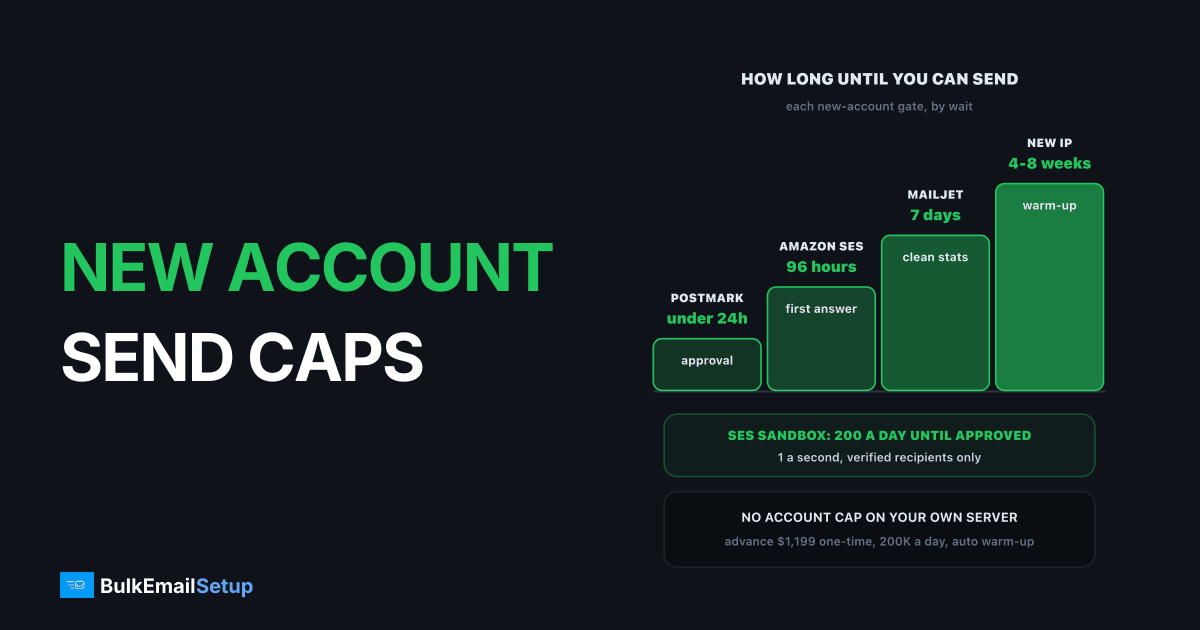
A brand-new email account is capped at almost every provider, and the cap lifts in one of four ways: a request (Amazon SES), a manual approval (Postmark, MailerLite), a week of clean sending (Mailjet) or a paid plan (SendGrid's trial, Brevo's free tier). The caps protect the provider's shared IPs from unknown senders. A dedicated server has no account cap, but Gmail and Microsoft cap new IPs themselves, so the fastest real path is to clear the provider's gate early and send week one to your most engaged subscribers only.
The caps at six providers
| Provider | New-account cap | How it lifts | Typical wait |
|---|---|---|---|
| Amazon SES | sandbox: 200 a day, 1 a second, verified recipients only, per region | production access request | first answer within 96 hours |
| Postmark | only to domains you own and verified | manual account approval | under 24 hours on weekdays |
| Mailjet | hourly sending limit for some new customers | a week of good metrics, then ask support | at least 7 days |
| SendGrid | 60-day trial at 100 emails a day | move to a paid plan, Essentials from $19.95 | at once |
| MailerLite | approval before your first campaign | account review | not published, users report hours to a day |
| Brevo (free) | 300 emails a day | paid plan | at once |
Two kinds of cap are hiding in that table. Plan caps (SendGrid trial, Brevo free) lift the moment you pay. Trust caps (SES, Postmark, Mailjet, MailerLite) lift only when someone, or some system, decides you are a real sender. Paying more does nothing for a trust cap.
The sources: AWS's guide to requesting SES production access for the sandbox figures and the 96-hour window, and Postmark's account approval article for its review. Mailjet's help centre describes the one-week rule for new accounts with an hourly limit.
Why the SES sandbox feels like a wall
The sandbox is the strictest gate on the list, because it caps recipients as well as volume. Put a real list against it and the numbers stop making sense quickly.
At 200 a day, a 10,000-person campaign takes 50 days. The sandbox is for testing, not sending.
| List size | Days to send one campaign at 200 a day |
|---|---|
| 1,000 | 5 |
| 10,000 | 50 |
| 50,000 | 250 |
And that is before the "verified recipients only" rule, which on its own makes a real campaign impossible. The sandbox is a test environment. Request production access the day you open the account, not the day you need to send. Our guide to getting out of the SES sandbox covers what to write in the request.
How to clear each gate faster
The details differ, but every reviewer is checking the same three things: a real sender, a real list source, and a plan for bounces and complaints.
- Use a custom-domain sender. A Gmail or Yahoo From address is a red flag at every provider. Set up SPF, DKIM and DMARC before you apply.
- Have a live website with the signup form your subscribers used. Reviewers look for it, and "under construction" pages slow approvals down.
- Describe the list source plainly. "Checkout opt-in and a double opt-in newsletter form" gets approved. "We have a database of leads" does not. Bought, rented or scraped lists get refused everywhere, and they are banned under our own anti-spam policy too.
- State your bounce and complaint handling. Automatic suppression of hard bounces and complaints, an unsubscribe link in every message.
- Apply early. Open the account and submit the request a week before your first real send.
Week one on new sending, done right
Whether the cap is the provider's or the inbox providers', the way through is the same: start with the people most likely to open.
Week one goes to people who opened recently. Everyone else waits a week or two.
| Days | Who gets mail | Why |
|---|---|---|
| 1 to 3 | opened or clicked in the last 30 days | highest opens, lowest complaints, builds reputation |
| 4 to 7 | opened in the last 90 days | still engaged, grows volume |
| week 2 | active in the last 6 months | add only if bounces stay under 2% |
| week 3+ | older contacts, after cleaning | the riskiest part of any list |
This is the same order whether you are clearing Mailjet's one-week check or warming fresh IPs. It also shows reviewers exactly the pattern they want to see. Our IP warm-up schedule has the volumes per IP, and how long IP warm-up takes explains why there is no shortcut.
Shared account cap vs a new dedicated server
| Question | New ESP account | New dedicated server |
|---|---|---|
| Who caps you | the provider | Gmail, Microsoft, Yahoo |
| Can paying lift it | only plan caps | no |
| Typical wait to full volume | hours to a week after approval | 4 to 8 weeks of warm-up |
| What happens after | the provider can re-cap you after any bad send | your IPs keep the reputation you build |
The ESP route is faster to start. The dedicated route is slower to start and then nobody can pause it for you. Senders who outgrow a free or trial cap often end up comparing exactly these two; outgrew the free SMTP tier walks through the choice.
How BulkEmailSetup helps
We set up a dedicated SMTP server you own, with your own IPs, SPF, DKIM, DMARC and PTR configured, bounce handling, a campaign platform and a written warm-up plan. There is no provider approval queue and no account cap, only the warm-up the inbox providers expect.
| Plan | One-time fee | Emails per day at full volume | Dedicated IPs | Warm-up |
|---|---|---|---|---|
| Basic | $549 | 25,000 | 3 | manual plan included |
| Advance | $1,199 | 200,000 | 15 | automatic |
No monthly fee to us, no contact limit, and a 15-day money-back guarantee that applies until server access is handed over. Opt-in lists only. See the Advance plan or all pricing.
Frequently asked questions
Why does a new ESP account have low limits?
Because the provider knows nothing about you yet, and your first sends land on IPs its other customers share. A new account could be a spammer testing a stolen card, so providers start every account small and raise the cap once it shows real opt-in sending: low bounces, low complaints and a sender identity they can check. The cap protects the shared pool, not you.
How long until a new account limit lifts?
It depends on the provider. Amazon SES gives a first answer to production access requests within 96 hours. Postmark approves most accounts in under 24 hours on weekdays. Mailjet asks new accounts with an hourly limit to show at least one week of good sending before support lifts it. SendGrid's trial and Brevo's free cap lift when you move to a paid plan.
Do new dedicated servers have the same cap?
Not an account cap, because nobody above you is approving your sends. But the receivers apply their own: Gmail, Microsoft and Yahoo throttle new IPs they have never seen. A new dedicated IP starts at a few hundred emails a day and grows about 30% every two days, reaching full volume in 4 to 8 weeks. BulkEmailSetup's Advance plan runs that warm-up automatically across 15 IPs.
How do I send my full list in week one?
Usually you shouldn't. On an approved account on a warm shared pool you can, if the list is clean and recently mailed. On any new infrastructure, send week one to your most engaged segment only, people who opened or clicked in the last 30 days, and add older segments as the numbers stay healthy. Forcing the full list early is how new accounts get reviewed.
Can I skip the Amazon SES sandbox?
No. Every new SES account starts in the sandbox in every region: 200 messages a day, 1 per second, and only to verified addresses. You leave it by requesting production access from the SES console, describing your use case, list source, and bounce and complaint handling. Approval in one region does not carry over to another, so request each region you plan to send from.
Does paying for a plan remove the cap straight away?
Sometimes. SendGrid's 100-a-day trial and Brevo's 300-a-day free cap are plan limits, so a paid plan lifts them at once, though the provider can still review a large first send. SES, Postmark and Mailjet caps are trust checks, not plan limits, so paying more does not skip them. Only a review, an approval or a clean sending history does.


