
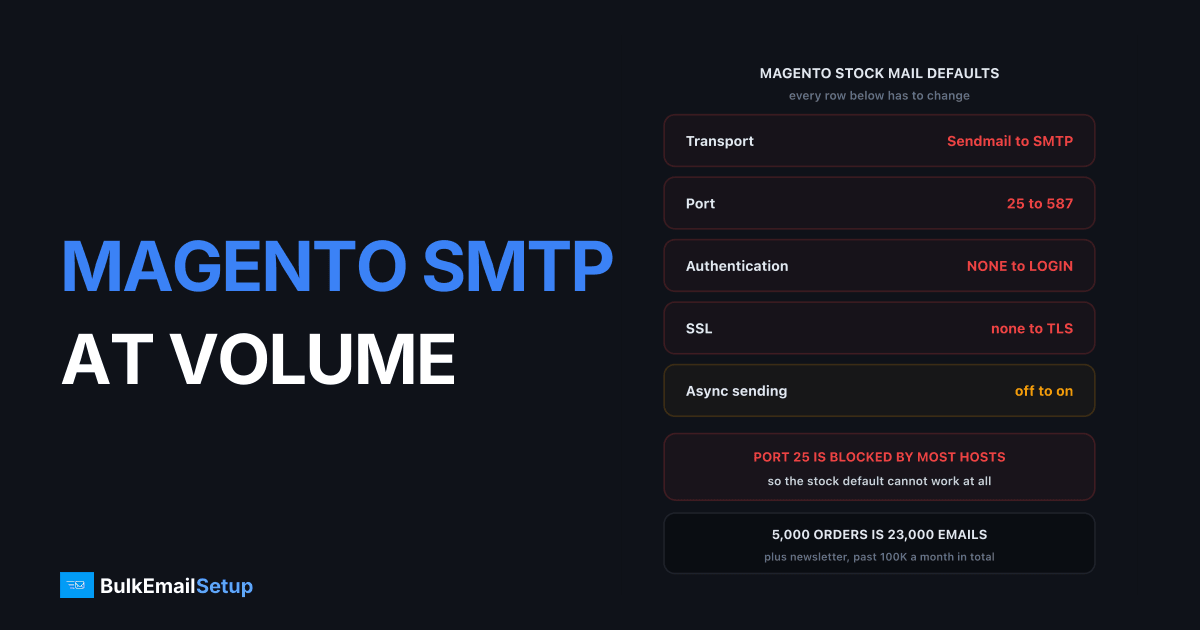
Magento SMTP setup at volume means switching Stores > Configuration > Advanced > System > Mail Sending Settings from the default Sendmail transport to authenticated SMTP on port 587, then splitting newsletter mail onto a separate subdomain and IP from order mail. A store doing 5,000 orders a month sends around 25,000 transactional emails before a single newsletter goes out. On the stock PHP mail() path those messages carry no DKIM signature and leave from the web server IP, exactly the profile Gmail rejects with 550 5.7.26.
Shopify keeps the sending path locked. Magento hands you the whole transport layer, which is an advantage right up until nobody uses it and the store spends three years sending receipts through PHP mail().
Why the default PHP mail() path fails
The default transport is Sendmail, which shells out to PHP's mail() on the web server and fails three authentication checks at once. No SMTP AUTH, no DKIM (neither Magento nor mail() signs anything), and the message leaves from a web server IP that is either unlisted with no reputation or, on shared hosting, already listed because of a neighbour.
What each piece breaks:
- No DKIM signature. DMARC needs SPF or DKIM to pass and align. Without DKIM you rely entirely on SPF, and SPF breaks on every forward.
- Web server IP. Allocated for HTTP, not SMTP, with no PTR pointing at a mail hostname. Gmail wants valid forward and reverse DNS.
- No TLS. Gmail's sender guidelines require TLS for transmitting email, and
mail()on a default host often does not negotiate one. - No visibility. A failed
mail()call returns false and Magento logs almost nothing.
That last one makes this expensive rather than merely wrong. A store runs for months with 15% of confirmations silently disappearing, the only symptom a support queue full of "did my order go through?".
Stock defaults vs correct SMTP settings
Magento's stock values are placeholders. Every row below needs changing.
| Setting | Magento default | What it should be |
|---|---|---|
| Transport | Sendmail | SMTP |
| Host | localhost | mail.yourstore.com |
| Port | 25 | 587 |
| Authentication | NONE | LOGIN |
| SSL | none | TLS |
| Set Return-Path | Yes | No |
| Username / password | empty | your SMTP credentials |
| Sales Email async sending | Disabled | Enabled |
Port 25 catches people out. Most hosts block outbound 25, so the stock default cannot work even if everything else is right. Adobe also recommends Return-Path No and moving off Sendmail for security, per the Adobe Commerce email communications guide.
Configuring SMTP in Magento 2.4.x
Native SMTP configuration arrived in Magento 2.4.0, so on any current install you need no module. Set Transport to SMTP under Mail Sending Settings and the host, port, authentication, username, password and SSL fields appear below it.
On 2.3.x or older the native transport does not exist. Mageplaza SMTP and Magepal SMTP both intercept the transport and speak SMTP instead of calling mail(). Plan the 2.4 upgrade anyway, since 2.3.x is out of security support.
Set credentials from the CLI so they lock into env.php, not the database:
bin/magento config:set system/smtp/transport smtp
bin/magento config:set system/smtp/host mail.yourstore.com
bin/magento config:set system/smtp/port 587
bin/magento config:set system/smtp/auth login
bin/magento config:set system/smtp/ssl tls
bin/magento config:set --lock-env system/smtp/username [email protected]
bin/magento cache:flush
Then set Stores > Configuration > General > Store Email Addresses. Every From must be a real mailbox on the domain you signed with DKIM. A leftover [email protected] breaks DMARC alignment however correct the SMTP config is.
The transactional streams a Magento store sends
A Magento store sends five or six distinct transactional streams with very different volume shapes. Knowing which is which tells you where the risk sits, and which can wait.
| Stream | Trigger | Volume per 1,000 orders | Latency tolerance |
|---|---|---|---|
| Order confirmation | Order placed | 1,000 | Seconds |
| Invoice | Payment captured | 900 to 1,000 | Minutes |
| Shipment with tracking | Shipment created | 1,000 to 1,300 | Minutes |
| Credit memo | Refund issued | 30 to 80 | Hours |
| Order comment update | Admin note added | 100 to 400 | Hours |
| Password reset | Customer request | independent of orders | Seconds |
Order confirmation and password reset are where delay equals failure. A customer who sees no confirmation within a minute assumes the payment failed, then reorders or opens a ticket. Everything else tolerates a queue. Newsletter is absent, because it belongs elsewhere entirely.
Why the newsletter needs its own subdomain and IP
Magento's newsletter module sends from the same transport as your order confirmations, so one bad campaign takes your receipts down with it. Gmail's complaint threshold is 0.3%, with 0.1% as the target. A promotional send to a stale list passes 0.3% easily, the IP reputation drops, and every order confirmation on that IP drops with it.
The split:
| Stream | Subdomain | IP | Warm-up |
|---|---|---|---|
| Transactional | mail.yourstore.com | IP 1, dedicated | 3 to 4 weeks, steady volume |
| Newsletter | news.yourstore.com | IP 2, dedicated | 4 to 6 weeks, ramp per campaign |
| Root domain | yourstore.com | not used for bulk | reserved for person-to-person mail |
Keeping bulk mail off the root domain also protects the corporate mail your team sends from Google Workspace or Microsoft 365. Subdomain vs root domain covers why that boundary matters.
Abandoned cart is the awkward middle case. Triggered by a customer action, so it feels transactional, but recipients complain at marketing rates. Put it on the newsletter IP, for the reasons in SMTP for ecommerce abandoned cart.
Queue, cron and the silent failure mode
Enable Asynchronous Sending under Stores > Configuration > Sales > Sales Emails, then make sure cron actually runs, because async moves order confirmations into a queue that drains only when the consumer runs. Right setting for a busy store. Also the most common Magento email outage I see.
With async on, placing an order writes a row to the email_message queue, and the consumers_runner process started by cron hands it to SMTP. Magento cron stalls for a dozen ordinary reasons: a stuck lock file, a deploy that did not restart consumers, a full cron_schedule table. The queue just grows. No error appears in the admin, orders keep processing perfectly, and nobody gets a confirmation.
Two checks belong in monitoring:
bin/magento cron:run --group=index
mysql -e "SELECT COUNT(*) FROM queue_message WHERE topic_name LIKE '%email%';" magento
If that count climbs rather than hovering near zero, the consumer is dead. Restart it with bin/magento queue:consumers:start, or fix whatever killed cron. An alert at 500 pending messages catches this before customers do. Cap the release rate too: a store that queues 8,000 messages during an outage and dumps them all at once sees 421 4.7.0 deferrals across the batch.
The volume maths for a 5,000-order store
A store doing 5,000 orders a month sends roughly 23,000 transactional emails plus newsletter, which is well past the point where a shared pool starts costing you both money and control.
| Line item | Monthly volume |
|---|---|
| Order confirmations | 5,000 |
| Invoices | 4,700 |
| Shipments with tracking | 5,600 |
| Credit memos and order updates | 1,900 |
| Password resets and account mail | 2,200 |
| Abandoned cart (3-email series) | 3,600 |
| Transactional subtotal | 23,000 |
| Newsletter, 2 sends to 40,000 | 80,000 |
| Total | 103,000 |
A store most would call mid-sized, already sending over 100,000 emails a month. What that costs:
| Provider | 100K/month | 500K/month | Dedicated IP included |
|---|---|---|---|
| Amazon SES | $10 plus EC2/SNS overhead | $50 plus overhead | No, $24.95/mo extra |
| SendGrid Pro | $89/mo | $249/mo (Pro 700K) | 1 IP on Pro and up |
| Mailgun Scale | $90/mo | $215/mo | Add-on |
| Klaviyo (list-based) | $150 to $400/mo | $700 to $1,400/mo | Shared only |
| Dedicated SMTP server | $549 one-time | $549 to $1,000 one-time | 3 to 15 IPs |
SES is the cheapest line and the most work: you build bounce and complaint handling on SNS yourself, and Magento does not speak SES natively. Klaviyo charges on contact count, so a store with 40,000 subscribers pays several hundred a month regardless of volume. Full numbers in what 100,000 emails a month actually costs. Break-even against a $549 one-time server lands around month 7 versus SendGrid Pro, month 4 versus Klaviyo.
Deliverability checks before you go live
Four things must be true before the first real order confirmation goes out, all checkable in under a minute.
SPF. Publish a record on the sending subdomain including your SMTP server IP, under the 10-DNS-lookup limit. Magento plus Klaviyo plus a CRM blows that limit and gets a PermError, which counts as no SPF at all.
DKIM alignment. Sign with a key on mail.yourstore.com and make sure the From header uses the same domain. Signing with your provider's domain while sending From your store domain gives a valid signature that fails DMARC alignment, the quiet reason "authenticated" mail still lands in spam.
PTR. The sending IP must reverse-resolve to a hostname that forward-resolves back to the same IP:
dig -x 203.0.113.45 +short
dig +short mail.yourstore.com
Those two must agree. Gmail treats a missing or mismatched PTR as a strong negative signal.
Bounce handling. Point Return-Path at a mailbox you process, and feed hard bounces back into Magento as disabled subscribers. Magento does not do this itself, and a store that ignores bounces drifts past a 5% bounce rate within a year.
Then place a real order. The admin test email proves the connection works, not that the confirmation template renders with the right From address. Send a live confirmation to a Gmail address and check the original headers for spf=pass, dkim=pass and dmarc=pass.
Go-live checklist
In order, each step depending on the one before it.
- Subdomains and DNS. Create
mail.yourstore.comandnews.yourstore.com, publish SPF, DKIM and DMARC atp=noneon each. - PTR. Reverse DNS on both sending IPs matches their HELO hostnames.
- Magento SMTP config. Transport SMTP, port 587, LOGIN auth, TLS, Return-Path No.
- Store email addresses. Every sender identity a real mailbox on the sending subdomain.
- Async on, cron verified. Consumer drains the queue within 60 seconds.
- Queue alert. Alarm at 500 pending messages.
- Warm-up. Three to four weeks on the transactional IP, four to six on the newsletter IP.
- Live order test. Real order, Gmail recipient, three authentication passes in the headers.
- DMARC to quarantine. After two weeks of clean reports, move
p=nonetop=quarantine. - Weekly monitoring. Complaint rate, bounce rate, queue depth, Postmaster Tools domain reputation.
The same shape applies to any PHP store, and SMTP for WooCommerce at volume covers the plugin equivalents if you run both.
Straight about the limits: correct SMTP config, aligned authentication and separated streams get Magento mail authenticated and isolated. Inbox placement still depends on list quality, complaint rate and send frequency. No setup guarantees 100% placement.
How BulkEmailSetup helps
We set up a dedicated SMTP server with IPs you own, ports 587, 465 and 2525, and SPF, DKIM, DMARC and PTR configured on your own sending subdomains so Magento signs and aligns to your store domain. It drops into Mail Sending Settings with a host, a port and credentials, and we handle warm-up on both the transactional and newsletter IPs.
Basic is $549 one-time, covering 1 SMTP server, 3 dedicated IPs, 25,000 emails/day and unlimited contacts. Higher tiers scale to 15 IPs and 200,000 emails/day, enough headroom for order mail and a full newsletter programme on separate IPs. See pricing.
Frequently asked questions
How do I configure SMTP in Magento 2.4?
Go to Stores > Configuration > Advanced > System > Mail Sending Settings, set Transport to SMTP, then fill in Host, Port 587, Authentication LOGIN, your username and password, and set SSL to TLS. Magento 2.4.x has this natively, so no third-party module is needed. Set Set Return-Path to No, which Adobe recommends for security.
Why do Magento order confirmation emails go to spam?
Because the default Transport is Sendmail, which hands mail to PHP mail() on the web server. That path has no SMTP authentication, no DKIM signature, and sends from your web server IP, which usually has no sending reputation. Gmail rejects unauthenticated bulk mail with 550 5.7.26, so confirmations either bounce or land in spam.
Should Magento newsletter and transactional email use the same SMTP server?
No. Put the newsletter on its own subdomain and IP, for example news.yourstore.com, and keep order mail on mail.yourstore.com. A newsletter complaint rate above Gmail's 0.3% line will drag order confirmations into spam if they share an IP, and order confirmations are the mail your customers actually need.
How many emails does a Magento store actually send per order?
Between 3 and 5 in a normal flow: order confirmation, invoice, shipment with tracking, plus a credit memo on returns and any order comment updates. A store doing 5,000 orders a month therefore sends roughly 20,000 to 25,000 transactional emails before you add newsletter, password resets, and abandoned cart.
Does Magento email queue need cron running?
Yes. With Asynchronous Sending enabled, Magento writes messages to the email_message queue and the consumer only drains it when cron runs, normally every minute. If cron stalls, confirmations sit in the queue for hours with no error anywhere in the admin. Check the queue depth as part of monitoring, not just cron status.
Which SMTP port should Magento use?
Port 587 with TLS is the right default and works on nearly every host. Magento's stock default is port 25, which most hosting providers block outbound, and that alone explains many silent failures. Use 465 for implicit SSL or 2525 as a fallback if 587 is filtered.


