
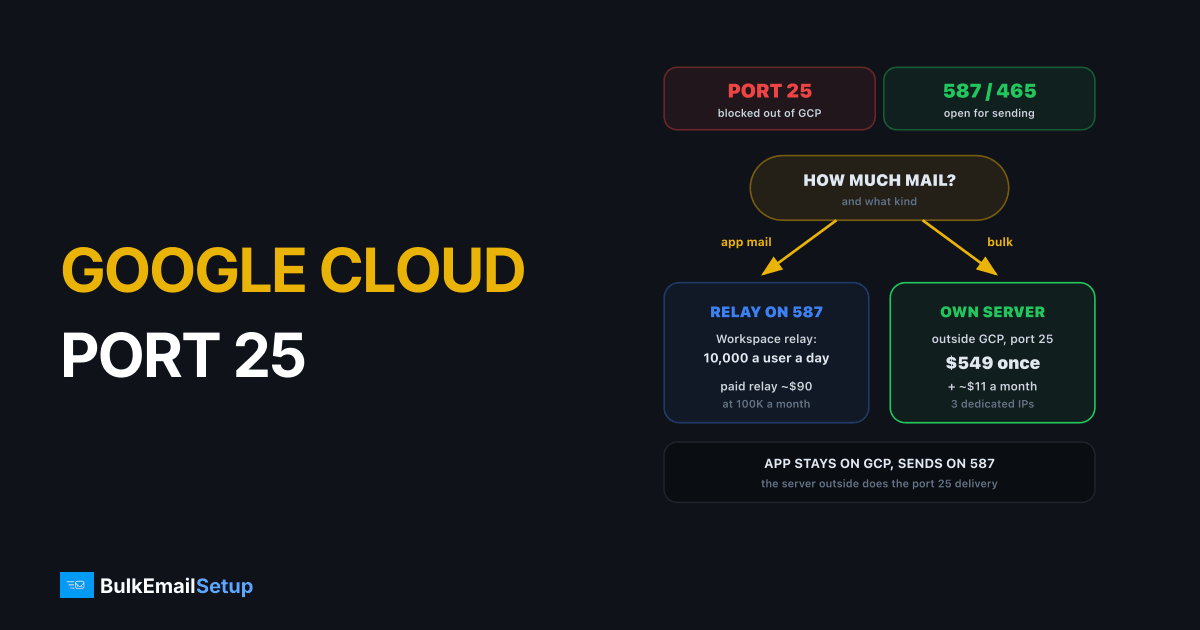
Google Cloud blocks outbound port 25 to the internet on Compute Engine, so a VM cannot deliver mail straight to Gmail or Outlook. Ports 587 and 465 stay open. That leaves three real ways to send: a relay service on 587, Google Workspace SMTP relay if your domain is on Workspace, or a mail server on a host outside GCP that your app submits to on 587. Which one fits depends on volume: app mail at a few thousand a day suits a relay, steady bulk sending suits your own server.
What Google blocks and what it leaves open
Google's Compute Engine guide to sending email is direct about it: connections to TCP port 25 are blocked when the destination is outside your VPC network. Some projects do not have the restriction, but most do, and you should plan as if yours does.
| Port | To the internet from a VM | What it is for |
|---|---|---|
| 25 | blocked by default | server-to-server delivery to MX records |
| 587 | open | authenticated submission to a relay |
| 465 | open | submission over implicit TLS |
| 25 inside your VPC or over VPN | allowed | mail between your own systems |
Port 25 is walled off; 587 and 465 are the gate
The block exists because cloud IPs are cheap to rent and were once a favourite source of spam. Blocking direct delivery forces mail through a sender that is accountable for it. The same rule shows up at most clouds; our explainer on why port 25 is blocked covers the history.
How to send email from a Compute Engine VM
There are three paths, and all of them use 587 or 465 from the VM.
| Path | How it works | Limits | Good for |
|---|---|---|---|
| Relay provider | app sends to SendGrid, Mailgun or Mailjet on 587 | per-email pricing, shared IPs unless you pay for dedicated | app mail, low to mid volume |
| Workspace SMTP relay | app sends to smtp-relay.gmail.com on 587 or 465 | 10,000 messages per user per 24 hours, 100 recipients per transaction | system mail from a Workspace domain |
| Your own server outside GCP | app sends to your server on 587, the server delivers on 25 | your server's capacity and IP reputation | newsletters, bulk, steady volume |
Google names SendGrid, Mailgun and Mailjet in its docs and says they offer a free tier to Compute Engine customers. Check the current terms before you build on that: SendGrid retired its general free plan in 2025, as covered in SendGrid's free plan ended.
Can I run Postfix on Google Cloud?
Yes, as a relay client. Postfix on the VM accepts mail from your app, queues it, and hands it to a smarthost on port 587. That gives you local queuing and retries without needing port 25 out.
# /etc/postfix/main.cf
relayhost = [smtp.yourrelay.com]:587
smtp_sasl_auth_enable = yes
smtp_sasl_password_maps = hash:/etc/postfix/sasl_passwd
smtp_sasl_security_options = noanonymous
smtp_tls_security_level = encrypt
What Postfix on Compute Engine cannot do in most projects is deliver directly to recipients' MX servers, because that is port 25 traffic. If you need a real sending server with its own IPs, run it on a host that allows port 25 and point the VM's Postfix or your app at it on 587.
To check your project, run this from the VM. A timeout means the block applies.
nc -vz -w 5 gmail-smtp-in.l.google.com 25
What is the best SMTP setup for GCP apps?
It comes down to two questions: how much you send, and whether it is app mail or marketing.
Pick by volume and mail type, not by which cloud you are on
Costs at 100,000 emails a month, the point where the choice starts to matter:
| Setup | Monthly cost at 100K | IPs |
|---|---|---|
| Mailgun Scale | $90 | shared, dedicated extra |
| SendGrid Pro | from $89.95 | 1 dedicated included |
| Workspace SMTP relay | included in Workspace licences | Google's, and Google watches for spam |
| Own server outside GCP, Basic plan | about $11 hosting after $549 once | 3 dedicated, yours |
Relay prices climb with every email. A dedicated server's monthly cost stays flat until you outgrow its 25,000 a day, which is why the line between the two sits somewhere around 50,000 to 100,000 emails a month for most senders. Our break-even analysis has the full curve.
A setup that works on GCP
Keep the app where it is and move only the delivery step.
- Your app on Compute Engine, Cloud Run or GKE submits mail on port 587 with a username and password.
- The sending server lives on a VPS host that allows port 25, with its own dedicated IPs.
- SPF, DKIM and DMARC are set for your sending domain, and PTR records match the server's hostname.
- Bounces come back to the server, which suppresses bad addresses automatically.
That way the port 25 block never matters, and your sending reputation is tied to IPs only you use. The same pattern fixes the block on other clouds too; see AWS EC2 port 25 throttling if you also run on AWS.
How BulkEmailSetup helps
We set up a dedicated SMTP server on a host where port 25 is open, with SPF, DKIM, DMARC and PTR configured, bounce handling and a campaign platform. Your GCP app points at it on port 587 and keeps running unchanged.
| Plan | One-time fee | Emails per day | Dedicated IPs | Hosting you pay your host |
|---|---|---|---|---|
| Basic | $549 | 25,000 | 3 | about $11 a month |
| Advance | $1,199 | 200,000 | 15 | about $49 a month |
No monthly fee to us and no contact limit. Every plan has a 15-day money-back guarantee, which applies until server access is handed over. See Basic plan details or all pricing.
Frequently asked questions
Does Google Cloud allow outbound port 25?
Not to the internet, by default. Google's Compute Engine docs say connections to TCP port 25 are blocked when the destination is outside your VPC network, and that this includes SMTP relay with Google Workspace. Some projects do not have the restriction, but you cannot plan on that. Port 25 inside your VPC, a peered VPC or over Cloud VPN still works.
How do I send email from a Compute Engine VM?
Send to a relay on port 587 or 465, which Google leaves open. The relay can be a provider Google names in its docs (SendGrid, Mailgun, Mailjet), Google Workspace SMTP relay if your domain is on Workspace, or your own mail server running on a host outside GCP that allows port 25. Your app authenticates on 587 and the relay delivers to the inbox.
Can I run Postfix on Google Cloud?
Yes, as a relay client. Postfix on the VM queues mail and hands it to a smarthost on port 587 with a username and password, using the relayhost setting. What Postfix on Compute Engine cannot do in most projects is deliver straight to recipients' MX servers on port 25, because that traffic is blocked.
What is the best SMTP setup for GCP apps?
For password resets and receipts at low volume, a relay or Workspace SMTP relay is simplest. For newsletters or steady bulk volume, a dedicated SMTP server outside GCP is cheaper and keeps your reputation separate. BulkEmailSetup's Basic plan is $549 one-time for 25,000 emails a day on 3 dedicated IPs, with your app submitting to it on port 587.
Can I ask Google to open port 25?
Google's docs describe the block as the default and only note that some projects do not have it. They do not offer a simple way to switch it off, so plan your sending around ports 587 and 465. Testing from your own VM with a quick telnet or nc to an MX on port 25 tells you which case you are in.
Does Google Workspace SMTP relay work from Compute Engine?
Yes, on ports 465 or 587 only, not 25. Each Workspace user can send up to 10,000 messages in 24 hours through the relay, with a 100-recipient limit per SMTP transaction. Google monitors relay traffic for spam, so it suits app and system mail from your own domain better than bulk marketing campaigns.
Is port 2525 open on Google Cloud?
Google's docs list 587 and 465 as the open sending ports and do not promise anything about 2525. Many relays also listen on 2525, and it usually works, but test it from your VM before you depend on it. If you control the receiving server, 587 is the safe choice.


