
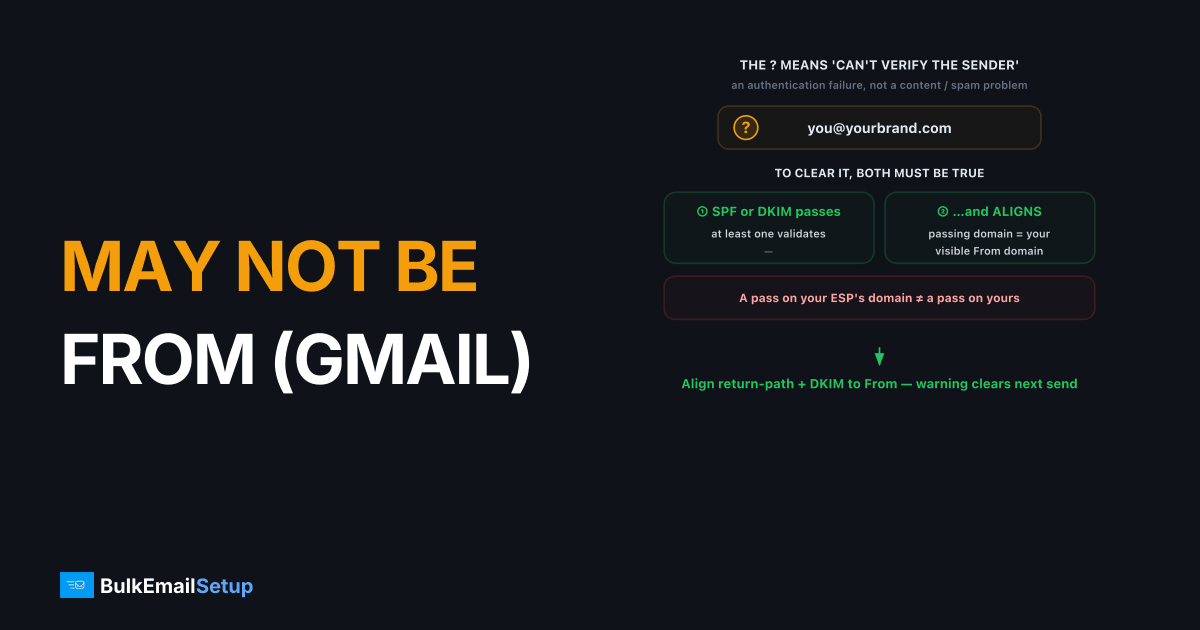
Gmail's "this message may not be from" warning means Gmail could not verify that your domain actually sent the message. It appears when neither SPF nor DKIM passes and aligns with the visible From address. To fix it, publish a correct SPF record, sign mail with DKIM, and make sure both the return-path and DKIM signing domain match your From domain. Once authentication aligns, the warning disappears on the next message you send.
What the warning actually means
The full text Gmail shows is a yellow question mark on the sender avatar plus "Gmail couldn't verify that [domain] actually sent this message (and not a spammer)." It is an authentication failure, not a content or spam-score problem. Gmail is telling the recipient it cannot prove the From domain authorized the message, so treat the sender with caution.
Two checks have to succeed for the warning to clear:
- SPF or DKIM must pass. At least one authentication method has to validate.
- That passing method must align with the domain in the visible From header. A pass on some unrelated domain does not count.
If both fail, or both pass on the wrong domain, you get the warning.
Why is Gmail showing this for my domain?
The warning appears when your authenticated domain and your visible From domain don't match, a state called alignment failure. Roughly, you sent as [email protected] but the only thing that authenticated was your ESP's domain, not yours. Gmail sees a gap between who the mail claims to be from and who actually signed it.
Common root causes:
| Cause | What's broken | Fix |
|---|---|---|
| No DKIM signing | Mail isn't signed at all | Add DKIM keys at your sender |
DKIM signs d=esp.com not your domain | DKIM passes but doesn't align | Configure DKIM for your own domain |
| SPF return-path is the ESP's domain | SPF passes, doesn't align | Use a custom return-path / bounce domain |
| Wrong or missing SPF record | SPF fails outright | Publish a correct v=spf1 record |
| Sending from a new platform you didn't authorize in DNS | Neither passes | Add the platform to SPF and enable DKIM |
How do I fix the warning?
Fixing the warning takes three correct DNS records and one setting at your sending platform. The goal is for at least one of SPF or DKIM to pass on a domain that matches your From address. DMARC alignment, defined in RFC 7489, is the standard Gmail uses to judge that match.
Step 1: Publish a correct SPF record
SPF lists the servers allowed to send for your domain. Publish one TXT record at the root:
v=spf1 include:_spf.yourprovider.com -all
Only one SPF record per domain is allowed. Two v=spf1 records is a hard error. If you're past the 10-lookup SPF limit, that's a separate fix.
Step 2: Enable DKIM and align it
DKIM signs each message with a private key; the public key lives in a selector._domainkey.yourdomain.com TXT record. Make sure the signing domain (d=) is your domain, not the provider's. Use a 2048-bit key. Full walkthrough in DKIM explained.
Step 3: Align the return-path (SPF)
Set a custom return-path (bounce domain) so the MAIL FROM domain matches your From domain. Most platforms call this a "custom return-path" or "bounce subdomain" and ask you to add a CNAME. With both DKIM and SPF aligned, Gmail has no reason to warn.
How to confirm it's fixed
Send a test message to a Gmail account, then open the message and click "Show original." Check the top block for the authentication results. You want to see spf=pass, dkim=pass, and dmarc=pass with the domains matching your From address. If all three pass and align, the warning is gone for good.
What to look for in Show original:
SPF: PASS with domain yourbrand.comDKIM: 'PASS' with domain yourbrand.comDMARC: 'PASS'
If DKIM passes but on esp.com, alignment still fails. Go back to step 2 and point DKIM at your own domain. The most common version of this we see is a sender whose Show original reads dkim=pass header.d=mail.sendingplatform.com while the From is yourbrand.com. Both technically passed, yet Gmail still shows the warning, because neither passing domain matches the visible From. Fixing the signing domain to your own root clears it on the very next message. For the related Gmail rejection, see the 550 5.7.26 unauthenticated email fix.
How BulkEmailSetup helps
A dedicated SMTP server from BulkEmailSetup ships with SPF, DKIM, and DMARC configured against your own domain from day one, so your From address authenticates and aligns instead of borrowing a shared provider's identity. That removes the warning at the source. See plans on our pricing page.
Frequently asked questions
Why does Gmail say my message may not be from my own domain?
Gmail couldn't confirm your domain authenticated the message. Either SPF and DKIM both failed, or neither one aligns with the visible From address. Gmail then warns the recipient that the sender may be spoofed.
Does the warning hurt deliverability?
Yes, often. The same authentication gap that triggers the warning also lowers your reputation with Gmail, so mail is more likely to land in spam. Fixing alignment usually fixes both at once.
How long until the warning goes away after I fix DNS?
DNS changes propagate within minutes to a few hours, but Gmail evaluates each new message live. The next email sent after records are correct and propagated should pass cleanly with no warning.
Can a forwarded email cause this warning?
Yes. Forwarding breaks SPF and can break DKIM if the body is modified. That's a known limitation, not a fault in your setup, and DMARC with DKIM alignment is the most resilient defense.


