
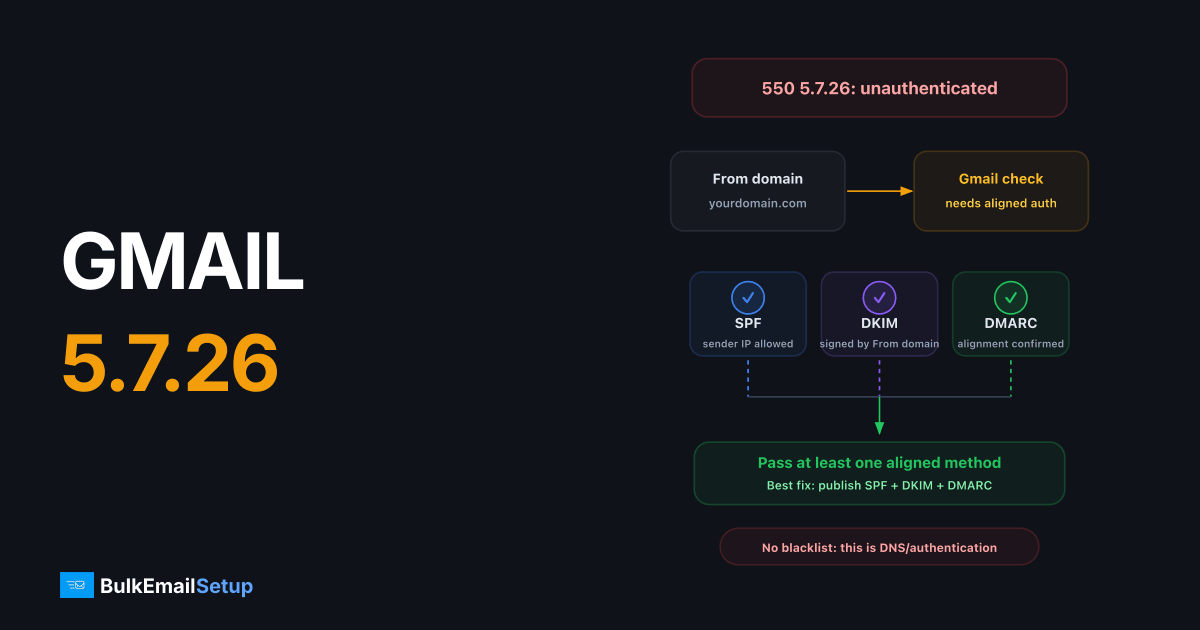
Gmail's 550 5.7.26 error means your message failed authentication, it didn't pass SPF or DKIM with a domain that aligns with your From address, so Google refused it. The fix is DNS: publish a correct SPF record for your envelope domain, sign mail with DKIM on your From domain, and the error clears as soon as the records propagate. Google lists these rules in its email sender guidelines.
The exact bounce text
550-5.7.26 This mail is unauthenticated, which poses a security risk to
550-5.7.26 the sender and Gmail users, and has been blocked. The sender
550-5.7.26 must authenticate with at least one of SPF or DKIM.
Gmail enforces this for virtually all senders since the February 2024 sender requirements. There is no whitelist and no exception form, the only fix is making authentication pass.
Diagnose which check is failing
Send a test message to a Gmail address you control, open it, and click Show original. The summary box at the top shows SPF, DKIM, and DMARC results in plain language. Alternatively, read the Authentication-Results header:
Authentication-Results: mx.google.com;
       spf=fail (google.com: domain of [email protected] does not
       designate 203.0.113.10 as permitted sender) smtp.mailfrom=mailer.example.net;
       dkim=none;
       dmarc=fail (p=NONE) header.from=yourdomain.com
| What you see | What it means | Fix |
|---|---|---|
spf=fail | Sending IP is not in the envelope domain's SPF record | Add the IP/include to SPF |
spf=pass but dmarc=fail | SPF domain doesn't match your From domain (alignment) | Use a bounce domain on yourdomain.com, or rely on DKIM |
dkim=none | Message isn't DKIM-signed at all | Enable signing on your SMTP server |
dkim=fail | Signature present but broken | Wrong key in DNS, or a relay modified the body |
dkim=temperror / spf=temperror | DNS lookup failed | Check record syntax and nameserver health |
Fix 1: SPF
SPF authorizes IPs to send for your envelope-from (Return-Path) domain. Publish one TXT record at the domain root:
yourdomain.com. IN TXT "v=spf1 ip4:203.0.113.10 include:yoursmtpprovider.com ~all"
Verify it:
dig TXT yourdomain.com +short
Three rules that cause most SPF failures:
- One SPF record only. Two
v=spf1records = permanent error = fail. - Max 10 DNS lookups. Every
include:,a,mx, andredirectcounts. Over 10 returnspermerror, which Gmail treats as a fail. - The record must cover the actual sending IP, the one in the bounce, not the one you think you send from.
Fix 2: DKIM
DKIM is the stronger fix because it survives forwarding and aligns naturally with your From domain. Generate a 2048-bit key pair on your SMTP server (OpenDKIM, rspamd, or your provider's panel), then publish the public key:
default._domainkey.yourdomain.com. IN TXT "v=DKIM1; k=rsa; p=MIIBIjANBgkqh...your-public-key...IDAQAB"
Verify:
dig TXT default._domainkey.yourdomain.com +short
Replace default with your actual selector, it's in the s= tag of the DKIM-Signature header on any signed message. Common failure modes: the DNS record was split incorrectly across 255-character strings, the key in DNS doesn't match the private key signing, or a downstream relay rewrote the body after signing.
Fix 3: Alignment (the one everyone misses)
Passing isn't enough. Gmail wants the passing domain to match your From header domain. This is DMARC alignment, and it's why mail sent through third-party SMTP services fails 5.7.26 despite "valid SPF."
| Scenario | SPF aligned? | DKIM aligned? | Result |
|---|---|---|---|
| From: [email protected], Return-Path: [email protected], DKIM d=yourdomain.com | Yes | Yes | Pass |
| From: [email protected], Return-Path: [email protected], DKIM d=yourdomain.com | No | Yes | Pass (DKIM carries it) |
| From: [email protected], Return-Path: [email protected], DKIM d=provider.net | No | No | 550 5.7.26 |
The bottom row is the classic misconfigured-relay setup. The fix is always the same: get DKIM signing with d=yourdomain.com, using a selector and key you publish in your own DNS.
Add DMARC while you're in DNS
Required for 5,000+/day senders, and it makes alignment failures visible via reports:
_dmarc.yourdomain.com. IN TXT "v=DMARC1; p=none; rua=mailto:[email protected]"
Start with p=none, watch the aggregate reports for a couple of weeks, then move to p=quarantine and eventually p=reject. Full walkthrough in our SPF, DKIM, and DMARC setup guide.
Special case: forwarded mail and mailing lists
Forwarding breaks SPF by design, the forwarder's IP isn't in your SPF record, and mailing lists that rewrite subjects or add footers break DKIM body hashes. If 5.7.26 reports come only from recipients who forward their mail (e.g., a custom domain forwarding to Gmail), your direct sending is fine.
What helps here:
- DKIM over SPF. A DKIM signature survives clean forwarding untouched, which is why Gmail accepts either check, and why DKIM is the one to get right.
- ARC (Authenticated Received Chain). Good forwarders (Google Workspace routing, modern list software) add ARC headers that let Gmail trust the original authentication results. You can't add ARC as the sender; you can only choose forwarders that implement it.
- Don't loosen DMARC to fix forwarding. Moving from
p=rejectback top=noneto appease one mailing list trades your domain's spoofing protection for someone else's broken software.
Special case: cPanel, WordPress, and PHP mail()
A large share of 5.7.26 bounces come from web servers sending application mail via the local mail() binary, unsigned, from an IP with no SPF coverage. The fix is never to tweak mail(); route the application through authenticated SMTP (an SMTP plugin in WordPress, msmtp or a relayhost on the box) so mail leaves a server that signs DKIM and is covered by SPF.
Verify the fix end to end
swaks --to [email protected] --from [email protected] \
  --server mail.yourdomain.com --port 587 --tls \
  --auth-user [email protected]
Then check Show original on the received message. You want spf=pass, dkim=pass, dmarc=pass. If the message still bounces with 5.7.26 after records propagate, your server isn't actually signing, check the outbound message for a DKIM-Signature header.
Note that authentication is the entry ticket, not the whole game. Once 5.7.26 is cleared, reputation takes over, if mail then lands in spam or hits 550 5.7.1 blocks, that's a separate reputation problem.
How BulkEmailSetup helps
Every dedicated SMTP server we deploy ships with SPF, DKIM (2048-bit), and DMARC configured and aligned on your domain before the first message leaves, so 5.7.26 simply never happens. See pricing for what's included.
Frequently asked questions
What does Gmail error 550 5.7.26 mean?
Gmail rejected your message because it failed both SPF and DKIM authentication, or the passing check didn't align with your From domain. Gmail requires every message to pass at least one aligned authentication method.
Do I need both SPF and DKIM to fix 550 5.7.26?
Technically one passing, aligned check is enough to clear the error, but Google's bulk sender rules require both for anyone sending over 5,000 messages a day. Set up both. DKIM also survives forwarding, which SPF does not.
Why do I get 5.7.26 even though my SPF record exists?
Usually an alignment problem: SPF is checked against the envelope-from (Return-Path) domain, not the visible From header. If your SMTP provider uses its own bounce domain, SPF passes but doesn't align, and DKIM must carry the authentication instead.
How long after fixing DNS will Gmail accept my mail?
DNS changes propagate within minutes to a few hours depending on your TTL. Once dig shows the correct records, the very next message should authenticate, there is no penalty period for past 5.7.26 bounces.
Does 550 5.7.26 mean my IP is blacklisted?
No. It's purely an authentication failure and says nothing about your IP or domain reputation. Fix the DNS records and delivery resumes immediately.


