
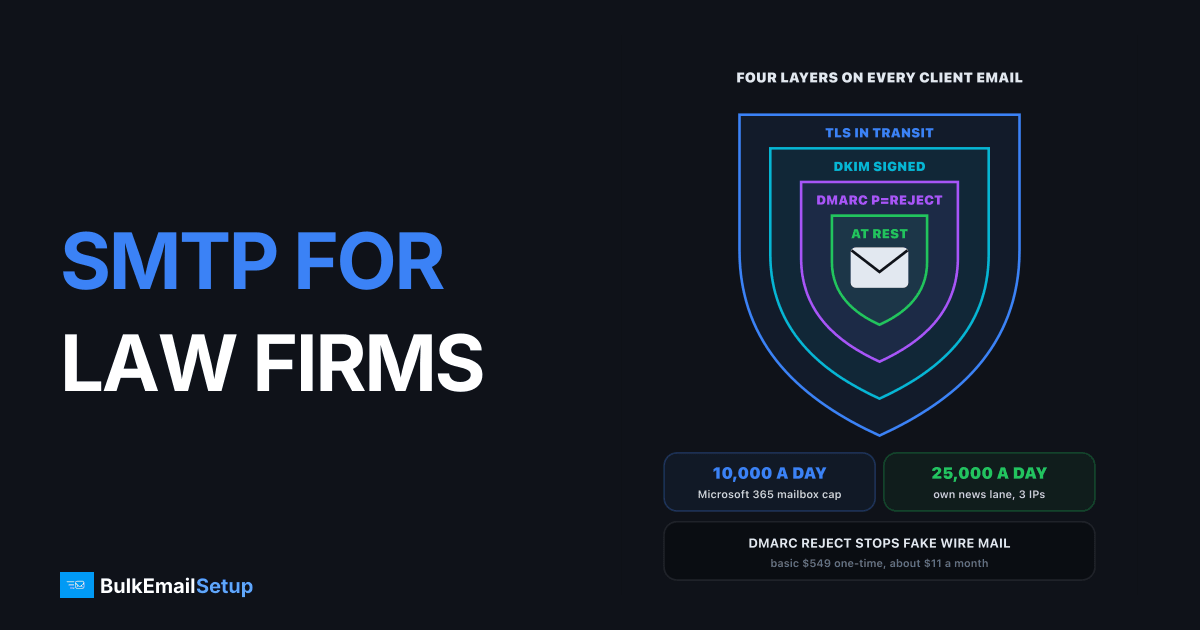
Email for law firms splits in two: firms can send newsletters to clients, and routine client mail over standard TLS usually meets the ABA's reasonable-efforts standard, while sensitive matters may need encryption or a portal. The setup that holds up keeps two streams apart: matter mail stays in Microsoft 365 or Google Workspace on the main domain, and newsletters, event invites and client alerts go out through a dedicated SMTP server on a subdomain. Add DMARC at p=reject, because a spoofed "new wire instructions" email in your firm's name is the most expensive email problem a firm can have.
This is general information about email rules and infrastructure, not legal advice. Your state bar's rules decide what applies to your firm.
What email a law firm actually sends
Most firms send far more kinds of mail than they think. Sorting it first tells you which stream each one belongs on.
| Email type | Example | Typical volume | Stream | CAN-SPAM status |
|---|---|---|---|---|
| Matter correspondence | drafts, advice, filings | daily, 1-to-1 | main domain, Microsoft 365 | not commercial |
| Client updates | "your hearing moved to 3 March" | dozens a week | main domain or alerts subdomain | transactional or relationship |
| Billing | invoices, payment receipts | monthly | alerts subdomain | transactional |
| Newsletters | legal update, rule change explainer | 1 to 4 a month to 1,000 to 10,000 contacts | news subdomain, dedicated IPs | commercial |
| Event invites | webinar, seminar | a few a year | news subdomain | commercial |
A 40-lawyer firm with 4,000 contacts sending two newsletters a month moves about 8,000 marketing emails a month. That is small for a server and large for a single Outlook mailbox.
Can law firms send newsletters to clients?
Yes, and plenty do. Two sets of rules apply in the US.
CAN-SPAM covers the newsletter as commercial email. The FTC's compliance guide lists the core duties: honest From and subject lines, a physical postal address, a clear way to opt out, and opt-outs honored within 10 business days. Pure transactional or relationship messages, such as a hearing date change for an existing client, are exempt from most of those duties.
State bar advertising rules can add more. Many states treat a firm newsletter as lawyer advertising. Some require a label; New York, for example, requires "Attorney Advertising" on email ads. Some require keeping copies for a set period. Rules differ by state, so check yours before the first send.
The practical rule that keeps you safe on deliverability is the same one that keeps you safe with the bar: email people who asked to hear from you. Existing clients, people who signed up on your site, seminar attendees who ticked the box. A bought list of local business owners breaks both.
Does legal email need TLS encryption?
ABA Formal Opinion 477R (2017) is the reference most firms work from. In plain terms, it says lawyers must make reasonable efforts to keep client information safe under Model Rule 1.6(c), that ordinary email is generally fine for routine matters, and that stronger measures such as encryption may be warranted when the information is highly sensitive or when a client or a law requires it. It is advisory, and state bars have read it in different ways.
That turns into a simple sorting exercise.
Sort client mail by how sensitive it is, then pick the channel
| Sensitivity | Examples | Channel |
|---|---|---|
| Routine | scheduling, status updates, general advice | standard email with TLS between servers |
| Highly sensitive | medical records, trade secrets, criminal matters | encrypted email or a secure client portal |
| Required by contract or law | client demands encryption, regulated data | encryption every time, no exceptions |
| Payment instructions | wire details, account numbers | confirm by phone, never trust email alone |
TLS here means the connection between mail servers is encrypted. Gmail and Microsoft both try TLS by default, and your own server can be set to require it. It protects the message on the wire. It does not protect it once it lands in someone's inbox, which is why truly sensitive files go through a portal.
What protects a message, layer by layer
A law firm email passes through several separate protections, and each one stops a different problem.
Five layers, five different problems stopped
| Layer | What it stops | How it is set |
|---|---|---|
| TLS on every hop | someone reading mail on the network | STARTTLS on your server, on by default at Gmail and Microsoft |
| Required TLS to key domains | a downgrade to plain text for a client or court | TLS policy on your server; MTA-STS (RFC 8461) for mail coming to you |
| DKIM | tampering in transit | a signing key on your server, public key in DNS |
| DMARC at p=reject | fake mail in your firm's name | one DNS record, after 2 to 4 weeks at p=none reading reports |
| Encryption at rest | a stolen disk or backup | encrypted server storage, short log retention |
DMARC is the one firms skip and regret. A spoofed email from your domain telling a client to wire settlement money to a "new" account is a well-known scam. DMARC at p=reject tells receiving servers to refuse anything that fails your SPF and DKIM checks. Our guide to DMARC policy and reports walks through getting there without blocking your own mail.
Should marketing and client mail share a stream?
No. This is the single most useful structural decision for a firm.
Matter mail and marketing never share a lane
Mail reputation is tracked per domain and per IP. If a newsletter to 4,000 contacts draws 20 spam complaints, that is 0.5%, above Gmail's 0.3% ceiling in its sender guidelines. If that newsletter went out from the same domain and IPs as matter mail, your next email to opposing counsel can land in junk or get deferred. On separate lanes, the newsletter's bad day stays on the newsletter.
| Setting | Matter lane | Marketing lane |
|---|---|---|
| Domain | yourfirm.com | news.yourfirm.com |
| Sends through | Microsoft 365 or Workspace | dedicated SMTP server |
| IPs | Microsoft or Google | your own 3 IPs |
| DKIM key | Microsoft or Google | your own |
| Who it reaches | clients, courts, counsel | subscribers who opted in |
The same split helps with unsubscribe link rules: the marketing lane carries one-click unsubscribe headers, the matter lane never needs them.
What email setup suits a law firm?
| Option | Good for | Watch out for |
|---|---|---|
| Microsoft 365 or Workspace only | small firms, no newsletter | 10,000 recipients a day per mailbox; bulk sends risk a block on a working mailbox |
| A marketing ESP (Mailchimp, Brevo) | quick start on newsletters | the client list lives with an outside vendor; shared IPs |
| Dedicated SMTP server on a subdomain | regular newsletters, alerts, client updates | needs warm-up and list care, like any sender |
The ESP route works, but the client list then sits with a third-party marketing company. Who your clients are can itself be confidential, so treat the vendor like any service holding client data. A server the firm controls removes that outside party. Our HIPAA-safe SMTP guide covers the same "who holds the data" question for healthcare, and most of it carries over.
What it costs
Firm volumes are modest, so the smallest dedicated setup is usually enough.
| Item | Cost |
|---|---|
| Setup, Basic plan | $549 one-time |
| VPS and 3 dedicated IPs | about $11 a month, paid to your host |
| Sending capacity | 25,000 emails a day |
| Contacts | unlimited |
| Microsoft 365 for matter mail | your existing licences, unchanged |
A firm sending 8,000 newsletter emails a month uses a small share of that capacity, which leaves room for client alerts and billing mail on the same server.
How BulkEmailSetup helps
We set up a dedicated SMTP server for your marketing and alerts lane on a subdomain, with TLS required on outbound connections, DKIM signing, SPF, DMARC moving to p=reject, PTR records, bounce handling and a campaign platform for newsletters. Matter mail stays exactly where it is in Microsoft 365 or Workspace.
The Basic plan is $549 one-time for 1 server, 3 dedicated IPs, 25,000 emails a day and unlimited contacts, plus about $11 a month hosting paid to your host. It carries a 15-day money-back guarantee, which applies until server access is handed over. See Basic plan details or all pricing.
Frequently asked questions
Can law firms send newsletters to clients?
Yes. A firm newsletter is commercial email under CAN-SPAM in the US, so it needs an accurate sender, a physical address and a working opt-out honored within 10 business days. Many state bars also treat it as lawyer advertising, and some, New York for example, require the words Attorney Advertising. Check your own state's rules before the first send.
Does legal email need TLS encryption?
For routine matters, ABA Formal Opinion 477R says ordinary email with reasonable safeguards is generally acceptable. TLS between servers is part of those safeguards. For highly sensitive information, or where a client agreement or law requires it, the opinion says stronger measures such as encryption or a secure portal may be warranted. State bars apply this differently, so check yours.
Should a law firm separate marketing and client mail?
Yes. Put client and matter mail on the main domain through Microsoft 365 or Google Workspace, and send newsletters and event invites from a subdomain such as news.yourfirm.com on separate IPs. A spike of spam complaints on a newsletter then cannot slow down a filing deadline or a settlement email to opposing counsel.
What email setup suits a law firm?
Keep day-to-day mail in Microsoft 365 or Workspace. Add a dedicated SMTP server for newsletters, alerts and client updates, with TLS on every hop, DKIM signing and DMARC at p=reject so nobody can spoof the firm's domain. BulkEmailSetup's Basic plan covers 25,000 emails a day on 3 dedicated IPs for $549 one-time plus about $11 a month hosting.
Is Mailchimp safe for a law firm's client list?
It works technically, but your client list then sits with a third-party marketing vendor. The identity of a client can itself be confidential, so treat the vendor as you would any service that holds client data: read its security terms and data location. Running the list on a server the firm controls removes one outside party.
Can a law firm send email from Microsoft 365 to all its clients at once?
Only in small batches. Exchange Online caps a mailbox at 10,000 recipients a day and expects person-to-person mail, not bulk. A blast to 3,000 clients from a partner's mailbox risks throttling or a sending block on that mailbox, which is the one you need for live matters.
Why does DMARC matter so much for law firms?
Because firms are a favourite target for payment fraud. A fake email that looks like it came from your domain, asking a client to wire settlement funds to a new account, is a known scam pattern. DMARC at p=reject tells Gmail and Microsoft to refuse mail that fails your SPF and DKIM checks, so those fakes never reach the inbox.


