
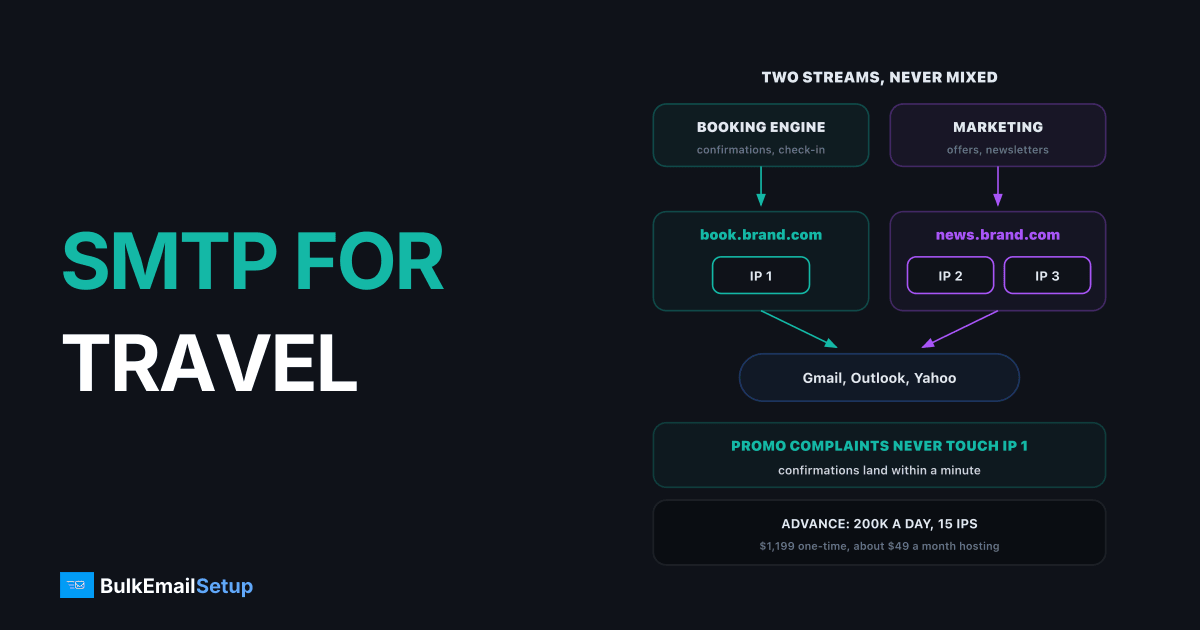
Email for hotels and travel brands works best on two separate streams: booking confirmations on their own subdomain and IP, promotions on others. Confirmations must land within a minute and get almost no complaints. Promotions get the most complaints and come in big bursts. Put them on the same IP and a single holiday sale can delay a guest's check-in details. With that split in place, a dedicated SMTP server handles both at a flat monthly cost.
The emails a travel brand actually sends
| When | Who it is for | Stream | |
|---|---|---|---|
| Booking confirmation | seconds after booking | every guest | transactional |
| Payment receipt | at payment | every guest | transactional |
| Itinerary or flight change | when it happens | affected guests | transactional, urgent |
| Pre-arrival and check-in details | 1 to 7 days before | every guest | transactional |
| Review request | after the stay | every guest | light marketing |
| Offers and newsletters | weekly or seasonal | opted-in subscribers | marketing |
The first four are what guests complain about when they go missing. The last one is what drives the next booking. They need very different handling.
One guest, six emails, two streams
Why confirmations land in spam
Confirmations rarely fail on their own. They fail because they share a reputation with something that is failing.
| Cause | What happens | Fix |
|---|---|---|
| Same IP as promotions | promo complaints lower the IP reputation | give confirmations their own IP |
| Same domain as promotions | domain reputation drops for both | send from a subdomain such as book.yourbrand.com |
| Missing authentication | Gmail and Yahoo reject or filter | SPF, DKIM and DMARC on every sending domain |
| Changing From name | looks like phishing | one fixed From name and address |
| Heavy upsell content | reads as marketing | keep offers to a short line |
| Booking engine's shared mail | another hotel's spam hits you | send through your own SMTP |
Google's sender guidelines require SPF, DKIM and DMARC for anyone sending 5,000 or more emails a day to Gmail, and ask bulk senders to keep the spam rate under 0.3%. A hotel group with a busy newsletter crosses that line fast. Our Gmail bulk sender checklist covers every item.
How email for hotels and travel brands should be split
Use one domain, two subdomains, and separate IPs.
Confirmations and offers on separate subdomains and IPs
| Stream | Subdomain | IPs on a 3-IP setup | Sends |
|---|---|---|---|
| Bookings | book.yourbrand.com | IP 1 | confirmations, receipts, changes, check-in |
| Marketing | news.yourbrand.com | IPs 2 and 3 | offers, newsletters, review requests |
If a promo campaign gets complaints, only the marketing subdomain and its IPs take the hit. The booking stream keeps its clean record. For the reasoning behind subdomains, see subdomain vs root domain for sending.
Most booking engines, property management systems and travel CRMs have a custom SMTP setting. Point the booking stream there, and point the marketing platform at the other IPs.
What to check in your booking system
Before you switch the booking stream to your own server, check these in the booking engine or property management system:
| Check | Why it matters |
|---|---|
| Custom SMTP host, port 587, TLS | some systems only offer their own shared mail |
| From address on book.yourbrand.com | the address must match the domain you signed with DKIM |
| Reply-To set to a real inbox | guests reply to confirmations with questions |
| Bounce address you can read | a mistyped guest email should reach you, not vanish |
| Test booking to Gmail and Outlook | confirm it lands in the inbox before going live |
If the system cannot send through a custom SMTP server at all, ask whether it can call a webhook on each booking. Your own server can then send the confirmation from a template. That is more work to set up, but it gets the booking stream off a mail pool shared with other hotels.
Peak season without deferrals
Travel volume is lumpy. Holiday sales, summer launches and flash deals can triple a normal week's sending. Cold IPs pushed to that volume overnight get deferred by Gmail and Microsoft, and the sale email arrives after the sale.
- Warm up 4 to 8 weeks before the season. Ramp each promo IP about 30% every two days with your most engaged guests. Our IP warm-up schedule has the week-by-week numbers.
- Clean before the big send. Drop addresses with no opens or clicks in 12 months. They cause most bounces and complaints.
- Spread the blast. Send a 1 million subscriber offer over several hours, not one minute.
- Keep booking capacity spare. A sale creates booking spikes, and those confirmations still have to leave first.
What travel email costs at volume
Take a mid-size brand: 50,000 bookings a month at about 6 transactional emails each, plus a weekly offer to 1 million subscribers.
| Line | Emails a month |
|---|---|
| Booking stream (50,000 x 6) | 300,000 |
| Weekly offers (1 million x 4) | 4,000,000 |
| Total | 4,300,000, about 143,000 a day |
| Option | Monthly cost at 4.3 million | Notes |
|---|---|---|
| Amazon SES, list price | about $430 | plus dedicated IPs and your own software |
| Marketing ESP billing per contact | often $1,000s | 1 million contacts sets the bill |
| Own server, Advance plan | about $49 hosting | $1,199 one-time, 200,000 a day, 15 IPs |
The per-contact line is the one that hurts travel brands, because a large past-guest list is billed every month whether you mail it or not. For a similar business with ticket and event mail, see SMTP for event and ticketing platforms.
How BulkEmailSetup helps
We set up a dedicated SMTP server you own, with the booking and marketing streams split across subdomains and IPs, SPF, DKIM, DMARC and PTR on each, bounce handling, a campaign platform and a warm-up plan. Your booking engine and your marketing platform both send through it.
| Plan | One-time fee | Emails per day | Dedicated IPs | Hosting you pay your host |
|---|---|---|---|---|
| Basic | $549 | 25,000 | 3 | about $11 a month |
| Advance | $1,199 | 200,000 | 15 | about $49 a month |
No monthly fee to us and no contact limit, so a large past-guest list costs nothing extra. See the Advance plan or compare all pricing.
Frequently asked questions
What email setup do travel booking sites use?
Most send booking confirmations through a transactional service or their own SMTP server on a dedicated subdomain and IP, and send promotions through a separate stream. Smaller agencies often start with their booking engine's built-in mail, then move to their own SMTP once volume grows or promos start delaying confirmations. The pattern that matters is the split, not the vendor.
How do hotels keep confirmations out of spam?
Authenticate the sending domain with SPF, DKIM and DMARC, send confirmations from their own subdomain and IP, keep the From name and address the same every time, and keep promotional content in confirmations light. Gmail also expects bulk senders to stay under a 0.3% spam rate, and a hotel's promo complaints hurt confirmations if both share the same IP and domain.
Should booking and promo email use separate IPs?
Yes, once you send promotions at any real volume. Confirmations get almost no complaints, while promotions get the most, so sharing one IP lets a single promo campaign drag down the delivery of check-in details. A setup with 3 IPs can give 1 IP and its own subdomain to bookings and the other 2 to newsletters and offers.
What does email cost for a travel brand at volume?
A brand sending 4.3 million emails a month, about 300,000 booking emails plus weekly promos to 1 million subscribers, pays about $430 a month on Amazon SES list price before IPs and software, and usually far more on a marketing ESP billing per contact. On your own server that volume fits BulkEmailSetup's Advance plan: $1,199 one-time plus about $49 a month hosting for 200,000 emails a day.
How fast should a booking confirmation arrive?
Within a minute. Guests who do not see a confirmation quickly book twice, call the front desk or raise a card dispute, each of which costs more than the email. That is why confirmations should never wait in the same queue as a 1 million subscriber promo send. Give them their own stream so they leave first, every time.
Do booking confirmations need an unsubscribe link?
Not as a rule. CAN-SPAM treats confirmations and receipts as transactional messages, and Gmail's one-click unsubscribe requirement targets marketing and promotional mail. Once you add strong promotional content to a confirmation, though, it starts to look like marketing, so keep upsells short and keep the unsubscribe link on every promo.
How do I prepare email for peak travel season?
Warm up the promo IPs 4 to 8 weeks before the season, not the week it starts. Clean the list of addresses with no opens or clicks in 12 months, plan sends across the day instead of one blast, and check that the confirmation stream has spare capacity for booking spikes. Cold IPs pushed to peak volume get deferred by Gmail and Microsoft.


