
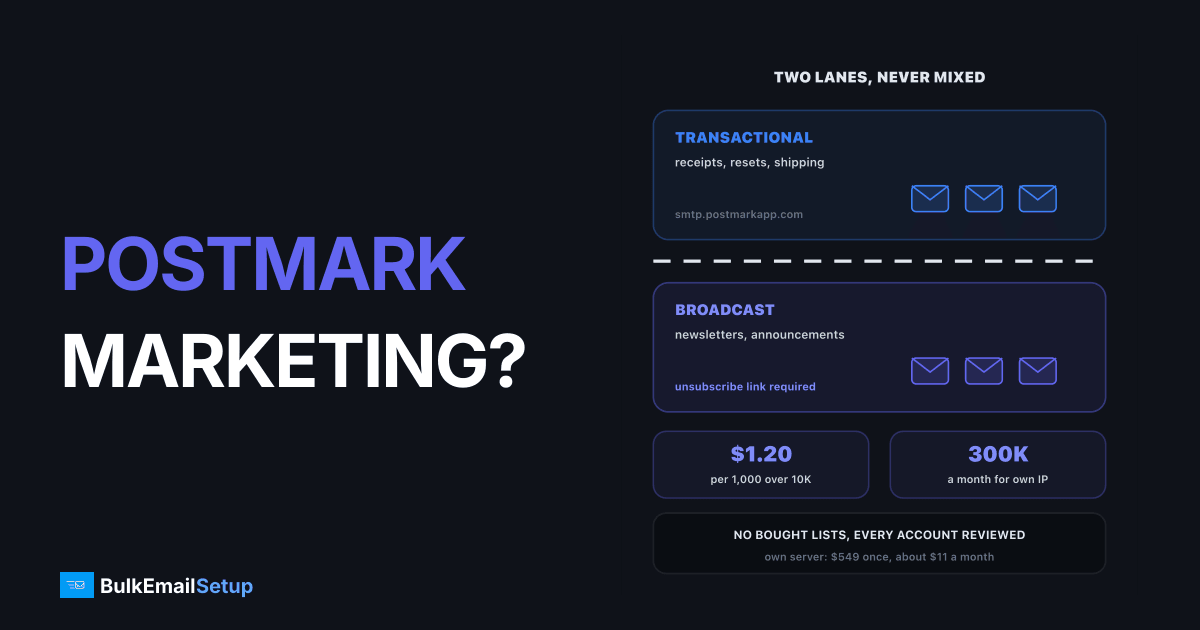
Yes, Postmark allows marketing email, but only through a Broadcast message stream that runs on separate infrastructure from its transactional mail. Every broadcast message carries an unsubscribe link, and Postmark adds one if you leave it out. Lists must be opted in: purchased, free or inherited lists break its terms. Every new account is reviewed before it can send outside its own domains. What decides whether Postmark fits your newsletter is mostly price: its lowest listed overage is $1.20 per 1,000 emails.
How Postmark separates marketing from transactional
Postmark splits mail into message streams inside each server, as its message streams guide explains.
Same account and API. Different lanes, rules and infrastructure.
| Feature | Transactional stream | Broadcast stream |
|---|---|---|
| What it carries | one-to-one, triggered by a user | one-to-many: newsletters, announcements |
| Examples | receipts, resets, shipping updates | product news, policy updates |
| Infrastructure | Postmark's transactional pool | dedicated broadcast infrastructure |
| SMTP host | smtp.postmarkapp.com | smtp-broadcasts.postmarkapp.com |
| Unsubscribe link | not added | required, added if missing |
| How you choose it | the default | name the stream in every send |
Broadcast sends must name the stream, either as the MessageStream field in the API or the X-PM-Message-Stream header over SMTP. A newsletter sent without it goes out on the transactional stream, which is against the rules and the fastest way to get the account reviewed.
What Postmark allows on Broadcast
From its broadcast best-practices guide:
| Content | Allowed? | Notes |
|---|---|---|
| Newsletter to opted-in subscribers | yes | the intended use |
| Product announcements to customers | yes | |
| Purchased, free or inherited lists | no | against Postmark's terms |
| Cold outreach | no | recipients must have opted in |
| Role addresses (sales@, support@) | discouraged | high complaint risk |
| No-reply From address | discouraged | not banned, but hurts engagement |
Postmark also asks for paced sending. For a first broadcast it suggests about 20,000 messages an hour for 12 hours, then batches of 50,000+ recipients spaced about 30 minutes apart, using the batch endpoint of up to 500 messages per request.
Account approval comes first
Every new Postmark account is reviewed before it can send to outside addresses. Until then it can only email domains it has added and verified. The owner submits expected monthly volume and the intended use, and Postmark says reviews finish in under 24 hours on weekdays.
Its stated preference is senders whose email is high-engagement and part of their business. A newsletter to customers fits. A growth campaign to a scraped list does not, which is the same line drawn in does Mailchimp allow purchased lists.
Moving a newsletter onto Broadcast
If you already send receipts through Postmark and want the newsletter there too, the order matters:
- Create a Broadcast stream in the same server as your transactional mail.
- Give it its own subdomain, for example news.yourdomain.com, with its own DKIM and Return-Path. Postmark recommends keeping the two streams on separate subdomains.
- Name the stream in every send. The MessageStream field in the API, or the X-PM-Message-Stream header over SMTP.
- Start with your most engaged readers and grow the audience over several sends, as Postmark's guide advises for a new stream.
- Use the batch endpoint for the list itself, up to 500 messages per request.
- Watch bounces and complaints by webhook. Postmark suppresses hard bounces and complainers for you, but says that is not a substitute for cleaning the list.
The subdomain step is the one people skip. Without it, a newsletter that draws complaints is scored against the same domain your password resets come from. Our subdomain guide covers the DNS side.
What marketing on Postmark costs
Postmark prices by volume on its pricing page and lists no separate rate for broadcast mail. Above 10,000 a month, every extra 1,000 emails is billed as overage.
Each step up adds $1.20 per 1,000. An own server stays flat.
| Monthly volume | Basic ($1.80 overage) | Pro ($1.30) | Platform ($1.20) |
|---|---|---|---|
| 10,000 | $15 | $16.50 | $18 |
| 50,000 | $87 | $68.50 | $66 |
| 100,000 | $177 | $133.50 | $126 |
| 300,000 | $537 | $393.50 | $366 |
These totals are the listed base price plus overage, before any high-volume deal Postmark offers on request. Dedicated IPs start at $50 a month per IP, and only for senders at 300,000 a month or more on Pro or higher.
A typical newsletter is a long way from its own Postmark IP
When Postmark is the right call, and when it is not
| Situation | Postmark Broadcast? |
|---|---|
| App mail on Postmark, occasional product news | yes, keep it in one place |
| Opted-in newsletter under 50,000 a month | fine, about $66 to $87 |
| Weekly newsletter at 300,000+ a month | expensive, $366+ before a dedicated IP |
| Cold outreach or bought lists | no |
The strongest case for Broadcast is a team already sending transactional mail through Postmark that wants one vendor. For a pure marketing program at volume, the per-email cost is the issue. Our Postmark alternatives and Postmark vs a dedicated SMTP server compare the options.
How BulkEmailSetup helps
Keep Postmark for receipts and resets if it works for you. Move the newsletter to a dedicated SMTP server you own, with no per-email cost, your own IPs, a campaign platform and automatic unsubscribe handling, on a subdomain with SPF, DKIM and DMARC done.
| Plan | One-time fee | Emails per day | Dedicated IPs | Hosting you pay your host |
|---|---|---|---|---|
| Basic | $549 | 25,000 | 3 | about $11 a month |
| Advance | $1,199 | 200,000 | 15 | about $49 a month |
At 300,000 emails a month, Postmark's Platform overage alone is about $366 a month. The Basic server handles that volume for about $11 a month of hosting. The 15-day money-back guarantee applies until server access is handed over. See Basic plan details or all pricing.
Frequently asked questions
Can I send newsletters through Postmark?
Yes, through a Broadcast message stream. Postmark describes Broadcast as the stream for one-to-many sends such as policy updates, product announcements and newsletters. It runs on dedicated infrastructure apart from transactional mail and uses its own SMTP host, smtp-broadcasts.postmarkapp.com. Your list must be opted in: Postmark's guide says purchased, free or inherited lists go against its terms.
What is a Postmark broadcast stream?
A message stream is a lane inside a Postmark server. The default Transactional stream carries one-to-one mail triggered by a user, like receipts and password resets. A Broadcast stream carries one-to-many mail. Sends must name the stream, for example MessageStream broadcasts in the API or the X-PM-Message-Stream header over SMTP, and every broadcast message carries an unsubscribe link.
Does Postmark approve every marketing sender?
Every new account is reviewed, marketing or not. Until approval an account can only send to domains it owns and has verified. The owner submits expected monthly volume and use case, and Postmark says reviews finish in under 24 hours on weekdays. Its blog says it looks for companies sending high-engagement mail as part of their business, so cold or bought-list senders are turned away.
What is cheaper than Postmark for bulk marketing?
At volume, almost everything per email. Postmark's lowest listed overage is $1.20 per 1,000 on the Platform plan, so 300,000 emails a month is about $366. Amazon SES is $0.10 per 1,000, and a dedicated server has no per-email cost at all: BulkEmailSetup's Basic plan is $549 one-time plus about $11 a month of hosting for 25,000 emails a day.
Does Postmark add an unsubscribe link automatically?
On Broadcast streams, yes. Postmark's broadcast guide says every message sent through a Broadcast stream includes a visible unsubscribe link, and if you do not add one, Postmark adds it for you. It also recommends one-click unsubscribes without a confirmation step. Transactional streams do not carry the link, which is one reason marketing mail must not be sent on them.
Can I get a dedicated IP on Postmark for marketing?
Only at volume. Postmark's pricing page says dedicated IPs start at $50 a month per IP, are available to customers sending 300,000 emails a month or more, and only on Pro plans or higher. Below that you share Postmark's broadcast pool, which is kept apart from transactional traffic.
Can I send cold email through Postmark?
No. Postmark's broadcast guide says purchased, free or inherited lists go against its terms, and its permission rules expect every recipient to have opted in. It also advises against sending to role addresses like sales@ or support@. Cold outreach belongs on infrastructure where you carry the reputation yourself, under the law of each market you mail.


