
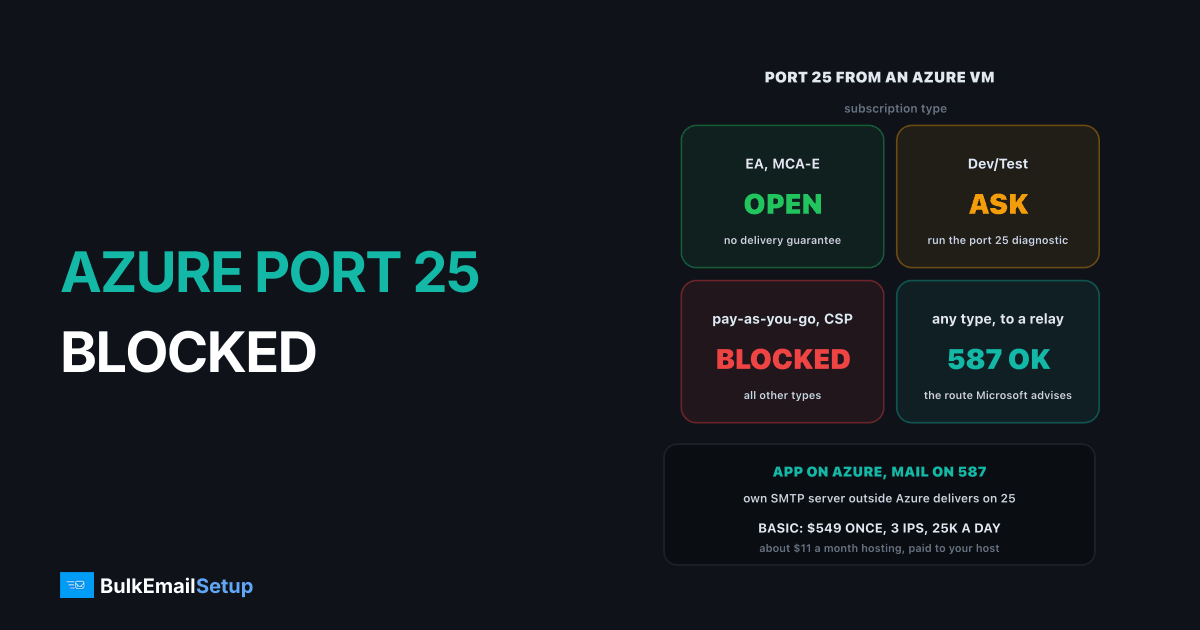
Azure blocks outbound port 25 from virtual machines on every subscription type except standard Enterprise Agreement and MCA-E, and Enterprise Dev/Test can request an exemption. Port 587 to an authenticated relay is never blocked, on any subscription. For bulk email that settles the design: keep the app on Azure, submit mail on 587 to a relay or to your own dedicated SMTP server, and let that server do the delivery. Even where port 25 is open, Microsoft says there is no guarantee anyone accepts the mail.
Which subscriptions are blocked
From Microsoft's outbound SMTP troubleshooting page:
| Subscription type | Port 25 from VMs | How to change it |
|---|---|---|
| Enterprise Agreement (standard) | open | nothing to do |
| MCA for Enterprise (MCA-E) | open | nothing to do |
| Enterprise Dev/Test | blocked by default | run the "Cannot send email (SMTP-Port 25)" diagnostic |
| Pay-as-you-go, CSP, free, others | blocked | use a relay on port 587 |
| Any type, port 587 to a relay | open | always allowed |
After a Dev/Test exemption, VMs must be stopped, deallocated and restarted to pick up the new network policy. Port 25 also works from App Service and Functions through virtual network integration, but the same subscription rules apply.
Your subscription type decides whether port 25 is even an option
How to tell the block is the problem
The block shows up as silence, not an error message. The connection simply never opens.
| Symptom | What it usually means |
|---|---|
| App logs "connection timed out" to a mail server on port 25 | the Azure block |
| Same code works on port 587 with a login | confirms it is port 25, not your app |
| Mail works from your laptop but not the VM | the block, or the VM's network security group |
| Port 25 times out on an Enterprise Agreement VM | check NSG rules and Azure Firewall before blaming the block |
A quick test from a Windows VM:
Test-NetConnection -ComputerName gmail-smtp-in.l.google.com -Port 25
Test-NetConnection -ComputerName your-relay-host -Port 587
If the first fails and the second succeeds, you have the block, and the 587 route below is the fix. On Linux, nc -vz host 25 does the same check.
Port 587 always works
The block is on server-to-server delivery, port 25. Submission to a relay on port 587, with a username and password, is open on every subscription.
Port 25 is walled off. Port 587 goes around it.
That is the route Microsoft itself recommends, and it is how most apps should send anyway. The app hands the message to a relay, and the relay deals with retries, bounces and receiver rules. Our port 25 vs 465 vs 587 guide explains the difference, and why port 25 is blocked covers the same policy at other clouds.
Your options for bulk email from Azure
| Option | What it is | Good for | Watch out for |
|---|---|---|---|
| Azure Communication Services email | Microsoft's own relay | app notifications | default rate limits, support case to raise them |
| External relay (SES, SendGrid, Mailgun) | shared sending service | quick start | shared IP policy, per-email pricing |
| Your own dedicated SMTP server | a server built only for sending | ongoing bulk volume | needs a host with port 25 open |
| Send directly from an EA VM | port 25 from the app VM | almost nothing | no delivery guarantee, mixes app and mail |
Azure Communication Services is priced per email plus per megabyte transferred. Check the Azure pricing page for current numbers, since the rate matters at volume. It handles delivery but not campaigns: lists, unsubscribes and the editor are still yours to build.
Why sending from the VM is a bad idea even when allowed
An Enterprise Agreement VM can open port 25. Microsoft still says external domains may refuse the mail and that rejections are not covered by Azure support. The practical problems:
- A cold, lone IP. One VM address with no sending history gets deferred by Gmail and Outlook until it is warmed.
- Your app and your mail share a fate. A complaint spike on campaign mail can land the same IP that sends password resets.
- You build the mail stack yourself. PTR, SPF, DKIM, DMARC, bounce processing and suppression are all on you.
Each layer does one job. The app never touches port 25.
The clean split is two machines: the app stays where it is on Azure, and a separate sending server, on a host that allows port 25, carries the mail. For app-heavy senders, SMTP for SaaS transactional email goes deeper.
Setting up the 587 route
- Pick the relay or server. Get the hostname, port 587 and SMTP credentials.
- Store credentials in Key Vault. Not in app settings or code.
- Use a sending subdomain. For example mail.yourapp.com, with SPF and DKIM published for the relay.
- Point the app at it. Most frameworks need only host, port, user and password.
- Test with a real inbox. Check the headers show SPF, DKIM and DMARC passing.
If you are deciding between a relay and your own server, Amazon SES vs a dedicated SMTP server compares the two at volume.
How BulkEmailSetup helps
We build a dedicated SMTP server on a host you choose with port 25 open, then hand you port 587 credentials for your Azure app. You get your own IPs with PTR records, SPF, DKIM and DMARC, bounce handling, a campaign platform and a warm-up plan. The plan page lists the hosting requirements before you buy.
| Plan | One-time fee | Emails per day | Dedicated IPs | Hosting you pay your host |
|---|---|---|---|---|
| Basic | $549 | 25,000 | 3 | about $11 a month |
| Advance | $1,199 | 200,000 | 15 | about $49 a month |
There is no monthly fee to us and no contact limit. The 15-day money-back guarantee applies until server access is handed over. See Basic plan details or all pricing.
Frequently asked questions
Why does Azure block outbound port 25?
Microsoft blocks direct SMTP on port 25 from VMs to protect its platform and its customers from spam sent off compromised or misused machines, and to follow industry practice. Port 25 is how servers hand mail to each other, so an open port on cheap cloud VMs is an easy route for abuse. The block applies to Azure VMs and scale sets, and port 25 is unsupported on most other PaaS resources.
Which Azure subscriptions can send on port 25?
Standard Enterprise Agreement and Microsoft Customer Agreement for Enterprise (MCA-E) subscriptions are not blocked. Enterprise Dev/Test is blocked by default but can be exempted through the Cannot send email (SMTP-Port 25) diagnostic in the portal, after which VMs must be stopped, deallocated and restarted. Every other subscription type, including pay-as-you-go, is blocked.
Can I use an SMTP relay from Azure?
Yes. Microsoft recommends an authenticated SMTP relay on port 587, and says that port is not restricted on any subscription type. Azure Communication Services offers one, or you can point your app at any external relay or at your own dedicated SMTP server. The app submits with a username and password, and the relay does the port 25 delivery.
Where should I host bulk email instead of Azure?
On a server whose job is sending: a VPS or dedicated machine with port 25 open, its own PTR records and a warmed IP pool, or a relay built for volume. Keep the app on Azure and have it submit mail on port 587. BulkEmailSetup's Basic plan builds that server for $549 one-time, with 3 dedicated IPs and 25,000 emails a day.
If my subscription can use port 25, should I send bulk email from the VM?
Usually not. Microsoft states there is no guarantee external domains accept mail sent directly from Azure VMs, and rejected mail is not covered by Azure support. A single VM IP has no sending history, and you still need PTR, SPF, DKIM, DMARC, bounce handling and a warm-up. Building that on an app VM mixes your application with your mail reputation.
Does Azure Communication Services work for bulk email?
It can carry volume, but it starts with default rate limits and Microsoft tells you to open a support case to raise them. It is priced per email plus per megabyte transferred, so check the current Azure pricing page for your volume. It suits app notifications well. For newsletters you still need a campaign tool, unsubscribe handling and list management on top.
Does changing my Azure subscription type affect email?
It can. Microsoft warns that moving from an Enterprise Agreement or MCA-E subscription to another type may leave outbound SMTP blocked on your deployments. If your app relies on port 25 today, switching it to an authenticated relay on port 587 removes that risk before any billing change.


