
For senders past roughly 100K-500K emails a month, a dedicated SMTP server usually beats Twilio SendGrid on cost-per-email and control, while SendGrid wins on speed-to-launch and its API ecosystem. SendGrid prices per email volume and contact tiers, with dedicated IPs as paid add-ons, so bills climb with growth. A dedicated SMTP server gives you a flat plan, a dedicated IP you control, and full MTA access, in exchange for managing warm-up and reputation yourself.
What does Twilio SendGrid actually cost at scale?
SendGrid splits into Email API plans (transactional) and Marketing Campaigns plans (contact-based), and both add cost as you grow. As of early 2026, the Email API Pro tier runs roughly $90/month and up depending on volume, with dedicated IPs sold as add-ons at around $30-80/month each. Overage past your tier is billed per thousand emails.
The pricing trap is the contact-based marketing model. You pay for stored contacts, not just emails sent, so a large but lightly mailed list costs the same as an aggressively mailed one. High-volume senders also hit dedicated-IP requirements: SendGrid recommends a dedicated IP above 100K emails/month, and that is an extra line item on top of the plan.
There is a second cost most teams miss until the invoice arrives: overage rates that apply per thousand emails once you exceed your tier. The version of this we see most is a team on a contact-tier marketing plan that runs one extra re-engagement send in a busy month and watches the bill jump because the overage rate per thousand sits well above their blended plan cost. A campaign that performs well, or a one-off announcement to your full list, can push you over and trigger charges at a rate higher than your blended plan cost. The model rewards predictable, capped sending and punishes the bursts that growing senders actually experience.
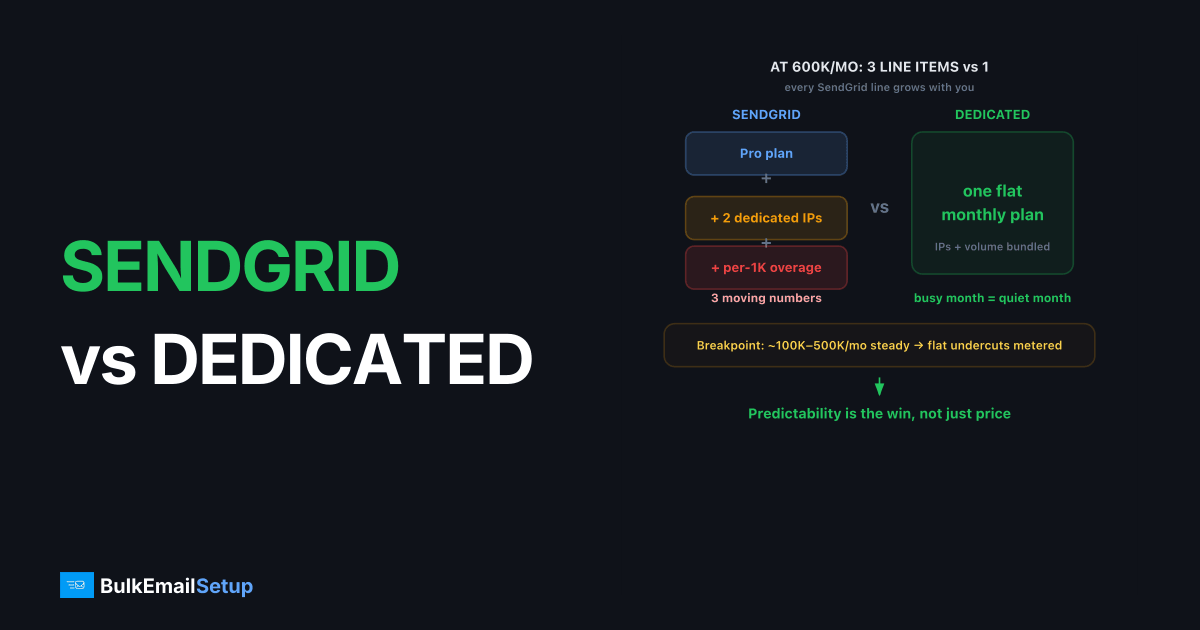
A worked example makes the gap concrete. Say you send 600K emails a month and need two dedicated IPs to keep transactional separate from marketing. On SendGrid you pay the Pro plan, plus two IP add-ons at roughly $30-80 each, plus per-thousand overage when a busy month pushes past your tier. That is three moving line items that all grow with you. A flat dedicated SMTP plan bundles the IPs and the volume into one number, so a busy month and a quiet month cost the same. Predictability, not just price, is the win.
SendGrid vs dedicated SMTP server: the comparison
A dedicated SMTP server flips the model from per-email metering to flat infrastructure. You rent the sending machine and one or more dedicated IPs, configure SPF, DKIM, DMARC, and PTR, and send as much as the server handles within your plan. No contact counting, no per-thousand overage.
| Factor | Twilio SendGrid | Dedicated SMTP server |
|---|---|---|
| Pricing model | Per email + per contact tiers | Flat monthly plan |
| Dedicated IP | Add-on, ~$30-80/mo each | Included, you control it |
| Overage fees | Yes, per 1,000 over tier | No (within plan capacity) |
| MTA / server access | None (managed API) | Full SMTP + server access |
| Setup speed | Minutes (API key) | Hours to days (DNS, warm-up) |
| Warm-up | Partly managed | You run it (or provider helps) |
| Deliverability control | Limited, platform-bound | High, your IP and config |
| Best for | Devs wanting fast API | High-volume senders watching cost |
When does SendGrid stop making sense?
SendGrid stops making sense when your volume is steady, large, and predictable, because that is exactly where flat-rate dedicated infrastructure undercuts per-email pricing. The breakpoint sits around 100K-500K emails/month for most senders. Below it, SendGrid's free tooling and instant API are hard to beat. Above it, the math shifts.
Three signals you have outgrown it:
- Overage bills. You routinely blow past your tier and pay per-thousand penalties on top of the plan.
- Dedicated IP friction. You need multiple IPs to separate streams, and each one is another monthly add-on you do not control.
- Deliverability debugging limits. When mail goes to spam, you can adjust your content but you cannot touch the MTA, connection limits, or routing.
If you are weighing a broader switch, SendGrid alternatives covers the full landscape, and SendGrid vs a dedicated SMTP server goes deeper on the head-to-head.
Does SendGrid actually deliver better than your own server?
No platform delivers better by brand alone, because inbox placement is decided by authentication, list hygiene, and complaint rate, not the logo on the dashboard. SendGrid's advantage is a warm shared pool and built-in suppression that catch some mistakes for you. Its disadvantage is that you cannot reach into the MTA when something goes wrong, so you are limited to the levers the platform exposes.
A dedicated SMTP server gives you every lever: connection concurrency, retry timing, per-domain throttling, and the raw logs to see exactly which mailbox provider deferred which message. That control is worthless if your sending practices are poor and decisive if they are good. Keep your complaint rate under the 0.3% threshold Gmail and Yahoo enforce (ideally under 0.1%), maintain SPF, DKIM, and DMARC alignment, and prune dead addresses, and a dedicated IP you control will match or beat a shared pool. The outcome is yours to earn, which is exactly the point of owning the infrastructure.
What you give up and gain by switching
Switching from SendGrid to your own SMTP server trades convenience for control, and that trade only pays off above a volume threshold. You gain a dedicated IP you fully own, flat costs, full MTA access, and the ability to isolate transactional from marketing streams. You give up the instant-on API and the platform's built-in suppression and analytics dashboards.
The honest catch is warm-up. A new dedicated IP starts with zero reputation and must ramp from roughly 50-100 emails/day to full volume over 4-6 weeks. Skip it and you will see 421 4.7.28 rate-limit deferrals from Gmail and soft blocks from Microsoft. Get your authentication right first: our guides on SPF, DKIM, and DMARC and the Gmail bulk sender requirements for 2026 cover the records you need before sending a single campaign.
You also take on operations SendGrid handled silently: bounce processing, suppression of repeat hard bounces, blocklist monitoring, and reacting to a 550 5.7.1 policy block before it becomes a pattern. None of this is hard, but it is real work, which is why many high-volume senders choose a managed dedicated SMTP setup. They get the control and flat cost of owning the IP without standing up an in-house deliverability function. The right answer depends on whether you have, or want, that capability in-house.
What does the switch cost at 100K, 500K, and 1M emails?
The cost gap between SendGrid and a dedicated SMTP server widens as volume climbs, because one model meters every email and the other holds flat. SendGrid stacks three line items that all grow: the plan tier, per-IP add-ons, and per-thousand overage. A dedicated plan bundles volume and IPs into one figure that does not move when a campaign spikes.
Here is the shape of the math at three volumes. Treat the SendGrid figures as model ranges, not quotes, since your exact tier and contact count change the total.
| Monthly volume | SendGrid (plan + IPs + overage) | Dedicated SMTP (flat) | What drives the gap |
|---|---|---|---|
| 100K | Plan + 1 dedicated IP add-on | One flat plan | IP add-on starts to bite |
| 500K | Higher plan + 2 IPs + likely overage | One flat plan | Overage on busy months |
| 1M | Top plan + multiple IPs + overage | One flat plan | Per-email metering dominates |
The pattern is consistent: at 100K the difference is small and SendGrid's tooling may be worth it. By 500K the IP add-ons and the occasional overage month make the flat plan look cheaper and far more predictable. At 1M, per-email metering is the dominant cost and owning the infrastructure usually wins outright. Predictable billing is half the value, since you can forecast a flat plan to the dollar.
Migrating from SendGrid: what actually breaks
The only thing that breaks in a SendGrid migration is IP reputation, and you protect it by warming new IPs before full volume. Your domain reputation travels with you: SPF, DKIM, DMARC, and your sending history are tied to the domain, not the platform. A fresh dedicated IP, though, starts from zero and has to earn its standing.
Run the cutover gradually instead of flipping a switch. Keep SendGrid live, route a slice of traffic through the new IP, and watch bounce and complaint rates as you ramp from roughly 50-100 emails/day over 4-6 weeks. Push too hard and Gmail answers with 421 4.7.28 rate-limit deferrals. In the smoothest cutovers we have run, the new IP carries maybe 5-10% of volume in week one and the rest stays on SendGrid; we only shift the next slice once Gmail Postmaster shows the new IP holding a "high" or "medium" reputation, never on a calendar date alone. Move your most engaged recipients first, since their opens build positive reputation fastest, then layer in the rest. The few weeks of overlap cost a little in double billing, cheap insurance against a placement drop.
Who should stay on SendGrid?
Stay on SendGrid when your volume is low to moderate, spiky, or you value developer speed over per-email cost. The free tier and instant API key make SendGrid hard to beat for a startup wiring up its first transactional emails, or for a team whose sends swing unpredictably month to month. There is no warm-up to babysit and no server to operate.
You should also stay if email is not core enough to justify owning the infrastructure. A team sending 20K receipts a month has no business running its own MTA: the per-email cost is trivial and the engineering time is better spent elsewhere. The switch to a dedicated SMTP server pays off specifically when volume is high, steady, and central to the business, and when overage bills and IP add-ons have grown into a line item worth removing.
How BulkEmailSetup helps
If SendGrid's per-email pricing and IP add-ons are eating your margin at volume, a dedicated SMTP server gives you a flat plan, a dedicated IP you control, and SPF, DKIM, DMARC, and PTR configured correctly from day one. We handle the 4-6 week warm-up and reputation monitoring so the switch does not cost you inbox placement. See plans and IP counts on our pricing page.
Frequently asked questions
Is SendGrid expensive at high volume?
It can be. SendGrid's marketing and Pro plans price per contact or per email tier, and dedicated IPs are paid add-ons. Past a few hundred thousand emails a month, flat-rate dedicated SMTP plans often cost less per email and remove overage surprises.
Does SendGrid give you a dedicated IP?
Only on higher plans, as a paid add-on, typically around $30-80/month per IP. The IP lives inside SendGrid's platform, so you do not control the underlying server, MTA config, or routing the way you do on a dedicated SMTP server.
Can I move off SendGrid without losing deliverability?
Yes, if you warm up new IPs properly. Your domain reputation (SPF, DKIM, DMARC, sending history) is portable. The IP reputation is not, so any new platform needs a 4-6 week warm-up before full volume.
What sends better, SendGrid or my own SMTP server?
Neither wins automatically. Inbox placement depends on authentication, list hygiene, and complaint rates, not the brand. A dedicated SMTP server gives you more control to fix problems, but you own the outcome.


