
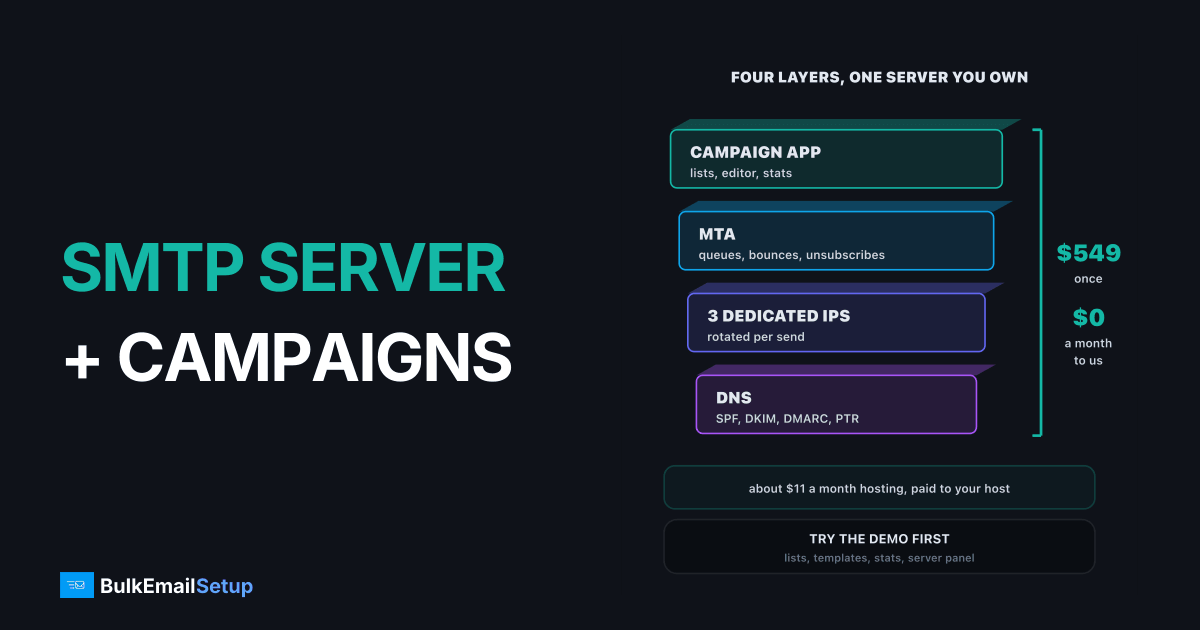
An SMTP server on its own sends mail; it does not give you lists, an editor, tracking or bounce handling. A server with a campaign platform built in does: you get the sending infrastructure and the marketing app on one machine you own. Our plans install both, starting at $549 one-time for 1 server, 3 dedicated IPs and 25,000 emails a day, with about $11 a month of hosting paid to your own provider.
What "SMTP server plus campaign platform" means
A hosted ESP like Mailchimp bundles four layers and rents them to you. A bare SMTP server gives you only the bottom two. A bundled setup puts all four on infrastructure you control.
| Layer | What it does | Bare SMTP server | Hosted ESP | Server + platform |
|---|---|---|---|---|
| Campaign app | lists, editor, schedule, stats | no | yes, theirs | yes, yours |
| MTA | queues and delivers mail | yes | yes, shared | yes, yours |
| IPs | the reputation inbox providers see | yes | shared pool | dedicated, yours |
| DNS | SPF, DKIM, DMARC, PTR | you set it up | partly | done at setup |
The bundle matters because the layers depend on each other. The campaign app has to write bounces and unsubscribes back to the list, or the MTA keeps mailing dead addresses and your IPs pay for it.
What the platform should include
Use this as a checklist, whoever you buy from:
- Lists: CSV import, custom fields, segments, suppression.
- Editor: drag-and-drop plus raw HTML, saved templates.
- Sending: scheduling, throttling per hour, rotation across IPs.
- Tracking: opens and clicks on your own tracking subdomain, not a shared one.
- Bounce handling: a bounce mailbox, hard and soft bounce rules, automatic suppression. See how a bounce server works.
- Unsubscribe: one-click links and the List-Unsubscribe header Gmail and Yahoo now expect.
- Reports: per campaign delivered, opened, clicked, bounced, complained.
- For agencies: client accounts, a sending limit per client, your own branding.
Every one of these is in our plans. You can click through most of them in the demo account before buying.
What you get for the one-time fee
Everything on the Basic receipt is paid once
| Plan | One-time fee | With white label | Emails per day | Servers | Dedicated IPs | Hosting you pay your host |
|---|---|---|---|---|---|---|
| Basic | $549 | $799 | 25,000 | 1 | 3 | about $11 a month |
| Advance | $1,199 | $1,499 | 200,000 | 3 | 15 | about $49 a month |
| Custom | $2,997 | $4,851 | 1,000,000 | 12 | 60 | about $170 a month |
More IPs carry more daily volume
The IP count is what sets the daily volume. Inbox providers throttle each IP, so 25,000 a day spread across 3 IPs stays comfortable, and 1,000,000 a day needs 60.
What it costs against a hosted ESP
Hosted platforms charge for the app and the sending together, by contact count. A bundled server charges once, then only hosting.
Where the monthly money goes, 25,000 contacts
| Route | Up front | Monthly at 25,000 contacts | Who owns the list and IPs |
|---|---|---|---|
| Hosted ESP (Mailchimp Standard list price) | $0 | about $310 | the vendor |
| Bare SMTP server + your own app | your time | hosting + app costs | you |
| Server + platform, Basic | $549 | about $11 | you |
The Mailchimp figure is the list price we use across our cost posts; check its pricing page for your exact tier. At about $310 against $11 a month, the $549 setup pays back inside two months. Our one-time fee vs monthly platform post runs the 3-year numbers.
What the first two weeks look like
A bundle only pays off once mail is landing. Here is the usual path from order to full volume:
| When | What happens | Your part |
|---|---|---|
| Day 1 | you order the VPS, IPs and domain from your host | share access with us |
| Days 1 to 3 | we install the MTA, the platform and the DNS records | add the DNS records if your registrar needs you to |
| Handover | you get the panel login, SMTP details and the DNS list | change the passwords |
| Week 1 | import the list, send to your most engaged contacts first | a few hundred a day per IP |
| Weeks 2 to 6 | volume grows about 30% every two days per IP | watch bounces and deferrals |
The warm-up is the part nobody can skip. New IPs have no history, so Gmail and Microsoft limit them until they see clean, wanted mail. Advance and Custom warm up automatically across the pool; Basic comes with a written warm-up plan.
When a bundle is the wrong choice
Be honest about the trade-offs:
- Under a few thousand contacts: a free ESP tier costs less and asks less of you.
- You need a complex visual automation builder: hosted ESPs still lead there.
- Nobody on the team will own list hygiene: your own IPs reward clean lists and punish dirty ones faster than a shared pool. Start with email list cleaning.
If you already run MailWizz or another self-hosted app and only need the sending side, see best SMTP for MailWizz instead.
How BulkEmailSetup helps
We install the SMTP server, the dedicated IPs, the DNS records, and the campaign platform on hosting you rent yourself, then hand over the logins. You get lists, the editor, campaign stats, bounce handling, a customer panel and a warm-up plan, with no monthly fee to us and no contact limit. White label is available for agencies that want to resell it under their own brand.
There is a 15-day money-back guarantee, which applies until server access is handed over. Try the demo account, then see the Basic plan or all pricing.
Frequently asked questions
Can I get an SMTP server with campaign software included?
Yes. Every BulkEmailSetup plan installs an email marketing platform on the same server as the SMTP setup: contact lists with CSV import and segments, a drag-and-drop and HTML editor, saved templates, and campaign stats for opens, clicks and bounces. Basic is $549 one-time for 1 server, 3 dedicated IPs and 25,000 emails a day.
What should the campaign panel include?
At minimum: list management with import and segments, a template editor, scheduling, open and click tracking, automatic bounce and unsubscribe handling, and per-campaign reports. For agencies, add client accounts with their own sending limits. If bounces and unsubscribes are not processed automatically, the panel will damage your IP reputation within weeks.
Do I still need an ESP with my own SMTP?
Not for sending, if the server comes with a campaign platform. The ESP's job is the editor, lists and reports plus shared sending. A bundled platform covers the first part and your own IPs cover the second. Some teams keep an ESP for a small transactional stream or for its automation builder, which is a choice, not a requirement.
How do I track opens and bounces on my own server?
The campaign platform adds a tracking pixel for opens and rewrites links for clicks, both on a tracking subdomain of your own domain. Bounces come back to a bounce mailbox set as the Return-Path; the platform reads them, sorts hard from soft, and suppresses dead addresses. Unsubscribes are written to the list automatically.
Is the campaign platform hosted on my own server?
Yes. It is installed on the VPS or dedicated server you rent from your own hosting provider, next to the SMTP software. Your lists, templates and reports live on infrastructure you control, not in a vendor's account that can be closed. You pay the host directly, about $11 a month on Basic.
Can I white-label the platform for my clients?
Yes, as an option at setup. White label gives you unlimited client accounts under your brand, a sending limit per client, an admin panel to manage credits and users, and your own domain and logo with BulkEmailSetup hidden. It is $799 one-time on Basic instead of $549, and $1,499 on Advance instead of $1,199.
Can I try the platform before buying?
Yes. The demo account lets you log in, create a list, import a CSV, build a template, set up a campaign and look at the stats and server settings. Actual sending is switched off in the demo. The admin side, with client accounts and limits, is shown live on a short call.


