
SMTP.com is one of the oldest relay brands still trading, and it prices like it: a premium managed relay where a chunk of the bill buys human deliverability help rather than throughput. The real choice is not SMTP.com versus a cheaper relay. It is whether you want to rent deliverability expertise monthly, or own the infrastructure and buy help only when something breaks. For most senders that decision flips somewhere around 500,000 emails a month.
I have run production mail through managed relays and through servers I built myself. Both work. They fail differently, and they bill very differently.
What SMTP.com actually sells
SMTP.com is a managed relay: you point your app at their SMTP endpoint, and they run the sending infrastructure, the IP reputation, and a support desk staffed by people who understand email specifically. That last part is the product. Plenty of relays deliver mail. Fewer will get on a call with you about a Spamhaus CSS listing.
Pricing is volume-banded with a monthly commitment, and the higher bands include dedicated IPs and named account support. SMTP.com does not publish a simple self-serve price ladder the way SMTP2GO or Mailgun do, and the plan set changes, so check the current numbers on the SMTP.com site directly before you budget. I am not going to quote figures I cannot verify today. What is stable is the shape: it sits at the premium end, well above the $10 to $30 a month starter tiers of the self-serve crowd, and the gap is the human layer.
What "managed deliverability" buys you
Four concrete things. Strip the marketing and this is the list.
| Service | What it actually is | What it is worth |
|---|---|---|
| Account manager | A named person who answers email in hours, not days | High if you have no email specialist |
| Warm-up planning | Someone builds and monitors your IP ramp schedule | High for a first dedicated IP |
| Blocklist escalation | Vendor relationships with Spamhaus, UCEPROTECT, Microsoft | Moderate, saves days per incident |
| Reputation monitoring | Alerts on Gmail/Microsoft reputation dips | Moderate, Postmaster Tools is free |
Two of those four you can replicate for nothing. Google Postmaster Tools gives you domain and IP reputation without a vendor in the middle, and the Spamhaus removal process is a self-service form for the vast majority of listings. Our Spamhaus delisting guide walks the whole thing.
The two that genuinely cost money to replace are the account manager and the warm-up planning. Hiring a deliverability consultant runs $150 to $300 an hour. If a managed relay saves you 6 hours of that a month, it has covered a meaningful chunk of its own premium.
The catch: that value is front-loaded. Months one to three of a new sending programme, you use the account manager constantly. Month fourteen, if things are running clean, you email them twice a year. You are still paying the premium every month.
SMTP.com against a dedicated server, factor by factor
| Factor | SMTP.com | Your own dedicated server |
|---|---|---|
| Cost model | Per-email bands, monthly commitment | Flat cost, volume-independent |
| IP ownership | Rented, on SMTP.com's ASN | Yours, your PTR, portable history |
| Support model | Included account manager | Setup provider or per-incident |
| Suspension risk | Real, shared platform policy applies | None from a relay, receivers only |
| MTA access | None, managed abstraction | Full Postfix or PowerMTA control |
| Logs | Dashboard reporting | Raw SMTP responses, live |
| Time to first send | Same day | Hours to days, or done for you |
| Stream separation | Plan-dependent | Free, one IP per stream |
| Reputation portability | Stays with the vendor | Travels with you |
Suspension risk is the row people underweight. Every shared platform has to police its customers, because one sender with a 0.4% complaint rate degrades the IP ranges everyone else is using. A premium plan changes the tone of that conversation. It does not remove the policy. On your own IPs there is no pool to protect, so nobody suspends you for being commercially risky to other customers. Gmail and Microsoft still judge you, of course, and they are stricter than any relay.
The cost picture at 100K, 500K and 1M a month
Here is the shape of the money. Relay figures are directional bands, not SMTP.com's published prices, because I could not verify their current page at time of writing. Treat the column as "premium managed relay" generally.
| Monthly volume | Premium managed relay | Dedicated server (owned) | Effective cost per 1,000 |
|---|---|---|---|
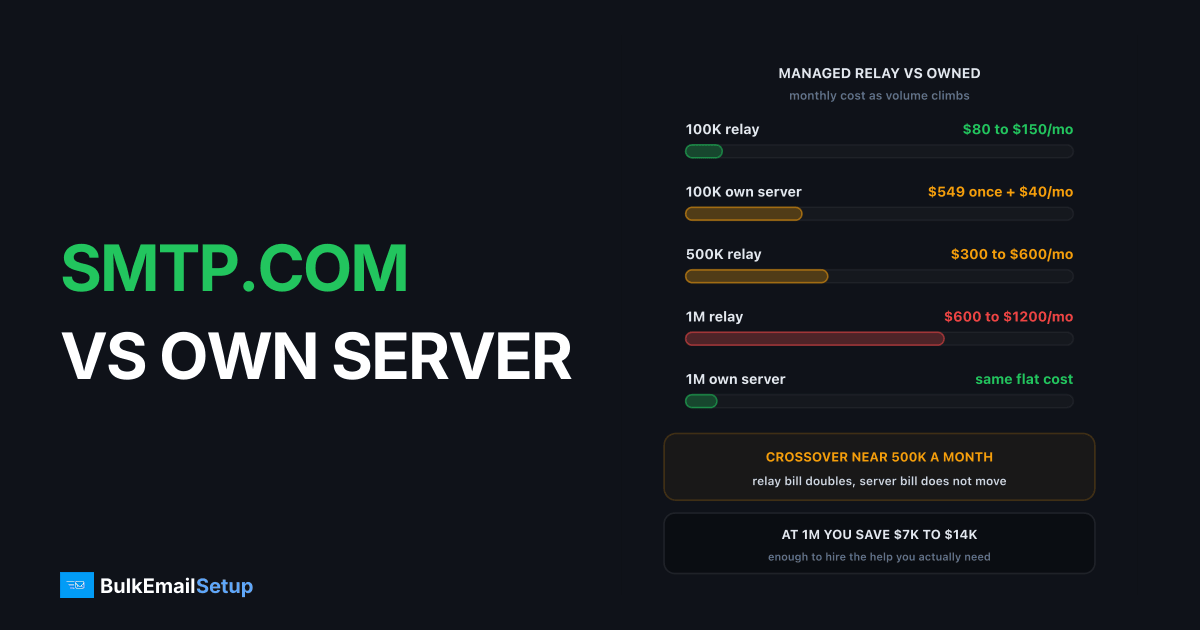
| 100,000 | Roughly $80 to $150/mo | $549 one-time + ~$40/mo hosting | Relay wins in year one |
| 500,000 | Roughly $300 to $600/mo | Same flat cost | Roughly break-even by month 4 |
| 1,000,000 | Roughly $600 to $1,200/mo | Same flat cost | Server 5x to 10x cheaper |
The mechanic is simple. Relay cost scales with messages. Server cost scales with hardware, and one properly tuned box with 3 dedicated IPs handles 25,000 a day comfortably before you add anything. Send twice as much next quarter and the relay bill doubles, while the server bill does not move until you outgrow the IP count.
At 1 million a month the annual difference is typically $7,000 to $14,000. That is a part-time deliverability contractor, paid for out of the saving, with money left over. We map the same curve across every vendor in cost per 1,000 emails, every provider.
Who genuinely should pay the premium
Three groups, and I mean this without snark.
Teams with zero ops capacity. If your engineering team is two people building product, and neither of them wants to learn what a 421 4.7.0 deferral means at 11pm, a managed relay is the right call. The premium is cheaper than the distraction.
Regulated senders who need an accountable vendor. Healthcare, finance, anything with an auditor. Having a named vendor with a contract, an SLA and a support ticket trail is sometimes a compliance requirement rather than a convenience. You cannot point an auditor at your own Postfix box and a shrug.
Spiky senders. If you send 400,000 emails in November and 20,000 in February, a dedicated IP is a liability. Dedicated IPs need roughly 50,000 messages a month of steady traffic to stay warm. Let it go cold, then blast it, and you will earn deferrals from Gmail within hours. A shared pool kept warm by other senders protects you here. We cover the timing in dedicated IP vs shared IP.
If none of those three describe you, the premium is buying insurance against a risk you can manage yourself.
The case for owning the IPs
Reputation is an asset, and on a relay you build it in someone else's name. Two years of clean sending on SMTP.com's dedicated IP produces excellent inbox placement. Leave, and none of it comes with you. The new IPs start at zero, and you warm up from scratch as if you were a brand new sender.
On your own server the IP is assigned to your host, the PTR record points at your domain, and the sending history attaches to infrastructure you control. Change providers, keep the IPs where possible, and the history holds.
The operational side matters just as much at volume:
- Stream separation for free. Password resets on one IP, marketing on another. A campaign mistake never delays a transactional message.
- Real logs. When Gmail starts deferring, you read the actual SMTP responses live instead of waiting on a ticket queue for a summary of them.
- Per-destination tuning. Throttle Microsoft to 20 connections while pushing Gmail harder. Managed relays make that decision for you.
- No content policy. If your legitimate use case is unusual, no policy team is deciding whether it is too risky for their other customers.
None of that helps if nobody on your team will use it. That is the honest trade, and it is the same one we work through in managed SMTP vs DIY, the real time cost and is managed SMTP worth it.
Where the crossover sits
| Signal | Stay on SMTP.com | Move to your own server |
|---|---|---|
| Monthly volume | Under 250,000 | Over 500,000 steady |
| Volume pattern | Spiky, seasonal | Consistent month to month |
| Team | No email-capable engineer | At least one, or a setup partner |
| Relay bill | Under $200/mo | Over $400/mo |
| Streams | One | Transactional plus marketing |
| Suspension history | Never paused | Paused once already |
Two of those six pointing right is worth modelling. Four is a decision.
The middle ground people forget: managed setup on owned infrastructure. Someone else builds the server, configures SPF, DKIM, DMARC and PTR, tunes the MTA and plans the warm-up, then hands you the keys. You get the expertise for the hard part, which is the first eight weeks, without renting it forever. That is the same argument as SMTP2GO vs a dedicated SMTP server, just at a higher price point on the relay side.
One thing that does not change either way: your list. A 5% bounce rate and a 0.4% complaint rate will destroy your placement on SMTP.com's best dedicated IP and on a server you built yourself. No amount of managed deliverability fixes a bad list, and every account manager will tell you the same thing in the first call.
How BulkEmailSetup helps
We build dedicated SMTP infrastructure you own: your own server, your own IPs, full SPF/DKIM/DMARC/PTR configuration, MTA tuning, bounce handling and a warm-up plan. That covers the part a managed relay's account manager would do for you, once, instead of as a monthly line item. After handover the IPs are yours, the logs are yours, and the reputation you build travels with you.
Basic is $549 one-time, covering 1 SMTP server, 3 dedicated IPs, 25,000 emails/day and unlimited contacts. Higher tiers scale to 15 IPs and 200,000 emails/day. See pricing, or read cost per 1,000 emails across every provider if you want the full comparison first.
Frequently asked questions
Is SMTP.com worth the price?
It is worth it if you have no ops capacity and you need someone accountable when Gmail starts deferring your mail. SMTP.com sits at the premium end of the relay market, above self-serve names like SMTP2GO and Mailgun, and the gap is human help rather than better wires. If nobody on your team would ever read an SMTP log, that gap is real value. If you have one engineer who would, you are paying for something you already have.
Does SMTP.com give you a dedicated IP?
Yes, dedicated IPs are available, but they stay on SMTP.com's ASN and under SMTP.com's account. You rent the reputation rather than own it. On your own server the IP is assigned to your host, you set the PTR record, and if you change providers the reputation history you built does not stay behind.
What does managed deliverability actually include?
In practice four things: an account or deliverability manager you can email, help planning an IP warm-up ramp, escalation to blocklist operators like Spamhaus when you get listed, and reputation monitoring that tells you about a Gmail dip before your open rate does. None of it is magic. All of it is labour you would otherwise do or hire.
At what volume should I move off SMTP.com to my own server?
Roughly 500,000 emails a month of steady sending is where the maths usually flips. Below that, per-email relay pricing plus included support is hard to beat on total cost. Above 1 million a month, a flat-cost dedicated server with 3 to 15 of your own IPs is normally several times cheaper per thousand emails, and the support you actually need becomes occasional rather than continuous.
Can SMTP.com suspend my account?
Yes. Every shared-platform relay reserves the right to pause sending for complaint rates, bounce rates or content policy, because your behaviour affects their other customers and their IP ranges. A premium plan buys you a phone call before the pause rather than immunity from it. On your own server there is no shared pool to protect, so the only parties judging you are the receivers themselves.
Is SMTP.com better for deliverability than a dedicated server?
Not inherently. Deliverability comes from list quality, authentication, complaint rate and warm-up discipline, and all four are available on either setup. What SMTP.com adds is a person who has done the warm-up a hundred times. What a dedicated server adds is raw access to logs, per-destination throttling and IP separation. The better setup is the one matching your team's capacity.
How long does it take to move from SMTP.com to a dedicated server?
The application change is an afternoon, since both speak standard SMTP on port 587 or 465. The reputation change takes 4 to 8 weeks, because new IPs start cold regardless of what you sent through SMTP.com. Run both in parallel and shift 20% of volume a week rather than cutting over in one night.


