
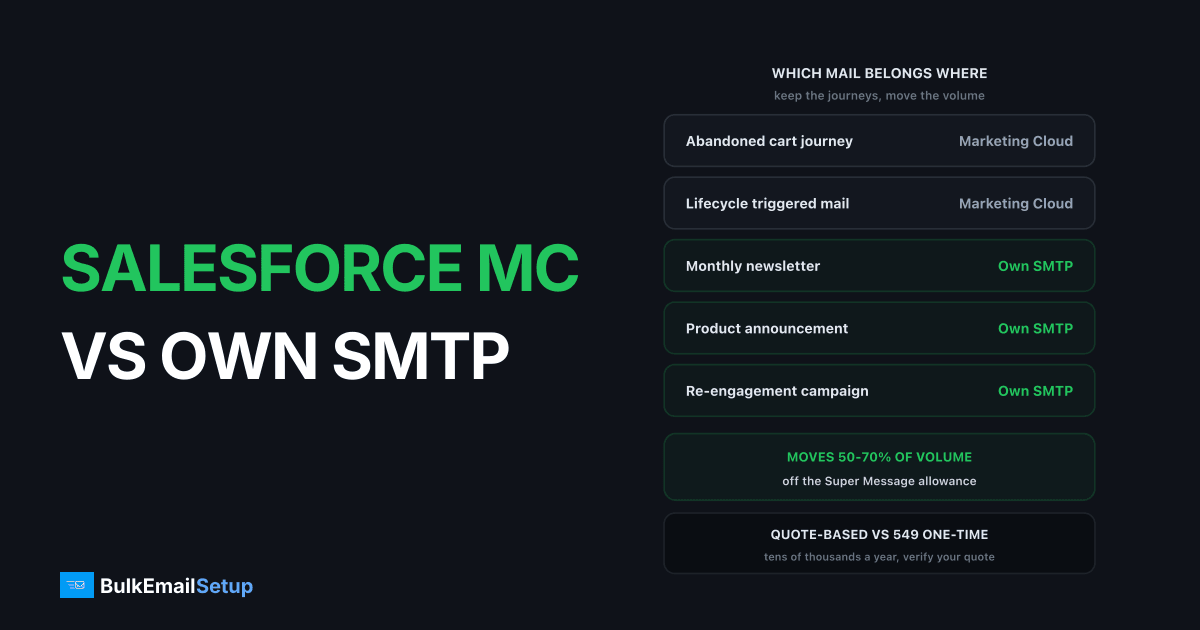
Marketing Cloud Engagement is sold as an annual contract with a committed Super Message allowance, and the real number comes from a quote rather than a price page. Salesforce does publish edition tiers, with Marketing Cloud Next Growth at $1,500 per org per month billed annually and Advanced at $3,250, but Engagement deals for high-volume senders are negotiated per account and typically run into the tens of thousands a year. Your own SMTP server sends mail for a flat cost and does none of the rest, which is why the honest answer for most Marketing Cloud customers is a split, not a migration.
How the pricing actually works
Four things set the number on your quote.
| Pricing lever | What it does |
|---|---|
| Edition tier | sets the feature floor, published on the pricing page |
| Contact count | the main multiplier on most Engagement contracts |
| Super Message allowance | your committed annual sending volume |
| Channels enabled | SMS, push and WhatsApp consume different multiples |
Salesforce lists the Next editions openly on its Marketing Cloud pricing page, along with add-on products from $1,250 to $20,000 a month. Engagement contracts sit outside that. Verify every figure below against your own quote, because I am describing the shape of the pricing, not your specific deal.
The Super Message is the unit that surprises people. It is a cross-channel billing token: one email generally consumes one, while SMS and push consume different amounts by channel and region. Your contract commits to an annual allowance. Go past it and the overage is billed at your contract rate, which is why a heavy year quietly sets your next renewal price.
Why the renewal quote jumped
Most people reading this arrived after a renewal came back 30 or 40% higher. The causes are boringly consistent.
| Cause | What happened |
|---|---|
| Contact growth | your addressable database grew, the multiplier grew with it |
| Super Message overage | last year's excess became this year's committed allowance |
| Channel additions | SMS or WhatsApp added mid-term, priced from renewal |
| Discount roll-off | a first-term discount expired at renewal |
Pull the Super Message consumption report before you talk to anyone. If you consumed 22 million against an 18 million commit, that gap is the conversation, and it is the one line you can actually move by sending less through Marketing Cloud.
What Marketing Cloud does that raw SMTP does not
This part matters, because the people who migrate badly are the ones who underestimate it. An SMTP server accepts a message and delivers it. That is the whole feature list.
| Capability | Marketing Cloud | Your own SMTP |
|---|---|---|
| Journey Builder orchestration | yes | no |
| CRM data model and Data Extensions | yes | no |
| SQL segmentation on your own data | yes | no |
| Einstein send-time and content | yes | no |
| Cross-channel SMS and push | yes | no |
| Raw sending throughput | metered by contract | limited by your hardware |
| Cost per additional million emails | contract overage rate | effectively zero |
If Journey Builder is running multi-step revenue programmes against Data Extensions, that is not something you rebuild in a weekend or a quarter. SQL segmentation directly over your own data model is genuinely hard to replace, and Einstein's send-time optimisation earns its keep on large engaged lists.
The reason people still leave is that none of it applies to the monthly newsletter.
Keep the CRM, move the volume
The workable option is not a migration. It is a split.
Marketing Cloud keeps: journeys, triggered sends, anything driven by Data Extensions or CRM state, cross-channel programmes, transactional-adjacent mail with tight SLAs. Low volume relative to your total, high revenue per message.
Your own SMTP takes: the newsletter, product announcements, seasonal blasts, re-engagement runs, anything that goes to a large slice of the database with light personalisation. High volume, low complexity, and exactly the mail that eats your Super Message allowance.
You export an engaged segment on a schedule, feed it to self-hosted campaign software such as MailWizz, Mautic or Listmonk, and point that at your own server. The CRM stays authoritative. This is the same pattern people land on with HubSpot email limits, and the mechanics are covered in SMTP for CRM and marketing automation.
Which mail belongs where
| Mail stream | Where it belongs | Why |
|---|---|---|
| Abandoned cart journey | Marketing Cloud | CRM state, multi-step, high value per send |
| Onboarding sequence | Marketing Cloud | journey logic, personalisation depth |
| Lifecycle triggered mail | Marketing Cloud | Data Extension driven |
| Monthly newsletter | your own SMTP | full-list, light logic, volume heavy |
| Product announcement | your own SMTP | one send, whole database |
| Re-engagement campaign | your own SMTP | high volume, low value per send, complaint risk |
| SMS and push | Marketing Cloud | SMTP does not do these at all |
Look at the volume split on your own account. In most Engagement tenants I have seen, the journeys generate the revenue and the broadcast sends generate the Super Message consumption. Moving the second category typically takes 50 to 70% of the volume off the contract while touching almost none of the revenue programmes.
The dedicated IP situation
Marketing Cloud does offer dedicated IPs, through a Private Domain add-on, and it is a contracted paid item rather than something included by default.
The catch is control. Salesforce operates the IP. Salesforce sets the warm-up schedule and the throttling policy. You carry the reputation consequences of your own list quality without holding the levers that manage them, and you pay a per-year fee for the privilege.
On your own infrastructure the IP is yours: you set the ramp, you choose the receiver-specific throttles, you decide when to add a second IP for a big send. That is more work and more responsibility. Compare that against how dedicated IPs work generally before deciding it is an upgrade for you.
The cost comparison, in ranges
I will not quote a Marketing Cloud contract price, because there is not one to quote. Ranges only, and verify against your own paperwork.
| Line item | Marketing Cloud Engagement | Own SMTP infrastructure |
|---|---|---|
| Annual platform cost | typically tens of thousands, quote-based | $549 one-time setup |
| Monthly server cost | included in contract | roughly $30 to $150 VPS |
| Dedicated IPs | paid add-on, Salesforce-operated | 3 included, yours to control |
| Cost per extra 1M emails | contract overage rate | near zero |
| Contact count charge | a main pricing multiplier | none |
| Campaign software | included | self-hosted, free or one-time licence |
| Journey orchestration | included | not available |
| Ongoing labour | vendor-managed | yours, a few hours a month |
The economics only work in one direction: Marketing Cloud gets more expensive as volume and contacts rise, own infrastructure does not. At 1 million emails a month the difference is already large, as the numbers in what 1 million emails a month costs show. Watch for the contract items nobody mentions at signing either, which hidden fees in ESP contracts covers.
The migration reality
A full move off Marketing Cloud Engagement is an enterprise migration, not an infrastructure swap. Be honest about the work.
- Data model. Data Extensions, attribute sets and relationships have to be reproduced somewhere. This is the single biggest item, usually measured in weeks.
- Journey rebuild. Every active journey becomes a workflow in whatever replaces it. Multi-branch journeys with wait steps and decision splits are the hardest.
- AMPscript and SSJS. Dynamic content blocks written in AMPscript do not port. They get rewritten.
- Preference and consent data. Subscriber status, opt-out records and channel preferences must move intact. Getting this wrong is a compliance problem, not a delivery problem.
- Warm-up. New IPs start cold regardless of your Marketing Cloud history. Budget 4 to 8 weeks to full volume, ramping around 30% every two days per IP. See the IP warm-up schedule.
- Parallel running. Nobody cuts over in one weekend. Expect to pay both for a quarter.
Realistic timeline for a full migration: two to three quarters with dedicated resource. Realistic timeline for the split described above: 4 to 8 weeks, and it does not touch a single journey.
Who should stay
Blunt version. Stay on Marketing Cloud if:
- Journey Builder drives a meaningful share of revenue and nobody has scoped a replacement.
- Your segmentation genuinely depends on SQL over Data Extensions rather than saved list filters.
- You run SMS or WhatsApp alongside email and want one orchestration layer.
- The contract has more than a year left and there is no usage-based exit.
- No one on the team will own warm-up, bounce processing and blacklist monitoring.
That last one closes the discussion more often than the rest combined. Owning infrastructure means owning the deliverability outcome, permanently.
Move the volume, not the platform, if your Super Message consumption is dominated by broadcast sends, your contact count is what is driving the price, and your journeys are stable enough that nobody wants to touch them. That is the common case, and it is the one where the maths works fastest.
How BulkEmailSetup helps
We build the sending half of that split: your own server, your own IPs, full SPF/DKIM/DMARC/PTR configuration, MTA tuning, bounce handling and a warm-up plan, on a subdomain kept separate from the mail Marketing Cloud still sends. No Super Message allowance, no contact-count multiplier, no overage line at renewal.
Basic is $549 one-time, covering 1 SMTP server, 3 dedicated IPs, 25,000 emails/day and unlimited contacts. Higher tiers scale to 15 IPs and 200,000 emails/day. See pricing, or SMTP for CRM and marketing automation for how the handoff from the CRM works in practice.
Frequently asked questions
How much does Salesforce Marketing Cloud cost?
Salesforce publishes edition tiers on its pricing page, with Marketing Cloud Next Growth listed at $1,500 per org per month billed annually and Advanced at $3,250, but Engagement contracts for high-volume senders are quote-based and negotiated per account. Typical mid-market annual contracts land in the tens of thousands of dollars, driven by contact count, channels and the Super Message allowance. Verify your own quote against your account executive rather than any published figure.
What is a Super Message in Marketing Cloud?
A Super Message is the billing unit Marketing Cloud Engagement uses across channels. One email typically consumes one Super Message, while SMS and push consume different multiples depending on the channel and region. Your contract includes an annual allowance, and sends beyond it are billed as overage at your contract rate.
Can you use your own SMTP server with Salesforce Marketing Cloud?
No. Marketing Cloud Engagement delivers through Salesforce's own sending infrastructure, and there is no custom SMTP relay for campaign mail. Teams who want to control the sending path run the high-volume streams from separate software pointed at their own SMTP server, and keep Marketing Cloud for journeys and CRM-driven mail.
Do you get a dedicated IP on Marketing Cloud?
Yes, but it is a paid item and Salesforce operates it. A Private Domain with dedicated IP is a contracted add-on rather than something included by default, and Salesforce controls the warm-up schedule and the throttling. You own the reputation outcome without owning the IP, which is the part that frustrates high-volume senders.
Should I migrate off Salesforce Marketing Cloud?
Most customers should not fully migrate. If Journey Builder, the CRM data model and SQL segmentation are load-bearing for your revenue, a full move is an enterprise project measured in quarters. The realistic win is moving high-volume low-complexity streams, newsletters and announcements, onto your own SMTP so the Super Message allowance stops being the thing that sets your renewal price.
Why did my Marketing Cloud renewal quote jump?
Usually contact growth, channel additions, or Super Message overage from the previous year being baked into the new commit. Salesforce prices the renewal against your actual usage, so a year where you exceeded the allowance by 30% typically comes back as a higher committed allowance. Pull your Super Message consumption report before the renewal conversation starts.


