
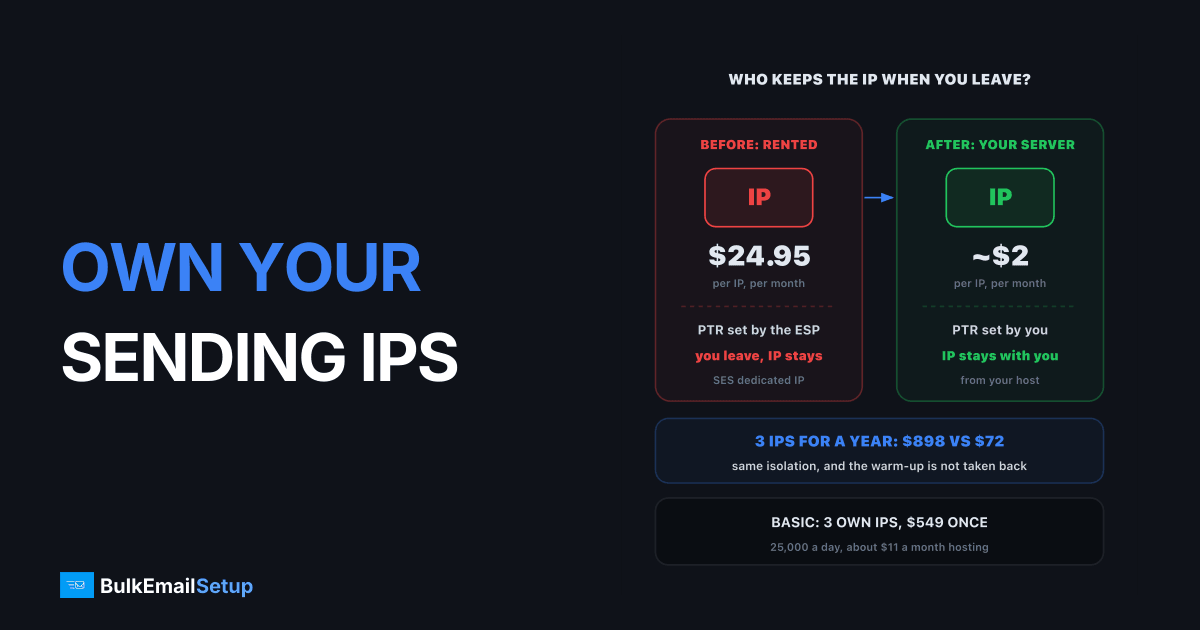
You can own your sending IPs in a practical sense: an IP assigned to a server in your own hosting account is yours to control for about $2 a month, and it stays with you when you change email software or end a contract. A dedicated IP at an ESP is different. It is rented, it stays behind when you leave, and the warm-up you paid for goes back into the provider's pool. Full ownership of an IP block from a registry exists too, but it costs thousands up front and only fits very large senders.
What "owning" an IP actually means
There are three levels, and people mix them up.
| Level | Who holds the IP | Who sets the PTR | What you pay | Leaves with you? |
|---|---|---|---|---|
| Rented from an ESP | SendGrid, Mailgun, SES | the ESP, on request | $24.95 to $89.95+ a month | no |
| Assigned to your server | your hosting provider, in your account | you | about $2 a month per IP | yes, inside that host |
| Your own registry block | you, via a regional registry | you | about $8,000 up front for a /24 | yes, anywhere |
The middle row is what most people mean when they say "our own IPs", and it is what a dedicated SMTP server uses. You do not own the address in a legal sense, the host does, but you control everything that matters for email: the reverse DNS name, the sending software, the warm-up pace and who else can send from it (nobody).
Each step up gives you more control. The middle step is where most senders land
The registry level is covered in depth in can you bring your own IPs to an SMTP provider. For almost everyone, it is the wrong place to spend money.
What happens to your IPs when you leave an ESP
This is the part that costs real money. A dedicated IP at an ESP feels like yours: nobody else sends from it, and you watched it warm up over 4 to 8 weeks. But the contract decides who keeps it.
- You close the account or drop the dedicated IP add-on.
- The provider takes the IP back into its pool.
- After a cooling period, it goes to another customer.
- You start again on new IPs, from cold.
The warm-up is the hidden loss. A few weeks of careful ramping, at maybe a few hundred emails a day per IP at the start, is gone. Our piece on who owns the IP reputation you build walks through what that re-warm costs in time and revenue.
What does leave with you is your domain reputation. Gmail and Microsoft score your sending domain separately from the IP, so a clean domain gives the new IPs a head start. A burned domain follows you, which is why changing provider never fixes a list problem.
When you leave an ESP, nothing sits in the overlap
Does owning IPs help deliverability?
Not directly. No inbox provider gives points for owning an address. Here is what ownership actually changes:
| Factor | Rented ESP IP | IP on your own server |
|---|---|---|
| Other senders on the IP | none while you hold it | none, ever |
| PTR / reverse DNS | set by the ESP | set by you, matches your HELO name |
| Sending rules | the ESP's policy | your MTA settings |
| Reputation after you leave | lost | kept while you keep the server |
| Monthly cost per IP | $24.95 (SES) | about $2 |
| Risk from a bad list | burns the IP | burns the IP |
The last row matters most. An owned IP is not safer from your own mistakes. A bought list or a complaint spike burns it as fast as a rented one, and there is no provider pool to hide in. Ownership pays off for senders with clean, opted-in lists who plan to keep sending for years.
How to move IPs to a new server
The answer depends on whether you are staying with the same host.
Same host, new server. Many hosting providers let you move additional IPs between servers in the same account and data centre. The IPs keep their history, so there is no re-warm. Check your host's docs for "additional IP" or "failover IP" reassignment before you plan around it. After the move:
- Point the PTR at the new server's HELO hostname.
- Update SPF if your record lists the old server.
- Send a small test batch and watch deferrals before full volume.
Different host. IPs cannot follow you between companies unless you own a registry block. You get new IPs, publish them in SPF, set PTR, and warm up again. Your domain reputation carries, so a clean sender usually ramps faster the second time, but plan for 4 to 8 weeks to full volume all the same. The IP warm-up schedule has week-by-week numbers.
What owning IPs costs, in one table
At 25,000 emails a day, here is what three IPs cost per year at each level.
| Setup | IPs | Yearly IP cost | Notes |
|---|---|---|---|
| Amazon SES dedicated IPs | 3 | about $898 | $24.95 each a month |
| SendGrid Pro | 1 included | about $1,079 | plan from $89.95 a month |
| Your own server | 3 | about $72 | $2 each a month from the host |
The SES figure comes from the Amazon SES pricing page. The own-server row also carries a one-time setup cost, which is where the comparison turns. Our dedicated IP vs shared IP guide covers when a dedicated IP is worth having at all.
When owning your IPs is worth it
- You send more than about 50,000 emails a month on a regular schedule.
- Your list is opted-in and clean, so the IP has a reputation worth keeping.
- You expect to change email software or ESP at some point and do not want to re-warm.
- You want to split streams (receipts on one IP, newsletters on another) under your own rules.
It is not worth it if you send a few thousand emails a month, or if the list is unproven. In those cases a shared pool hides problems while you fix them.
How BulkEmailSetup helps
Every plan sets up a dedicated SMTP server in your own hosting account, so the IPs are assigned to you, not rented from us. We set the PTR records, SPF, DKIM and DMARC, rotation across the IPs, bounce handling and a warm-up plan.
| Plan | One-time fee | Dedicated IPs | Emails per day | Hosting you pay your host |
|---|---|---|---|---|
| Basic | $549 | 3 | 25,000 | about $11 a month |
| Advance | $1,199 | 15 | 200,000 | about $49 a month |
| Custom | $2,997 | 60 | 1,000,000 | about $170 a month |
There is no monthly fee to us, and extra IPs cost about $2 a month each from your host. Each plan comes with a 15-day money-back guarantee, which applies until server access is handed over. See the Basic plan or compare all pricing.
Frequently asked questions
Can I own my sending IP addresses?
Yes, at two levels. The common one is an IP your hosting provider assigns to a server in your account: you control its PTR record and who sends from it, for about $2 a month per IP. The rare one is your own block from a regional internet registry, which costs thousands up front and only makes sense at very large volume.
What happens to my IPs if I leave an ESP?
They stay with the ESP. A dedicated IP at SendGrid, Mailgun or Amazon SES is rented, so when you close the account the provider takes it back and can hand it to another customer. The warm-up you paid for goes with it. Your domain reputation is the part that leaves with you.
Does owning IPs help deliverability?
Not by itself. Gmail and Microsoft do not reward ownership. What owning gives you is isolation and continuity: nobody else's complaints land on your IPs, and the reputation you build is not taken away when a contract ends. A bad list still ruins an owned IP just as fast as a rented one.
How do I move IPs to a new server?
Within the same host, many providers let you reassign additional IPs from one server to another in the same account and location, so the IPs and their history move with you. Across hosts you cannot take them; you get new IPs, update SPF and PTR, and warm up again while your domain reputation carries over.
How much does a dedicated IP cost per month?
It depends who holds it. Amazon SES charges $24.95 a month per dedicated IP. SendGrid bundles one IP into its Pro plan from $89.95 a month. An extra IP on your own server costs about $2 a month from the hosting provider, which is why BulkEmailSetup's Basic plan runs 3 dedicated IPs for about $6 a month, after a $549 one-time setup.
Is a rented ESP IP the same as a dedicated IP on my own server?
Only in that nobody else sends from it while you have it. The ESP still controls the PTR record, the sending rules and whether you keep it. On your own server you set the PTR, choose the MTA settings, decide which streams use which IP, and keep it for as long as you pay the host.


