
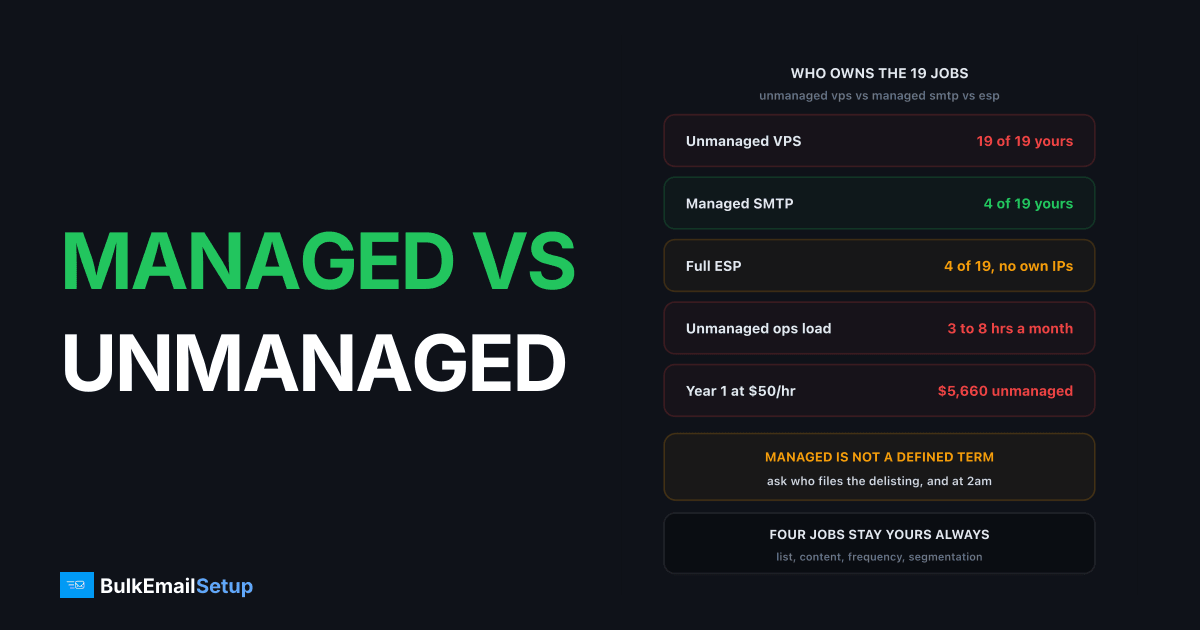
Managed vs unmanaged SMTP is a question about who owns 19 specific jobs, not about price. Unmanaged means you rent a box and own all 19: provisioning, patching, MTA tuning, SPF/DKIM/DMARC/PTR, warm-up, blocklist delisting, bounce and FBL processing, queue monitoring, TLS certs, log retention, mailer software, and the 2am incident. Managed SMTP takes about 14 of those off you. A full ESP takes those plus templates, but you give up the IPs. None of them take your list, your content, or your sending decisions.
I've bought all three. The word "managed" is the problem: at one vendor it means monitored 24/7 with delisting included, at another it means they ran the installer once and handed you root. Compare the task list, not the label.
The task-by-task ownership table
The whole scope of work for a bulk sending setup, split three ways. "You" means a human on your team does it or it doesn't happen.
| Task | Unmanaged VPS | Managed SMTP | Full ESP |
|---|---|---|---|
| Server provisioning | You | Provider | Provider |
| OS patching and security updates | You | Provider | Provider |
| MTA install and tuning (Postfix/Postal) | You | Provider | Provider |
| SPF, DKIM, DMARC records | You | Provider (you paste DNS) | Provider (you paste DNS) |
| PTR / reverse DNS request | You | Provider | Provider |
| IP warm-up plan and execution | You | Provider | N/A (shared pool) |
| Blocklist monitoring | You | Provider | Provider |
| Blocklist delisting requests | You | Provider | Provider |
| Bounce processing and suppression | You | Provider | Provider |
| Feedback loop (FBL) enrollment | You | Provider | Provider |
| Queue and deferral monitoring | You | Provider | Provider |
| TLS certificate renewal | You | Provider | Provider |
| Log retention and search | You | Provider (usually 7 to 30 days) | Provider (usually 30 to 90 days) |
| Mailer software (the sending app) | You | You, or provider installs it | Provider |
| Template building | You | You | Provider |
| List hygiene and suppression rules | You | You | You |
| Content and offer decisions | You | You | You |
| Sending frequency and segmentation | You | You | You |
| 2am incident response | You | Provider | Provider |
Count the "You" column. Unmanaged is 19 of 19. Managed SMTP hands back 4 or 5, and they're the ones that need a marketer, not a sysadmin. An ESP hands back the same four plus the template builder, which is why it feels easier until you read the content policy.
What "managed" almost never includes
Every provider selling managed SMTP, us included, draws the line in the same place: they own the pipe, you own what goes through it.
| Yours, always | Why the provider can't own it |
|---|---|
| List quality and consent | Only you know where the addresses came from |
| Complaint rate | Driven by your content and frequency |
| Email content and offer | Legal exposure sits with the sender |
| Send frequency and segmentation | Business decisions, not infrastructure |
| Unsubscribe honouring | You run the app that holds the opt-outs |
| Sender identity in the From header | Your domain, your brand |
The failure people blame on infrastructure usually isn't infrastructure. Google's sender requirements put the spam complaint line at 0.3%, with 0.10% as the target. A managed provider can set your DKIM perfectly and still watch you cross 0.3% on the third campaign because you mailed a two-year-old list. Dedicated IPs give you your own reputation. They also make it entirely yours to ruin.
Same for a bounce rate over 5%. The provider suppresses the bounced addresses, but if you keep importing the same dead file every month, the suppression list just grows and reputation keeps sliding. More on that in is managed SMTP worth it.
Skills you need if you go unmanaged
Unmanaged is a real option and the cheapest on the invoice. It has an entry requirement: four skills, and you need all four, not three.
Linux administration. Not "I've used a terminal". You need systemd, ufw or iptables, unattended-upgrades, and enough comfort to fix a box that won't boot after a kernel update. A $20/month VPS gives you a root password and nothing else.
DNS. SPF syntax including the 10-lookup limit, DKIM key generation and selector placement, DMARC policy, and how to file a PTR request with your host (a support ticket at Hetzner and DigitalOcean, not a control panel field).
MTA configuration. Postfix main.cf, transport maps, per-destination rate limits, or the Postal equivalent. Default Postfix will happily hammer Gmail at a rate that gets you deferred by lunchtime.
SMTP debugging. When Gmail returns 421 4.7.28 Gmail has detected an unusual rate of unsolicited mail, you need to know that's a rate problem, not a content one. When Outlook returns 550 5.7.606 Access denied, banned sending IP, you need to know where the delisting form is.
Honest hours, once the box is live:
| Activity | Hours per month (unmanaged) |
|---|---|
| OS and MTA patching | 1 to 2 |
| Blocklist checks and delisting | 1 to 3 |
| Queue and deferral review | 1 to 2 |
| Bounce and FBL handling | 0.5 to 2 (if scripted) |
| Log review and cert renewal | 0.5 to 1 |
| Typical total | 3 to 8 hours |
Plus 15 to 40 hours for the first build and a 4 to 6 week warm-up that needs attention most days. The full calendar breakdown is in managed SMTP vs DIY time cost.
Who fixes it when it breaks
The task table is the calm-day view. This is the one that decides it for most teams.
| Failure | Unmanaged VPS | Managed SMTP | Full ESP |
|---|---|---|---|
| Spamhaus SBL listing | You notice (maybe), you file, 24 to 72 hrs | Provider files, usually hours | Shared pool, they may suspend you |
| Gmail 421 4.7.28 deferrals | You diagnose and re-pace | Provider re-paces the queue | Provider throttles silently |
| Outlook 550 5.7.606 block | You find the form, you wait | Provider handles the ticket | Provider handles it, or drops you |
| Disk full, queue stalls | You, and you find out from a customer | Alert fires, provider clears | Never your problem |
| Kernel CVE published | You patch within days or you don't | Patched on their schedule | Never your problem |
| Expired TLS cert | Sends fail until you notice | Auto-renewed | Never your problem |
| DKIM key rotated wrong | Auth fails silently, opens crater | Provider verifies before cutover | Provider owns the key |
| Complaint spike past 0.3% | Your problem | Your problem | Your problem, plus suspension risk |
Two lines stand out. The last row is identical across all three: nobody rescues you from your own list. And the "you find out from a customer" pattern in row four is the real cost of unmanaged, not the two hours of fixing but the 14 hours the queue sat stalled first.
Bounce handling is worth calling out because it's the task people most often assume is automatic. It isn't. Machine-readable bounce reports follow RFC 3464, the delivery status notification format, and on an unmanaged box you're writing the parser that reads them and writes to your suppression table. Skip it and every hard bounce gets mailed again next campaign.
Cost, with your own time priced in
Sticker prices first, 2026 ballparks, check current pricing before you commit.
| Line item | Unmanaged VPS | Managed SMTP | Full ESP (100K/mo) |
|---|---|---|---|
| Infrastructure or plan | $20 to $40/mo | flat plan or one-time | $150 to $400/mo |
| Dedicated IPs | 1, sometimes extra cost | 3 to 15 included | $30 to $80/mo add-on |
| Setup labour (one-time) | 15 to 40 hrs | under 1 hr | 2 to 5 hrs |
| Ongoing ops | 3 to 8 hrs/mo | 0 | 0 |
| Incident hours per year | 10 to 30 | 0 | 0 |
Now price the hours. At a modest $50/hour, year one unmanaged is $360 hosting, 25 setup hours ($1,250), 66 ops hours ($3,300), 15 incident hours ($750). That's about $5,660 for the "cheap" option. At $100/hour, roughly $11,000.
Managed SMTP with a one-time build fee plus hosting lands in the low four figures with essentially zero labour hours. The ESP at 100K a month runs $1,800 to $4,800 a year, also zero labour, but on a shared pool and under someone's content policy. The dollar-side comparison sits in buy an SMTP server vs build one.
The unmanaged number only wins if you value your hours at zero. A solo operator with quiet evenings can honestly do that. Just be honest that it's the answer you're giving.
Decide by capability, not by volume
Most guides say pick by send volume. Wrong axis. I've seen a 2M/month sender run a flawless unmanaged Postfix box and a 30K/month sender destroy a domain in three weeks. The variable is who's on the team.
| Your team | Right model | Why |
|---|---|---|
| Has a Linux admin with 8+ spare hours/month | Unmanaged VPS | You'll do all 19 tasks and save real money |
| Has a developer, no mail experience | Managed SMTP | They can wire the API; they can't warm an IP |
| Marketing only, no technical staff | Managed SMTP or ESP | Someone has to own the server, and it won't be you |
| Agency sending for multiple clients | Managed SMTP, separate IPs | One client's bad list shouldn't sink the others |
| Needs a template builder and campaign UI | ESP, or managed SMTP plus Mautic | Managed SMTP gives you no app layer |
| Content an ESP won't take | Managed SMTP | Own IPs remove the shared-pool policy conflict |
If nobody on your team can read an SMTP transcript, unmanaged isn't cheaper, it's deferred. And if you need Mailchimp's editor, managed SMTP alone won't give it: you pair it with Mautic or Sendy, a job you own in both columns.
Questions to ask before you sign anything
"Managed" isn't a defined term, so make the vendor fill in the table. Six questions that separate real management from an installer script.
- Do you monitor blocklists, and do you file the delisting yourself? "We'll tell you" is not management.
- Who runs the warm-up, and on what schedule? Ask for the daily ramp numbers. A real answer starts around 1,000 to 2,000/day and roughly doubles every 2 to 3 days over 4 to 6 weeks.
- Do you process bounces and FBLs into a suppression list, or do I? This is the most commonly excluded task.
- How long do you keep logs, and can I search them? 7 days is thin for debugging a campaign that ran on Monday.
- What's the response time at 2am on a Sunday? Get it in writing. The SMTP provider SLA guide covers which SLA terms actually bind.
- Do you install and update the mailer app, or just the MTA? Big scope difference, often unstated.
If a vendor won't answer 1, 3, and 5 specifically, what they're selling is an unmanaged server with a nicer invoice.
How BulkEmailSetup helps
We sit in the managed column of that table: we provision the server, install and tune the MTA, set up SPF, DKIM, DMARC and PTR, run the warm-up, monitor blocklists and file delistings, process bounces and feedback loops, and watch the queue so a stall doesn't sit unnoticed overnight. You keep the four jobs nobody can do for you, your list, your content, your frequency, and your segmentation, and you keep full SMTP access to dedicated IPs that belong to you.
Basic is $549 one-time, giving you 1 SMTP server, 3 dedicated IPs, 25,000 emails/day and unlimited contacts. Higher tiers go to 15 IPs and 200,000 emails/day. If you want the ownership of unmanaged without the 19-task checklist, that's what this is. See pricing for current tiers.
Frequently asked questions
What is the difference between managed and unmanaged SMTP?
Unmanaged means you rent a server and own every job on it: OS patching, MTA install, SPF/DKIM/DMARC/PTR, IP warm-up, blocklist delisting, bounce processing and queue monitoring. Managed SMTP means the provider owns the infrastructure and reputation jobs while you keep your list, your content and your sending decisions. The split runs to 19 named tasks, and only about four of them stay yours on a managed plan.
What does managed SMTP not include?
Almost no managed SMTP provider owns your list quality, your email content, your sending frequency, or your template building. If you import a purchased list and your complaint rate goes past Google's 0.3% limit, that is your failure on managed infrastructure too. Managed covers the server and the reputation plumbing, not the sending decisions that create reputation in the first place.
What skills do I need to run unmanaged SMTP?
Four: comfortable Linux administration (systemd, firewall, package updates), DNS record editing including TXT and PTR requests, MTA configuration in Postfix or Postal, and basic SMTP debugging so a 421 4.7.28 or a 550 5.7.1 tells you something. Budget 15 to 40 hours for the first build and 3 to 8 hours a month after that.
Is a managed SMTP server the same as an ESP like Mailchimp?
No. An ESP gives you templates, a campaign editor, list tools and a shared IP pool, but you do not own the IP or the reputation and you sit under their content policy. Managed SMTP gives you dedicated IPs and full SMTP access with the ops handled, but no template builder. Roughly, an ESP owns 15 of 19 tasks plus the app layer, managed SMTP owns 14 or 15, and unmanaged owns none.
Who fixes a Spamhaus listing under each model?
Unmanaged: you, and you have to notice it first, which usually takes hours or days without monitoring. Managed SMTP: the provider files the delisting, typically inside a few hours. ESP: nobody files anything for you specifically, because the listing hits the shared pool and the provider more often suspends the account that caused it.


