
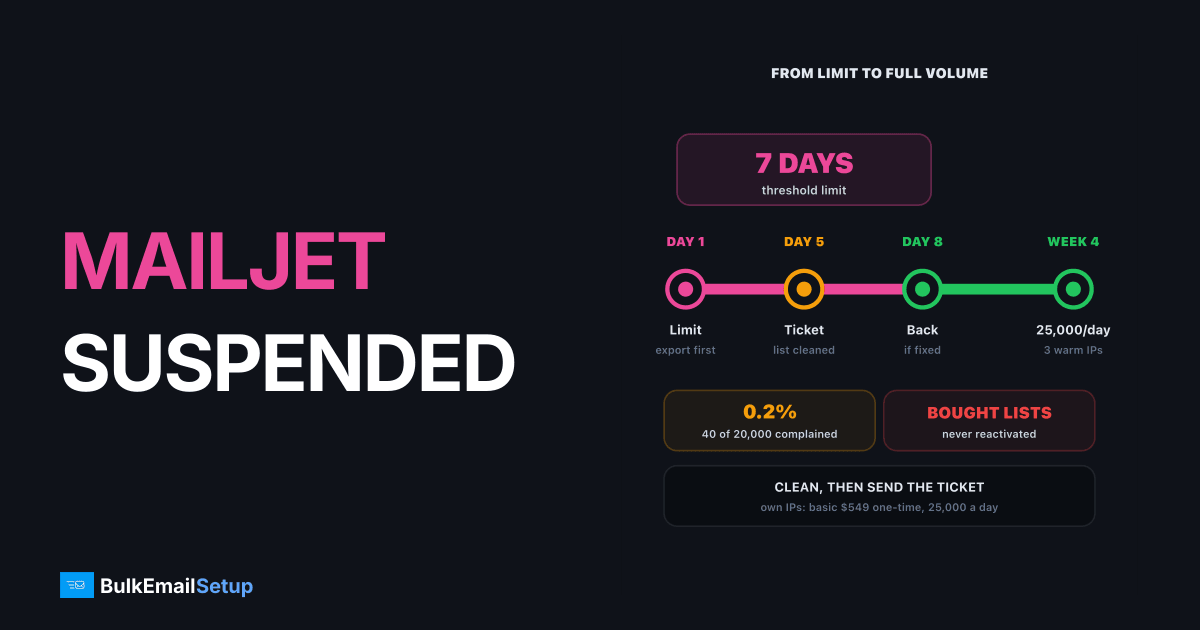
Mailjet limits or blocks an account for four reasons: sending past the thresholds in its Acceptable Use Policy, high spam complaints, abuse reports from recipients, or an internal review that flags the account as a deliverability risk. A threshold breach brings a temporary sending limit for 7 days. Complaint and abuse limits stay until Mailjet's Compliance Team is satisfied. Either way, the way back is the same: find the list segment that caused it, remove it, and send a support ticket that proves it.
What the Mailjet notice is telling you
Mailjet's blocked or limited account article names the causes. They lead to different outcomes, so read the notice before you reply.
| Notice | What triggered it | How long | Way back |
|---|---|---|---|
| Sending thresholds exceeded | recent sending went past the AUP limits | temporary limit, 7 days | ticket with email types, volume, list source, changes |
| High spam reports | too many recipients hit "report spam" | rate limit, no fixed end | explain how the list was collected and kept clean |
| Abuse complaint | a recipient wrote to Mailjet directly | until Compliance reviews | the same, plus proof that person opted in |
| Compliance risk | internal review flagged the account | until reviewed | contact support with your sending practices |
The 7-day limit is the mildest of the four. It feels like a ban, but it is a timeout with a known end.
A threshold limit is a week with a known end, so use the week
Use that week. Day 1 is for exporting and finding the cause. Days 2 to 4 are for cleaning. Send the ticket once the clean is done, not before.
Why did Mailjet suspend my account?
Mailjet does not publish its complaint or bounce numbers, and it says it can change its sending thresholds without notice. So measure yourself against the lines every inbox provider uses. Gmail's sender guidelines set 0.1% spam complaints as the target and 0.3% as the ceiling.
| Metric | Healthy | Where shared platforms act | What it points to |
|---|---|---|---|
| Spam complaints | under 0.1% | around 0.1% to 0.3% | people who never asked for your mail |
| Hard bounces | under 2% | around 5% | an old or bought list |
| Volume jump | steady | 3x or more in a week | an import that was never warmed |
| Abuse reports | none | a handful | a contact who never opted in |
40 complaints on 20,000 emails is 0.2%, already in the danger zone
Shared platforms act earlier than Gmail because your complaints land on IPs that other customers use too. On a shared pool you are judged on the risk you pose to them.
Does Mailjet suspend for purchased lists?
Yes, and this one is not negotiable. Mailjet's help centre article on buying B2B lists says that even where buying such a list is legal, Mailjet does not allow it, and that unsolicited email breaks its Acceptable Use Policy and Terms. It names blocklisting and account suspension or termination as the result.
If a bought or scraped segment caused the limit, no ticket will fix it. Delete that segment. The same rule applies at every reputable provider, including us: our anti-spam policy bans bought, rented and scraped lists too. See does Mailchimp allow purchased lists for the same rule at another platform.
How to get reactivated
A ticket that works answers four questions with facts.
- What you send. Newsletters, receipts, product updates. Be specific.
- How much. Expected emails per month, and your usual daily peak.
- Where every contact came from. Signup form, checkout, event registration, with dates.
- What changed. "Removed 3,200 contacts from a 2023 trade-show import, added double opt-in to the signup form."
Before you send it, export everything while you still have dashboard access: contacts, unsubscribes, bounces, complaint lists. Our guide to exporting your list before an ESP ban has the checklist. If you still have the stats, sort the triggering campaign's bounces and complaints by list source. One segment usually stands out.
Where to send after Mailjet
| Option | Good when | Risk |
|---|---|---|
| Fix and stay on Mailjet | small opt-in list, one bad import now removed | same shared-pool rules next time |
| Another shared ESP | small list, cause fully fixed | Brevo, Mailchimp and SendGrid police the same way |
| Mailjet for receipts, own server for campaigns | app mail works, bulk keeps hitting limits | two systems to run |
| Dedicated SMTP server | steady volume, list you can vouch for | warm-up and hygiene are your job |
Moving the same list to another shared ESP is the common mistake. It gets the same result within weeks. If your list is clean and you simply send more than shared pools like, dedicated IPs remove the policy conflict, because nobody else's mail shares your IPs. Our take on whether Mailjet is good for bulk email covers where it fits.
New IPs start cold, whatever your history. A typical ramp grows each IP about 30% every two days from 500 a day.
Three new IPs reach 25,000 a day in about four weeks
The 30-day plan
Days 1 to 3. Export everything. Find the segment that caused the spike. Set up Google Postmaster Tools if it is not already running.
Days 4 to 7. Delete hard bounces and any bought or scraped contacts. Mark anyone silent for 12 months as inactive. Send the Mailjet ticket.
Days 8 to 30. Whatever Mailjet decides, start the new path: a sending subdomain with SPF, DKIM and DMARC, your most engaged contacts first, and volume growing step by step.
How BulkEmailSetup helps
We build a dedicated SMTP server you own: your own IPs, SPF, DKIM, DMARC and PTR set up, bounce handling, a campaign platform and a warm-up plan. Because the IPs carry only your mail, there is no shared pool for a compliance team to protect. A clean, opt-in list still matters, and our setup will not help a bought list.
| Plan | One-time fee | Emails per day | Dedicated IPs | Hosting you pay your host |
|---|---|---|---|---|
| Basic | $549 | 25,000 | 3 | about $11 a month |
| Advance | $1,199 | 200,000 | 15 | about $49 a month |
There is no monthly fee to us and no contact limit. Every plan has a 15-day money-back guarantee, which applies until server access is handed over. See Basic plan details or compare all pricing.
Frequently asked questions
Why did Mailjet suspend my account?
Mailjet's help centre lists four main causes: sending past the thresholds in its Acceptable Use Policy, too many spam complaints, abuse reports sent to Mailjet by recipients, and an internal review that flags the account as a deliverability risk. Almost all of these trace back to the list, usually an old or bought segment, rather than to the email content.
How do I get a Mailjet account reactivated?
Open a support ticket that answers four things: what kinds of email you send, your expected monthly volume, where every contact came from and how they opted in, and what you changed since the problem. Mailjet's Compliance Team reviews it. Remove the segment that caused the spike before you write, because the ticket is judged on proof, not promises.
Does Mailjet suspend for purchased lists?
Yes. Mailjet's own help centre says that even where buying a B2B list is legal, Mailjet does not allow those lists, and that sending unsolicited email breaks its Acceptable Use Policy and Terms of Service. Possible results it names include blocklisting and account suspension or termination. A bought list will not get you reactivated.
Where can I send bulk email after Mailjet?
If the list caused it, clean it first, because Brevo, Mailchimp and SendGrid apply the same shared-pool rules. If your sending is legitimate and you have outgrown shared IPs, a dedicated SMTP server puts only your own reputation at risk. BulkEmailSetup's Basic plan is $549 one-time for 3 dedicated IPs and 25,000 emails a day, plus about $11 a month hosting.
How long does a Mailjet sending limit last?
When an account goes past Mailjet's sending thresholds, its help centre says a temporary sending limit applies for 7 days. Limits for spam complaints or abuse reports have no fixed end and stay until the Compliance Team is satisfied. Plan for at least a week without full sending either way.
Can I just open a new Mailjet account?
It is a bad idea. Providers link accounts by domain, payment details and sending patterns, and a second account sending the same list to the same people will hit the same limits within days. It also makes any appeal on the first account harder. Fix the list or move to infrastructure that fits your sending.


