
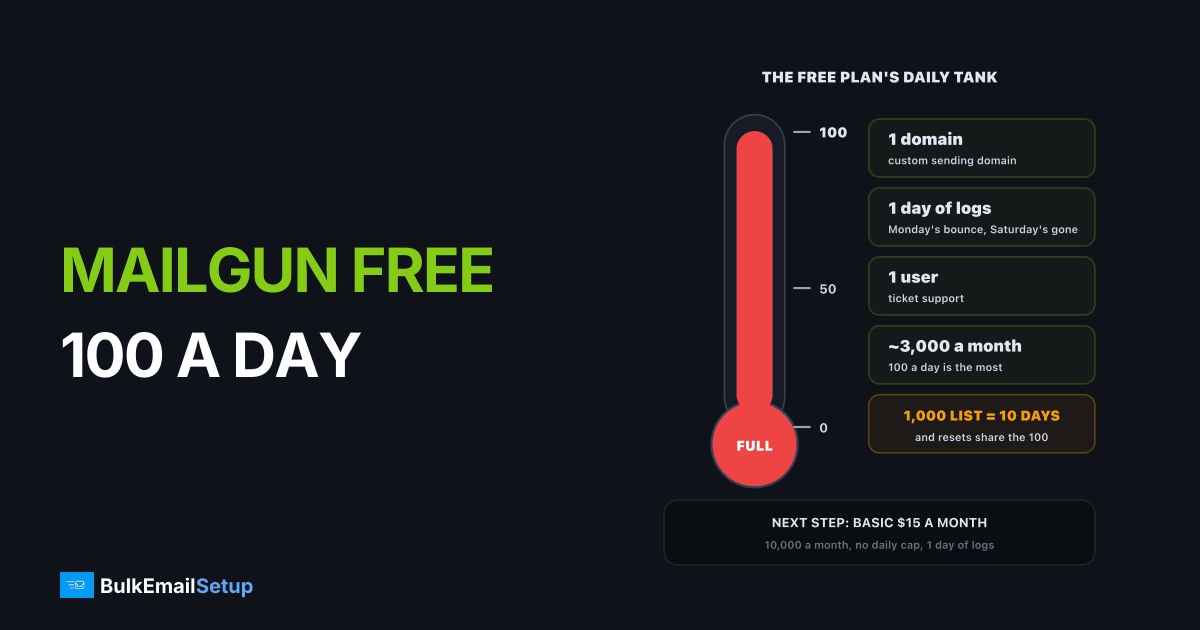
Mailgun's free plan sends 100 emails a day, with 1 custom domain, 1 day of log retention and 1 user. That is about 3,000 emails a month at most, which is right for testing an app and wrong for anything customers rely on. The next step is Basic at $15 a month for 10,000 emails, and at steady volume a flat-cost server becomes cheaper than any of Mailgun's tiers.
What the Mailgun free plan includes
These are the free plan terms from Mailgun's pricing page:
| Limit | Free plan |
|---|---|
| Emails | 100 a day |
| Most in a 30-day month | about 3,000 |
| Custom sending domains | 1 |
| Log retention | 1 day |
| Users | 1 |
| Support | ticket |
| Dedicated IP | not included |
The daily cap is the one that bites. A monthly allowance lets you send a burst and then go quiet. A daily allowance does not, so a 1,000 person announcement takes 10 days to reach everyone.
At 100 a day, one 1,000 person send fills ten days
What the free plan is good for
Be fair to it. The free plan is the right choice when you are:
- Building an app and need password resets and signup mail to work in development.
- Testing a new domain's DNS: SPF, DKIM and DMARC alignment before real traffic.
- Running a tiny tool with a handful of users and a few emails a day.
It is the wrong choice the moment real customers depend on it. The 1 day of logs means that when a customer says "I never got the reset email," the evidence may already be gone by the time you look.
When you have outgrown it
Three signs you need to move up:
- You hit 100 in a day more than once a month.
- You need a second domain, for example one for your app mail and one for marketing.
- You need to debug delivery after the fact. One day of logs is not enough to investigate a problem reported on Monday.
What each Mailgun step costs
Each Mailgun step up buys volume, domains and longer logs
| Plan | Price | Included | Overage per 1,000 | Domains | Logs |
|---|---|---|---|---|---|
| Free | $0 | 100 a day | none, sending stops | 1 | 1 day |
| Basic | from $15 a month | 10,000 a month | from $1.80 | 1 | 1 day |
| Foundation | $35 a month, first month free | 50,000 a month | from $1.30 | 1,000 | 5 days |
| Scale | $90 a month, first month free | 100,000 a month | from $1.10 | 1,000 | 30 days |
Basic removes the daily cap but keeps the single domain and the 1 day of logs. Foundation is where Mailgun starts to feel like production infrastructure. Mailgun's pricing page lists extra dedicated IPs at $59 a month each, with one included at higher volumes.
What it costs as you grow
Using the list prices and overage rates above:
| Monthly volume | Mailgun plan | Monthly cost | Own server, Basic |
|---|---|---|---|
| 3,000 | Free | $0 | not worth it yet |
| 10,000 | Basic | $15 | about $11 hosting |
| 50,000 | Foundation | $35 | about $11 hosting |
| 100,000 | Scale | $90 | about $11 hosting |
| 250,000 | Scale + 150,000 overage | about $255 | about $11 hosting |
| 500,000 | Scale + 400,000 overage | about $530 | about $11 hosting |
The own-server column is hosting only; add a $549 one-time setup. At 100,000 emails a month the setup pays itself back in about 7 months against Scale. At 500,000 a month it pays back in about five weeks.
If you are weighing Mailgun for a newsletter rather than app mail, read is Mailgun good for newsletters first. If you are comparing free tiers across providers, SMTP providers with a real free trial lines them up side by side.
How to move off the free plan without breaking mail
Moving up a Mailgun tier is a billing change; your domain and DNS stay as they are. Moving off Mailgun to your own server takes a little more care, because app mail must keep flowing during the switch:
- Keep the old SPF include until the end. Add the new server to the same SPF record, so both senders pass while you switch.
- Publish the new DKIM key on its own selector. The old Mailgun selector keeps working for anything still in flight.
- Move one stream at a time. Start with newsletters, which tolerate a slow warm-up, and move password resets last.
- Warm the new IPs before the big send. Start at a few hundred a day per IP and grow about 30% every two days, as in our warm-up schedule.
- Export suppressions from Mailgun first. Bounced and unsubscribed addresses must come with you, or the new IPs mail them again on day one.
Only remove the Mailgun SPF include once its logs show no traffic for a week.
Before you move up, check the policy
Mailgun's paid plans keep the same acceptable use rules as the free plan, including the complaint and bounce limits. If you plan to send outreach rather than opt-in mail, read does Mailgun allow cold email before paying for a bigger tier.
How BulkEmailSetup helps
When you are past a few thousand emails a month and growing, we set up a dedicated SMTP server on hosting you own. There is no per-email fee and no contact limit, so going from 50,000 to 500,000 a month does not change your bill. You get dedicated IPs, SPF, DKIM, DMARC and PTR, bounce handling, a campaign platform and a warm-up plan.
| Plan | One-time fee | Emails per day | Dedicated IPs | Hosting you pay your host |
|---|---|---|---|---|
| Basic | $549 | 25,000 | 3 | about $11 a month |
| Advance | $1,199 | 200,000 | 15 | about $49 a month |
There is a 15-day money-back guarantee, which applies until server access is handed over. See the Basic plan or all pricing.
Frequently asked questions
How many emails does the Mailgun free plan allow?
100 emails a day, according to Mailgun's pricing page. There is no separate monthly figure, so the most you can send in a 30-day month is about 3,000. The cap is per day, which means a 1,000 contact newsletter would take 10 days to go out on the free plan.
What does Mailgun's free plan leave out?
The free plan gives you 1 custom sending domain, 1 day of log retention, 1 user and ticket support. It does not include a dedicated IP, longer logs or more domains. One day of logs matters more than it sounds: if a bounce problem shows up on Monday, Saturday's sending history is already gone.
What does the next Mailgun plan cost?
Basic starts at $15 a month for 10,000 emails with no daily cap, then Foundation at $35 a month for 50,000 and Scale at $90 a month for 100,000. Overage runs from $1.80 per 1,000 on Basic down to $1.10 on Scale. Extra dedicated IPs are $59 a month each. Check Mailgun's live pricing page before you buy.
What is cheaper than Mailgun after the free tier?
At low volume, Amazon SES at $0.10 per 1,000 emails is cheaper on paper but takes more setup. At steady volume, a dedicated SMTP server with no per-email fee wins: BulkEmailSetup's Basic plan is $549 one-time for 25,000 emails a day, plus about $11 a month of hosting paid to your own provider.
Does the Mailgun free plan expire?
Mailgun lists Free as a plan on its pricing page, not as a time-limited trial, so it does not show an end date. What does run out is the 100 a day. Any day you need more than that, mail waits or fails, so treat the free plan as a sandbox for development and testing, not for production.
Can I send a newsletter on the Mailgun free plan?
Only a very small one. At 100 emails a day, a 500 person list takes 5 days and a 1,000 person list takes 10. Mailgun is also a sending API rather than a newsletter tool, so you would still need signup forms and an editor from somewhere else.
Does the Mailgun free plan include a dedicated IP?
No. Free plan mail goes out on Mailgun's shared IPs. Mailgun's pricing page sells extra dedicated IPs at $59 a month each and says one is included with its higher-volume plans from around 100,000 emails a month. On shared IPs, your deliverability depends partly on other senders on the same pool.


