
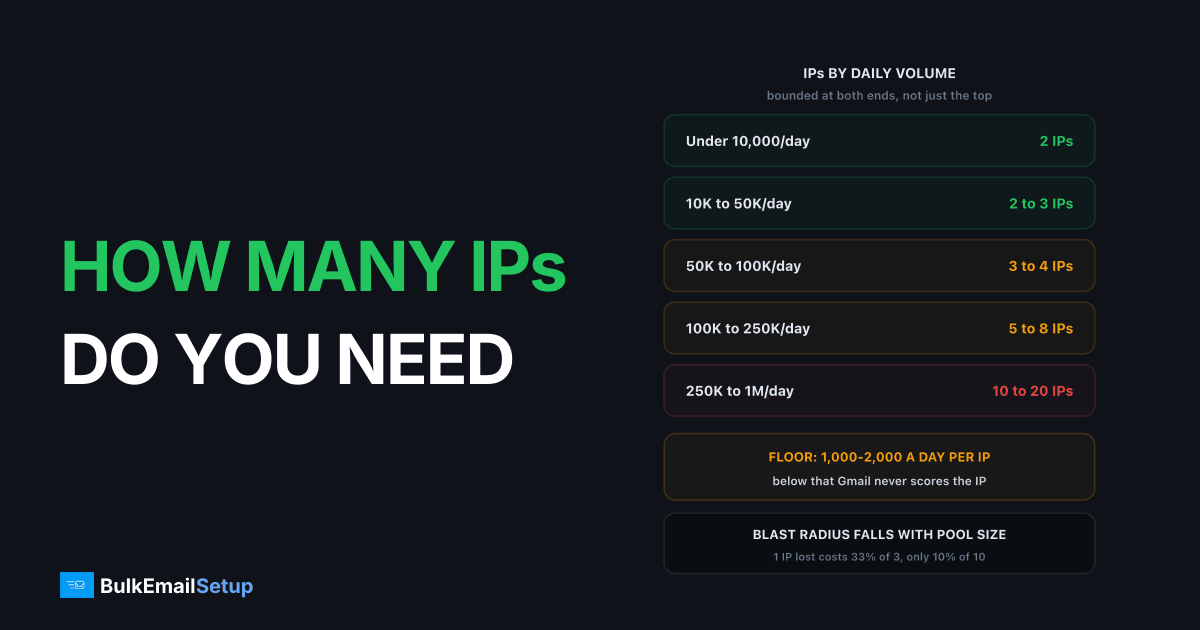
Divide your daily volume by 25,000, round up, and set a floor of 2. That is the answer for most senders: under 10,000 a day run 2 IPs, 50,000 a day run 2 to 3, 100,000 run 3 to 4, and 1 million run 20 to 40. The number is bounded on both sides. Too few IPs and Microsoft and Yahoo throttle you at 5,000 to 20,000 per IP per day. Too many and each IP drops under the roughly 1,000 a day it needs to hold a reputation at all.
This is the inverse question to how many emails per day per IP. That one asks what a single IP can carry. This one starts from your volume and works out the pool.
The two-sided rule
Every IP in your pool has a floor and a ceiling, and both are behavioural, not technical.
| Bound | Number | What sets it |
|---|---|---|
| Floor to hold reputation | 1,000 to 2,000/day, most days | Gmail needs traffic to score an IP at all |
| Comfortable ceiling | 25,000 to 50,000/day | per-receiver hourly limits, mostly Microsoft and Yahoo |
| Hard ceiling on a mature IP | 50,000 to 100,000/day | rarely reachable on a consumer-heavy list |
| Re-warm trigger | 14+ days idle | reputation decays without traffic |
The floor is the one people ignore. Send 300 a day from a dedicated IP and Google Postmaster Tools draws no reputation line for it, because there is not enough data. Unknown is not neutral. An IP with no track record gets more scrutiny than a busy shared pool Gmail has watched for three years.
The ceiling is not really the IP's ceiling either. It is the sum of what each receiver tolerates from one IP. Microsoft is the tightest, often 5,000 to 20,000 a day, so a list that is 35% Outlook and Hotmail hits a wall well below the theoretical 50,000.
The sizing table by daily volume
Run your real daily peak, not your monthly average divided by 30. A Tuesday blast of 200,000 needs the pool sized for 200,000.
| Daily volume | IPs to run | Per IP/day | Reasoning |
|---|---|---|---|
| Under 10,000 | 2 | 5,000 each | one carries the load, one stays warm as failover |
| 10,000 to 50,000 | 2 to 3 | 8,000-17,000 | rotation plus a spare if one gets listed |
| 50,000 to 100,000 | 3 to 4 | 17,000-25,000 | keeps each IP inside Microsoft and Yahoo tolerance |
| 100,000 to 250,000 | 5 to 8 | 20,000-31,000 | blast radius drops to 12-20% per IP lost |
| 250,000 to 1M | 10 to 20 | 25,000-50,000 | stream separation and receiver-specific pools start paying |
| Over 1M | 20 to 40 | 25,000-50,000 | multi-server, staggered warm-up permanently running |
Read the "per IP/day" column as the sanity check. If it lands under 1,000 you have too many IPs. If it lands over 50,000 you have too few. Everything between 5,000 and 30,000 is comfortable.
A B2B list skewing toward corporate gateways such as Proofpoint and Barracuda needs more IPs at the same volume, because gateway reputation is per-IP and unforgiving. A list that is 70% Gmail needs fewer, because Gmail weighs your sending domain more heavily than your IP.
Why the answer is never 1
One IP is a single point of failure with a 24 to 72 hour repair time. That is the entire argument.
When one IP lands on Spamhaus or UCEPROTECT, delisting takes hours to days. With one IP your sending stops for that whole window. With two, you shift traffic in minutes and delist at your own pace. The second IP is insurance, not throughput, and it is the cheapest insurance in email.
Rotation is the second reason. Two IPs on alternating days keeps both above the warm floor while halving the per-IP daily hit at each receiver, and gives you a known-good IP to compare against when delivery drops. Even at 3,000 a day, run two at 1,500 each.
The blast-radius math
Every IP you add cuts the cost of losing one. The curve flattens fast, which is why the table stops adding IPs so aggressively past 8.
| Pool size | Capacity lost per IP blocklisted | Days to recover full capacity |
|---|---|---|
| 1 IP | 100% | 1 to 3 (delisting), sending stopped |
| 2 IPs | 50% | 1 to 3, at half speed |
| 3 IPs | 33% | 1 to 3, at two thirds speed |
| 5 IPs | 20% | 1 to 3, barely noticed |
| 10 IPs | 10% | 1 to 3, invisible to the business |
| 20 IPs | 5% | absorbed by normal queue slack |
The jump from 1 to 2 removes 50 points of risk. The jump from 10 to 20 removes 5. That is diminishing returns in plain form, and it is why the right answer at 100,000 a day is 4 IPs rather than 12.
The big pool has a hidden cost. Twenty IPs at 250,000 a day is 12,500 each, fine. Twenty at 40,000 a day is 2,000 each, right on the floor, and any bad week drops several below it.
How stream separation changes the count
Split by stream before you split by volume. Transactional and marketing mail should not share an IP once both can hold their own floor.
| Stream | Typical share of volume | IP treatment |
|---|---|---|
| Transactional (receipts, resets, alerts) | 5-20% | own IP once it clears 1,000/day, else warm shared pool |
| Marketing and newsletters | 60-90% | the main pool, sized from the table above |
| Cold outreach or lead gen | varies | separate IPs and a separate subdomain, always |
| Re-engagement to old contacts | small, bursty | separate IP or throttled into the marketing pool |
Marketing is where complaints come from. Those complaints must never land on the IP delivering password resets, because that mail is the least tolerant of delay and the most damaging to lose.
The catch is the floor again. A sender whose transactional stream is 400 a day should not give it a dedicated IP. Put it on a shared pool at Postmark or SES, where it inherits a warm history it could never build alone. At 250,000 a day the split is typically 2 IPs transactional, 8 marketing, and a spare kept warm and idle for listings.
The warm-up cost of every extra IP
Each IP you add costs 4 to 8 weeks before it carries full volume. Not calendar weeks you can run in parallel, either.
| Week | Per IP/day | Notes |
|---|---|---|
| 1 | 50-500 | most engaged segment only |
| 2 | 500-1,500 | watch 4xx deferral rate daily |
| 3-4 | 2,000-7,000 | first point Postmaster Tools shows a reputation |
| 5-6 | 8,000-20,000 | per-receiver caps become the binding limit |
| 7-8 | 20,000-50,000 | full volume if complaints stayed under 0.1% |
Stagger, do not batch. Warming four IPs simultaneously means four cold IPs and no warm capacity to fall back on if one stalls. Bring up one, get it to week 4, start the next. Four IPs staggered is roughly 14 to 20 weeks end to end, and the full ramp is in the IP warm-up schedule.
Add capacity two months before you need it. Deciding in November that you need three more IPs for Black Friday is too late. Gmail's sender guidelines put the spam complaint line at 0.3% with 0.10% as the target, and a rushed warm-up is the fastest way to cross it: cold IPs land in spam, and spam gets reported.
When to add an IP versus when to slow down
Not every delivery problem is a capacity problem. Adding an IP to fix a reputation problem just gives you two damaged IPs.
| Symptom | Add an IP | Slow down instead |
|---|---|---|
| 421 deferrals at Microsoft only, clean complaints | yes, you are over per-receiver tolerance | no |
| Complaint rate over 0.3% | no | yes, and fix the list |
| Bounce rate over 5% | no | yes, clean before anything else |
| Volume grew 40% and deferrals followed | yes | ramp the growth over 2 weeks too |
| One IP blocklisted, others fine | yes, for failover you should already have had | no |
| Gmail spam-foldering across all IPs | no, this is domain reputation | yes |
The test is whether the problem is per-IP or across the board. Per-IP deferrals with healthy engagement metrics mean you need more IPs. Anything showing up identically on every IP is a list, content, or domain problem, and more IPs make it worse by splitting volume below the warm floor while fixing nothing.
What extra IPs cost across providers
Renting IPs is a monthly line item that scales linearly. Owning them is not.
| Provider | Cost per extra IP/month | Plan gate | 5 IPs for 12 months |
|---|---|---|---|
| Amazon SES | $24.95 | none, pay per email on top | $1,497 plus send fees |
| SendGrid | ~$30 | Pro plan, ~$90/month | ~$2,880 |
| Mailgun | $59 | Foundation, ~$35/month | ~$3,960 |
| Postmark | $50 | needs 300,000/month volume | $3,000 plus plan |
| BulkEmailSetup Basic | included (3 IPs) | $549 one-time | $549 total, year 2 is $0 |
| BulkEmailSetup higher tiers | included (to 15 IPs) | one-time | no recurring per-IP fee |
Amazon publishes the $24.95 standard dedicated IP price on its SES pricing page, the cheapest rental here. The plan gate is what actually hurts on SendGrid and Mailgun: a $30 IP behind a $90 plan is a $120 IP in the first month.
The rental model punishes the thing that makes you safer. Going from 3 IPs to 8 costs an extra $1,500 a year at SES and roughly $1,800 at SendGrid, every year. On owned infrastructure it is a one-time step up a tier. For 100,000 a day, the best SMTP setups for 100K per day compares the whole stack.
The sizing checklist
Work through it in order and stop at the first no.
- What is your peak daily volume? Not the monthly average. Size to the biggest Tuesday.
- Divide by 25,000 and round up. That is your starting count.
- Is the result under 2? Make it 2. Failover is not optional.
- Divide volume back across that count. Under 1,000 per IP per day means drop an IP.
- Is your list more than 30% Microsoft? Add one IP, Outlook tolerance is the tightest.
- Do you run separate transactional and marketing streams, each over 1,000 a day? Add an IP for the split.
- Is your complaint rate under 0.1% and bounce rate under 2%? No means fix the list first. More IPs will not help.
- Can you stagger 4 to 8 weeks of warm-up per new IP? No means buy fewer and grow into them.
- Rent or own at 12 months? At 5 or more IPs, renting is roughly $1,500 to $4,000 a year against a one-time cost.
The common mistake is step 4 in reverse: buying the pool you will need in two years, splitting today's volume across it, and ending up with eight IPs at 600 a day that never build a reputation. Buy what you can keep warm. Whether to own IPs at all is covered in dedicated IP or shared.
How BulkEmailSetup helps
We size the IP pool against your real peak day, then warm each IP on a staggered schedule so you always have warm capacity while the next one ramps. You get your own server, your own IPs, full SPF, DKIM, DMARC and PTR setup, MTA tuning and bounce handling, and extra IPs cost about $2 a month each at your host, with no fee to us on top.
Basic is $549 one-time, covering 1 SMTP server, 3 dedicated IPs, 25,000 emails/day and unlimited contacts. Higher tiers scale to 15 IPs and 200,000 emails/day. See pricing for the tier that matches your volume.
Frequently asked questions
How many sending IPs do I need?
Divide your daily volume by 25,000 and round up, then set a floor of 2 IPs. At 50,000 a day that is 2 to 3 IPs, at 250,000 it is 10, and at 1 million it is 20 to 40. Never run 1 IP, because a single blocklisting then stops all your mail with no failover.
What is the minimum volume per IP to keep it warm?
Roughly 1,000 to 2,000 emails a day, sent most days of the week. Below that Gmail does not see enough traffic to score the IP and Postmaster Tools shows no reputation line at all. This is why buying 8 IPs for 10,000 a day is worse than buying 2.
Can one IP handle 100,000 emails a day?
Technically yes on a mature IP, but not safely across a normal consumer list. Microsoft and Yahoo start deferring a single IP somewhere between 5,000 and 20,000 a day each, so 100,000 through one IP produces 421 deferrals long before the IP's own ceiling. Plan 3 to 4 IPs at that volume.
Is it better to have more IPs or fewer?
More IPs shrink your blast radius: with 3 IPs, losing one to a blocklist costs 33% of capacity, with 10 it costs 10%. But every extra IP splits your volume further, and once each IP falls under about 1,000 a day none of them build reputation. Size for the smallest pool that keeps every IP above that floor.
Should transactional and marketing mail use separate IPs?
Yes, once each stream can hold 1,000 a day on its own. Marketing generates the complaints, and those complaints should never land on the IP that delivers password resets. If your transactional stream is only 200 a day, keep it on a warm shared pool instead of giving it a dedicated IP it cannot keep warm.
How long does it take to add an IP to an existing pool?
4 to 8 weeks per IP to reach full volume, ramping roughly 30% every two days. Stagger new IPs rather than warming three at once, because a pool where every IP is cold has no warm capacity to fall back on. Add capacity 8 weeks before you need it, not the week you need it.
What does each extra dedicated IP cost?
Rented from an ESP, roughly $25 to $60 per IP per month: Amazon SES lists $24.95, SendGrid around $30 on a Pro plan, Postmark $50, Mailgun $59. Owned IPs on your own server are a one-time cost, and BulkEmailSetup's $549 Basic plan includes 3 with no monthly per-IP fee.


