
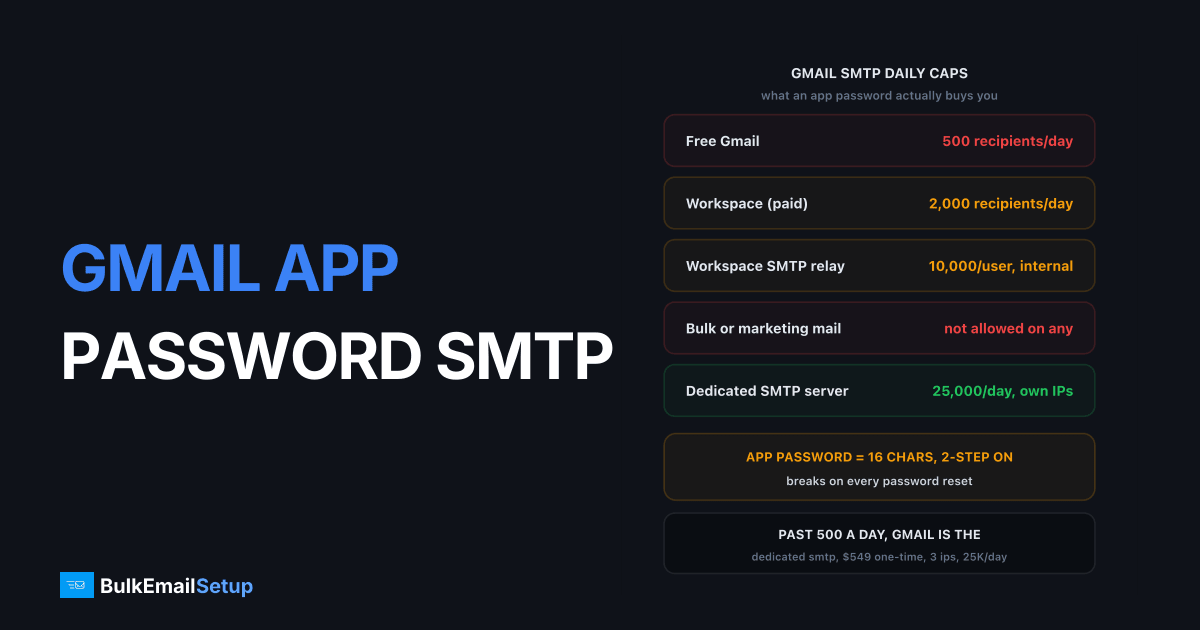
A Gmail app password for SMTP is a 16-character code Google generates so one app or script can log in to smtp.gmail.com without your real password. You need 2-Step Verification on first, then you create the password at myaccount.google.com/apppasswords and use it with your full email address on port 587 (STARTTLS) or 465 (SSL). It fixes the login. It does not lift the limits: 500 recipients a day on free Gmail, 2,000 on Workspace.
I've set this up for dozens of contact forms, cron jobs, and invoice mailers. It works fine for that. Where it falls apart is the moment someone points a list at it.
Why does Gmail require an app password now?
Google removed the "Less secure app access" switch from personal accounts on 30 May 2022, and turned it off for every Google Workspace account on 30 September 2024. That switch was the thing that let a script log in with your normal password over AUTH PLAIN. With it gone, there are two sanctioned ways in: OAuth 2.0, or an app password tied to 2-Step Verification.
The reasoning is straightforward. A plain password in a config file is a full-account key. If it leaks, the attacker has your Drive, your contacts, and your recovery options. An app password is scoped to sign-in only, is revocable on its own, and dies automatically when you change your main password. Google would rather you used OAuth, but most SMTP libraries and every hardware device (printers, NAS boxes, alarm panels) only speak username and password. App passwords are the compromise.
One thing people miss: an app password is not a weaker password. It still grants SMTP and IMAP access to the whole mailbox. Treat it like a key, not a token.
How do I create a Gmail app password for SMTP?
Five steps. The first one is where most people get stuck, because Google hides the app password page entirely until 2-Step Verification is on.
- Turn on 2-Step Verification. Go to myaccount.google.com/security, open "2-Step Verification", and finish the prompts. A phone number or an authenticator app both work. Without this step, the app password page returns "The setting you are looking for is not available for your account."
- Open the app passwords page. Go to myaccount.google.com/apppasswords directly. Google removed the link from the security menu in 2024, so searching for it in settings often finds nothing.
- Name it and generate. Type a name like "invoice-mailer" and click Create. Google shows a 16-character code in four groups of four. Spaces are display only. Paste it with or without them, both work.
- Copy it now. Google shows it exactly once. If you lose it, delete the entry and generate a new one. There is no "reveal" button.
- Put it in your SMTP config. Username is your full address (
[email protected]or[email protected]on Workspace). Password is the 16 characters. Leave your real password out of the config entirely.
If you are on Workspace and step 2 shows nothing, your admin has either not enabled 2-Step Verification for your org or has restricted it to security keys. Both block app passwords. That is covered below.
What are the smtp.gmail.com settings?
These are the settings I use in every client. The username is always the full address, never the local part.
| Setting | Value |
|---|---|
| SMTP host | smtp.gmail.com |
| Port (recommended) | 587 with STARTTLS |
| Port (alternative) | 465 with implicit SSL/TLS |
| Authentication | Required, AUTH PLAIN or AUTH LOGIN |
| Username | Full email address |
| Password | The 16-character app password |
| From address | Must match the account or a verified "Send mail as" alias |
Port 587 is the one to start with. If your host or ISP blocks it, 465 is the fallback. Port 25 is not usable for authenticated sends to Google, and Google's own SMTP options doc only lists 25 for the unauthenticated restricted relay that can reach Gmail addresses alone. For the full port argument, see SMTP port 25 vs 465 vs 587 vs 2525.
A quick test from the shell, so you know whether the problem is credentials or your app:
openssl s_client -connect smtp.gmail.com:587 -starttls smtp -crlf -quiet
EHLO test
AUTH PLAIN <base64 of "\[email protected]\0xxxx xxxx xxxx xxxx">
A 235 2.7.0 Accepted reply means the app password works. Anything starting with 5 means it does not, and the next section tells you which.
What are the Gmail SMTP sending limits?
The app password changes nothing about volume. Google counts recipients, not messages, and the caps are hard.
| Account | Daily cap | Per-message cap | Notes |
|---|---|---|---|
| Free Gmail | 500 recipients | 100 external recipients | Rolling 24 hours, not midnight reset |
| Workspace (paid, out of trial) | 2,000 recipients | 2,000 recipients | Trial accounts stay at 500 |
| Workspace SMTP relay | 10,000 messages per user | Policy bound | Internal apps and devices only, configured by admin |
| Restricted Gmail relay | Unlimited to Google addresses | Google recipients only | Port 25, no auth, cannot reach Outlook or Yahoo |
The figures come from Google's SMTP relay options page, which also states the relay is for "messages sent from devices or applications in your organization," not for marketing. A message to 300 people uses 300 of your 500 or 2,000. One newsletter to a 1,500-address list on free Gmail fails at recipient 501 with 550 5.4.5 Daily user sending limit exceeded, and the account stays locked for roughly 24 hours.
Throttling kicks in earlier than the cap. In my experience a Workspace account sending steadily through smtp.gmail.com starts seeing 4.x.x deferrals somewhere around 60 to 70 percent of the daily allowance, and the deferrals look like slowness rather than errors until you read the log. The outgrew Gmail SMTP limits article covers what happens when you push past this and why buying extra seats gets every seat suspended together.
What errors do app passwords throw?
Four errors cover almost every ticket. The exact text tells you what to fix.
| Error | Meaning | Fix |
|---|---|---|
535 5.7.8 Username and Password not accepted | Wrong app password, wrong username, or a revoked app password | Regenerate the app password and retype the full email address |
534 5.7.9 Application-specific password required | 2-Step Verification is on and the client sent the real password | Replace the account password with an app password |
534 5.7.14 Please log in via your web browser | Google flagged the login (new IP, new country, too many failures) | Log in to the account in a browser from the sending server's network, then retry |
454 4.7.0 Too many login attempts | Burst of failed AUTH, usually a retry loop | Stop the loop, wait 10 to 15 minutes, fix the credential, then restart |
The 535 is the one that wastes the most time, because the password in your config looks correct. Nine times out of ten it was revoked. The full cause list is in SMTP 535 5.7.8 authentication failed. The 5.7.14 is the strangest: Google wants to see a human sign-in from the same IP range before it trusts the SMTP login, which is awkward when the sender is a headless VPS. Opening the account in a browser via SSH tunnel or a one-off VNC session usually clears it.
When do Gmail app passwords stop working?
App passwords break on their own more often than any other SMTP credential I manage. Three triggers account for nearly all of it.
You changed your Google password. Google revokes every app password on the account the moment the main password changes. No warning, no email. The cron job that sent invoices for two years returns 535 the next morning. This also happens when Google forces a reset after a suspected compromise.
A Workspace admin changed the 2-Step Verification policy. App passwords exist only while 2-Step Verification is on. If the admin turns it off for the org, every app password dies. If the admin sets the enforcement method to security keys only, the app password page disappears too. Admins can also block "less secure" sign-ins per organisational unit, which removes app passwords for that OU without touching the rest of the company.
Google decided the login looked wrong. A new server IP, a new hosting region, or a batch of failed attempts from a misconfigured retry loop can trigger the 5.7.14 browser-login demand. The app password is still valid. Google just will not accept it from that location until a human proves the account is theirs.
Password resets are the one you can plan for. Put the app password in your secrets manager with a note that says "regenerate after any Google password change," and you will save a support ticket.
When Gmail SMTP is the wrong tool
Gmail SMTP exists so your app can send a receipt, a password reset, a form notification. Low volume, one recipient per message, mail the person asked for. For that it is free and reliable. The moment the job is "send this to everyone on the list," the numbers stop working.
| Factor | Free Gmail | Workspace SMTP relay | Dedicated SMTP server |
|---|---|---|---|
| Daily limit | 500 recipients | 10,000 messages per user | 25,000 emails on the entry plan |
| Cost | $0 | From $7 per user per month (Workspace pricing) | $549 one-time setup plus your own VPS |
| Bulk or marketing mail allowed | No | No, internal apps only | Yes, with opt-in lists |
| Sending IP | Shared Google pool | Shared Google pool | Your own dedicated IPs |
| Reputation control | None | None | Full, including warm-up |
| Account suspension risk | High past 500 | High past policy | Your server, your rules |
| Breaks on password change | Yes | Yes | No |
The cost column is the part people underweight. A Workspace seat is cheap, but ten seats to get 20,000 recipients a day is $70 a month, breaches the acceptable use policy, and gets all ten suspended the first time Google notices the pattern. A dedicated server at 25,000 a day costs $549 once, then whatever your VPS provider charges, which for a single-server plan is roughly $11 to $30 a month. After month eight the dedicated option is cheaper and it never had the volume risk.
The honest summary: use a Gmail app password when the mail is transactional and the volume is in the hundreds. Stop using it the day you write a loop over a list.
How BulkEmailSetup helps
We set up a dedicated SMTP server with your own IPs, a credential that does not vanish when someone changes a Google password, and server-side rate limits matched to a warm-up schedule. The Basic plan is $549 one-time for 1 SMTP server, 3 dedicated IPs, 25,000 emails a day and unlimited contacts. See the Basic plan cost breakdown or compare all tiers on the pricing page.
Frequently asked questions
What is a Gmail app password for SMTP?
A 16-character password Google generates for one app or device, so it can log in to smtp.gmail.com without your real account password. It requires 2-Step Verification to be on first. You use it in place of your normal password in any mailer, script, or device that speaks SMTP.
Why does Gmail say Application-specific password required?
Your account has 2-Step Verification on and the client sent your normal Google password over SMTP. Google returns 534 5.7.9. Create an app password at myaccount.google.com/apppasswords and paste it in place of the account password. The username stays your full email address.
Can I send bulk email through Gmail with an app password?
No. The app password only fixes the login. The limits stay: 500 recipients a day on free Gmail, 2,000 a day on Google Workspace, and 10,000 a day on the Workspace SMTP relay. Marketing volume on any of them breaks Google's terms and gets the account suspended, usually for 24 hours first, then permanently.
Why did my Gmail app password stop working?
Four common reasons. You changed your Google password, which revokes every app password. A Workspace admin turned off 2-Step Verification or restricted it to security keys. Google flagged the login as suspicious and now returns 534 5.7.14. Or the account hit its daily cap and returns 550 5.4.5 until the window resets.
Which port should I use for smtp.gmail.com?
Port 587 with STARTTLS is the one Google recommends and the one most libraries default to. Port 465 with implicit SSL also works and is a fine fallback when 587 is blocked on your network. Port 25 is not an option for authenticated sending to smtp.gmail.com.


