
The first 100,000-email send fails for boring reasons, and almost all of them are settled before you press send: an unwarmed IP, a list nobody has cleaned in two years, bounce handling that is not wired up, and no plan to stop mid-send. Staged properly, 100,000 messages spread across 5 days from a warmed sending path is routine. Fired in one burst from a fresh IP, the same 100,000 gets you deferred inside the first 5,000 and blocked by the second day. This is the readiness checklist and the numbers that tell you to abort.
If you want the build instructions rather than the readiness check, we cover those separately in how to send 10,000 emails a day and the infrastructure to send 100K emails per day. This article assumes the plumbing exists and asks whether you are actually ready to use it.
The readiness checklist
Seven things. If any one of them is a no, the send is not ready, whatever the calendar says.
| Item | Ready means | Not ready means |
|---|---|---|
| Authentication | SPF, DKIM, DMARC all pass on a test to Gmail and Outlook | Records published but never verified against a real inbox |
| List provenance | You can name where every address came from and when | "It came with the CRM" |
| List age | Collected or re-confirmed within 12 months, verified within 30 days | Untouched since 2023 |
| Suppression list | Loaded into the sending tool and actually applied at send time | Sitting in a spreadsheet |
| IP warm-up | The sending IP has pushed volume in the last 30 days | Provisioned last week |
| Content tested | Rendered and delivered to seed inboxes at Gmail, Outlook, Yahoo | Tested by mailing yourself once |
| Bounce and unsubscribe | Bounces parsed automatically, List-Unsubscribe header present and working | Replies landing in a mailbox nobody reads |
Two of these deserve extra attention because they fail silently.
Authentication verified, not just published. Publishing a DMARC record is not the same as passing DMARC. Send a real message to Gmail and to Outlook, then read the raw headers:
dig TXT send.yourdomain.com +short
dig TXT s1._domainkey.send.yourdomain.com +short
dig TXT _dmarc.send.yourdomain.com +short
The headers must say spf=pass, dkim=pass and dmarc=pass, with the DKIM domain aligned to your From domain. A misaligned signature passes DKIM and fails DMARC, and you will not notice until 100,000 messages are already moving.
The suppression list has to apply. I have watched a send go out with the suppression file loaded against the wrong list. Every previously unsubscribed address got mailed, and complaints from that group arrive faster than from anyone else, because those people already told you to stop. Test it: pick three addresses from the file, run the send preview, confirm they are excluded.
The mistakes that kill a first send
| Mistake | What happens | Cost |
|---|---|---|
| Whole list at once from a cold IP | Deferrals at Gmail and Outlook within the first few thousand, then 5xx blocks | The IP, plus 2 to 4 weeks to recover |
| No segmentation | Your worst addresses send first alongside your best, so reputation forms on the bad half | Complaint rate 3 to 5x higher |
| List older than 12 months | 15 to 30% invalid plus recycled spam traps | Bounce rate 8%+, possible Spamhaus listing |
| Single IP, no headroom | One blocklist entry and the send stops dead mid-campaign | Campaign dead, no failover |
| Nobody watching during the send | Deferrals climb for 4 hours before anyone notices | 40,000 messages sent into a wall |
The first one costs the most. A new IP has no sending history, so receivers throttle it hard, and Outlook.com starts deferring young IPs within a few thousand messages. The actual mistake comes next: people see 4xx responses, assume a blip, and let the queue retry aggressively. That turns a soft throttle into a hard block. Our guide on how long IP warm-up takes has the full ramp; you cannot compress it.
Addresses go dead at roughly 2% a month, so a two-year-old list is around 30% invalid. Worse, providers recycle abandoned addresses into spam traps after about 12 months of inactivity, and those accept mail and report you. Verification catches the dead ones but not the traps, which is why engagement filtering matters more than verification alone. The full process is in our email list cleaning guide.
Stage the send instead of firing it
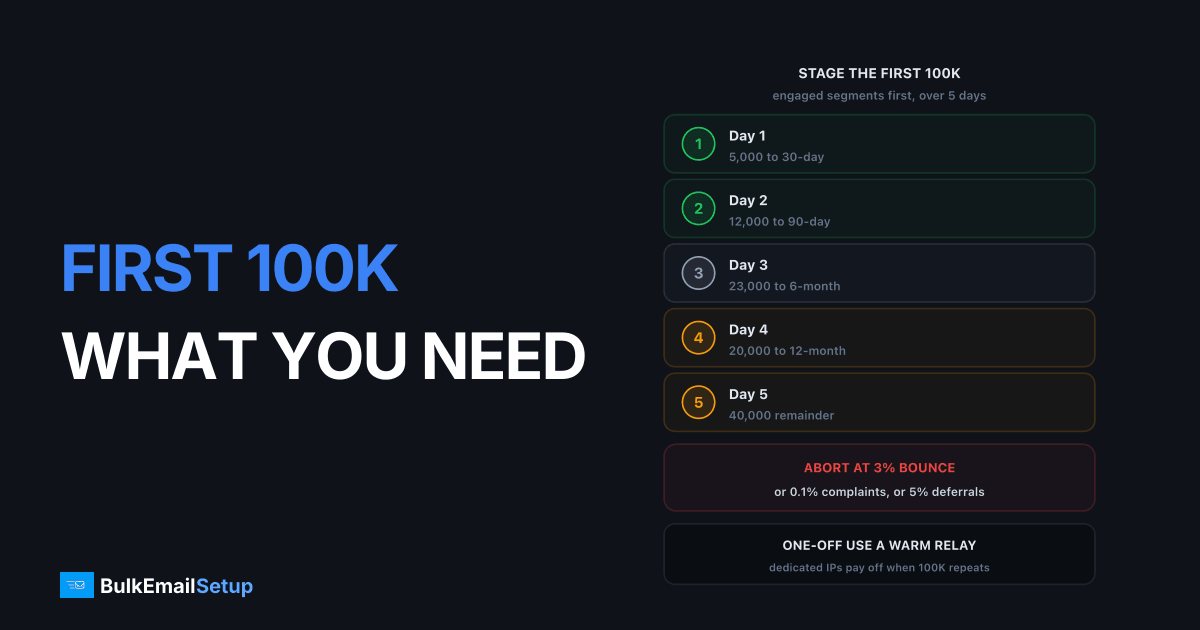
Do not treat 100,000 as one campaign. Treat it as five, ordered by how likely each segment is to engage.
| Day | Segment | Volume | Cumulative | Why this order |
|---|---|---|---|---|
| 1 | Opened or clicked in last 30 days | 5,000 | 5,000 | Best engagement builds the reputation everything else rides on |
| 2 | Engaged in last 90 days | 12,000 | 17,000 | Still strong signal, tests scale |
| 3 | Engaged in last 6 months | 23,000 | 40,000 | First real volume test |
| 4 | Engaged in last 12 months | 20,000 | 60,000 | Watch complaint rate here, it rises |
| 5 | Everyone else, verified only | 40,000 | 100,000 | Reputation is established, riskiest group last |
Three rules make this work:
- Order by recency, always. Gmail and Outlook weight recent behaviour heavily, so opens and clicks on day one buy tolerance on day five.
- Spread each day's batch over hours, not minutes. 20,000 messages in ten minutes reads as a blast. The same 20,000 over 8 hours reads as a business. Cap outbound rate per receiving domain.
- Do not increase after a bad day. If day three throws deferrals, repeat day three's volume instead of stepping up. The schedule is a plan, not a commitment.
What to watch while it runs, and when to stop
Somebody has to be at the dashboard. Not checking at the end of the day, watching during.
| Metric | Normal | Slow down | Abort |
|---|---|---|---|
| Deferral rate (4xx) | under 2% | 2 to 5% | over 5% |
| Complaint rate | under 0.05% | 0.05 to 0.1% | over 0.1% |
| Hard bounce rate | under 2% | 2 to 3% | over 3% |
| Unsubscribe rate | under 0.3% | 0.3 to 0.5% | over 0.5% |
| Blocklist status | clean | any CSS or PBL entry | Spamhaus SBL or Barracuda |
Google's bulk sender rules put the spam complaint limit at 0.3% and tell senders to stay under 0.1%, applying to anyone sending 5,000 or more messages a day to Gmail. The full requirements are in Google's email sender guidelines. At 20,000 messages a batch, 0.1% is 20 complaints. Small enough to hit without the campaign feeling like a disaster, which is why the alarm sits low.
Deferrals are the earliest signal and the one people ignore. If deferral rate to one provider crosses 5%, stop sending to that provider, hold 24 hours, resume at half rate. Do not let the queue retry into a block.
"Abort" means pause the queue, not cancel the campaign. Work out which segment produced the numbers, suppress it, restart with what is left.
One-off or recurring changes the infrastructure answer
This is where first-timers overbuy or underbuy.
| Scenario | Best fit | Cost for 100K | Trade-off |
|---|---|---|---|
| Genuine one-off, never again | Shared relay (Amazon SES, SendGrid) | $10 to $80 | Warm IPs immediately, but their policy team can pause you mid-send |
| One-off now, maybe more later | Shared relay, own domain and DKIM | $10 to $80 | Domain reputation is yours and transfers later |
| 100K monthly | Dedicated IP, managed | $50 to $150/mo | 4 to 6 weeks warm-up before the first full send |
| 100K weekly or more | Dedicated multi-IP pool | $200 to $600/mo | Real operations work, real control |
For a true one-off, dedicated IPs are the wrong tool. You would spend six weeks warming an IP to use it once. A shared relay borrows warm reputation and gets the job done. The catch is policy: shared providers police complaint rates hard because your behaviour lands on their other customers, so a bad first send can get paused halfway through.
The moment 100,000 becomes a monthly number, the maths flips. On shared infrastructure you rebuild trust every month with no reputation of your own, and carry suspension risk you cannot control. On dedicated IPs, month one's reputation is still there in month twelve. Our pricing covers those tiers. Either way, authenticate with your own domain and DKIM key from day one, so what you build on a relay follows you when you move.
The day after
The send is not finished when the last message leaves. Block out two hours the next morning.
- Process bounces into permanent suppression. Every 5xx user-unknown is removed forever, no exceptions and no second attempt next quarter. Soft bounces get suppressed after 3 to 5 consecutive failures.
- Pull complaints from feedback loops. Register for Microsoft JMRP and Yahoo's complaint feedback loop before the send, not after, or the day-one complaints are simply lost.
- Read Google Postmaster Tools. Open Postmaster Tools and look at domain reputation, IP reputation and spam rate for the send window. Data appears with a day or two of lag, so check again 72 hours later.
- Write down the segment numbers. Bounce and complaint rate per segment, not per campaign. That is what tells you which part of the list to fix before the next send.
- Check blocklists. Spamhaus, Barracuda and SpamCop against your sending IP and domain. A listing caught within 24 hours is usually a same-day delist.
Suppression is the part that gets skipped, and that is why second sends often perform worse than firsts. Whatever you fail to remove today, you mail again next month.
Go or no-go
Run this the morning of the send. Every line is yes, or you postpone.
- SPF, DKIM and DMARC verified
passon a real message to both Gmail and Outlook, with DKIM aligned to the From domain. - PTR record on the sending IP matches the HELO hostname, forward and reverse.
- List verified within the last 30 days, hard bounces already removed, bounce rate on the verification run under 3%.
- Suppression list loaded and confirmed excluded in the send preview.
- Sending IP has pushed volume within the last 30 days, or you are on a warm shared relay.
- Test message delivered to seed inboxes at Gmail, Outlook and Yahoo, inbox not spam, images and links rendering.
- List-Unsubscribe and List-Unsubscribe-Post headers present, and the one-click link actually removes the address.
- Bounce processing tested end to end with a deliberately invalid address.
- Segments built and ordered by engagement recency, day one capped at 5,000.
- A named person is watching the dashboard during each batch, with authority to pause.
A postponed send costs you a week. A blocked domain costs you a quarter.
How BulkEmailSetup helps
We build the sending path a first 100K send needs: your own SMTP server, clean dedicated IPs, full SPF, DKIM, DMARC and PTR configuration, bounce and feedback loop handling wired up before the first message, and a warm-up schedule that gets the IPs to volume without the deferral spiral. If the 100,000 is going to repeat, that infrastructure is reputation you keep rather than borrow.
Basic is $549 one-time, covering 1 SMTP server, 3 dedicated IPs, 25,000 emails/day and unlimited contacts. Higher tiers scale to 15 IPs and 200,000 emails/day. See pricing for the full breakdown.
Frequently asked questions
Can I send 100,000 emails in one day on my first send?
Not from new infrastructure. A cold IP that pushes 100,000 messages in a day gets deferred by Gmail and Outlook within the first few thousand and can be blocked outright. Spread the first 100,000 over 5 days, roughly 5,000 on day one and 40,000 on day five, and you stay inside what receivers tolerate.
What bounce rate should make me stop a 100K send?
Stop at 3%. Under 2% is normal for a maintained list, 2 to 3% is a warning that the list is stale, and above 3% you are burning reputation with every additional batch. Pause, clean the segment that is bouncing, and restart with the engaged portion only.
What complaint rate is too high on a first big send?
0.1% is the alarm line and 0.3% is where Gmail acts. On a 20,000-message batch that is 20 complaints as the warning and 60 as the failure point. Google publishes the 0.3% threshold in its bulk sender guidelines, and it applies to anyone sending 5,000 or more messages a day to Gmail.
Do I need a dedicated IP to send 100,000 emails once?
No. For a genuine one-off, a shared relay such as Amazon SES or SendGrid is the cheaper and safer choice because their IPs are already warm. Dedicated IPs only pay off when the 100,000 sends repeat monthly, because then you are building reputation you keep instead of borrowing someone else's.
How old can my list be before a 100K send is risky?
Anything over 12 months old without a re-permission pass is risky. Addresses go dead at roughly 2% a month, so a 24-month-old list can be 30% invalid, and abandoned mailboxes get recycled into spam traps after about 12 months. Verify the whole list before sending, not just a sample.
What do I do the day after the send?
Process bounces into a permanent suppression list, add every complaint from your feedback loops, and open Google Postmaster Tools to check domain reputation and spam rate for the send window. Do this within 24 hours, because the next send inherits whatever you fail to clean up.


