
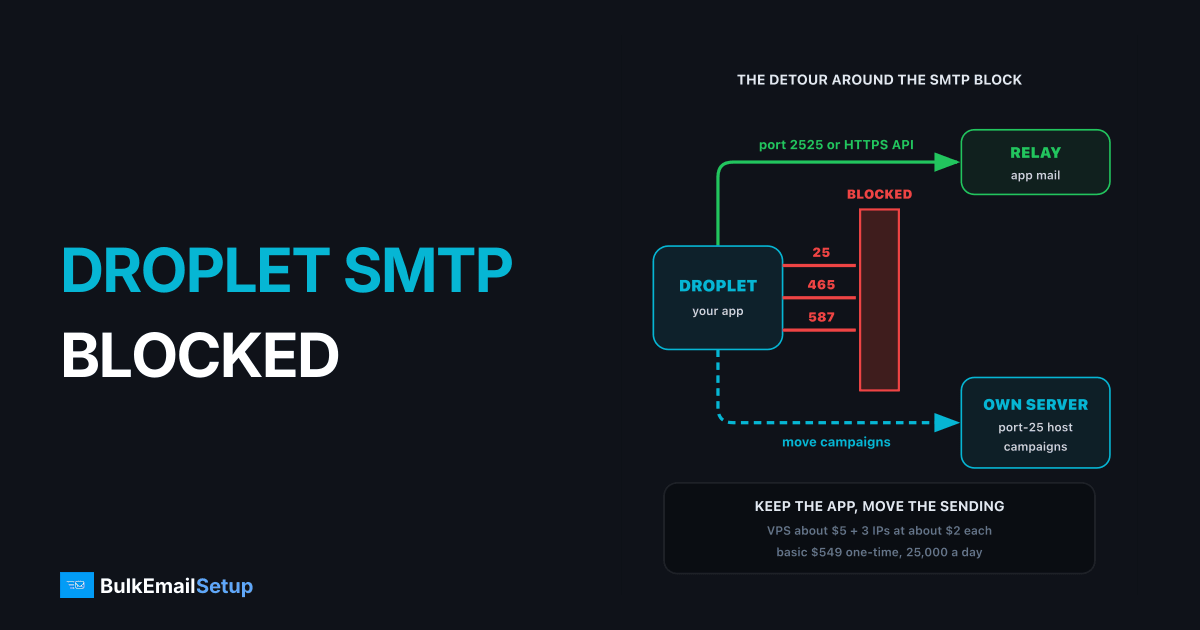
DigitalOcean blocks outbound SMTP ports 25, 465 and 587 on every Droplet by default, and its docs describe no way to lift it. App mail can still go out: point your app at a relay on port 2525 or send through the relay's HTTPS API. Bulk sending is different. It needs your own server on a host that allows port 25, so keep the app on DigitalOcean and move only the sending.
What DigitalOcean actually blocks
DigitalOcean's support page Why is SMTP blocked? is clear on the ports and silent on exceptions.
| Port | Used for | On a Droplet |
|---|---|---|
| 25 | server to server delivery | blocked |
| 465 | submission over TLS | blocked |
| 587 | submission with STARTTLS | blocked |
| 2525 | alternate submission, many relays | usually open |
| 443 | HTTPS email APIs | open |
The block applies to traffic through a Reserved IP as well, so swapping IPs does not help. The doc's own recommendation is a third-party email provider, and it warns that self-hosted mail servers are hard to keep off spam lists.
Three SMTP ports are walled off. Two ways around are open
What still works for app mail
Password resets, receipts and sign-up confirmations are low volume and time-sensitive. A relay handles them well, and you can reach it from a Droplet on a port that is not blocked.
- Relay on port 2525. Many relays listen on 2525 as well as 587. Set your app's SMTP port to 2525 and keep TLS on.
- Relay HTTPS API. Most providers have a REST API on port 443. Use their SDK instead of SMTP, which also avoids any port issue.
- Test it. From the Droplet,
nc -vz <relay-host> 2525should connect. If it times out, the relay does not offer 2525.
Port 2525 is common but not universal, so check your relay's docs. Our port 25 vs 465 vs 587 vs 2525 guide explains what each port is for.
Why bulk sending needs a different host
A relay on 2525 carries mail on the relay's IPs. That is fine for receipts. For campaigns you want your own IPs, your own reputation and a flat cost, and that means running a mail server, which needs outbound port 25 to deliver to Gmail and Outlook.
App mail and campaigns take different roads
| Mail type | Volume | Best path from a DigitalOcean setup |
|---|---|---|
| Password resets, receipts | low, steady | relay on 2525 or API |
| Product updates to opt-in users | medium | relay, or own server |
| Newsletters, campaigns | 25,000+ a day | own server on a port-25 host |
You do not have to move the website. Most teams keep the app where it is and add one sending server elsewhere, with DNS records on the same domain.
Picking a host for the sending server
Hosts differ a lot on port 25. Some allow it from the first day, some open it on request after the account has a payment history, and the big clouds restrict it. Our why port 25 is blocked post covers the common providers.
| Check | Why it matters |
|---|---|
| Outbound port 25 allowed | without it the server cannot deliver |
| Reverse DNS (PTR) per IP | Gmail and Outlook expect it to match |
| Extra IPs available | you rotate several IPs at volume |
| Abuse policy that allows opt-in bulk | some hosts ban bulk mail entirely |
| Clean IP ranges | a dirty range starts you on blocklists |
What sits on what when the app and the sending live apart
If the server is already built and you are seeing timeouts, our connection timed out on port 25 fix walks through the test that proves the block.
What it costs to split the setup
| Line item | Monthly |
|---|---|
| Keep the app Droplet | what you pay now |
| Relay for app mail, small plan | often free to about $15 |
| Sending VPS, 2 GB | about $5 |
| 3 dedicated IPs | about $6 ($2 each) |
| Spare sending domain | about $10 a year |
The VPS and IPs are our Basic plan's hosting, about $11 a month, for 25,000 emails a day on 3 IPs. The relay stays on for receipts, so a campaign problem never delays a password reset.
Common mistakes
- Opening a ticket and waiting. The docs promise nothing. Build the alternative in parallel.
- Sending campaigns through the app relay. The per-email bill climbs and the relay's policy team starts watching.
- Using the same IP for app mail and campaigns. One bad campaign then slows every login email.
- Skipping PTR on the new server. Microsoft and Gmail both penalise IPs without matching reverse DNS.
How BulkEmailSetup helps
We set up the sending server for you on a host that allows port 25: server, dedicated IPs with PTR, SPF, DKIM and DMARC on your domain, bounce handling, a campaign platform and a warm-up plan. Your app stays on DigitalOcean and keeps its relay.
| Plan | One-time fee | Emails a day | IPs | Hosting you pay |
|---|---|---|---|---|
| Basic | $549 | 25,000 | 3 | about $11 a month |
| Advance | $1,199 | 200,000 | 15 | about $49 a month |
No monthly fee to us. The 15-day money-back guarantee applies until server access is handed over. See the step-by-step VPS setup guide for what is involved, or go straight to pricing.
Frequently asked questions
Does DigitalOcean block port 25?
Yes. DigitalOcean's own support doc says SMTP ports 25, 465 and 587 are blocked on Droplets to prevent spam, by default, and that the block also covers traffic through a Reserved IP. So a Postfix server on a Droplet cannot deliver mail to Gmail or Outlook directly, and cannot reach most relays on the usual submission ports either.
Can DigitalOcean unblock SMTP ports?
Do not plan on it. The support doc does not describe any unblock request process, and staff answers in DigitalOcean's community forum differ on whether support will lift it. DigitalOcean's own advice is to use a third-party email service. If you need to run a sending server, host that one server somewhere that allows outbound port 25.
Can I use port 587 on a DigitalOcean droplet?
Not by default. Port 587 is on the blocked list along with 25 and 465. What usually works instead is a relay that listens on port 2525, which many providers offer, or sending over the provider's HTTPS API on port 443. Both are fine for app mail like password resets and receipts, sent through someone else's infrastructure.
Where can I host a bulk email server instead?
On a host that allows outbound port 25 and lets you set reverse DNS on each IP. Some allow it from day one, others open it on request once the account has history. Keep your website and app on DigitalOcean if you like it there, and move only the sending server. BulkEmailSetup's plans run on a VPS from about $5 a month plus IPs at about $2 each, after a one-time setup from $549.
Why does DigitalOcean block SMTP at all?
Cheap cloud servers are a favourite tool for spammers, and one abused Droplet can get a whole IP range listed. Blocking outbound SMTP by default protects every other customer's IP reputation. It also means DigitalOcean IP ranges are not built for bulk mail, so even with the ports open they would start with a weak reputation.
Is a relay on port 2525 enough for bulk email?
For low volume, yes. The relay carries the mail on its own IPs and you pay per email. At bulk volume the per-email bill and the shared-pool rules start to bite, and at that point a dedicated server on a host that allows port 25 is usually cheaper. Keep the relay for app mail and move campaigns.


