
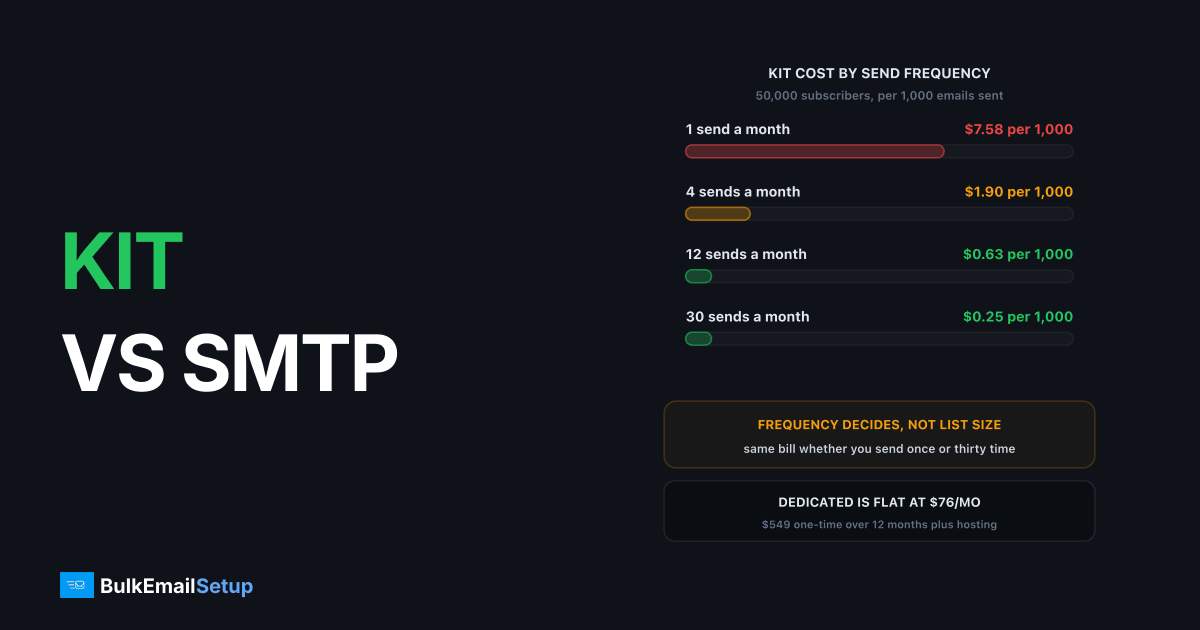
Kit charges per subscriber and includes unlimited email broadcasts, so the comparison against a dedicated SMTP server turns on send frequency, not list size. A daily newsletter to 50,000 subscribers is 1.5 million emails a month at no extra cost on Kit, which is the case where per-subscriber pricing genuinely wins. The same 50,000-subscriber list mailed four times a month is 200,000 emails against the same bill, and that sender is overpaying badly. Everything else in this comparison is secondary to that one number.
Kit (formerly ConvertKit) is built for creators. It is a newsletter and audience platform first, and a sending system second. A dedicated SMTP server is the opposite.
What Kit actually costs
The verified figures from Kit's pricing page: a free plan up to 10,000 subscribers, Creator at $33 a month and Pro at $66 a month, both quoted at 1,000 subscribers. Above that the price moves on a slider tied to subscriber count, and both paid tiers include unlimited email broadcasts.
| Plan | Price at 1,000 subs | Includes |
|---|---|---|
| Free | $0 | Up to 10,000 subs, unlimited broadcasts, landing pages, forms |
| Creator | $33/mo | Unlimited visual automations, SMS, 100+ integrations |
| Pro | $66/mo | Engagement scoring, subscriber signals, referral system, paid recommendations |
The free tier to 10,000 subscribers is unusually generous and it is the reason Kit shows up on so many creator stacks. If you are under 10,000 subscribers, this article is not for you. Stay on the free plan.
The interesting part is the pricing model itself. You are billed for stored subscribers. You are not billed for emails. That single design choice is what makes the frequency question decisive.
The frequency table that settles it
Take a 50,000-subscriber list. Assume Kit lands somewhere in the region of $379 a month at that size, which is where the slider sits for a list of that scale on a mid tier. Now vary only how often you press send.
| Sends per month | Emails sent | Kit cost per 1,000 emails | Dedicated server cost per 1,000 emails |
|---|---|---|---|
| 1 | 50,000 | $7.58 | $1.60 |
| 4 | 200,000 | $1.90 | $0.40 |
| 12 | 600,000 | $0.63 | $0.13 |
| 30 | 1,500,000 | $0.25 | $0.05 |
The dedicated column assumes a $549 one-time build amortised over 12 months plus roughly $30 a month in server hosting, giving about $76 a month all-in for the first year and under $30 a month after that. Recalculate for your own numbers with the SMTP cost calculator by list size.
Two things fall out of that table.
First, Kit's effective rate improves by 30x between a monthly and a daily send. Nobody else in email pricing gives you that curve, because everyone else meters emails.
Second, the dedicated server is cheaper at every row. That is not the point. The point is the ratio: at one send a month the dedicated build is roughly 4.7 times cheaper, and at 30 sends a month it is still about 5 times cheaper but the absolute gap has stopped mattering to anyone whose newsletter earns money. Saving $300 a month is a real decision. Saving $300 a month while giving up your landing pages, your sponsorship network and your checkout is a different decision entirely.
Where the crossover really sits
Most comparison articles put the crossover at a subscriber count. For Kit that is wrong, or at least incomplete.
| Profile | Sends/month | Verdict |
|---|---|---|
| 10K subs, any frequency | any | Kit free plan, no contest |
| 50K subs, daily newsletter | 30 | Stay on Kit, unlimited sending is doing real work |
| 50K subs, weekly | 4 | Roughly even, decide on features not cost |
| 50K subs, monthly | 1 | Dedicated wins, you are paying for storage |
| 100K subs, weekly or less | 4 | Dedicated wins clearly |
| 100K subs, daily | 30 | Kit still defensible if you use the creator layer |
A 100,000-subscriber list mailed once a month is the worst case on any per-subscriber platform. You are paying several hundred dollars a month to store names, and pressing send twelve times a year. That sender should have moved a year ago. The general shape of this is covered in the break-even point for a dedicated SMTP setup.
A 50,000-subscriber daily newsletter is the opposite. 1.5 million emails a month through a metered provider at even $0.40 per 1,000 is $600, more than Kit charges for the whole platform. Per-subscriber pricing with unlimited sends is genuinely the best deal in email for that sender, and I would not move them.
Cost by list size, both models
Holding frequency at a weekly send, here is the shape of the bill as the list grows.
| List size | Kit, approx/mo | Emails/mo at weekly | Dedicated, year one/mo |
|---|---|---|---|
| 10,000 | $0 (free tier) | 40,000 | ~$76 |
| 50,000 | ~$379 | 200,000 | ~$76 |
| 100,000 | ~$679 | 400,000 | ~$76 |
Kit's figures above 10,000 subscribers come off the slider on their pricing page rather than a published rate card, so treat them as the region rather than the exact invoice. Check yours before deciding anything.
The dedicated column does not move, and that is the whole argument. A dedicated build is priced on capacity, not on how many names you keep. Growing the list from 50,000 to 100,000 costs you nothing on your own server and roughly $300 a month on Kit. Growing send frequency from weekly to daily costs you nothing on Kit and nothing on your own server, which is why frequency alone never settles it.
What you give up, honestly
Kit is not an SMTP relay with a nicer login. It carries a stack of creator tooling that a dedicated server does not replace.
| What Kit does | What replaces it |
|---|---|
| Landing pages and hosted forms | Carrd, a WordPress page, or your own site |
| Visual automation workflows | MailWizz, Mautic or Listmonk automations |
| Creator Network and recommendations | Nothing. This one has no equivalent |
| Paid newsletter subscriptions | Stripe plus a membership plugin |
| Digital product and commerce checkout | Gumroad, Lemon Squeezy or Stripe Checkout |
| Sponsorship matching (Pro) | Nothing. Direct sponsor sales instead |
| Engagement scoring, subscriber signals | Your own reporting on open and click data |
Two rows there have no replacement, and they are the ones people underestimate. The Creator Network drives subscriber growth through recommendations from other newsletters on Kit. Sponsorship matching puts advertisers in front of you. If either is producing revenue or list growth today, that revenue is a line item in this comparison and it usually dwarfs the hosting saving.
The rest is replaceable. Most senders who move run a self-hosted mailer on top of their own SMTP, which restores the campaign and automation layer for a one-time licence or nothing at all. That is the honest shape of it: you swap one bill for a build plus cheaper software, and you take on warm-up and list hygiene yourself. Newsletter-specific detail in SMTP servers for newsletter publishers.
Deliverability, and why Kit's pool is better than most
Kit sends from shared IP pools. Normally I would treat that as a mark against a platform, and with most relays it is.
Kit's pool is a better-than-average one. The mail leaving it is overwhelmingly permission-based creator newsletters to people who typed their address into a form, which is about the healthiest traffic mix in bulk email. There is very little cold outreach and very little transactional bulk sharing those IPs. Engaged newsletter lists get good inbox placement on Kit, and I would not expect an immediate delivery win from moving to your own IPs.
What you actually get on dedicated infrastructure is control rather than an instant improvement.
| Factor | Kit shared pool | Your own IPs |
|---|---|---|
| Reputation | Pooled, mostly good creator mail | Entirely yours |
| Another sender's complaint spike | Can affect your delivery | Cannot happen |
| Warm-up | None needed, send day one | 4 to 8 weeks, yours to run |
| Visibility into IP health | None | Full, via Postmaster Tools and SNDS |
| Policy suspension risk | Real, they protect the pool | None, the IPs are yours |
| Poor list quality | Absorbed by the pool for a while | Shows up immediately |
That last row is the honest warning. A pool forgives a slightly stale list. Your own IPs do not.
Either way the receiver rules are identical. Google's bulk sender guidelines apply to anyone sending over 5,000 messages a day to Gmail addresses: SPF and DKIM on the sending domain, a DMARC record even at p=none, one-click unsubscribe in the header, valid forward and reverse DNS, and a spam complaint rate under 0.3% with 0.1% as the real target. Kit handles the DNS and IP half. The complaint rate is yours in both models, and it is the requirement that actually breaks campaigns.
Who should stay on Kit
Stay if you send daily or several times a week. Unlimited broadcasts on a per-subscriber plan is the correct pricing model for you, and no metered provider will beat it at that frequency.
Stay if the Creator Network, recommendations or sponsorship matching are producing revenue or growth. Those have no replacement and they are worth more than the hosting line.
Stay if you sell paid subscriptions or digital products through Kit. Rebuilding checkout, membership gating and delivery is a bigger project than standing up a mail server.
Move if you are past 50,000 subscribers and send four times a month or less. You are paying a storage fee. The same case applies harder at 100,000, where a monthly send makes the per-subscriber model indefensible.
Move if you need IP reputation you own, usually because a shared-pool policy has bitten you or your use case sits outside pure opt-in newsletters.
Run both is common and often right. Keep Kit for the audience layer, forms, automations and the network, and route the large low-frequency campaign sends through your own infrastructure. The comparison logic is close to the one in MailerLite vs a dedicated SMTP server, with frequency swapped in for list size as the deciding variable.
Three questions to settle first
How many times will you send next month? Not last month. Count the sends you have actually scheduled. If it is under five and your list is over 50,000, the maths has already answered this.
What does the Creator Network bring in? Pull the subscriber source report. If recommendations are a meaningful share of new subscribers, price that growth before you drop it.
Who owns warm-up? Four to eight weeks of daily attention, ramping roughly 30% every two days per IP while watching deferrals rather than opens. If that is nobody's actual job, stay on shared infrastructure. It is the most common reason self-managed sending fails.
How BulkEmailSetup helps
We build the sending half: your own server, your own IPs, full SPF, DKIM, DMARC and PTR configuration, MTA tuning, bounce handling and a warm-up plan. You keep whatever campaign or newsletter software you prefer on top, and you keep Kit alongside it if the creator layer is earning its keep.
Basic starts at $549 one-time, covering 1 SMTP server, 3 dedicated IPs, 25,000 emails a day and unlimited contacts, which is the row that matters when you are being billed per subscriber elsewhere. Higher tiers go to 15 dedicated IPs and 200,000 emails a day. See pricing for the full ladder.
Frequently asked questions
Is Kit (ConvertKit) cheaper than running my own SMTP server?
It depends on send frequency, not list size. Kit's paid plans include unlimited email broadcasts, so a 50,000-subscriber list mailed daily costs the same as one mailed once a month. At 30 sends a month you are paying a fraction of a cent per 1,000 emails on Kit; at one send a month you are paying roughly 30 times that for the same subscription.
How much does Kit cost per month?
Kit's free plan covers up to 10,000 subscribers. Paid plans start at $33/month for Creator and $66/month for Pro at 1,000 subscribers, and both scale up with subscriber count on a slider. Pricing at 50,000 and 100,000 subscribers runs into the hundreds per month, charged whether you send or not.
Does Kit give you a dedicated IP?
No, not as a standard product. Kit sends from shared IP pools it manages centrally, which works well for engaged newsletter audiences because the whole pool is mostly permission-based creator mail. If you need IP reputation you own and control, that is a dedicated SMTP server, not Kit.
When should a newsletter move off Kit to its own SMTP server?
When you pass roughly 50,000 subscribers and send four times a month or less, the per-subscriber bill stops buying you anything. A daily newsletter at the same list size is getting real value from unlimited sending and should stay. Frequency moves the crossover more than list size does.
What do you lose leaving Kit?
Landing pages, forms, visual automations, the Creator Network and recommendation engine, paid newsletter subscriptions and digital product checkout, and Pro's sponsorship matching. A dedicated SMTP server sends mail and nothing else. Most people replace the campaign layer with MailWizz, Sendy, Mautic or Listmonk and replace commerce with a separate checkout tool.
Is Kit's deliverability good?
For engaged, opt-in newsletter lists, yes. Kit's shared pools carry mostly permission-based creator mail, which keeps the pool reputation healthier than a general-purpose relay that also carries cold outreach and transactional bulk. The trade is that you have no visibility into the pool and no control when another sender's complaint rate spikes.


