
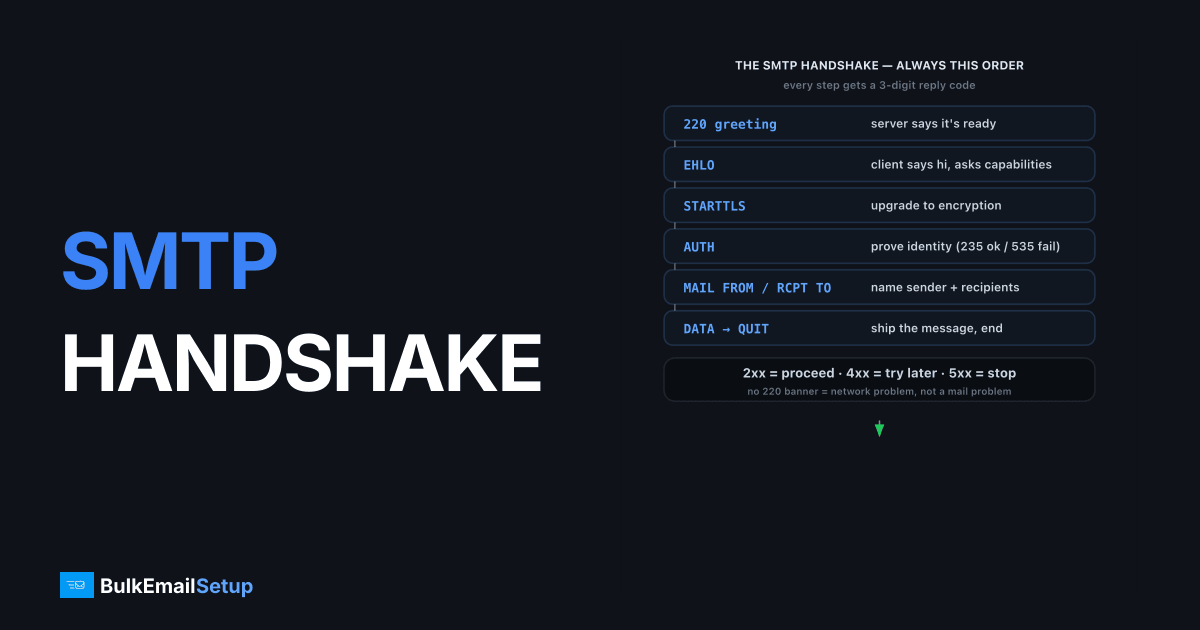
The SMTP handshake is the ordered conversation two mail servers have to move a message, and it always runs in the same sequence: the client opens with EHLO (or HELO), optionally upgrades the link with STARTTLS, proves identity with AUTH, names the sender with MAIL FROM, names each recipient with RCPT TO, ships the message after DATA, then ends with QUIT. Every step gets a three-digit reply code. A 2xx means proceed, 4xx means try again later, and 5xx means stop. This whole exchange is defined by RFC 5321. Learn the sequence and the codes, and almost any sending failure becomes readable.
What happens before any command is sent?
The handshake begins when the client opens a TCP connection to the server on port 25, 587 or 465. Before the client says anything, the server speaks first with a greeting banner, normally 220 mail.example.com ESMTP ready. That 220 is the server announcing it is willing to talk.
If you never see a 220, the handshake is dead on arrival. The usual causes are a blocked port (many ISPs block outbound 25), a firewall dropping the packets, or the server being down. A connection that hangs with no banner is a network problem, not a mail problem. A 421 banner instead means the server is up but refusing service right now, often due to rate limits or temporary overload.
What does the EHLO step do?
EHLO is the client introducing itself and asking what the server supports. The client sends EHLO sender.example.com, and the server replies with a multi-line 250 listing its capabilities: 250-STARTTLS, 250-AUTH LOGIN PLAIN, 250-SIZE 36700160, and so on. This capability list is the whole point of Extended SMTP.
HELO is the older, dumber version. It just says hello and gets a single 250 back with no capability list. Clients send EHLO first because they need to know whether STARTTLS and AUTH are available. If the server rejects EHLO (some very old systems do), the client falls back to HELO. The hostname you send should match your forward and reverse DNS, because many receivers check it. A mismatch can trigger a soft penalty or a 550 rejection later.
How do STARTTLS and AUTH secure the session?
STARTTLS upgrades a plaintext connection to encrypted without changing ports. After EHLO advertises 250-STARTTLS, the client sends STARTTLS, the server replies 220 ready to start TLS, and both sides negotiate a TLS tunnel. The client then re-sends EHLO inside the encrypted channel, because the earlier capability list can no longer be trusted.
AUTH proves the client is allowed to send through this server. After TLS is up, the client sends AUTH LOGIN or AUTH PLAIN with base64-encoded credentials. A success returns 235 2.7.0 Authentication successful. A failure returns 535 5.7.8 authentication failed, which means wrong credentials, or the server demanding TLS before it accepts any AUTH at all. Port 465 skips the STARTTLS dance entirely by wrapping the session in TLS from the first byte, which is the difference covered in STARTTLS vs implicit TLS. Either way, authenticated submission is what separates a legitimate sender from an open relay.
When a customer reports 535 5.7.8 to us, the credentials are right far more often than not. The usual culprit we find is an app trying to AUTH before STARTTLS, so the server refuses credentials on the still-plaintext channel. The giveaway in a session trace is an AUTH LOGIN line appearing before any STARTTLS, with the 535 landing immediately. Reorder so STARTTLS completes first, then AUTH, and the same credentials that "failed" succeed on the next attempt. A close second is a client pointed at port 465 but configured for STARTTLS, which hangs because 465 expects TLS from the first byte.
How does the envelope get built with MAIL FROM and RCPT TO?
This is where the message envelope is set, and it is separate from the visible From and To headers. The client sends MAIL FROM:<[email protected]> to declare the return-path address that bounces go to. The server replies 250 2.1.0 OK if it accepts the sender. Then one RCPT TO:<[email protected]> per recipient, each getting its own 250 2.1.5 OK, or a rejection.
RCPT TO is where most policy rejections land. A 550 5.1.1 user unknown means the mailbox does not exist. A 554 5.7.1 relay denied means the server will not relay to that domain for you. A 451 4.7.1 greylisting means come back in a few minutes. The envelope sender from MAIL FROM, not the header From, is what gets checked for SPF alignment, which is why these two addresses can legitimately differ.
What do DATA and QUIT actually transfer?
DATA is the handoff of the message itself, headers and body together. The client sends DATA, the server replies 354 start mail input, and the client streams the full message, ending with a single dot on its own line. The server then accepts with 250 2.0.0 OK queued as ABC123 or rejects with a 5xx, often 554 5.7.1 message rejected as spam.
That final 250 with a queue ID is the only proof of acceptance. Until you see it, the message is not delivered. QUIT closes the session cleanly: the client sends QUIT, the server replies 221 2.0.0 Bye, and the TCP connection tears down. A polite client always QUITs rather than dropping the socket, because abrupt disconnects can hurt sender reputation on picky receivers.
What does a full handshake look like end to end?
Here is one complete, successful submission on port 587, every command and every reply code in order. Lines the client sends have no leading number; lines the server returns start with a reply code:
220 smtp.provider.com ESMTP ready
EHLO sender.example.com
250-smtp.provider.com
250-STARTTLS
250-AUTH LOGIN PLAIN
250 SIZE 36700160
STARTTLS
220 2.0.0 Ready to start TLS
EHLO sender.example.com
250-smtp.provider.com
250 AUTH LOGIN PLAIN
AUTH LOGIN
334 VXNlcm5hbWU6
... base64 username ...
334 UGFzc3dvcmQ6
... base64 password ...
235 2.7.0 Authentication successful
MAIL FROM:<[email protected]>
250 2.1.0 Ok
RCPT TO:<[email protected]>
250 2.1.5 Ok
DATA
354 End data with <CR><LF>.<CR><LF>
Subject: Test
From: [email protected]
To: [email protected]

Hello.
.
250 2.0.0 Ok: queued as ABC123
QUIT
221 2.0.0 Bye
Trace the codes and the story is complete: 220 greeting, 250 capabilities, 220 TLS ready, second 250 after re-EHLO, 235 auth accepted, 250 for sender and recipient, 354 invitation to send the body, 250 ... queued acceptance, 221 clean close. Any step that returns a 4xx or 5xx instead is exactly where your send broke.
How BulkEmailSetup helps
Most handshake failures we see, a stuck AUTH, a missing STARTTLS, a 554 relay denial, come from misconfigured submission settings rather than the message itself. A dedicated SMTP server from BulkEmailSetup ships with SMTP AUTH, TLS and the correct ports already configured, so the handshake just works on 587 or 465. If you are choosing between rolling your own and buying, see buy an SMTP server vs build one and our pricing page.
Frequently asked questions
What is the SMTP handshake?
The SMTP handshake is the ordered command-and-reply conversation a client opens with a mail server to deliver a message. It runs EHLO, optional STARTTLS, AUTH, MAIL FROM, RCPT TO, DATA and QUIT, with each step gated by a numeric reply code.
What is the difference between HELO and EHLO?
EHLO is the modern Extended SMTP greeting that asks the server to list its capabilities, like STARTTLS, AUTH and SIZE. HELO is the older RFC 821 greeting with no capability list. Clients try EHLO first and fall back to HELO only if the server rejects it.
Does the SMTP handshake encrypt my email?
Only if STARTTLS or implicit TLS is used. Plain SMTP sends commands and message body in cleartext. STARTTLS upgrades an existing port 587 connection to TLS, while port 465 wraps the whole session in TLS from the first byte.
Why does my handshake fail at AUTH?
An AUTH failure usually returns 535 5.7.8, meaning the username or password is wrong, or the server requires STARTTLS before it will accept credentials. Check that you authenticate after STARTTLS and that the account allows SMTP submission.


