
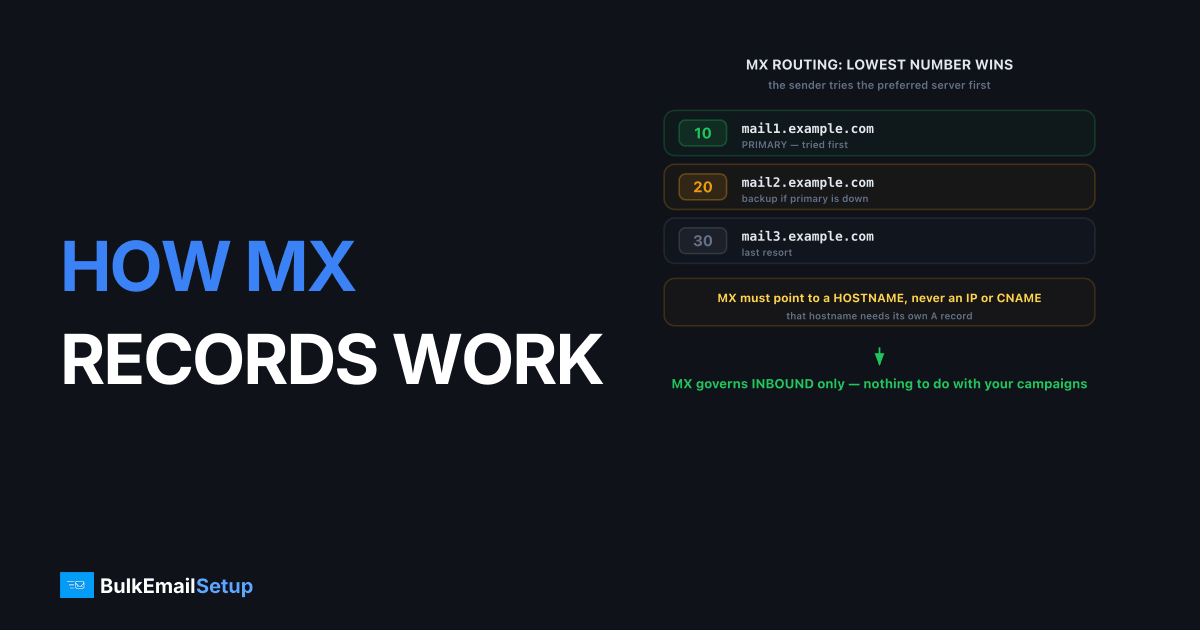
An MX record is a DNS entry that tells the rest of the internet which server accepts email for your domain, and routing follows one rule: the lowest priority number wins. When someone sends mail to [email protected], their server looks up the MX records for example.com, sorts them by priority, and tries the lowest-numbered host first. Higher-numbered records are backups, used only when the preferred server cannot be reached. MX records govern inbound mail only. They have nothing to do with how your outbound campaigns deliver.
What does an MX record contain?
An MX record has just two meaningful parts: a priority number and a mail server hostname. A typical set looks like this:
example.com.  IN  MX  10  mail1.example.com.
example.com.  IN  MX  20  mail2.example.com.
The number (10, 20) is the priority. The hostname (mail1.example.com) is the server that accepts mail. That hostname must itself resolve to an A or AAAA record with a real IP address. One rule trips people up constantly: an MX record must point to a hostname, never directly to an IP address. Pointing an MX at an IP is invalid and will cause delivery failures. Also, the target hostname should not be a CNAME; many receivers treat a CNAMEd MX target as a misconfiguration. Keep it simple: MX points to a hostname, that hostname has an A record.
You can read a domain's live MX records with dig. A real Google Workspace domain looks like this:
$ dig MX gmail.com +short
10 alt1.gmail-smtp-in.l.google.com.
20 alt2.gmail-smtp-in.l.google.com.
30 alt3.gmail-smtp-in.l.google.com.
40 alt4.gmail-smtp-in.l.google.com.
5 gmail-smtp-in.l.google.com.
dig returns the records unsorted, so read the leading number on each line, not the order. The 5 host is preferred over the 10, which is preferred over the 20, and so on. A sender sorts them ascending and tries 5 gmail-smtp-in.l.google.com first.
How do MX priorities decide where mail goes?
Priority sets the order servers are tried, and lower always means more preferred. A sending server collects all your MX records, sorts them ascending, and attempts delivery to the lowest number first. Only if that server refuses the connection or times out does it move to the next priority up.
Here is the behavior in practice:
| MX setup | What happens |
|---|---|
| Priority 10 only | All mail goes to that one server |
| 10 and 20 | 10 gets everything; 20 used only if 10 is down |
| 10 and 10 (equal) | Mail is split randomly across both, load-balanced |
| 10, 20, 30 | 10 preferred, 20 next, 30 last-resort backup |
This is why a backup MX uses a higher number. It is not a spare that shares the load; it sits idle until the primary fails. A common mistake is putting a weak backup server at a high priority. If it accepts mail during an outage but cannot forward it cleanly, you can create spam-filtering problems. Many operators now skip backup MX records entirely and rely on the sending server's own retry queue instead, which holds mail for days anyway.
Walk through a concrete failover. Say your domain publishes two records, 10 mail1.example.com and 20 mail2.example.com. A sender delivering to you:
- Sorts the records:
10first, then20. - Opens a connection to
mail1.example.comon port 25. - If
mail1answers with a220greeting, delivery proceeds there andmail2is never touched. - If
mail1times out or refuses the connection, the sender triesmail2.example.comat priority20. - If both are unreachable, the message stays in the sender's queue and retries later, following standard queue and retry logic.
Priority 20 only ever does work during a real outage of the priority 10 host. The rest of the time it is pure standby.
How does an MX lookup work step by step?
Delivery starts with a DNS query, and the sending server does the lookup before opening any SMTP connection. The sequence is mechanical:
- The sender extracts the domain from the recipient address (
example.com). - It queries DNS for the MX records of that domain.
- It sorts the returned records by priority, lowest first.
- It resolves the chosen hostname to an IP via its A record.
- It opens an SMTP connection to that IP and runs the SMTP handshake, the message-relay flow defined in RFC 5321.
If a domain has no MX record at all, senders fall back to the domain's A record as an implicit mail server, which is legacy behavior you should not rely on. The MX result is cached for the length of its DNS TTL, so changes propagate gradually. When you migrate mail servers, lower the TTL a day ahead so the switch takes effect quickly instead of being stuck in caches.
A frequent mistake here is editing MX records with a long TTL still in effect, then wondering why mail keeps hitting the old server hours after the change. If your MX TTL is 86400 (one day), every resolver that cached the old record will keep using it for up to a full day. Drop the TTL to 300 seconds at least 24 hours before any cutover, confirm the new records resolve, then raise the TTL back afterward. Skipping that step is the single most common cause of split-brain mail delivery during a migration.
The version of this we run into most is an MX target pointed at a CNAME, usually a hosting panel that auto-created mail.example.com as a CNAME to a provider hostname. Mail mostly works, then one stricter receiver bounces with a 550 host-not-found style error because it refused to chase the CNAME. The records look correct in the panel. The fix is to repoint the MX target at a hostname that carries a real A record, not a CNAME, and the intermittent bounces stop.
Do MX records affect your outbound deliverability?
No, and this is the single most common misconception. MX records decide where mail to your domain lands. They have zero influence on whether your outbound campaigns reach the inbox. Outbound delivery depends on your sending IP's reputation, plus correct SPF, DKIM, DMARC and reverse DNS.
You can have flawless MX records and still land in spam, because receivers judge your outbound mail on authentication and IP history, not on how you receive. The records that protect your outbound are SPF, DKIM and DMARC, the trio compared in SPF vs DKIM vs DMARC. If you are choosing where to host sending, the MX setup is irrelevant to that decision; the IP and authentication are everything, which is why the dedicated versus shared IP question matters far more than your MX layout.
How BulkEmailSetup helps
BulkEmailSetup is for outbound sending, so your existing MX records and inbound mail provider stay exactly as they are. We give you a dedicated SMTP server with a clean IP, SPF, DKIM, DMARC and reverse DNS configured for delivery, while Gmail, Microsoft 365 or whatever handles your inbox keeps receiving on its own MX. See how that splits on our pricing page.
Frequently asked questions
What is an MX record?
An MX (Mail Exchanger) record is a DNS record that tells sending servers which hostname accepts email for your domain. Each MX record has a priority number and a hostname. Sending servers look up the MX records before delivering any mail.
Does a lower or higher MX priority win?
Lower wins. The MX record with the smallest priority number is tried first. So an MX at priority 10 is preferred over one at priority 20. Higher numbers act as backups that are only used when the lower-priority servers are unreachable.
What happens if two MX records have the same priority?
When MX records share the same priority number, sending servers pick between them at random, which spreads inbound load across multiple servers. This is the standard way to load-balance inbound mail across two or more equally capable mail servers.
Do MX records affect outbound email or just inbound?
MX records only control inbound mail, where messages to your domain get delivered. Outbound sending is governed by SPF, DKIM, DMARC and your sending IP's reputation. A perfect MX setup does not improve your outbound deliverability at all.


