
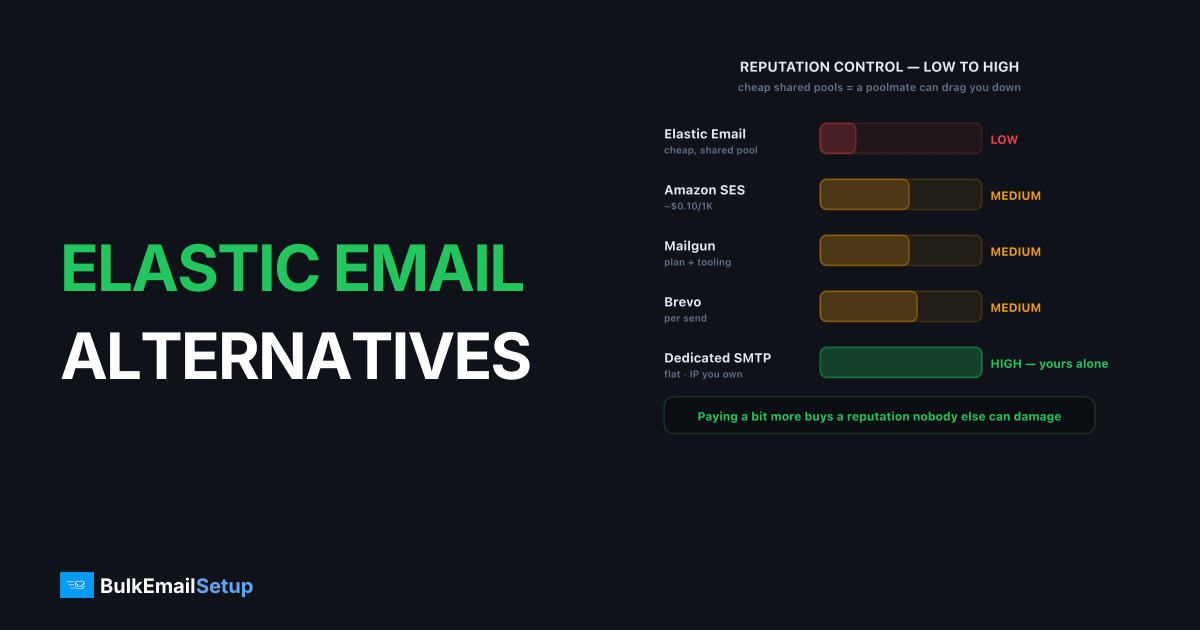
The best Elastic Email alternatives for bulk sending are Amazon SES for raw cost, Mailgun for tooling, Brevo for marketing-heavy lists, and a dedicated SMTP server for deliverability control with a dedicated IP you own. Elastic Email is genuinely cheap, but its low pricing leans on shared pools where another sender's behavior can hurt your inbox placement. Serious bulk senders who want a reputation nobody else can damage usually need a dedicated IP or their own infrastructure.
Why look for an Elastic Email alternative?
Bulk senders outgrow Elastic Email mainly over deliverability control, because cheap shared pools mean you inherit other senders' reputation, good and bad. Elastic Email's price is attractive, and for low-stakes sending it works. The risk appears when your business depends on the inbox and a poolmate gets the shared IP blocklisted.
Three common triggers to switch:
- Shared-pool reputation risk. On a shared IP you inherit the pool's reputation. A Spamhaus CSS or SBL listing from another sender can hit your delivery.
- Limited control. You can adjust content and authentication, but not connection limits, routing, or stream isolation at the server level.
- Diagnosis is hard. When mail goes to spam, you cannot tell if it is you or a poolmate, and delisting is in the provider's queue, not yours.
We have migrated senders off cheap shared pools after exactly this. One arrived with their domain unblemished, Postmaster domain reputation High, yet half their Gmail traffic was spam-foldering. The cause was a Spamhaus CSS listing on the shared range they had no part in creating and no way to delist themselves. Moving them to a dedicated IP they owned fixed it inside the warm-up, because the new IP carried only their own clean history.
Elastic Email alternatives compared
Here is how the main alternatives line up for a bulk sender. The pattern across the table: paying a bit more, or running your own infrastructure, buys you a reputation you control.
| Option | Pricing model | Dedicated IP | Reputation control | Best for |
|---|---|---|---|---|
| Elastic Email | Cheap, per-email tiers | Add-on (higher plans) | Low (shared pool) | Budget low-stakes sending |
| Amazon SES | ~$0.10/1,000 | Add-on (std/managed) | Medium | Lowest raw cost |
| Mailgun | Plan + overage | Add-on (higher plans) | Medium | Built-in tooling |
| Brevo | Per email sent | Add-on (higher tiers) | Medium | Marketing-heavy lists |
| Dedicated SMTP server | Flat monthly | Included, you control it | High (yours alone) | Bulk senders who own the inbox |
For the direct comparison, see Elastic Email vs a dedicated SMTP server.
Which alternative fits your bulk sending?
The right pick depends on your volume, your tolerance for setup work, and how much you need reputation isolation. Bulk senders usually choose between the lowest unit cost, the best tooling, and the most control, rarely all three at once.
- Lowest cost at scale, has engineers: Amazon SES. Cheap per email, but you build bounce handling, suppression, and warm-up yourself.
- Tooling without infrastructure work: Mailgun. Logs, validation, and analytics built in at a mid-tier price.
- Marketing-heavy lists: Brevo. Send-based pricing keeps big lists affordable.
- Reputation isolation matters most: A dedicated SMTP server with a dedicated IP you own and flat pricing.
For most bulk senders leaving Elastic Email specifically over shared-pool problems, the last option is the direct fix, because it removes the exact risk that pushed them to switch. The others reduce cost or add tooling, but they do not necessarily give you a reputation that is yours alone.
The cost trade is worth stating plainly. Elastic Email's low price comes partly from packing senders onto shared pools, so you are paying less and accepting more reputation risk. Moving to a dedicated IP, whether through SES managed IPs or owned infrastructure, costs more per month but removes the single largest threat to a bulk sender's inbox rate. At volume, one shared-pool blocklisting that drops a 50K/day send to 12% placement costs far more in lost reach than the price difference. A flat dedicated plan also holds steady through campaign spikes, where per-email tiers climb, so the gap narrows once you account for predictability.
Why deliverability control matters for bulk senders
Deliverability control matters most for bulk senders because at volume a single shared-pool blocklisting can wipe out a campaign. Picture a 50K/day send that drops to 12% inbox placement after a poolmate triggers a Spamhaus listing on the shared IP. On a shared pool, you wait for the provider to delist. On a dedicated IP, the reputation is yours alone, and so is the fix.
A dedicated IP only helps if your own practices are clean and your volume is steady, roughly 50K+/month sent consistently. Below that, a dedicated IP cannot accumulate enough history to hold a stable reputation, and a quality shared pool delivers better. For the full trade-off, see dedicated IP vs shared IP for email. Above the threshold, owning the IP is the difference between controlling your delivery and hoping your neighbors behave.
Diagnosis is the other half of the control story. On a shared pool, when placement drops you cannot tell whether the cause is your content, your list, or a poolmate, so you are guessing. On a dedicated IP, the answer is always "it is you," which sounds worse but is actually better: every problem is reproducible, traceable in your own logs, and fixable without waiting on a provider queue. For a high-volume sender whose revenue rides on the inbox, that clarity is worth more than the few dollars a shared pool saves.
What to look for in an Elastic Email alternative
The features worth checking in an Elastic Email alternative are the ones its cheap shared pools cannot give you: reputation isolation, real diagnostic access, and predictable pricing at volume. Since most bulk senders leave specifically over deliverability risk, weight reputation control highest.
- Reputation isolation. A dedicated IP you own means only your own behavior can damage your standing. Shared pools expose you to every poolmate's mistakes.
- Pricing that holds at volume. Per-email tiers and add-on IPs add up. Flat plans keep cost predictable when a campaign spikes.
- Diagnosis you can run yourself. On a shared pool you cannot tell whether a placement drop is you or a neighbor. Owned infrastructure makes every problem traceable in your own logs.
- Authentication done right. SPF under the 10-DNS-lookup limit, DKIM at 2048-bit, DMARC at
quarantineorreject, and a valid PTR record on the sending IP. - Warm-up support. A new dedicated IP ramps over 4-6 weeks. A good provider runs the schedule and monitors blocklists so a fresh IP does not earn a
421 4.7.28deferral in week one.
Weight these by your exposure. If your revenue rides on the inbox and a shared-pool blocklisting would cost real money, reputation isolation outranks every other line on the list.
How does setup compare to a managed relay?
Setup on owned infrastructure is more involved than Elastic Email's, but a managed dedicated SMTP provider closes most of that gap. With a plain relay you verify a domain and send. With your own server, you also configure SPF, DKIM, DMARC, and a valid PTR record, then warm the dedicated IP over 4-6 weeks before pushing full volume.
That warm-up is the part bulk senders most often rush, and rushing it is how a brand-new IP earns a 421 4.7.28 Gmail rate-limit deferral or a soft block at Microsoft in week one. A written ramp schedule takes the guesswork out: daily caps per IP, raised every few days while bounces and complaints stay low. You get the control and flat cost of owned infrastructure without standing up a deliverability team. For the ramp itself, see our IP warm-up schedule explained.
Switching without losing inbox placement
You switch off Elastic Email without losing inbox placement by carrying authentication intact and warming new IPs before full volume. Domain reputation moves with your domain: SPF, DKIM, DMARC, and sending history are portable. IP reputation is not, which is the part that breaks rushed migrations.
Verify your records before cutover: SPF under the 10-DNS-lookup limit, DKIM at 2048-bit, DMARC at quarantine or reject with passing alignment, and a valid PTR record on the sending IP. Then ramp the new dedicated IP from roughly 50-100 emails/day over 4-6 weeks, and keep your complaint rate under the 0.3% Gmail and Yahoo threshold. Our Gmail bulk sender requirements for 2026 and SPF, DKIM, and DMARC guide cover the full checklist.
How BulkEmailSetup helps
If Elastic Email's shared pools are putting your inbox placement at the mercy of other senders, a dedicated SMTP server gives you a dedicated IP you control, a one-time setup fee ($549 on the Basic plan, 25,000 emails a day on 3 dedicated IPs) plus about $11 a month hosting paid to your own host, with no monthly fee to us, and full SMTP access. We configure SPF, DKIM, DMARC, and PTR correctly, and include a 4-6 week warm-up plan so your bulk sends keep reaching the inbox. See plans and IP counts on our pricing page.
Frequently asked questions
What is the best Elastic Email alternative for bulk sending?
It depends on your priority. Amazon SES wins on raw cost, Mailgun on tooling, and a dedicated SMTP server on deliverability control and flat pricing. For high-volume senders who want a dedicated IP they own, a dedicated SMTP server is usually the strongest fit.
Why do bulk senders leave Elastic Email?
Usually over deliverability and control. Elastic Email's low pricing relies partly on shared pools, where one bad sender can hurt your inbox placement. Bulk senders who want a reputation nobody else can damage move to dedicated IPs or their own SMTP server.
Does Elastic Email offer a dedicated IP?
Yes, as a paid add-on on higher plans. The IP runs inside Elastic Email's platform, so you do not control the underlying server, MTA configuration, or routing the way you would with a dedicated SMTP server you own and operate end to end.
Can I keep deliverability when switching from Elastic Email?
Yes, if you warm up new IPs. Domain reputation (SPF, DKIM, DMARC, history) is portable. IP reputation is not, so any new platform or dedicated IP needs a 4-6 week ramp. Keep your complaint rate under 0.3% and inbox placement holds.


