
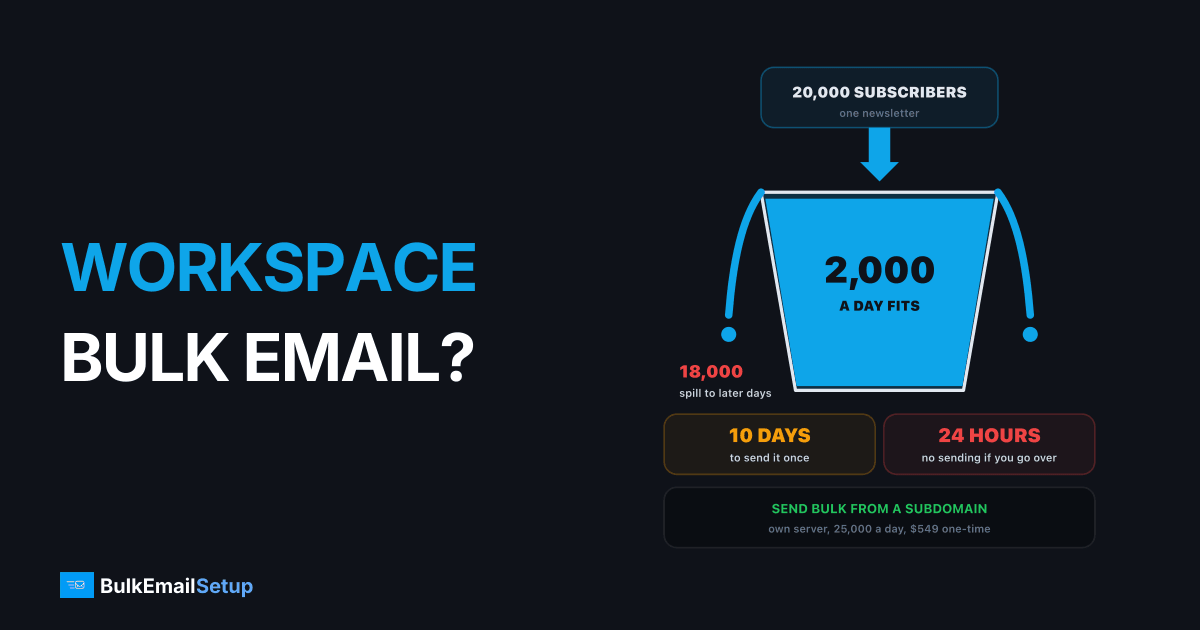
Google Workspace is not built for bulk email. Each user can send 2,000 messages a day, 1,500 through mail merge, to at most 2,000 unique external recipients, and going over any limit locks that user's sending for up to 24 hours. Google says repeat breaches can lead to suspension. Workspace is fine for person-to-person mail and small personal sends; newsletters and campaigns belong on a separate sending server on a subdomain, so Workspace keeps working for your team.
How many emails can Workspace send per day?
These are Google's published per-user limits, from its Gmail sending limits page.
| Limit | Per user, per rolling 24 hours |
|---|---|
| Messages a day | 2,000 (1,500 for mail merge, 500 on a trial) |
| Recipients per message | 2,000, no more than 500 external |
| Total recipients a day | 10,000 (1,500 for mail merge) |
| External recipients a day | 3,000 |
| Unique external recipients a day | 2,000 (500 on a trial) |
| Workspace SMTP relay | 10,000 messages, 100 recipients per transaction |
For a newsletter, the line that bites first is unique external recipients: 2,000 a day. Every subscriber is a unique external recipient.
Daily capacity by option, to the same scale
Can I send bulk email from Google Workspace?
You can send a small number of personal emails, and Gmail's mail merge is built for exactly that. It is not a way to run a newsletter.
The arithmetic is simple. A 20,000 subscriber list at 2,000 unique external recipients a day takes 10 days to send once, with the sending user stuck at the limit every one of those days.
One newsletter, 10 days on Workspace
| List size | Days to send once on one Workspace user | Same send on a 25,000 a day server |
|---|---|---|
| 1,000 | 1 | under 1 hour |
| 5,000 | 3 | under 5 hours |
| 20,000 | 10 | under 1 day |
| 50,000 | 25 | 2 days |
Spreading the send across several users does not fix it. It multiplies the number of mailboxes at risk of a block, and Google watches the domain as a whole.
Does Google ban Workspace accounts for newsletters?
Not for having a newsletter. The problem is what bulk sending does to an account built for people.
When a user hits a limit, Google's page says they cannot send new messages for up to 24 hours, though they can still sign in and receive mail. If it keeps happening, the account might be suspended. The mailbox at risk is usually a real person's, often the founder or the sales lead, and losing their sending for a day costs more than any newsletter earns.
What Workspace is for, and where it stops
Gmail's bulk sender rules apply on top. Anyone sending more than 5,000 messages a day to Gmail addresses must meet the bulk sender requirements: SPF, DKIM, DMARC, one-click unsubscribe and a spam rate under 0.3%. A newsletter from Workspace still has to meet those, without the tools to manage them.
How to tell you are close to the limit
Workspace gives little warning. These are the signs, roughly in the order they show up.
| Sign | What it means |
|---|---|
| A mail merge stops part way through | the user hit 1,500 merge recipients for the day |
| Bounce "550 5.4.5 Daily user sending limit exceeded" | the 24-hour block has started |
| Replies and forwards count against the day | busy inboxes reach the limit sooner than the campaign alone suggests |
| CC and BCC addresses count as recipients | one email to 400 BCC addresses is 400 recipients |
| Admin console shows the user as restricted | repeat breaches, suspension risk |
If any of these show up more than once a month, the sending pattern has outgrown Workspace. Moving the bulk part is cheaper than losing a working mailbox for a day each time.
What about Workspace SMTP relay?
The relay is a separate service for printers, apps and servers that need to send as your domain. It allows up to 10,000 messages per user in 24 hours and 100 recipients per SMTP transaction, and Google monitors it for spam.
It works well for password resets, invoices and system alerts. It is not a campaign tool: there is no unsubscribe handling, no bounce suppression and no campaign stats, and a spam spike lands on Google's infrastructure tied to your Workspace account.
What should I use for bulk mail on a Workspace domain?
Keep Workspace for everyday mail. Send bulk from a subdomain through a dedicated SMTP server.
| Record | Main domain (Workspace) | news.yourdomain.com (bulk) |
|---|---|---|
| MX | Google, unchanged | not needed for sending |
| SPF | include:_spf.google.com | your server's IPs |
| DKIM | Google's key | your server's own key |
| DMARC | one policy on the main domain covers both | aligned with the subdomain |
The DNS for the sending subdomain looks like this. The IPs here are documentation examples.
news.yourdomain.com.  TXT  "v=spf1 ip4:203.0.113.10 ip4:203.0.113.11 ip4:203.0.113.12 -all"
mail._domainkey.news.yourdomain.com.  TXT  "v=DKIM1; k=rsa; p=MIIBIjANBg..."
_dmarc.yourdomain.com.  TXT  "v=DMARC1; p=quarantine; rua=mailto:[email protected]"
Your team's inboxes are untouched, and the newsletter's reputation lives on IPs that only carry your campaigns. If you have already hit the wall, our guide to Workspace suspending your sending covers getting unlocked, and outgrowing Gmail SMTP compares the options.
How BulkEmailSetup helps
We set up a dedicated SMTP server for your sending subdomain, with SPF, DKIM, DMARC and PTR configured, bounce handling, one-click unsubscribe, a campaign platform and a warm-up plan. Workspace stays exactly as it is for your team.
| Plan | One-time fee | Emails per day | Dedicated IPs | Hosting you pay your host |
|---|---|---|---|---|
| Basic | $549 | 25,000 | 3 | about $11 a month |
| Advance | $1,199 | 200,000 | 15 | about $49 a month |
No monthly fee to us and no contact limit. Every plan has a 15-day money-back guarantee, which applies until server access is handed over. See Basic plan details or all pricing.
Frequently asked questions
Can I send bulk email from Google Workspace?
Only in small amounts. Google caps each user at 2,000 messages a day, 1,500 when using mail merge, and at 2,000 unique external recipients a day. Go past a limit and the user cannot send for up to 24 hours, and repeat breaches can get the account suspended. It suits a few hundred personal emails, not a newsletter to thousands.
How many emails can Workspace send per day?
Per user: 2,000 messages a day, 10,000 total recipients, 3,000 external recipients and 2,000 unique external recipients. Trial accounts get 500. Each message can have up to 2,000 recipients, no more than 500 of them external. Through the separate Workspace SMTP relay, a user can send up to 10,000 messages in 24 hours.
Does Google ban Workspace accounts for newsletters?
Google does not ban newsletters as such, but its limits and spam monitoring are built for normal person-to-person use. Hitting a limit blocks that user's sending for up to 24 hours, and Google says repeated breaches may lead to suspension. The risk is that the blocked mailbox is the one your team needs for clients.
What should I use for bulk mail on a Workspace domain?
Keep Workspace for everyday mail and send bulk from a subdomain such as news.yourdomain.com through a dedicated SMTP server. MX records stay at Google, so inboxes are untouched. BulkEmailSetup's Basic plan is $549 one-time for 25,000 emails a day on 3 dedicated IPs, plus about $11 a month hosting.
What is the Gmail mail merge limit?
Google lists 1,500 messages a day and 1,500 total recipients a day for mail merge in Workspace. That is enough for a personalised note to a few hundred contacts, but a 10,000 contact list would take a week or more and would keep the user at the edge of the limit every day.
Can I use Workspace SMTP relay for newsletters?
The relay allows up to 10,000 messages per user in 24 hours and 100 recipients per SMTP transaction, and Google describes it as being for devices and applications that generate outbound email. Google monitors relay traffic for spam. It is fine for app and system mail; for marketing at volume a dedicated server is safer.
Will sending bulk email from a subdomain affect my Workspace inbox?
No, if it is set up correctly. The subdomain has its own SPF, DKIM key and sending IPs, while the main domain keeps Google's records and MX. Receivers score the two separately enough that a bad newsletter day does not stop your team's day-to-day mail, and your Workspace mailboxes keep receiving as normal.


