
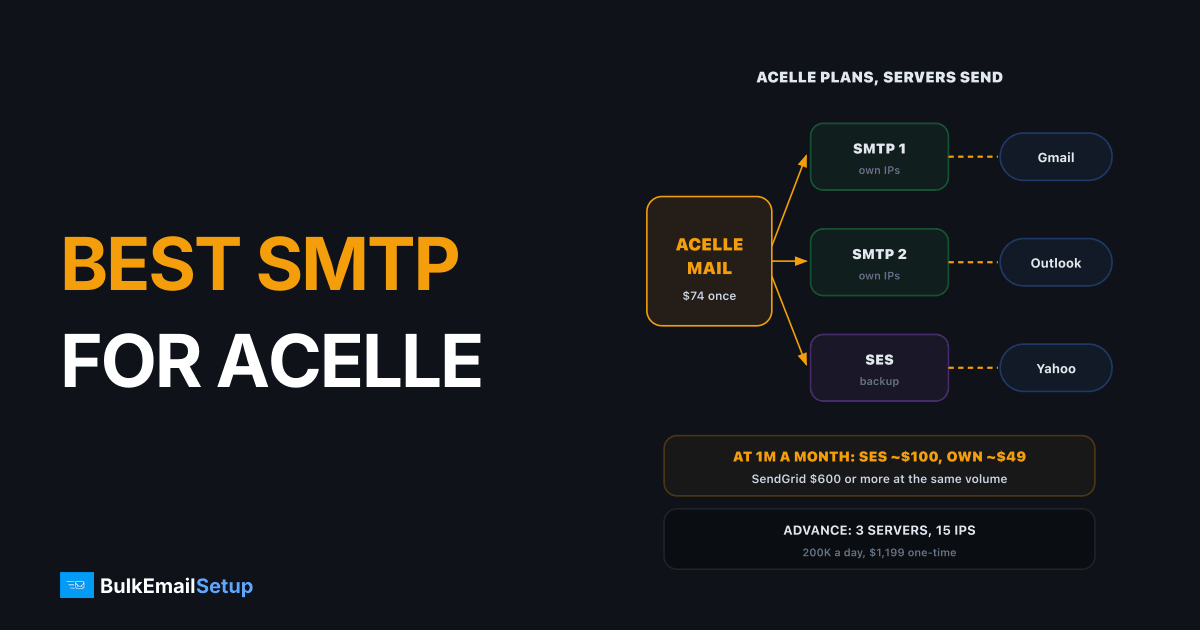
The best SMTP for Acelle Mail depends on your volume. Under about 100,000 emails a month, Amazon SES is the cheapest option at $0.10 per 1,000 emails. For steady volume above a few hundred thousand a month, a dedicated SMTP server on your own IPs usually wins on control and cost, at about $49 a month in hosting on our Advance plan. Acelle itself is $74 once. It sends nothing on its own, so the sending server is the decision that matters.
How Acelle sends mail
Acelle Mail is the panel. It holds lists, builds campaigns, tracks opens and handles unsubscribes. The actual delivery goes through a sending server you connect.
Acelle plans the campaign. The sending servers deliver it
According to Acelle's own site, it connects to Amazon SES, SendGrid, SparkPost, Mailgun, Postmark, Elastic Email or any RFC-compliant SMTP server. The Regular licence is $74 once for a single domain, and the Extended licence is $199 once with resale rights.
Six built-in services plus any standard SMTP server
The sending options compared
| Sending server | Cost model | Dedicated IP | Cold email | Best for |
|---|---|---|---|---|
| Amazon SES | $0.10 per 1,000 emails | $24.95 per IP a month | not allowed | low cost, opt-in lists |
| SendGrid | plan tiers, Pro from $89.95 | Pro and up | not allowed | teams already on SendGrid |
| Mailgun | plan tiers | higher plans | not allowed | developer workflows |
| Postmark | plan tiers | at high volume | not allowed | transactional mail |
| Your own SMTP server | flat hosting fee | included, yours | your rules and the law | steady high volume |
The shared services all have acceptable use rules and account reviews, and none of them allows bought lists. That matters more with Acelle than with a hosted platform, because Acelle makes it easy to import any list and send. The relay still decides whether you can.
What it costs per month
At 1 million a month the gap is in the monthly bill
| Volume | Amazon SES | SendGrid | Own server |
|---|---|---|---|
| 100,000 a month | about $10 | Pro from $89.95 | about $11 hosting (Basic) |
| 1 million a month | about $100 | $600 or more | about $49 hosting (Advance) |
| 3 million a month | about $300 | quote | about $49 hosting (Advance) |
The own-server column also has a one-time setup: $549 for Basic or $1,199 for Advance. At 100,000 a month SES is hard to beat on cash. At a million or more, the flat hosting bill pulls ahead within the first year, and you stop paying more every time the list grows. Amazon's own SES pricing page has the current per-email rate.
Which one should you pick?
| Your situation | Pick |
|---|---|
| Under 100,000 a month, clean opt-in list | Amazon SES |
| Already pay for SendGrid or Mailgun | connect that, no migration needed |
| 300,000+ a month, every month | your own SMTP server |
| Agency selling email to clients (Extended licence) | own servers per client group |
| Need a fallback | own server plus SES as backup |
A setup we see working well: two sending servers on your own IPs, plus SES connected as a backup if one server pauses for maintenance or a deferral spike. Set each server's speed to what its IPs can carry while warming up.
Getting deliverability right with Acelle
Acelle will send whatever you queue. These are the checks that keep it out of spam:
- Authentication. SPF, DKIM and DMARC must pass for every sending domain. See SPF, DKIM and DMARC explained.
- PTR record. Each sending IP needs reverse DNS matching the server's hostname.
- Bounce handling. Connect a bounce mailbox so hard bounces are suppressed automatically.
- Speed limits. On new IPs, start slow and raise the per-server speed over 4 to 8 weeks. Our IP warm-up schedule has the numbers.
- List hygiene. Remove hard bounces and long-inactive contacts before every big send.
If you run MailWizz or Mautic instead, the same logic applies. See the best SMTP for MailWizz and the best SMTP for Mautic.
Three mistakes Acelle users make with sending servers
1. Sending a full list through a brand new server. Acelle will happily queue 200,000 emails on day one. Fresh IPs cannot carry that. Gmail and Outlook defer most of it, and the server gets a poor reputation before it has a good one. Set the speed on each new server low, around a few hundred an hour per IP, and raise it every few days while bounces and deferrals stay low.
2. Mixing transactional and marketing mail on one server. If your app sends password resets through the same server as a weekly newsletter, one bad campaign can delay every reset. Add a separate sending server, or at least a separate sending domain, for each stream. Acelle makes this easy because servers are just entries in the admin panel.
3. Skipping bounce processing. Without a bounce mailbox connected, hard bounces stay on your lists. Send to them twice more and your bounce rate passes 5%, which is the point where shared relays like SES start reviewing your account and inbox providers start deferring your own IPs.
| Mistake | What happens | Fix |
|---|---|---|
| Full list on a new server | deferrals, low reputation | start slow, raise speed over 4 to 8 weeks |
| One server for all mail | resets stuck behind campaigns | separate server or domain per stream |
| No bounce mailbox | bounce rate above 5% | connect bounce handling before the first send |
How BulkEmailSetup helps
We build the sending side for self-hosted panels like Acelle: dedicated SMTP servers on your own IPs, with SPF, DKIM, DMARC and PTR done, bounce handling and a warm-up plan. You connect them to Acelle as standard SMTP sending servers.
| Plan | One-time fee | Emails per day | SMTP servers | Dedicated IPs | Hosting |
|---|---|---|---|---|---|
| Basic | $549 | 25,000 | 1 | 3 | about $11 a month |
| Advance | $1,199 | 200,000 | 3 | 15 | about $49 a month |
| Custom | $2,997 | 1,000,000 | 12 | 60 | about $170 a month |
There is no monthly fee to us and no contact limit, and every plan has a 15-day money-back guarantee. See the Advance plan or all pricing.
Frequently asked questions
Which sending servers does Acelle Mail support?
Acelle lists built-in connections for Amazon SES, SendGrid, SparkPost, Mailgun, Postmark and Elastic Email, plus any standard SMTP server. That last option covers your own Postfix or Postal server and most relays. You add sending servers in the admin panel, and each one has its own speed setting so you can match the limits of the service behind it.
Is a dedicated SMTP better than SES for Acelle?
It depends on volume and what you send. Amazon SES is the cheapest per email at $0.10 per 1,000, but it reviews accounts with high bounce or complaint rates and you share its rules. A dedicated SMTP server costs a flat hosting fee and the IPs are yours. Above a few hundred thousand emails a month, the dedicated server usually wins on control and often on cost.
Can Acelle rotate several SMTP servers?
You can add several sending servers to Acelle and set a sending speed on each one. How campaigns are spread across them depends on your version and how plans are set up in the admin panel, so check the sending server and plan settings in your install. A common setup is two servers on your own IPs with SES as a backup.
What does Acelle sending cost per month?
The licence is $74 once for a single domain, so the monthly cost is the sending. At 100,000 emails a month, SES is about $10 and SendGrid Pro starts at $89.95. At 1 million a month, SES is about $100 and an own server on BulkEmailSetup's Advance plan is about $49 a month in hosting after a $1,199 one-time setup.
Do I need the Acelle Extended licence?
Only if you want to sell email marketing to your own customers. The Extended licence, $199 once, adds the multi-tenant layer with customer accounts, plans and payment gateways for agencies and resellers. For sending your own campaigns on one domain, the $74 Regular licence is enough. Your sending server choice is the same either way.
Why are my Acelle emails going to spam?
Usually authentication or the sending IP, not Acelle. Check that SPF, DKIM and DMARC pass for the sending domain, that the server has a PTR record matching its hostname, and that the IP is not on a blocklist. On a shared relay, other senders can drag the IP down. Bounce handling also matters: unsuppressed hard bounces push your bounce rate up fast.


